
Overview
You will learn
- all fundamentals about the data model used in the Marketing Planning and Portfolio Planning module of the CX Commercial Planning content package. This includes…
- …understanding the different dimensions and what they are used for
- …understanding the different measures and what they are used for
- …getting an understanding of how data is stored in the data model.


Prerequisites
Prerequisites
- You have an SAP Analytics Cloud tenant. If this is not the case, get started by requesting a free SAP Analytics Cloud trial tenant.
- You have installed the SAP CX Commercial Planning content in an SAP Analytics Cloud tenant. Reference: Business Content Installation Guide, Content Package User Guide
- You have read through both introduction tutorials xP&A Commercial Planning - Get to know the Portfolio Planning module and xP&A Commercial Planning - Get to know the Marketing Planning module.
Steps
Intro
Now that you have successfully gone through the introduction tutorials and know how to use the content package like an expert, you may want to start customizing it and adjusting it according to your own business needs.
But in order to do this, you have to get an understanding about the data model first.
This tutorial provides fundamental information about the data model and the provided demo data. You will learn about the dimensions, measures and how data is supposed to be stored.
In case you have any questions or require further support, please use the SAP Question Form.
If you have a specific request to our team in regards to the business content, you may also submit a request using the SAP Influence Platform.
If you are interested in more xP&A topics, related business content packages, or videos showing the content in action, feel free to check out our community page Extended Planning & Analysis Business Content.
In this step you will learn about the dimensions of the data model and what they are used for.
Generally the Marketing Planning data model SAP_MKT_IM_MarketingPlanning is composed of twelve dimensions and is used by the Portfolio Planning module and the Marketing Planning module of the Commercial Planning content package.
The Sales Planning module has its own data model while it consumes some of the information from the Marketing Planning data model.
Version
The
Versiondimension is a mandatory dimension and is part of each and every SAC planning data model.In the scope of this content package, the
Versiondimension comes with five pre-defined versions.
xp&A Commercial Planning The member
public.Actualstores actual data as the name indicates. It contains actual revenues, costs as well as the list prices and cost rates per product.The member
public.Financial Targetof categoryBudgetserves as a reference version and is not used for planning activities in this content package. This version stores data which mimics a revenue and cost budget that is given from upper management or from the financial department and is thus only used for reporting purposes.The member
public.Budgetof categoryBudgetis initially an exact copy of theFinancial Targetversion. The difference here is that planning on theBudgetversion is enabled which means that you can change your marketing budget and use this version as a reference for your planning activities later.The member
public.Planof categoryPlanningis the version where you will enter your planning assumptions. Here you can plan quantities, price changes, revenues and costs. Here you can also find the baseline quantity which is imported from SAP Integrated Business Planning and the initial list prices imported from SAP S/4HANA. In addition to that, imported COGS rates from the product cost modelSAP_FI_IFP_IM_ProductCostpart of the Integrated Financial Planning for SAP S/4HANA (xP&A - Integrated Financial Planning for SAP S/4HANA and S/4HANA Cloud) business content are also stored here.The member
public.PricesFromSourceof categoryPlanningstores the initial prices coming from the source system, which is SAP S/4HANA in this case. This version serves as a sort of backup version or reference version for the initial data that had been integrated and is not used for planning purposes, but rather for reporting purposes.
GL Account
The
SAP_FI_XPA_GLAccountdimension is an account dimension which provides an exemplary General Ledger Account structure in combination with a couple of calculated accounts outside the hierarchy.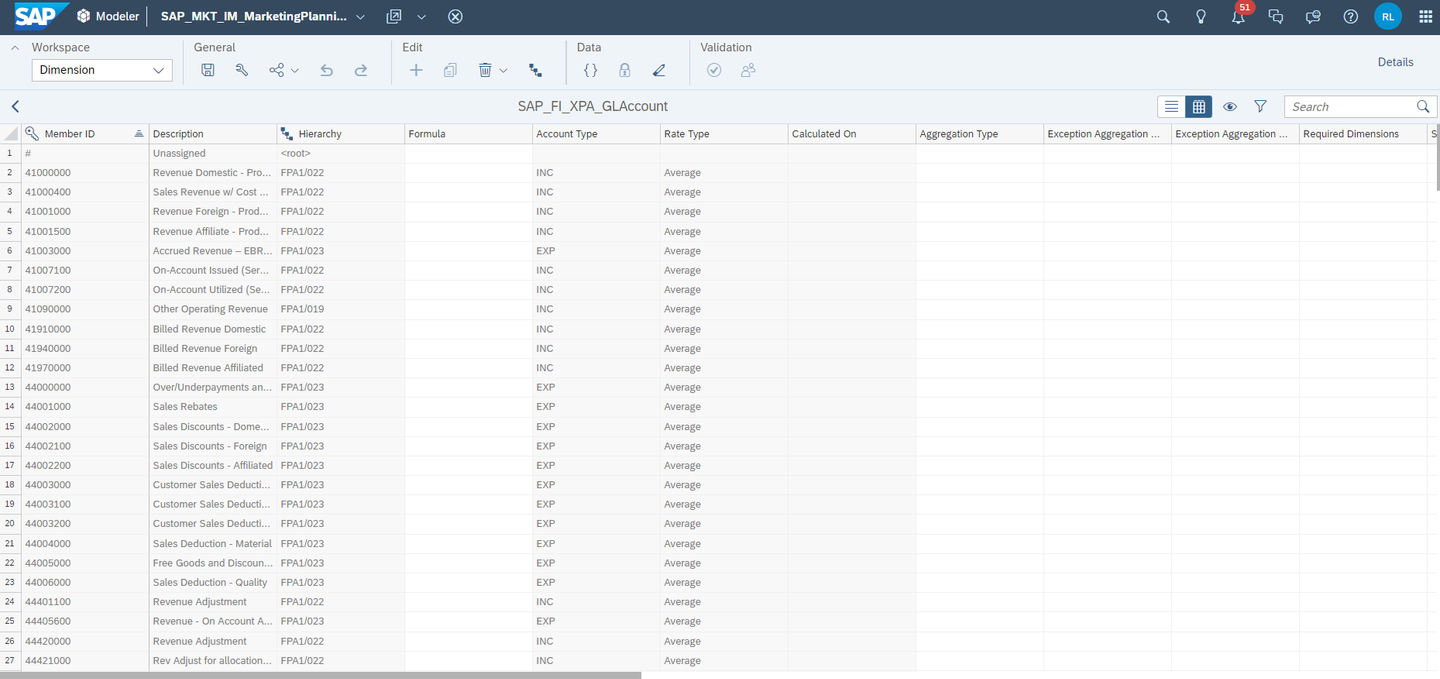
xp&A Commercial Planning In the scope of this content package, only a limited number of G/L Accounts is used.
Most of the data is located under the Net Revenue node
FPA1/013.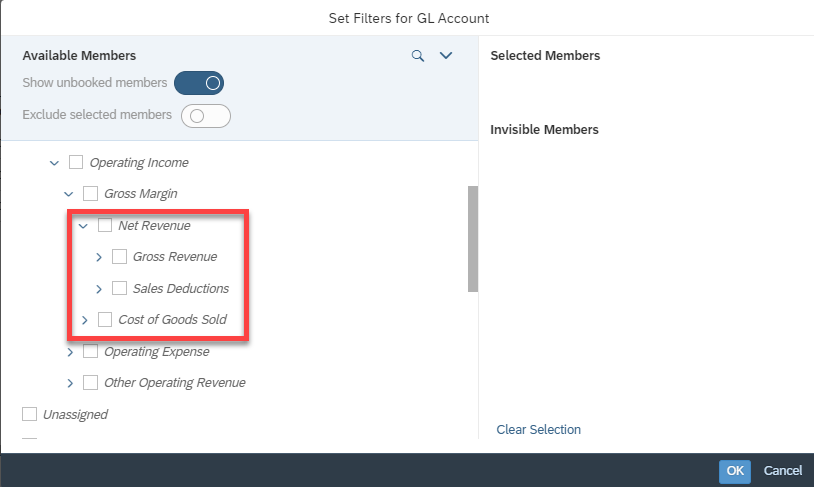
xp&A Commercial Planning
Date
- The
Datedimension is another mandatory dimension for every SAC data model. - In the scope of this content package, dates range from period
202101(first period of fiscal year 2021) until202512(last period of fiscal year 2025). - Most of the data is stored on the years 2023 to 2024, while actual data can be found for
Q1andQ2of2023. Plans and Budgets can be found from2023to2025. - The data model is configured to handle the
Datedimension withFiscal Yearproperty, where the fiscal year starts in January. Periods are labeled asP01, P02, P03 ....
Sales Organisation
The dimension
SAP_ALL_SALESORGANISATIONis a shared public dimension and provides IDs for numerous sales organisations which are semantically structured by region.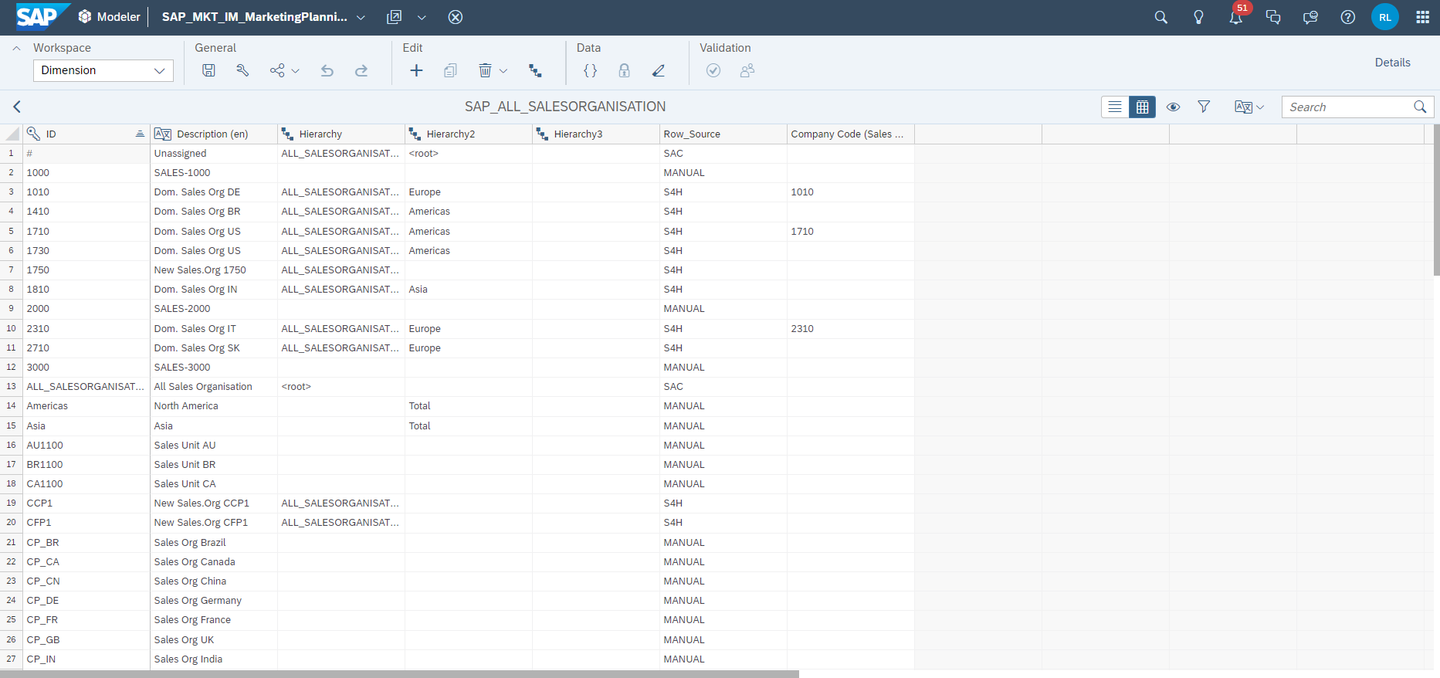
xp&A Commercial Planning The public dimension comes with three pre-defined hierarchies. In this content package, the default hierarchy with the ID
Hierarchyis used across all stories.The property
Row_Sourceshows where the sample master data comes from. Some products might be imported from a source system like SAP S/4HANA while others might be created manually.The property
Company Codeshows if a specific sales organisation is related to a company code as a company code might have multiple sales organisations in theory. For the demo data, the relationship between used sales organisations and company codes is 1:1 though.
Product
The dimension
SAP_ALLPRODUCTis a shared public dimension and contains a list of different products.The public dimension comes with four pre-defined hierarchies. In this content package, the hierarchy with the ID
Hierarchy4is used across all stories as the demo data focusses on bike products only. Other products are excluded from this hierarchy.In addition to that, all Data Actions are restricted to only work on
Hierarchy4of this dimension.
xp&A Commercial Planning The property
Base Unit of Measuremust be maintained inside the data modeler and shows the base unit of the measure. For the products used in the demo data, all items have the base unitPCwhich translates toPiece.The property
PC Std UOMcomplements the propertyBase Unit of Measureby telling how many pieces are covered by onePCunit. All bike products have aPC Std UOMof1, which means that onePCtranslates to exactly1bike.The property
Row_Sourceshows where the master data comes from. Some products might be imported from a source system like SAP S/4HANA while others might be created manually. All bike data was created manually and thus these items are marked asMANUALinside this property.
Marketing Campaign
The dimension
SAP_MKT_MarketingCampaignis a private dimension which exists only inside the data model.This dimension is used to store different marketing campaigns which are created in the Marketing Campaign Planning story.
The dimension comes with two hierarchies.
The hierarchy
All Campaignsis used to display all existing campaigns, both active and inactive ones.The hierarchy
Active Campaignsis used to display only active campaigns as the name indicates.The properties
Start DateandEnd Datedefine the validity period of each campaign and are maintained from inside the Marketing Campaign Planning story.The property
Campaign Statusshows the current status of the campaign and is also maintained from inside the Marketing Campaign Planning story.The property
Objectivedescribes the goal of the campaign and is also maintained from inside the Marketing Campaign Planning story.The property
Company Codeis created for technical reasons and is maintained automatically when a campaign is created from inside the Marketing Campaign Planning story.The properties
Campaign Spend AmountandCampaign Uplift Percentagestore the respective numbers and are automatically updated by the Marketing Campaign Planning story.The properties
Expense Start DateandExpense End Dateare also maintained from inside the Marketing Campaign Planning story and show when expenses are expected to occur for a specific campaign.The property
Commentis also maintained from inside the Marketing Campaign Planning story and shows user generated comments related to a specific campaign.The property
Deletedshows whether a campaign was deleted and is maintained from inside the Marketing Campaign Planning story.
xp&A Commercial Planning
Marketing Activity
The dimension
SAP_MKT_MarketingAtivityis a private dimension which exists only inside the data model.This dimension is used to store different marketing activities which are created in the Marketing Campaign Planning story.
The dimension comes with two hierarchies.
The hierarchy
All Activityis used to display all existing activities, both active and inactive ones.The hierarchy
Active Activitiesis used to display only active activities as the name indicates.The property
Invoice Dateshows the date of the invoice in aYYYY-MM-DDformat and is maintained from inside the Marketing Campaign Planning story.The property
Spend Typeshows what kind of marketing activity is planned and is maintained from inside the Marketing Campaign Planning story.The property
Campaign Idshows the related campaign member ID as a marketing campaign can have multiple marketing activities related to it. The IDs maintained are the ones that can be found in theSAP_MKT_MarketingCampaigndimension.The property
Activity Spend Amountstores the respective spend amount and is automatically updated by the Marketing Campaign Planning story.The property
Deletedshows whether an activity was deleted and is maintained from inside the Marketing Campaign Planning story.The property
Activity Statusshows the current status of the activity and is also maintained from inside the Marketing Campaign Planning story.The property
Commentis also maintained from inside the Marketing Campaign Planning story and shows user generated comments related to a specific activity.
xp&A Commercial Planning
Spend Type
The dimension
SpendTypeis a private dimension which exists only inside the data model.This dimension is used to store different options of spend types which can be maintained in the property Spend Type< of the
SAP_MKT_MarketingAtivitydimension.
xp&A Commercial Planning
Quantity Unit
The dimension
SAP_FI_IFP_QUANTITY_UNITis a shared public dimension and contains a list of different quantity units.This list serves as a sort of allowlist for possible units which can be maintained in the property
Base Unit of Measureof the dimensionSAP_ALLPRODUCT.As mentioned earlier, for the demo data only the member ID
PCwas used.
xp&A Commercial Planning
Driver
The dimension
Driveris a private dimension which exists only inside the data model.This dimension is used to differentiate different components or sources of quantities, revenues and costs.
The member
baseLineis used to store all baseline quantities coming from the source system SAP Integrated Business Planning. By taking the price and the COGS rates which are stored on the driver member#, baseline revenues and costs are calculated and stored on the memberbaseLineas well. Eventually, this member stores the baseline quantity, baseline revenue and the baseline costs.The member
campaignLiftis used to store incremental quantities, revenues and costs which come from planned marketing campaigns and activities.The member
consumerTrendis used to store incremental quantities, revenues and costs which come from assumptions made about the consumer trend.The member
marketShareis used to store incremental quantities, revenues and costs which come from estimated changes based on the market share.The member
priceImpactis used to store incremental quantities, revenues and costs which result from price changes.The sum of all members represents the total planned revenue or respectively the total costs and quantities.

xp&A Commercial Planning
Plant
The dimension
SAP_ALL_PLANTis a shared public dimension and contains a list of different plants where a product comes from.The dimension has one hierarchy only which is used throughout the entire content respectively.
The property
Company Codeshows the assignment of the plant to a company code, as a company code may have multiple plants.Different plants may have different COGS rates, baseline quantities, revenues etc. - but in the scope of this content package, planning does not occur on plant level explicitly as the plant dimension itself is not included in the planning tables. The dimension is rather present in the background and entered planning assumptions are distributed across the respective plant members automatically.

xp&A Commercial Planning INFORMATION:
- Let us assume you have a product called
Mountain Bikein company codeGermanywith a baseline quantity of900. - Out of those
900bikes,300units come from plantMunichwhile600units come from plantBerlin. - In the planning table itself, you would not be able to see any plant related information as planning in the context of this content package occurs on a company code and product level only.
- As a result, you would only see the value of
900units in the planning table. - If you now increased the value from
900units by25 %to a value of1200units, the baseline quantity for plantMunichwill automatically adjust from a value of300units to400units and for plantBerlinfrom600units to800units.
- Let us assume you have a product called
Company Code
The dimension
SAP_ALL_COMPANY_CODEis a shared public dimension and contains a list of different company codes.The public dimension comes with three pre-defined hierarchies. In this content package, the default hierarchy with the ID
Hierarchyis used across all stories.This dimension is also used to derive the currencies for each company code.
The property
Currencyis used to define the currency used for a specific company code.The property
Countryis used to translate the company code to a specific country and must be maintained inside the data model.The property
Trading Partneris used to define the trading partner and must be maintained inside the data model, while the trading partner is specific by using an existing company code member ID.None of these properties apart from the
Currencyproperty are important for the scope of this content package.
xp&A Commercial Planning
That’s it for the dimensions! You may jump to the next step to learn about the measures of this data model.
In this step you will learn about the measures of the data model and what they are used for.
Generally you can differentiate between base measures and calculated measures as the data model contains both. In order to understand how this content package works, it is sufficient to look at the base measures only as most of the calculated measures were specifically designed to address one particular use case only, for instance in order to bypass filter settings in a table widget in order to still show a number despite not matching the filter criteria. But more about this topic later, let’s start with the base measures first.
Revenues and Costs
- Revenues and costs are stored on the measure
AMOUNT. - The measure
AMOUNTof typedecimalis a currency measure which derives its currency from the company code dimensionSAP_ALL_COMPANY_CODEby reading from the propertyCurrency. - In order to differentiate whether a value stored on the measure
AMOUNTis a revenue or a cost measure, you need to take into consideration the G/L Account dimension as well. - If the value is stored on a member of the Gross Revenue Account
FPA1/022, the value is considered to be a revenue as all these account members are of typeINC(income). - If the value is stored on a member of the Sales Deductions Account
FPA1/023or Cost of Goods Sold AccountFPA1/021, the value is considered to be cost as all account members are of typeEXP(expense). - Other members outside the Gross Revenue Account
FPA1/017are not represented in the demo data, but the core concept remains the same. - By taking into consideration the driver dimension
Driverin addition to that, you can even identify the revenue and cost portions which come from different streams, such as revenues and costs coming from assumptions made about market share changes or revenues and costs which come from campaign planning assumptions etc.
INFORMATION:
If you do not know if an account is considered to be of type INC (representing an income account) or EXP (representing an expense account), simply go into the data modeler and access the dimension SAP_FI_XPA_GLAccount. Each account has an attribute which tells you the type of a particular account or account node.
List Price and COGS rates
- The list prices and COGS rates per product are stored on the measure
PRICE. - The measure
PRICEof typedecimaluses an exception aggregation of typeAverageacross the dimensionsDateandSAP_ALL_PRODUCTso the prices will not be aggregated on a node level in table widgets, but it will rather be displayed as an average. - Same as with the
AMOUNTmeasure, it derives its currency from the company code dimensionSAP_ALL_COMPANY_CODEby reading from the propertyCurrency. - Whether the value stored on the
PRICEmeasure is a list price or a COGS rate can be identified by taking into consideration the G/L Account dimension. - If the value is stored on a member of the Gross Revenue Account
FPA1/022, the value is considered to be a list price as all these account members are of typeINC. - If the value is stored on a member of the Cost of Goods Sold Account
FPA1/021, the value is considered to be a COGS rate as all account members are of typeEXP.
INFORMATION:
- In the demo data, list prices are only stored on one member of the Gross Revenue Account
FPA1/022, which is the account Revenue Domestic - Product41000000. That is also why most of the data actions are hard coded to read list prices from this account, for instance in data actions where the revenue is calculated by multiplying quantities with the list price. - What is also important to know is that other than revenues and costs, prices are always stored on the driver member unassigned
#and are also planned on this driver. If you want to have your initial list price which came from the source system as a reference, you need to take a look at the versionPricesFromSourceinstead of looking at the driver memberbaseLine.
Quantity
- Quantities are stored on the measure
QUANTITY. - The measure
QUANTITYof typedecimalhas its unit fixed to the unit typeUnit. - Similar to the list price, all quantities are stored on members of the G/L Account which have the type
INC. In order to keep things easy, quantities are only stored on the account member Revenue Domestic - Product41000000in the demo data, equally to the list price. - What is different compared to the list price is that all baseline quantities which were loaded in from the source system SAP Integrated Business Planning are stored on the member of the driver dimension
baseLineinstead of#. - Incremental quantities from other planning streams (or driver members to be precise) can be found on the other driver members respectively.
INFORMATION:
- While the Driver dimension plays an important role for differentiating the different components of quantities, revenues and costs, the version
Financial Targetstores everything on the driver member#. - This is because the financial target is considered to be an externally fed-in budget and does not take into consideration targets for different streams, but rather represents an overall budget target from upper management or the financial department.
- The driver dimension is only relevant for planning purposes, which is important for the versions
PlanandBudget, whereasFinancial Targetis a sole reporting or reference version. - In addition to that it is important to keep in mind that while imported baseline quantities are stored on the member
baseLineof theDriverdimension, they can still be changed in the Marketing Demand Planning story. This means that you will lose information about the initially imported baseline quantities as you are able to manipulate values stored onbaseLine. Thus if you want to maintain the original values imported from SAP Integrated Business Planning, you will need to create an additional reference Version prior to beginning your planning operation.
Impact Percentage
- The measure
IMPACT_PERCENTAGEis a measure of typedecimalwhich uses an exception aggregation of typeAverageacross the dimensionsDateandSAP_ALL_PRODUCTscaled inPercent. - It is used to plan the incremental quantity as a percentage which comes on top to the baseline quantity.
- Generally, you do not plan incremental quantities as absolute values in this content package. You would rather have to plan whether you expect the quantity to increase or decrease based on what is provided as
baseLineby entering percentage values. - The
IMPACT_PERCENTAGEis stored on the exact same combination of dimensions as theQUANTITY, using both G/L Account and driver to identify which quantity and for which stream you expect the quantity to increase or decrease. - In the demo data, quantities are stored on the G/L Account Revenue Domestic - Product
41000000for instance. If you add theDriverdimension to the table, you could now add percentage numbers for the other driver members (apart from#andbaseLine, as the baseline is what has been initially loaded in and#does not contain data for quantity) and hit a data action inside the planning stories to calculate the incremental quantity per driver as a result.
Prorated Revenues
- The measure
PRORATED_AMOUNT_BASELINEof typedecimalis a currency measure which derives its currency from the company code dimensionSAP_ALL_COMPANY_CODEby reading from the propertyCurrency. - All points that have been mentioned for the
AMOUNTmeasure apply here as well. - The only difference to the
AMOUNTmeasure is that this measure is only used in combination with marketing campaigns and only stores revenues, but not costs. - Whenever you create a marketing campaign, you can define a start date and end date in a
DD-MM-YYYYformat. If you decide to start your campaign mid of the month, for instance on15-04-2023, the campaign will cover only 50 % of the month as a result, as the month of April has 30 days in total, but only 15 days are effectively left to be planned. - While the measure
AMOUNTwill now represent the revenues for the whole month, the measurePRORATED_AMOUNT_BASELINEwill represent the correct value for the campaign under consideration of the remaining days of a month, being 50 % of the value stored onAMOUNTas only 50 % of the month of April are left.
Prorated Quantity
- The measure
PRORATED_QUANTITY_BASELINEof typedecimalhas its unit fixed to the unit typeUnit. - All points that have been mentioned for the
QUANTITYmeasure apply here as well. - The logic behind this measure is precisely the same as for the measure
PRORATED_AMOUNT_BASELINE- with the only difference that this measure represents quantities instead of revenues.
Prorated Costs
- The measure
PRORATED_AMOUNT_BASELINE_EXPof typedecimalis exactly the same as the measurePRORATED_AMOUNT_BASELINE, with the only difference being that this measure stores prorated costs instead of revenues. - The reason why revenues and costs are stored on separate measures is because in the course of the campaign planning process, you have the possibility to define different start dates and end dates for expected revenues and costs.
- Let us assume that you plan a campaign which is supposed to start mid of April 2023 (
15-04-2023). While expenses are most likely to start occurring on the date the campaign is launched, revenues will probably come in with a delay. - By having two separate measures, you can model exactly this behaviour. For the expenses, you can then use the measure
PRORATED_AMOUNT_BASELINE_EXPwith the start date15-04-2023, while for the expected revenue you can take the measurePRORATED_AMOUNT_BASELINEwith a later start date, for instance29-04-2023if you expect the revenues to flow in with a two week offset.
Prorated Quantity relevant for Expenses
- The measure
PRORATED_QUANTITY_BASELINE_EXPof typedecimalis exactly the same as the measurePRORATED_QUANTITY_BASELINE, with the only difference being that this measure takes into consideration the respective start date and end date for expenses.
Allocation Driver
- The measure
ACT_ALLOC_DRIVERof typedecimalscaled asPercentis a technical measure which is only used for recalculation purposes for marketing campaigns and activities in case the baseline quantity has changed. - It is used to persist the ratio used for the calculation of prorated measures. If for instance your campaign is supposed to start mid of April 2023 (
15-04-2023), it will persist a value of50 %so the ratio does not have to be calculated in the course of the overall recalculation again.
User Selection
- The measure
ACT_USER_SELECTIONof typeIntegeris another technical measure used in the context of campaign planning. - When you plan a marketing campaign in the Marketing Campaign Planning story, you are asked to select the products that are affected by the campaign.
- For each product selected, a
1is persisted on the measureACT_USER_SELECTION. This way the application knows what products were selected for this specific campaign.
In this step you will learn how data is stored in the data model. As the way data is stored varies depending on the version, we will take a look at it version by version. For simplicity reasons, we will not take a look at the real demo data but instead use the following spreadsheet:

Plan
- Let us begin with the most important but also most complex version, which is the
Planversion. - As you have learned in Step 1, the version
Planis where you enter most of your planning assumptions. - In the first line you can see how list prices are stored in this version. List prices are always stored on a combination of
Company Code,Sales Organisation,ProductandQuantity Unit. - The
Quantity Unitis always fixed to the memberPieceacross the entire package while the other dimensions are set to#, which means that the list price is completely independent of theDriverdimension. - In addition to that the list price is always stored on the measure
Pricewith the G/L Account41000000. Naturally, it could be any G/L Account of typeINC, but in this content package we only use one single G/L Account which is the account with the member ID41000000. - The second line shots how COGS rates are stored. COGS Rates reside on the exact same combination of dimensions as list prices, with the only difference that COGS rates have a
Plantassigned but in exchange, do not have aSales Organisation. - This is because the product cost model where COGS rates are imported from does not have the
Sales Organisationas part of the data model and thus this information is not available. As a result, COGS rates reside on theSales Organisationmember unassigned#. - The third line shows how baseline quantities are stored. As you have learned, baseline quantities are imported from SAP IBP while revenues and costs are not imported, but calculated inside the content package.
- Generally the baseline quantity is stored on a combination of
Company Code,Sales Organisation,Product,Plant,DriverandQuantity Unit, while theQuantity Unitis fixed to the memberPieceand theDriverdimension is set tobaseLine. - In order to derive the total revenue and total costs for the baseline quantity, the number residing on the
DrivermemberbaseLineis multiplied by the COGS rates and list prices shown in the previous lines. Afterwards the results are stored on the same record as the baseline quantity as you can see. - In lines 4 to 10 you can then see how numbers are stored for the other drivers. Let us first take a look at lines 4 and 5, which show how numbers for the consumer trend driver are stored.
- As already mentioned before, you cannot plan total quantities or revenues on a driver level in this content package. What you can do is plan the
Impact Percentagethough, which is a percentage number saying by how much percent the baseline quantity is estimated to go up or down. - Let us assume that you think that based on consumer trend statistics, your baseline quantity is estimated to increase by 10 %. When you enter this assumption in the story Marketing Demand Planning, it will eventually be persisted on the combination of
Company Code,Sales Organisation,Product,DriverandQuantity Unit, while again theQuantity Unitis fixed to the memberPieceand the driver to the respective member, which in this case would beconsumerTrend. - The resulting incremental quantity and the respective revenues and total costs are then stored on a combination of
Company Code,Sales Organisation,Product,Plant,DriverandQuantity Unit- exactly the same as it is the case for the baseline quantities, revenues and costs. The Data Action which is responsible for the calculation simply takes your assumed 10 % and multiples it by the baseline quantity. The result is written on the respective driver member while the plant is derived from the record where the baseline quantity is residing. - The exact same concept applies for the drivers
marketShareandpriceImpact. - Only the driver
campaignLiftis handled differently. Here, you do not enter an impact percentage as part of your planning assumptions, but rather provide the expected uplift as an input manually. Thus no record for the measureImpact Percentageexists for thecampaignLiftdriver. Nonetheless, quantities, revenues and costs are stored on the same combination as the other drivers with one exception - it does have a marketing campaign member other than#assigned to it as you can see in line 10 as this driver is designed to specifically store planning assumptions for marketing campaigns. - In the demo data set, data in this version can be found from the year
2023to2025.
Financial Target
- Let us continue with the version
Financial Target. - The
Financial Targetversion is not enabled for planning in this content package and only serves as a reference version for reporting purposes as mentioned. - List prices and COGS rates are stored on the exact same combination as it is the case in the
Planversion. - The same applies for quantities, revenues and costs, but with one major difference.
- As the numbers stored on this version represent a high-level budget, no differentiation between different drivers is made. As a result, absolutely all records on this version are stored on the driver member
#. - In the demo data set, data in this version can be found from the year
2023to2025.
Budget
- On the
Budgetversion, data is stored exactly the same as on theFinancial Targetversion. - Initially, the budget version is empty. It is initialized from within the story Marketing Budget Planning by creating a copy of the
Financial Targetversion. - The only difference between these versions is that the budget version is enabled for planning and that it is of type
Budgetinstead ofPlanning. - But in terms of how data is stored, it is precisely the same.
- In the demo data set, this version is initially empty and must be initialized from within the Marketing Budget Planning story.
Actual
- Data stored on the
Actualversion is also stored the same way as onFinancial Target, where no differentiation between drivers is made. - What is different here though is that the actual version contains data on the sales rebates account member in addition to COGS, revenues and prices.
- In the demo data set, data in this version can be found from
Q1 2023toQ2 2023.
Prices From Source
- The version
pricesFromSourcestores the initially imported list prices from SAP S/4HANA and serves as a reference and backup version. - As you can see, list prices are stored on the same record as it is the case in other versions.
- In the demo data set, data in this version can be found from
2023to2025.
Congratulations! You have finished the tutorial.
If you want to learn more about the modules of this content package, check out the following tutorials:
- xP&A Commercial Planning - Get to know the Sales Planning module
- xP&A Commercial Planning - Get to know the Portfolio Planning module
- xP&A Commercial Planning - Get to know the Marketing Planning module
If you want to customize the content and adjust it according to your own business requirements, the following resources might be helpful:
- xP&A Commercial Planning - Understanding the technical structure of Stories
- xP&A Commercial Planning - Data Integration
- xP&A Commercial Planning - Manage data loads
- xP&A Commercial Planning - Add additional sections to a story
- xP&A Commercial Planning - Add an additional story to the Navigation Menu
- xP&A Commercial Planning - Customize Default Settings
- xP&A Commercial Planning - Customize Table Settings Dialogue
- xP&A Commercial Planning (Marketing) - Add a new Driver
- xP&A Commercial Planning (Marketing) - Add a new Version
- xP&A Commercial Planning (Marketing) - Extend activity spend dates
- xP&A Commercial Planning (Sales) - Add a new Version
- xP&A Commercial Planning (Sales) - Add a new Tactic
- xP&A Commercial Planning (Sales) - Add a new Spend Type
If you want to get an overview of the entire xP&A Commercial Planning content package, make sure to check out the Mission.
Interested in more xP&A topics and related business content packages? Visit our community page Extended Planning & Analysis Business Content.
Resources
Discussion
Share feedback on this tutorial or join the conversation in SAP Community.