
Overview


Prerequisites
Prerequisites
- Proficiency: Beginner
- System Access to SAP Web IDE for the HANA System you are working with.
- Tutorials: Create a New User and Assign Permissions
Steps
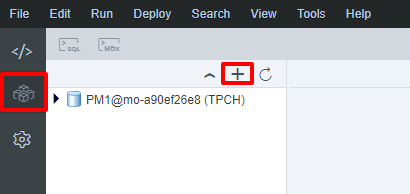
Open and login to Web IDE. You should be greeted to a blank-looking screen. Click on the Database Explorer tab on the left, and click the “+” button in the new panel.
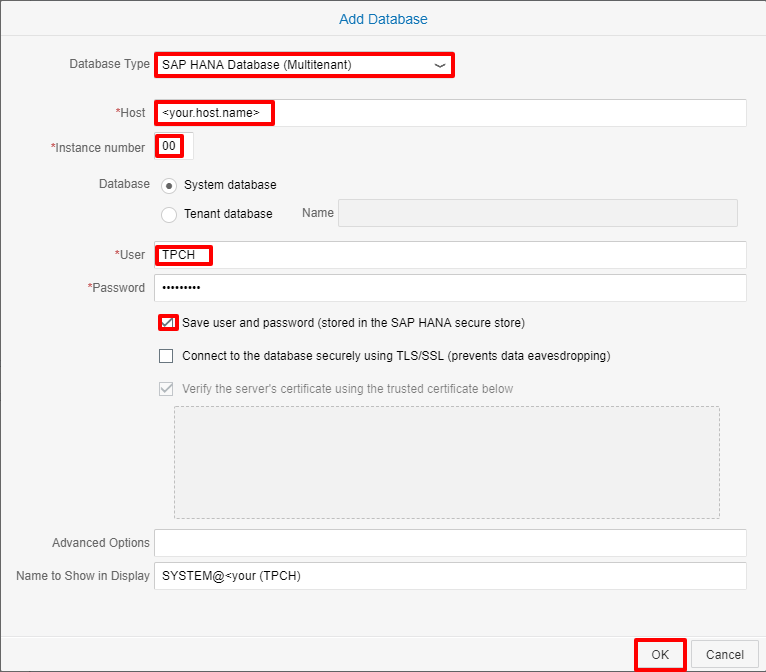
- In the new window, select SAP HANA Database (Multitenant) as the database type.
- Enter the host name and instance number of your HANA instance.
- Login with the appropriate credentials for the TPCH user we created.
- Check the save user and password box so you won’t have to re-enter your credentials when re-connecting to the system.
- Click OK to add the database.
To verify extended storage status, we will be using SAP HANA cockpit. Login to SAP HANA cockpit, click the Resources link at the top, and select the appropriate resource, which should be the tenant database in the HANA System you are working with.

In the Overall Database Status tile (at the top), click on the area indicating the running services.

A Manage Services window should pop up. Scroll down to the esserver service to see its status. If what you see is:
- Empty and/or the “SAP HANA dynamic tiering” line does not exist, it probably means that dynamic tiering is not installed. Please install and register dynamic tiering before proceeding.
- Status of “Errors” with a red circle. It might mean that dynamic tiering is not running. Please restart the dynamic tiering process before proceeding.
- Status of “Installed but not running yet” with a yellow triangle, then proceed to Create Extended Storage section below.
- Status of “Running” with a green box, then you are all set and can skip the rest of this tutorial section by scrolling to the bottom of this lesson and clicking the link to part 3.

In Web IDE, right click on the database you are working with, and select Open SQL Console or use the shortcut Ctrl + Alt + C.

In the SQL console, paste the following script:
CREATE EXTENDED STORAGE AT '<your.machine.name>' size 1000 MB;Replace “<your.machine.name>” with the host name of the machine where the dynamic tiering component is installed.
This script will create 1 GB of
dbspace. This is small for DT (warm store) which can scale up to handle 100 TB of data, but 1 GB is sufficient for tutorial purposes.

Execute the script using the green play button. It will create the extended storage dbspace for SAP HANA dynamic tiering. Repeat step 2 to verify that extended storage is setup successfully.
The CREATE EXTENDED STORAGE statement creates the warm store and the required dbspaces. A dbspace is a logical name for a container of files used to store the dynamic tiering table data and related objects. Dbspaces are specialized to manage specific types of data. Types of dbspaces used by dynamic tiering include ES_SYSTEM, ES_USER, ES_DELTA etc. Creating the extended storage dbspace is a prerequisite to creating extended tables.
Resources
Discussion
Share feedback on this tutorial or join the conversation in SAP Community.