
Overview
You will learn
- How to transform a procedure to a table function.


Prerequisites
Prerequisites
- This tutorial is designed for SAP HANA Cloud.
- Tutorials: Creating Scalar User Defined Functions
Steps
Intro
There are application and scenarios where you need a table function instead of procedure to leverage the advantage of direct selects on the output, for example, filtering, sorting and grouping. In the following exercise, we show you how you can easily transform a procedure to a table function.
Use what you have learned and return to the
functionsfolder and create a new function calledget_po_countsusing the SAP HANA: Create Database Artifact command.
New Function
Add the input parameter called
IM_FDATEas well as the RETURN Table parameter as shown. Please note the scalar input parameter we will used later on for filtering.SQLScriptFUNCTION "get_po_counts" ( im_fdate DATE ) RETURNS TABLE (EMAIL NVARCHAR(255), FULLNAME NVARCHAR(255), CREATE_CNT INTEGER, CHANGE_CNT INTEGER, COMBINED_CNT INTEGER) LANGUAGE SQLSCRIPT SQL SECURITY INVOKER AS BEGIN END;Copy the logic from the procedure
get_po_header_datainto the body of the function. Make sure to only copy the code between the BEGIN and END statements
logic statements Add to the WHERE clauses in the first two SELECT statements for filtering by month. Month is captured from the input parameter
im_fdate.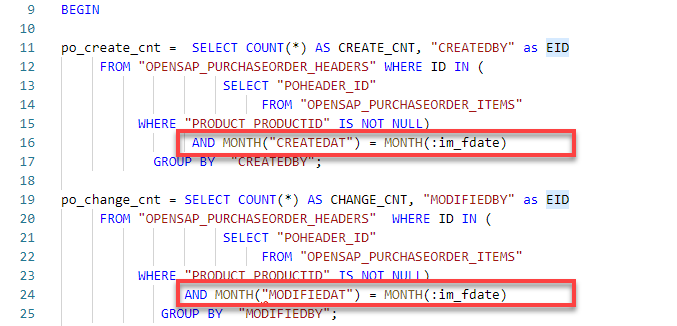
where clause In the third SELECT statement, change the name of the intermediate table variable to
EMP_PO_COMBINED_CNTto match the variable name to the semantics of the query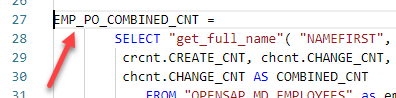
select statement Also add the
EMAILcolumn to the field list.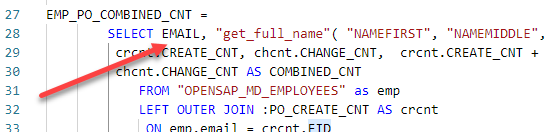
Add email Remove the LIMIT clause at the end.
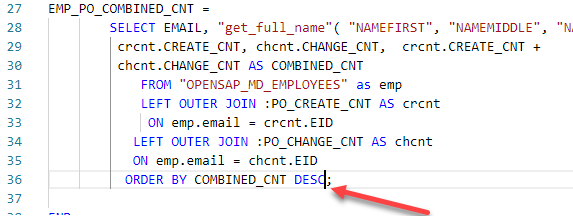
LIMIT Finally, add a RETURN SELECT statement at the end to mark the to be returned result set of the function.

RETURN select The completed code should be very similar to this.
SQLScriptFUNCTION "get_po_counts"( im_fdate DATE ) RETURNS TABLE (EMAIL NVARCHAR(255), FULLNAME NVARCHAR(255), CREATE_CNT INTEGER, CHANGE_CNT INTEGER, COMBINED_CNT INTEGER) LANGUAGE SQLSCRIPT SQL SECURITY INVOKER AS BEGIN po_create_cnt = SELECT COUNT(*) AS CREATE_CNT, "CREATEDBY" as EID FROM "OPENSAP_PURCHASEORDER_HEADERS" WHERE ID IN ( SELECT "POHEADER_ID" FROM "OPENSAP_PURCHASEORDER_ITEMS" WHERE "PRODUCT_PRODUCTID" IS NOT NULL) AND MONTH("CREATEDAT") = MONTH(:im_fdate) GROUP BY "CREATEDBY"; po_change_cnt = SELECT COUNT(*) AS CHANGE_CNT, "MODIFIEDBY" as EID FROM "OPENSAP_PURCHASEORDER_HEADERS" WHERE ID IN ( SELECT "POHEADER_ID" FROM "OPENSAP_PURCHASEORDER_ITEMS" WHERE "PRODUCT_PRODUCTID" IS NOT NULL) AND MONTH("MODIFIEDAT") = MONTH(:im_fdate) GROUP BY "MODIFIEDBY"; EMP_PO_COMBINED_CNT = SELECT EMAIL, "get_full_name"( "NAMEFIRST", "NAMEMIDDLE", "NAMELAST") as FULLNAME, crcnt.CREATE_CNT, chcnt.CHANGE_CNT, crcnt.CREATE_CNT + chcnt.CHANGE_CNT AS COMBINED_CNT FROM "OPENSAP_MD_EMPLOYEES" as emp LEFT OUTER JOIN :PO_CREATE_CNT AS crcnt ON emp.email = crcnt.EID LEFT OUTER JOIN :PO_CHANGE_CNT AS chcnt ON emp.email = chcnt.EID ORDER BY COMBINED_CNT DESC; return select * from :emp_po_combined_cnt; END;
Save the function.

Save Perform a Deploy
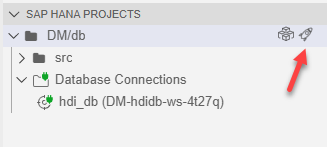
DBX Return to the Database Explorer page. Select the Functions folder. Right-click on the
get_po_countsfunction and choose Generate SELECT statement.
SQL Tab A new SQL tab will be opened with a SELECT statement. Enter the date
18.12.2014as the input parameter and add LIMIT 3 at the end of it. Click Run.SQLScriptSELECT * FROM "get_po_counts"('18.12.2014') LIMIT 3;
Results
Resources
Discussion
Share feedback on this tutorial or join the conversation in SAP Community.