
Overview
You will learn
- How to create and access an SAP Service Manager instance
- How to use the SAP Service Manager’s REST API from a REST client and an application


Prerequisites
Prerequisites
- An SAP BTP account
- An SAP HANA Cloud instance
Steps
A service manager instance will be created. It can then be used to manage SAP HANA Cloud instances within the subaccount.
In the SAP BTP Cockpit, in the subaccount, create a new SAP Service Manager instance.

create a service manager instance After clicking Create, the instance will be shown as seen below.
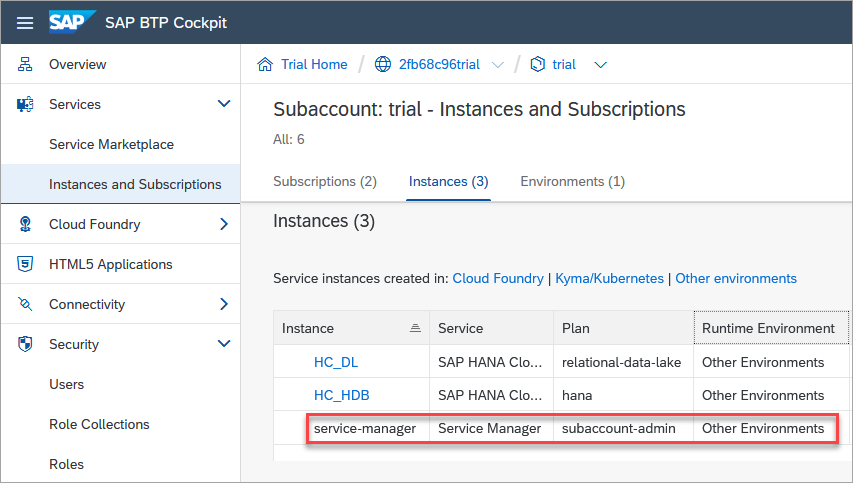
create a service manager instance Create a service binding by clicking on the just created service manager instance and choose Create under Service Bindings.

add a binding The service binding provides a URL and credentials that can be used when requesting access to the service and will be used in the next step.

service manager binding
The SAP Service Manager’s APIs are available through a REST API. Details of the REST API can be seen in the Business Accelerator Hub.
The API’s can be invoked using a tool such as the REST Client for Visual Studio Code. Additional details on how to use the REST Client can be found at the tutorial Access SAP HANA Cloud Alerts and Metrics using a REST API.
Create a folder and a text file that will contain REST API calls and open the file with Visual Studio Code.
Shellmkdir %HOMEPATH%\AutomationTutorial cd %HOMEPATH%\AutomationTutorial code Automation.httpPaste the following into the opened file and save it. Using the values from the service binding, verify the values on lines 4 and 9 and provide a value for the values on lines 12 and 15.
HTTP[4,#REST Client variables ------------------- #From the sm_url, last field in the service binding @uri = https://service-manager.cfapps.us10.hana.ondemand.com @oauth = oauth/token?grant_type=client_credentials #From the url field in the service binding. @uaa_url = https://2fb68c96trial.authentication.us10.hana.ondemand.com #From the clientid field in the service binding. @clientid = #From the clientsecret field in the service binding. @clientsecret = #Instance ID of a SAP HANA Cloud instance in the same subaccount as the service manager instance @instanceid = #Generated by the request bearer token call. Copy the access_token value from the result without the quotes @bearer = #Authorization REST API call -------------------- #Request bearer token and paste result into the bearer variable above #See also https://help.sap.com/docs/service-manager/sap-service-manager/retrieve-oauth2-access-token #Note that by default the token expires after 1799 seconds or 30 minutes as seen in the response in the expires_in field GET {{uaa_url}}/{{oauth}} Authorization: Basic {{clientid}}:{{clientsecret}} ### #Service plan query #See also https://help.sap.com/docs/service-manager/sap-service-manager/filtering-parameters-and-operators #See also https://api.sap.com/api/APIServiceManager/resource/Service_Plans GET {{uri}}/v1/service_plans?fieldQuery=name contains 'hana' Authorization: Bearer {{bearer}} ### #Instance query #See also https://api.sap.com/api/APIServiceManager/resource/Service_Instances GET {{uri}}/v1/service_instances Authorization: Bearer {{bearer}} ### #Instance query with filter GET {{uri}}/v1/service_instances?fieldQuery=name eq 'HC_HDB' Authorization: Bearer {{bearer}} ### #Instance query with params GET {{uri}}/v1/service_instances/{{instanceid}}/parameters Authorization: Bearer {{bearer}} ### #Update description of an instance provisioned in a subaccount (Other) #Service manager can not update instances provisioned in Cloud Foundry spaces PATCH {{uri}}/v1/service_instances/{{instanceid}} Authorization: Bearer {{bearer}} { "parameters": { "metadata": { "ui.hc.sap.com/description": "Created as part of Automation Tutorial!" } } } ### #Update label PATCH {{uri}}/v1/service_instances/{{instanceid}} Authorization: Bearer {{bearer}} { "labels": [ { "op": "add", "key": "Contact", "values": [ "Dan at 123 456 7890" ] } ] } ### #Stop instance PATCH {{uri}}/v1/service_instances/{{instanceid}} Authorization: Bearer {{bearer}} { "parameters": { "data": { "serviceStopped": true } } } ### #Start instance PATCH {{uri}}/v1/service_instances/{{instanceid}} Authorization: Bearer {{bearer}} { "parameters": { "data": { "serviceStopped": false } } } ### #Create #The service_plan_id and the systempassword will need to be updated POST {{uri}}/v1/service_instances Authorization: Bearer {{bearer}} Content-Type: application/json #Content-Type: application/x-www-form-urlencoded { "name": "HC_HDB", "service_plan_id": "3647b218-dbf1-4cec-af64-cede4d48edbf", "parameters": { "data": { "systempassword": "ManagerPWD1234", "edition": "cloud", "memory": 30, "vcpu": 2, "additionalWorkers": 0, "whitelistIPs": [ "0.0.0.0/0" ], "extensionservices": [ { "name": "ConnectivityProxy", "enabled": false, "whitelistIPs": [ "0.0.0.0/0" ] } ], "enabledservices": { "scriptserver": false, "docstore": false, "dpserver": true }, "storage": 120, "availabilityZonePlacement": { "primaryAvailabilityZone": "us-east-1d", "highAvailabilityCrossMultiAZEnabled": false }, "productVersion": { "releaseCycle": "generally-available-quarterly", "track": "2023.16" } }, "metadata": { "ui.hc.sap.com/description": "" } } } ### #DELETE instance DELETE {{uri}}/v1/service_instances/{{instanceid}} Authorization: Bearer {{bearer}}Provide a value for the
instanceidvariable on line 21. This can be obtained from the action’s menu item Copy Instance ID in SAP HANA Cloud Central.Request a bearer token (line 28) by clicking Send Request. The token is valid for 30 minutes as described in the expires_in field in the response.
Copy the returned
access_tokenvalue to the bearer variable (line 18) which is then used for credentials in subsequent requests (line36).
request a bearer token Try out a few of the other examples such as getting the details of an instance, update the label or description.
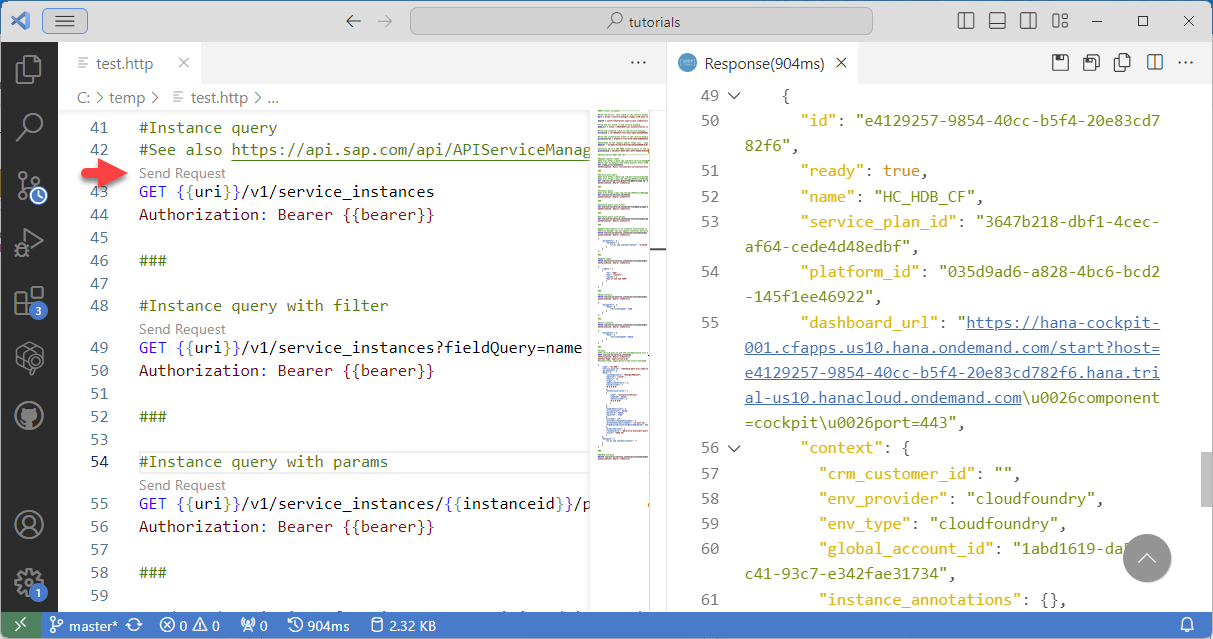
rest api call
In this step, a Node.js application will be used to update the description of an SAP HANA Cloud instance. Before proceeding ensure that Node.js is installed. Instructions on installing Node.js can be found at Connect Using the SAP HANA Node.js Interface.
Initialize a Node.js project, install node-fetch, and create and open a JavaScript file.
Shellmkdir %HOMEPATH%\AutomationTutorial\sm-node cd %HOMEPATH%\AutomationTutorial\sm-node npm init -y npm install node-fetch@2 code updateDesc.jsCopy the below code into updateDesc.js.
Highlighted values are to be updated with details from your binding key. Sensitive values could alternatively be read from environment variables. Remember to also update the instance ID.
JavaScript[4,const fetch = require('node-fetch'); //replace with your url from the service manager binding const url = "https://2fb68c96trial.authentication.us10.hana.ondemand.com"; const oauthUrl = url + "/oauth/token?grant_type=client_credentials"; //replace with your sm_url const smUrl = "https://service-manager.cfapps.us10.hana.ondemand.com"; //fill in your clientid and clientsecret here or remove lines 9-11 and uncomment line 12 to use environment variables const clientId = ""; const clientSecret = ""; const auth = "Basic " + Buffer.from(clientId + ":" + clientSecret).toString('base64'); //const auth = "Basic " + Buffer.from(process.env.CLIENT_ID + ":" + process.env.CLIENT_SECRET).toString('base64'); //Note, on Windows, precede | with ^| in the clientid when setting the environment variable //replace with your HANA Database instance id const instanceId = "5d9d428a-e613-4964-97cb-f7dba1283cb6"; const authHeaders = { "Content-Type": "application/json", "Authorization": auth } var requestHeaders = { "Content-Type": "application/json", "authorization": "Bearer " } const jsonData = { "parameters": { "metadata": { "ui.hc.sap.com/description": "Updated via service manager REST API" } } } //get the bearer token fetch(oauthUrl, { method: 'GET', headers: authHeaders }) .then((res) => { return res.json() }) .then((authResult) => { //add the bearer token to the authorization header requestHeaders.authorization = requestHeaders.authorization + authResult.access_token; //make a request to update the description fetch(smUrl + "/v1/service_instances/" + instanceId, { method: 'PATCH', headers: requestHeaders, body: JSON.stringify(jsonData) }) .then((res) => { console.log("HTTP Status: " + res.status); return res.json() }) .then((result) => { console.log(JSON.stringify(result, null, 2)); }); });Run the application.
Shellnode updateDesc.js
Run the application The result can be seen in SAP HANA Cloud Central.

Updated description
Congratulations! You have now created an instance of the SAP Service Manager, added a service binding, and used the SAP Service Manager REST API in both a REST client and in an application.
Resources
Discussion
Share feedback on this tutorial or join the conversation in SAP Community.