
Overview
You will learn
- How to install the .NET SDK
- How to create and debug a .NET application that queries an SAP HANA database


Prerequisites
Prerequisites
- You have completed the first 3 tutorials in this mission.
Steps
Intro
.NET is a free and open-source software framework for Microsoft Windows, Linux and macOS operating systems and is the successor to the .NET Framework. .NET was previously known as .NET Core.
The first step is to check if you have the .NET SDK installed and what version it is. Enter the following command:
dotnet --version If the dotnet command is not recognized, it means that the .NET SDK has not been installed. If the SDK is installed, the command returns the currently installed version, such as 8.0.203.
If the .NET SDK is not installed, download it from Download .NET and run the installer on Microsoft Windows or Mac.

On Linux, follow the instructions for the appropriate Linux version such as Install the .NET SDK or the .NET Runtime on openSUSE.
In order for the shell to recognize that the .NET SDK is installed and for any dotnet commands in future steps to be recognized, a new shell window needs to be opened.
For further details on supported versions, see SAP Note 3165810 - SAP HANA Client Supported Platforms.
Create a new console app with the below commands:
Shellcd %HOMEPATH%/HANAClientsTutorial dotnet new console -o dotNETShellcd $HOME/HANAClientsTutorial dotnet new console -o dotNETAdd the SAP HANA .NET data provider which is available on nuget. A list of available providers from SAP is available at SAP-SE.
Shellcd dotNET dotnet add package Sap.Data.Hana.Net.v8.0
HANAClientDriverDownload Run the app to validate that SAP HANA driver can be loaded:
Shelldotnet runOpen an editor to edit the file
Program.cs.Shellnotepad Program.csShellpico Program.csReplace all content of
Program.cswith the code below. Be sure to update values where necessary and save the file when finished.C#using System; using Sap.Data.Hana; namespace dotNETQuery { class Program { static void Main(string[] args) { try { using (var conn = new HanaConnection("Server=xxxxxxxx-xxxx-xxxx-xxxx-xxxxxxxx.hana.prod-xxxx.hanacloud.ondemand.com:443;UID=User1;PWD=Password1;encrypt=true;sslValidateCertificate=false")) // encrypt and sslValidateCertificate should be true for HANA Cloud connections // As of SAP HANA Client 2.6, connections on port 443 enable encryption by default // sslValidateCertificate should be set to false when connecting // to an on-premise SAP HANA instance that uses a self-signed certificate. { conn.Open(); Console.WriteLine("Connected"); var query = "SELECT TITLE, FIRSTNAME, NAME FROM HOTELS.CUSTOMER"; using (var cmd = new HanaCommand(query, conn)) using (var reader = cmd.ExecuteReader()) { Console.WriteLine("Query result:"); // Print column names var sbCol = new System.Text.StringBuilder(); for (var i = 0; i < reader.FieldCount; i++) { sbCol.Append(reader.GetName(i).PadRight(20)); } Console.WriteLine(sbCol.ToString()); // Print rows while (reader.Read()) { var sbRow = new System.Text.StringBuilder(); for (var i = 0; i < reader.FieldCount; i++) { var result = reader[i].ToString(); if (result is not null) { sbRow.Append(result.PadRight(20)); } } Console.WriteLine(sbRow.ToString()); } conn.Close(); } } } catch (Exception ex) { Console.WriteLine("Error - " + ex.Message); Console.WriteLine(ex.ToString()); } } } }Save and close the
Program.csfile after replacing the code and updating the host and port.The above app makes use of some of the SAP HANA client .NET driver methods, such as HanaConnection. Connection details for this class can be found at Microsoft ADO.NET Connection Properties. Further .NET API details can be found in the .NET API browser.
Run the app:
Shelldotnet runBefore running the program make sure to be in the directory where Program.cs is saved

Result of running the app Optionally remove any unused platform files from the runtimes folder at HANAClientsTutorial\dotNET\bin\Debug\net9.0\runtimes.
Open Visual Studio Code. If needed, download Visual Studio Code here.
If you have not already done so, choose File | Add Folder to Workspace, and then add the
HANAClientsTutorialfolder.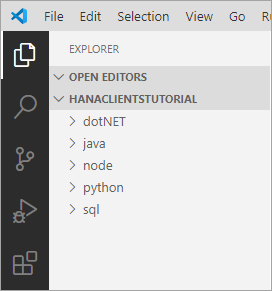
Workspace Open the file
Program.cs.
C# Extension Visual Studio Code will recognize the
csfile extension and will suggest installing the C# for Visual Studio Code extension. Click Install.Place a breakpoint on the line sbRow.Append line. Select Run | Start Debugging | .NET Core. A configuration will be added. Choose Run | Start Debugging.
Notice that the debug view becomes active and that the RUN option is .NET Launch.
Notice that the program stops running at the breakpoint that was set.
Observe the variable values in the leftmost pane. Step through code.

VS Code Debugging For further information on debugging .NET apps consult Tutorial: Debug a .NET Core console application using Visual Studio Code and Instructions for setting up the .NET Core debugger.
Congratulations! You have now created and debugged a .NET application that connects to and queries an SAP HANA database.
Resources
Discussion
Share feedback on this tutorial or join the conversation in SAP Community.