
Overview
You will learn
- Why managing backup files is important
- How to delete old HANA backup Files
- How to delete old Dynamic Tiering backup files


Prerequisites
Prerequisites
- Proficiency: Beginner
- Tutorials Reviewing Available Backups
Steps
Managing backups is also important. It will be your duty to make sure that the data backup location and log backup location do not run out of disk space. If the locations overflow, the log backup system will not write new log backups when attempted.
When the data backups and log backups are not properly managed, this will lead to the log volume becoming full, preventing any further backups from being created.
In order to avoid running out of disk space for you log volume, you will need to delete older backups using HANA Studio.
Navigate to the backup editor for a system in your Systems Panel by right clicking the system, selecting Backup and Recovery > Open Backup Console.
After you reach the Backup Console, navigate to the backup catalog. You may right click on a backup in the backup editor and select “Delete Older Backups…”
Note: For the purpose of this tutorial, we will be working from the
SystemDB’s SYSTEM user.
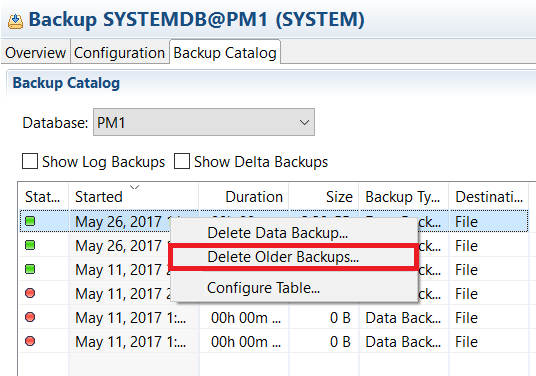

Note: The data and log backups for core HANA or Dynamic Tiering should not be deleted based on the timestamp. The older timestamp backups might still contain significant log backups. Hence deleting backups based on date would ruin the consistency of the system. Therefore, it is better to investigate which are the necessary data and log backups to be kept for Dynamic Tiering or core HANA.
Resources
Discussion
Share feedback on this tutorial or join the conversation in SAP Community.