
Overview
You will learn
- How to create a Facebook Messenger app
- How to set up your app for use as a chatbot
- How to connect your SAP Conversational AI chatbot to your app
- How to test and publish your Messenger chatbot


Prerequisites
Prerequisites
- An SAP Conversational AI account (as described in Step 1 of Build Your First Chatbot with SAP Conversational AI)
- A Facebook account
Steps
First, create a chatbot by following the steps in the tutorial Build Your First Chatbot with SAP Conversational AI.
You’ll need a bot so you can connect it to Facebook Messenger, and share with others.
Your chatbot will only be available for integration on a Facebook page – not on your personal profile. This means you must either create a Facebook page or have an existing page that you can use with your bot.
We assume your organization already has a page. If it does, continue to the next step.
If it doesn’t, create one by doing the following:
Click Create a Page.

Facebook pages In the Business or Brand tile, click Get Started.
Enter:
Field Name Value Page name My Chat Bot PageCategory EducationClick Continue and follow the remaining instructions.
We suggest you add a unique profile image so when you message the page later, you can more easily find your page.
We also suggest you create a unique username for your page, also to make it easier to find. You can do this on the About tab of your page.

Username
To publish your chatbot on your Facebook page, you need to create an app that connects SAP Conversational AI and your Facebook page.
You do this at https://developers.facebook.com/ (make sure you are logged into Facebook).

First, choose My Apps at the top right of the screen and then choose + Create App.

Second, give the app a name (e.g., My Bot App) and enter your email, then click Create App ID.

Complete security check, if needed.
On the left of your Facebook dashboard, choose the plus symbol after PRODUCTS.
Find the Messenger tile, and choose Set Up.

Messenger
You now see Messenger under PRODUCTS on the left of the screen.

On the left of your dashboard, choose Settings just below the Messenger product.

Settings In Access Tokens section, click Add or Remove Pages.

Add page to app A login dialog asks you to confirm your account. Click Continue as ….
Select your Facebook page, and click Next.
Click Done.
Back in the Settings screen, click Generate Token.

Generate tokens Click I Understand, and copy the token, and click Done.
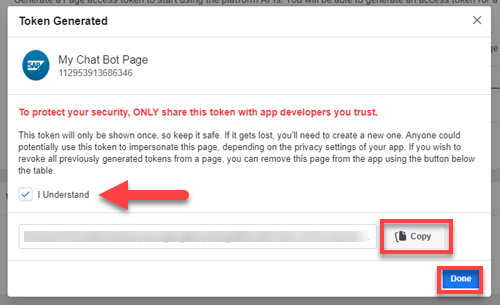
Token Go back to your SAP Conversational AI bot, and open the Connect tab in your SAP Conversational AI chatbot.
Choose Messenger.
Under Get your app secret, paste the token into the Page token field.
Leave the page open. You will soon add the secret.
On your Facebook dashboard, choose Settings > Basic.

For privacy reasons, the app secret is hidden.
Choose Show.
Copy the contents of the field, and then paste them into the App secret field on back in SAP Conversation AI on your chatbot’s Connect tab – in the same way as you did with the page token.

Link text e.g., Destination screen Now that you pasted in the token and secret, click Get Tokens.
Go back to the Facebook dashboard and choose Products > Messenger > Settings.
Go to the Webhooks section, and click Add Callback URL.

Add Callback URL In the popup that now appears, enter the values for Callback URL and Verify Token, which you can copy from the your chatbot’s Connect tab in SAP COnversational AI.
The values were generated when you clicked Get Tokens.

Callback and token Click Verify and Save.
Once your page has reloaded, click Add Subscriptions for your page.

Link text e.g., Destination screen Select the first 4 fields:
messagesmessaging_postbacksmessaging_optinsmessage_deliveries

Link text e.g., Destination screen Click Save.
Your bot won’t be publicly accessible until you get approval and publish it. But you can access it as the administrator/developer.
Take your time to test the bot and make sure everything is working properly before releasing it to the world.
Go to your Facebook home page (not the bot page) and start a conversation with your bot.
Click the New Message button at the bottom of the page, and enter the name of your Facebook page.
I used the unique username
DanielSAPChatBotto find my page.
Link text e.g., Destination screen Type in text that will trigger intents of your bot.

Conversation
You can also grant test roles using Roles in the left-hand menu in your app page on Facebook for Developers.
You’ve been testing your bot in development. Now you can make it public and everyone can talk with it.
Go back to your app in Facebook for Developers.
In the menu on the left, choose Products > Messenger > Settings.
In the App Review for Messenger area, and next to
pages_messaging, click Add to Submission.
Link text e.g., Destination screen This enables Facebook to perform mandatory verification and testing for your Messenger chatbot. You likely will have to provide additional information and add settings to the bot.

To do for approval Once you have added all the information, click Submit for Review. It won’t take long for the Facebook review team to look at your bot and give you the green light to publish it.
Once it is approved, a message should appear next to your submission.
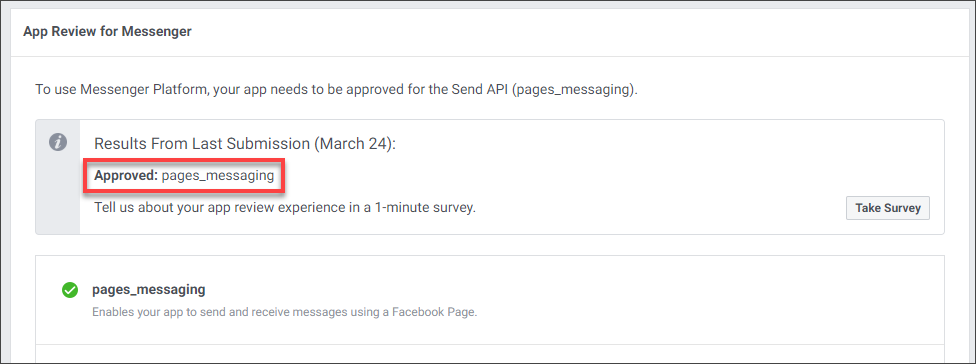
Approved Once approved, make your application live by changing the In development / Live toggle.

Link text e.g., Destination screen
Congratulations! Your Messenger chatbot is now online on Facebook. If necessary, you can modify it, and any changes you make will appear in your Messenger chat.
Ask others to test
Resources
Discussion
Share feedback on this tutorial or join the conversation in SAP Community.