Always replace #### with your initials or group number.
The ABAP RESTful Application Programming Model (RAP) now supports the native consumption and exposure of business events from release 2022. For exposure, an event can be defined and raised in a RAP business object or in the behavior extension and then published via Event Bindings.
Step 1Download event specification file
—
An Event Consumption Model is a set of ABAP artifacts which allows you to receive events from external applications and to consume them within your business application. You can have a wide range of event producers. So, you need to know how the emitted event exactly looks like. To this aim, you need a file which contains the metadata of this event like how the payload looks like, what kind of types are there and so on. This is all specified in the event specification file, in this case, AsyncAPI specification, which is supported by SAP and can be downloaded from SAP API Business Hub in JSON format. For this aim, you need to download an event specification for the event business partner from the API hub.
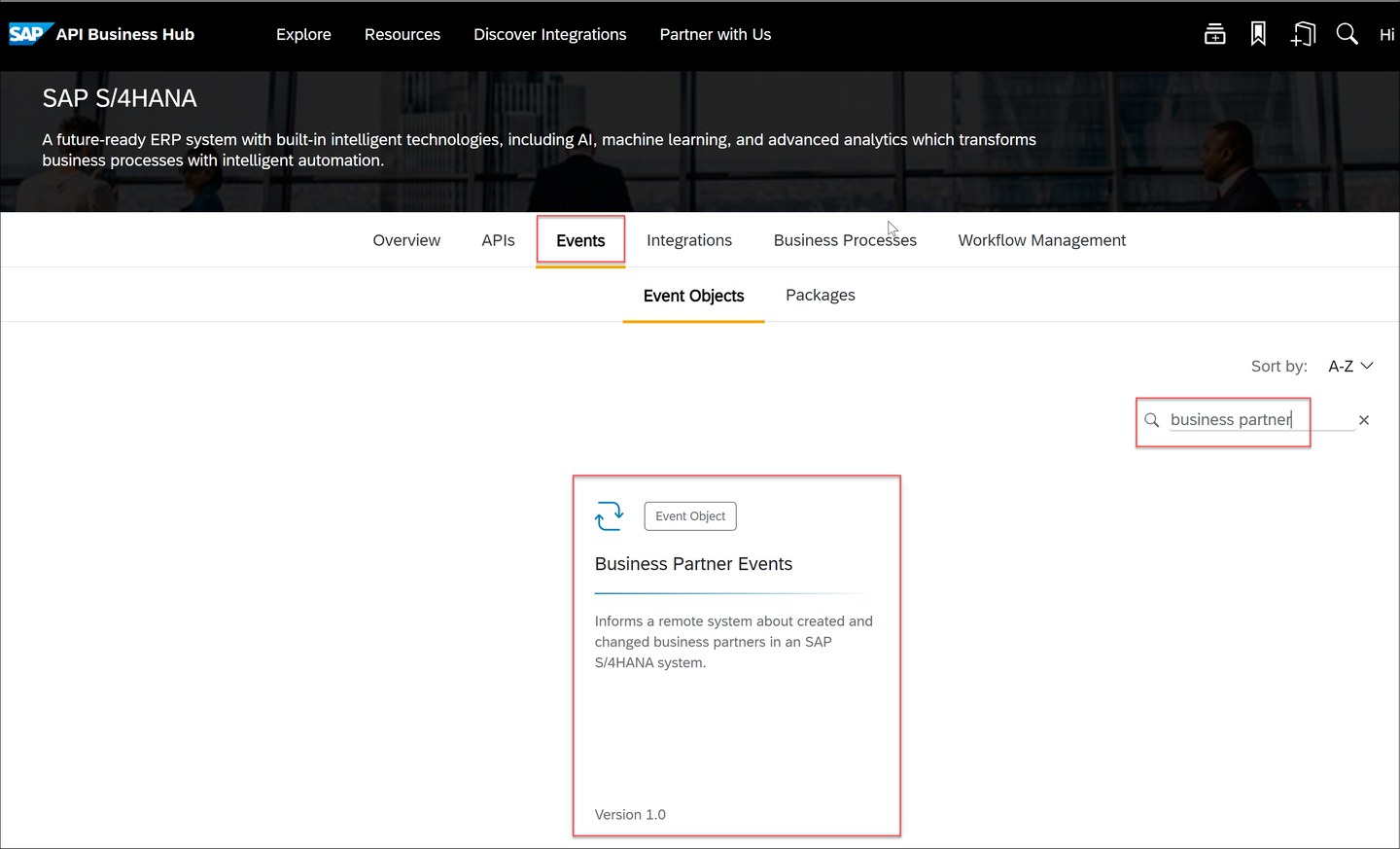
Under SAP S/4HANA choose Events tab and search for business partner.
events
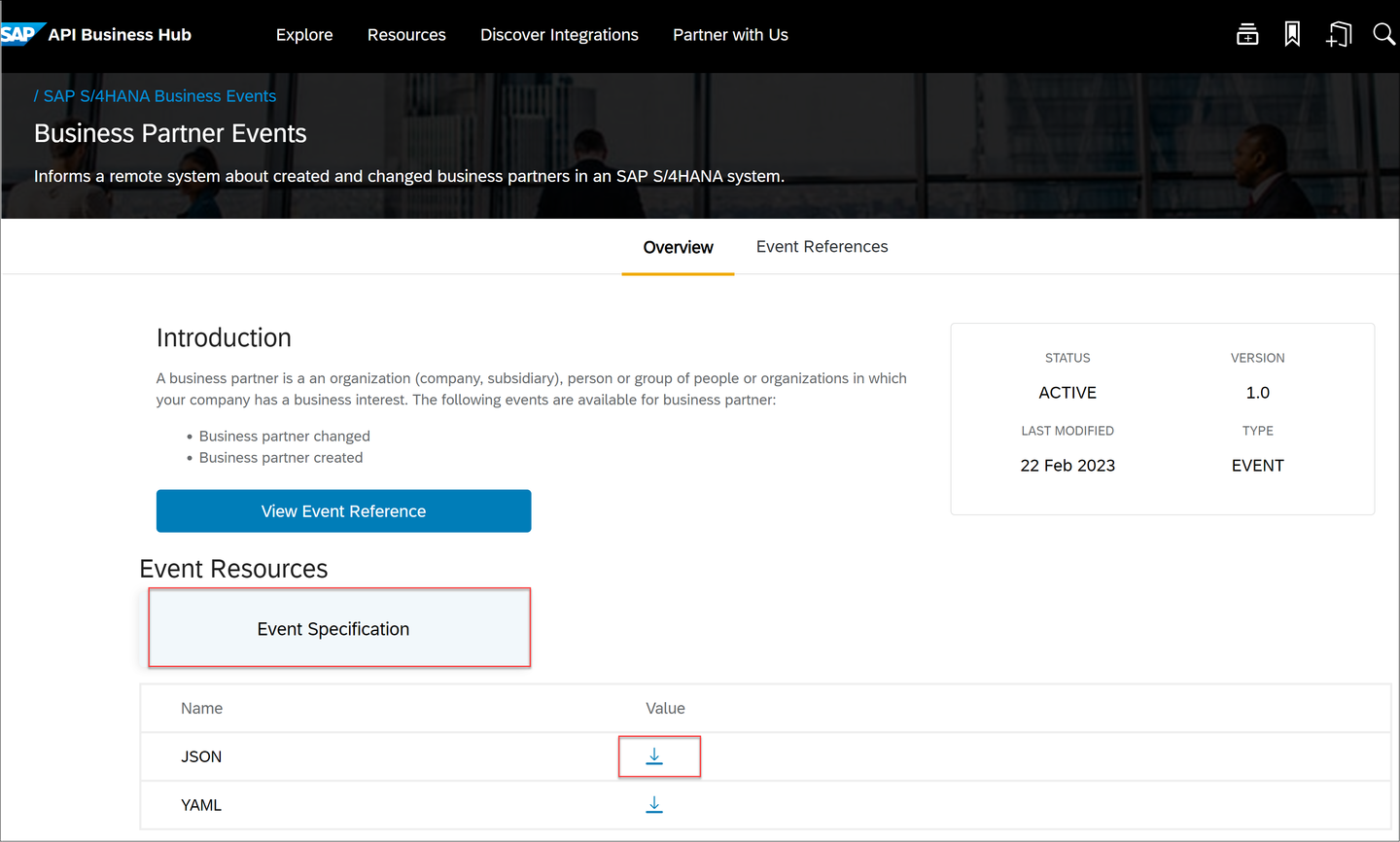
Click Event Specification and download the JSON file.
json
Step 2Create event consumption model in ADT
+
Here you will create an Event Consumption Model with the .json file that you downloaded in last step.
Open ADT and open your S/4HANA system.
Create a new ABAP Package if you have not one. Please be sure if your package name is with Z like
Name: ZEVENT_CONSUMPTION_####
Description: event consumption
new
Right-click your package and choose New > Other ABAP Repository Object > Business Services > Event Consumption Model and click Next to launch the creation wizard.
new
new
Fill the fields and upload the .json file you saved before into the new event consumption ADT wizard. This will then automatically generate all that you need in this event consumption model, like the event handler custom code, authorization defaults values and inbound service.
Name: will be created with the Prefix and Identifier
Description: event consumption model
Namespace/ Prefix/ Identifier : Zand EVENT####
Event specification File: .json file
click Next.
event
Select all the event types that you would like to consume in your business application and click Next.
event type
Click Next by Define Consumer Artifacts
define
In ABAP Artifact Generation List click Next.
generate
Select a Transport Request and click Finish.
transport
In created event consumption model you can see the selected Event Types that are assigned because of your .json file.
types
Save and activate your event consumption model.
Step 3Create database table for handler method
+
In this step, you can create a DB table and save the business partner IDs in this DB table. With this you can consume the event which is created in a S/4 system. Creating a DB table in this tutorial is just to help you to save and check your created IDs.
Right-click your package and choose New > Other ABAP Repository Object > Database Table and click Next
new
database
Enter the following name and description:
Name:ZTABLE_####
Description: Database table
database
click Next, select a Transport Request and click Finish .
Define the table with this code and replace all #### with your number:
In the consumer extension class, the event processing logic can be implemented. In the generated class, you can find for each event type of the Event Consumption Model a respective handle event method. In each method, the corresponding event type and the typed business data for this event can be found. The latter is commented out so that you can implement your own logic.
Navigate to Business Service > Event Consumption models > ZEVENT#### > Classes > ZCL_EVENT#### which is generated (or you can navigate to the Source Code Library > ZCL_EVENT####). Here you can see the create Method.
class
class
Remove comment from these lines:
Code
  DATA ls_business_data TYPE STRUCTURE FOR HIERARCHY Z_BusinessPartner_Created_v1.
  ls_business_data = io_event->get_business_data( ).
You need to copy the code below and replace it in your method. Replace all #### with your number:
ZCL_EVENT####
  DATA ls_business_data TYPE STRUCTURE FOR HIERARCHY Z_BusinessPartner_Created_v1.

  DATA wa TYPE  ztable_####.
  ls_business_data = io_event->get_business_data( ).

  wa-payload = ls_business_data-BusinessPartner.

  DATA(sydatum) = cl_abap_context_info=>get_system_date(  ).
  DATA(sytime) = cl_abap_context_info=>get_system_time(  ).

  wa-recorddate = sydatum.
  wa-recordtime = sytime.

  DELETE FROM  ztable_####
  WHERE recorddate < @sydatum.

  INSERT ztable_#### FROM @wa.
Your code will look like the following:
class
You can raise an exception whenever there is an issue. This will imply that the event processing has failed and therefore set the event status to failed. To see the exception, open Window > Show View > Other search for Feed Reader. Here you can see a message if an issue is raised.class
Step 5Channel Configuration
+
In order to successfully exchange events between SAP Event Mesh and an SAP S/4HANA on-premise system, a corresponding connection is required. This connection is maintained by the Enterprise Event Enablement framework during channel creation. To consume events, the inbound bindings and subscriptions of the channel must be configured as well.
Step 6Creating a channel using a service key
+
A channel represents a single connection to a service instance of the SAP Event Mesh. As a prerequisite, you need to prepare an Event Mesh instance in your SAP Business Technology Platform account and download the service key of this instance.
Open your On-Premise system in SAP Logon and run the transaction /n/IWXBE/CONFIG.
run
Press via Service Key > Default to create a new channel.
new
Enter the following name and description and replace all #### with your number, enter the service key of your Event Mesh instance into the corresponding field and press save icon.
Name:ZEVENT_CHANNEL_####
Description: New Channel ####
name
Your channel is created. Choose your channel and press Activate.
new
After creating a channel, you can decide which events should be listed on this channel. This explicit step of maintaining an outbound/inbound binding is necessary to publish/consume events from/in an S/4HANA system.
Step 7Configure inbound bindings
+
In the channel configuration UI click on Inbound Bindings to start configuring the event topics for the event consumption. Alternatively, you can run /n/IWXBE/INBOUND_CFG.
inbound
Choose your active channel and click on create new topic binding icon.
new
Choose the search help to find the corresponding topic you wish to create an inbound binding for. in this case, choose sap/s4/beh/businesspartner/v1/BusinessPartner/Created/v1 and switch to the next page.
new
new
new
Choose your consumer, ZEVENT#### and click Create Destination.
dest
Enter your user and click save icon. Please keep in mind that the specified user here is the user that runs the consumer code in the event consumption model. So, one should make sure the specified user has all the necessary authorizations.
dest
In Create Inbound Binding screen you can see that a destination is created, now click save icon as well.
The second step of the event consumption configuration is the creation of queue subscriptions for the channel. Back to your On-Premise system. In the channel configuration UI click Subscriptions to start configuring the queue subscriptions for the event consumption. Alternatively, you can run /n/IWXBE/SUBSCRIPTION.
subs
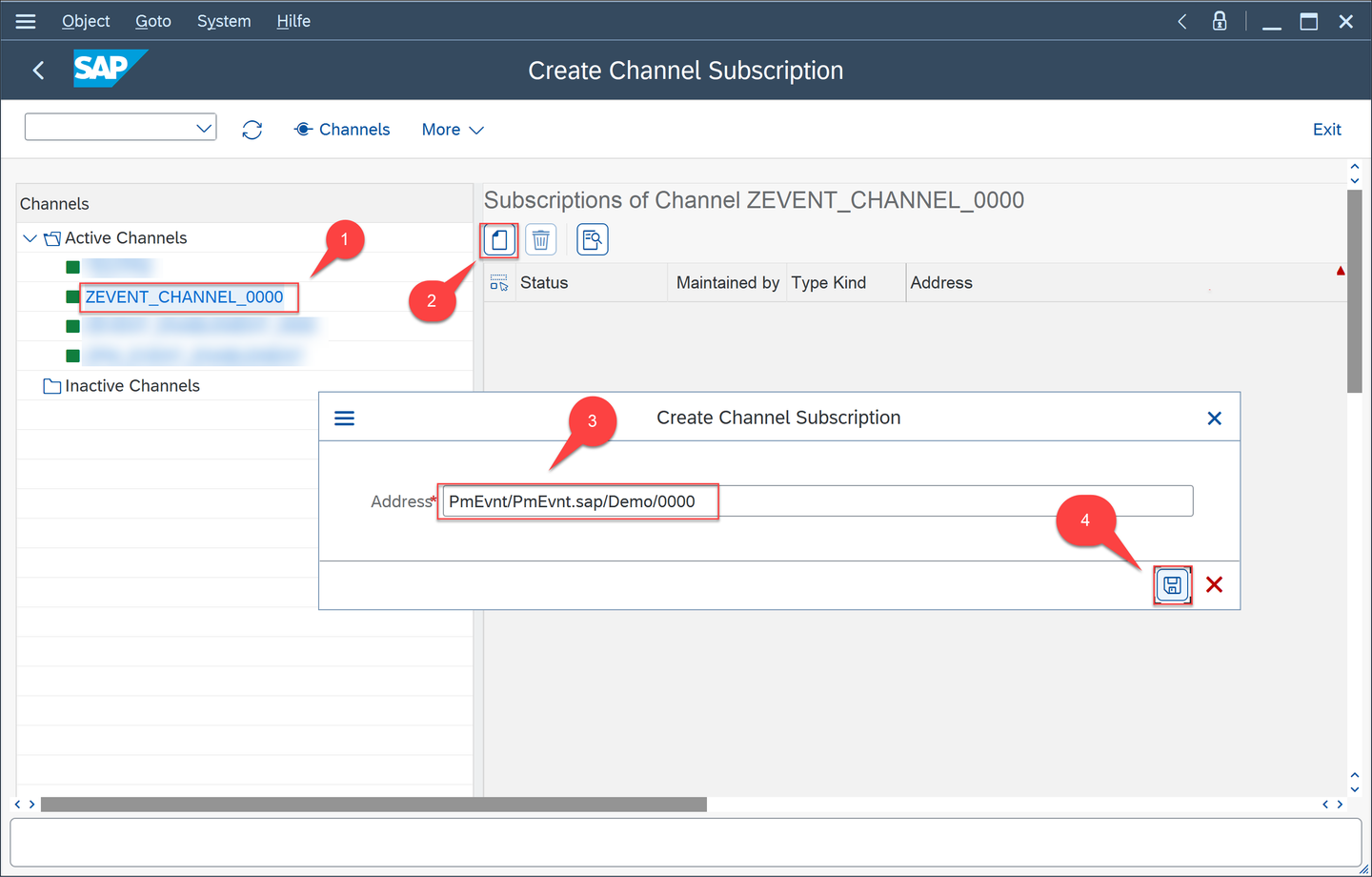
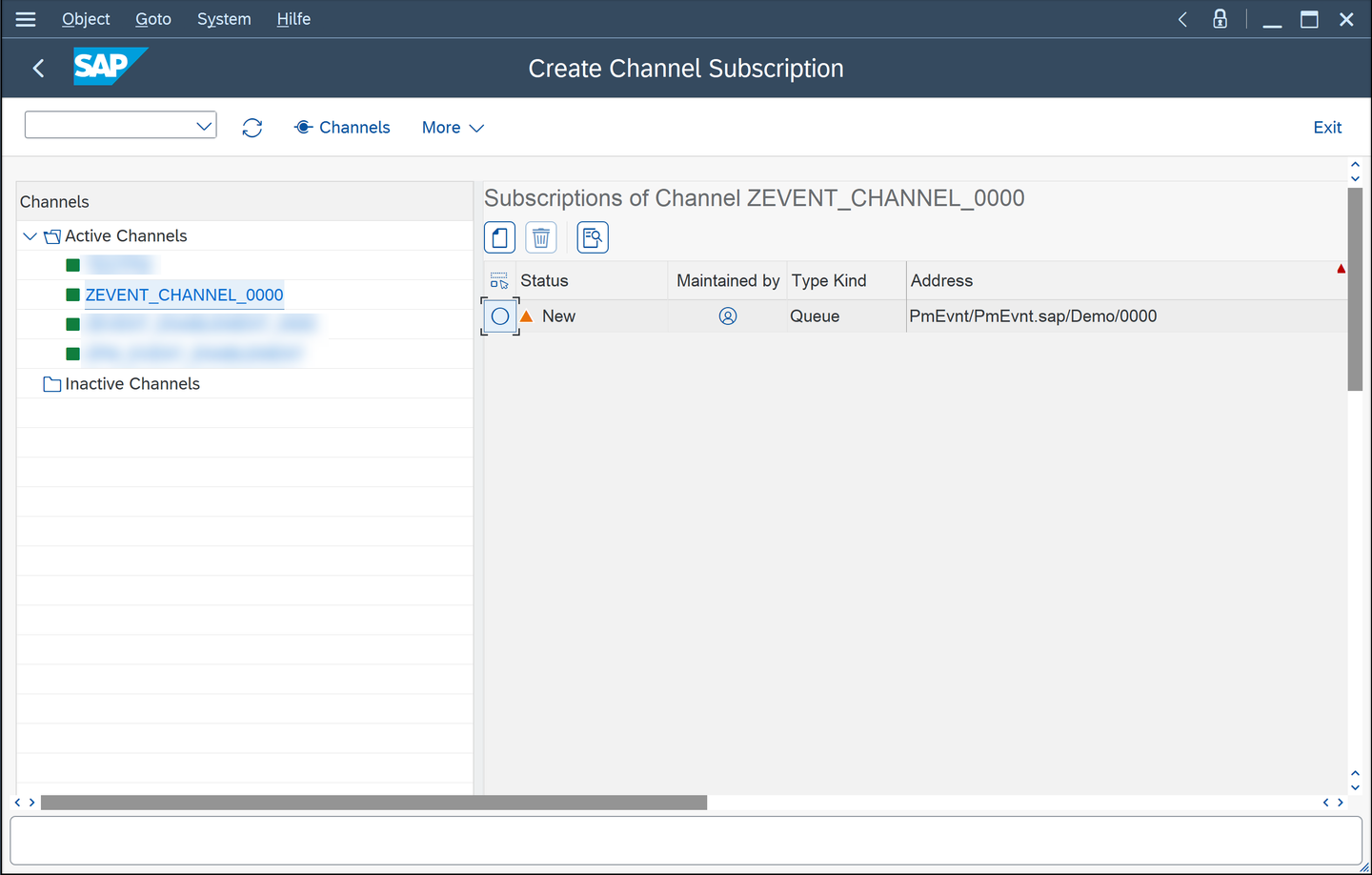
In the Create Channel Subscription choose your active channel, click create new subscription icon and enter the address of the queue you already created for your Event Mesh instance and click Save.
queue
queue
Now you can consume an event using the event consumption model embedded in ABAP Development Tools for Eclipse (ADT).
Step 9Create business partner
+
To test your event consumption scenario, a business partner must be created in the event producer system (which can be any cloud or OP system). Based on the logic you defined in the handler event method, as soon as a new business partner is created, the event will be sent to the Event Mesh and you will see the ID of the created business partner in the table.
If you want to send the event from an On-Premise system to the Event Mesh, you need to have an active channel and configure the outbound topic bindings for this channel.
Open your second On-Premise system in SAP Logon and create and activate a channel like in step 6. In this step you can use a name like ZEVENT_TEST_####
To configure your channel run /n/IWXBE/OUTBOUND_CFG or click Outbound Bindings.
conf
In the configuration UI select your channel and click Create new topic binding icon and Choose the search help to find the corresponding topic you wish to create an inbound binding for. in this case, choose sap/s4/beh/businesspartner/v1/BusinessPartner/Created/v1 and click save icon.
topic
Check your topic is listed and run the transaction BP to create a new business partner.
topic
In Business Partner UI click Person and enter a name and last name and click Save.
person
A new business partner will be created and you can see the ID.
person
Now open your first On-Premise system in ADT and open your database table ZTABLE_#### and run the table with F8. You can find your created business ID in this table.
Share feedback on this tutorial or join the conversation in SAP Community.
Submit detailed feedbackDiscuss in Community
Steps
Step 1 of 10
1. Download event specification file2. Create event consumption model in ADT3. Create database table for handler method4. Define handle event methods5. Channel Configuration6. Creating a channel using a service key7. Configure inbound bindings8. Configure subscriptions9. Create business partner10. Test yourself
Joule
AI Notice
Joule is an AI assistant. Generative AI may produce inaccurate, incomplete, or biased information. Always verify important details before acting on them.
Conversations are sent to SAP-hosted large language models for processing. Do not include personal data, credentials, or confidential information in your messages.
Joule's responses are based on the SAP tutorial catalog and may not reflect the latest product changes. For authoritative guidance, consult the linked tutorials and official SAP documentation.