
Implement an Outbound Service Call in SAP BTP, ABAP environment for an OData Service via Service Consumption Model
As an ABAP developer, implement an outbound service call from an SAP BTP, ABAP Environment system to an SAP S/4HANA Cloud, public edition system. Use the Business Partner (A2X) API to create business partners in the SAP S/4HANA Cloud system remotely.
Overview
You will learn
- How to create a custom communication scenario.
- How to create a service consumption model for an OData service.
- How to implement a console application.
- How to execute remote calls from your ABAP code.


Prerequisites
Prerequisites
- Your business User in the SAP BTP, ABAP environment system must be assigned to business role
SAP_BR_DEVELOPER. - You have downloaded and installed the latest ABAP Development Tools (ADT) on the latest Eclipse platform.
- You have created an ABAP Cloud project for your SAP BTP ABAP environment system in ADT.
Steps
Create your own ABAP development package, which will serve as the basis for the development artifacts to be created.
Open Eclipse and connect to your system.
Right click the main package
ZLOCALand choose New > ABAP Package.Create your own ABAP development package as a sub package of
ZLOCALusing Software ComponentZLOCAL. No transport request is necessary, as change recording is not enabled.
Create an outbound service object, which models the outbound call that will be implemented. The outbound service will be part of a custom communication scenario.
Mark the created package under
ZLOCALor in Favorite Packages and click on File and choose New > Other… > Outbound Service: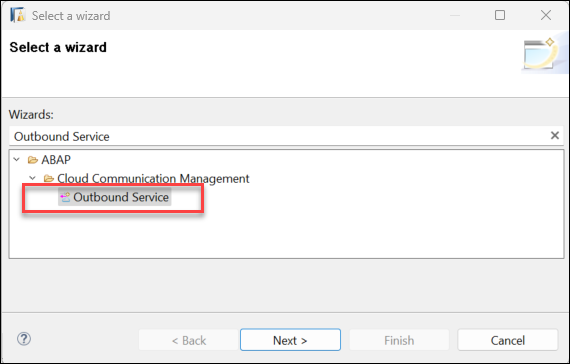
Create Outbound Service Provide:
Choose Next
No transport request is necessary, as change recording is not enabled. Choose Finish.
In the newly created Outbound Service set the Default Path Prefix parameter to
/sap/opu/odata/sap/API_BUSINESS_PARTNERand save the Outbound Service.
Set Path The Path parameter can be retrieved from the Business Partner (A2X) under Configuration Details > PRODUCTION URL. You will need to remove the
https://{host}:{port}part of the URL.
Create a communication scenario and assign the outbound service to it. This will be the basis for the outbound communication arrangement, which will be configured by an administrator at a later point. Keep in mind that the developer defines which authentication methods are supported, while the administrator decides which authentication method is ultimately used at runtime.
In ADT, mark the created package under
ZLOCALor in Favorite Packages and click on File and choose New > Other… > Communication Scenario: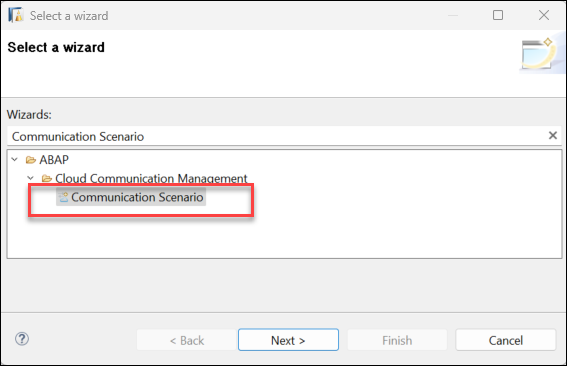
Create Communication Scenario Provide:
No transport request is necessary, as change recording is not enabled. Choose Finish
In this tutorial, we assume that the Communication Scenario only needs to be setup once per client and no receiver determination is needed (for more information, see Service Consumption via Communication Arrangements). Select “One instance per client” from the Allowed Instances dropdown list:
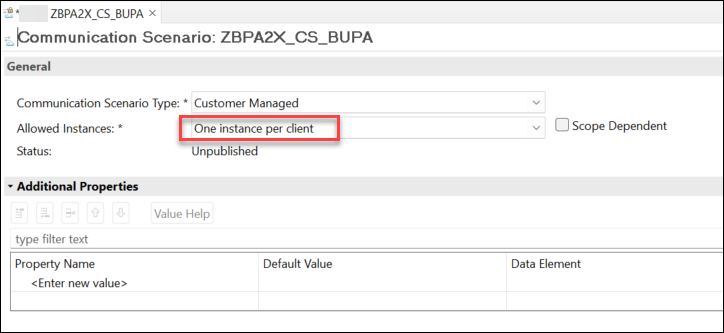
Create Communication Scenario 3 Choose Tab Outbound and Add the Outbound Service created before:
ZBPA2X_OBS_BUPA_REST. The Default Path Prefix field should be filled automatically according to the Default Path Prefix set for the Outbound Service in the previous step. If that is not the case, click on the button Synchronize.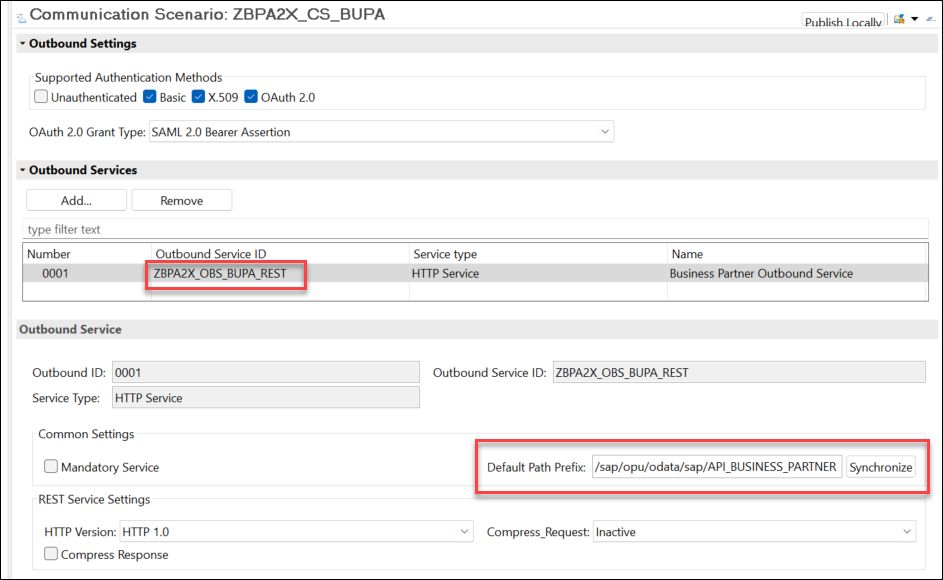
Automatic path Choose the Authentication Methods Basic and X.509 to permit basic and certificate-based authentication via communication user. Choose Authentication Method OAuth 2.0 with Grant Type SAML 2.0 Bearer Assertion to permit principal propagation.
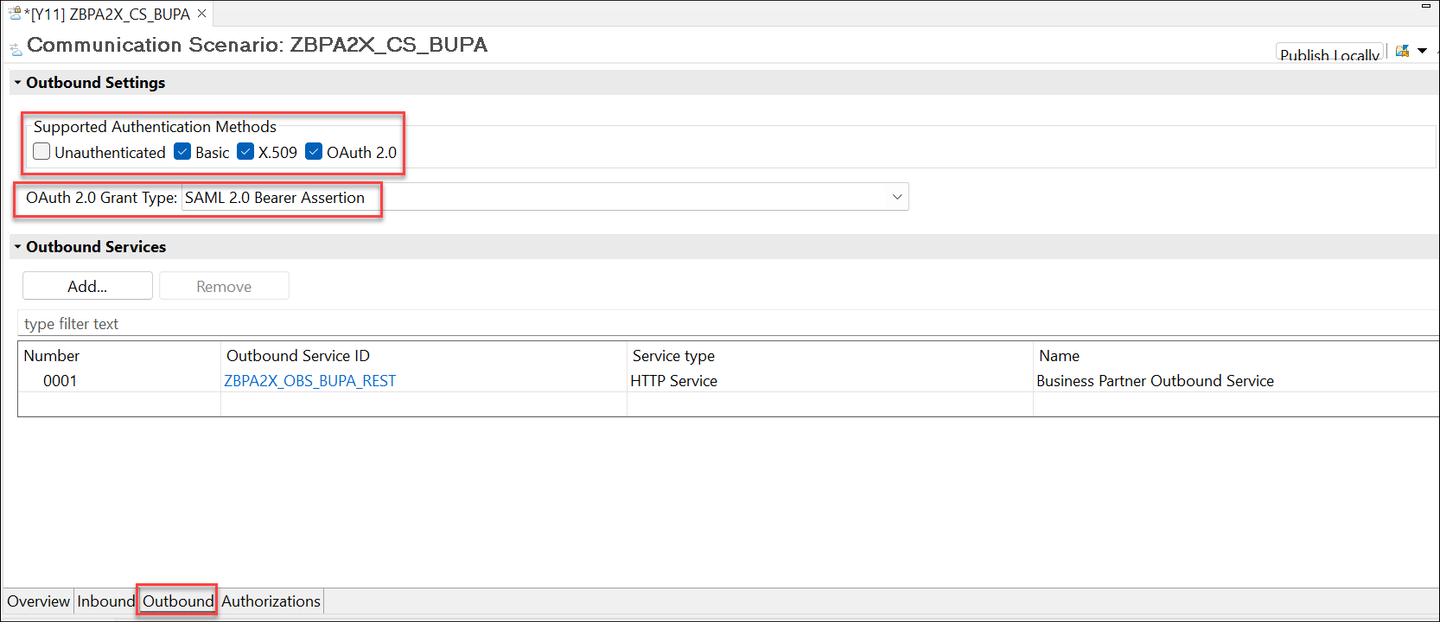
Create Communication Scenario 4 Save the communication scenario.
Choose Publish Locally.
Obtain the service metadata file to be able to create the service consumption model in the next step.
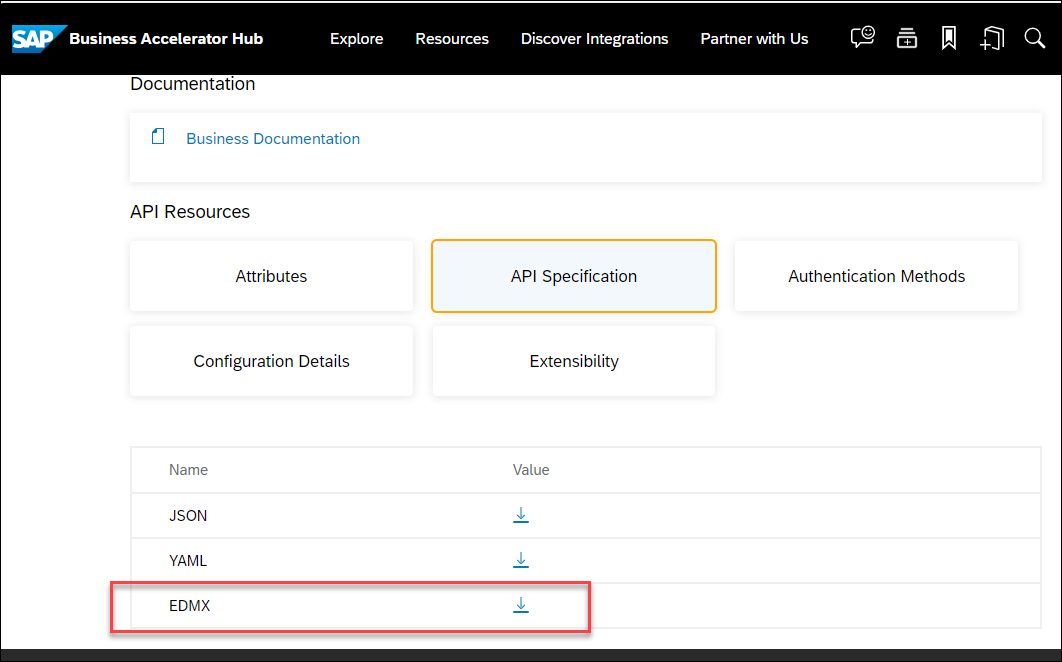
In the browser access the business Partner API directly in the SAP Business Accelerator Hub. Use Business Partner (A2X)
Choose API Specification
Choose to download the EDMX file
Create a service consumption model for the targeted OData service from the metadata file. This generates a number of proxy objects and greatly simplifies the remote service call in your ABAP code.
In ADT, mark the package created in the previous tutorial of this tutorial group (
ZBPA2X) underZLOCALor in Favorite Packages and click on File and choose New > Other… > Service Consumption Model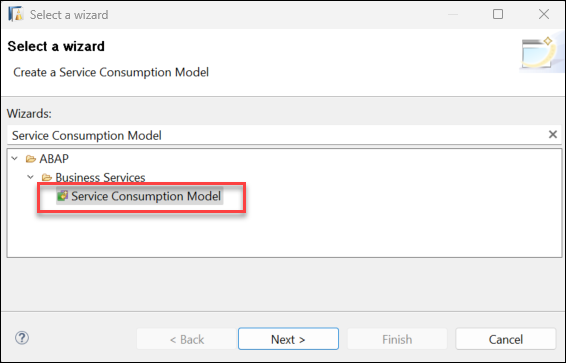
Create Service Consumption Model Provide:
Choose Next
Provide the Service Metadata File of the OData service, that you downloaded in the previous step
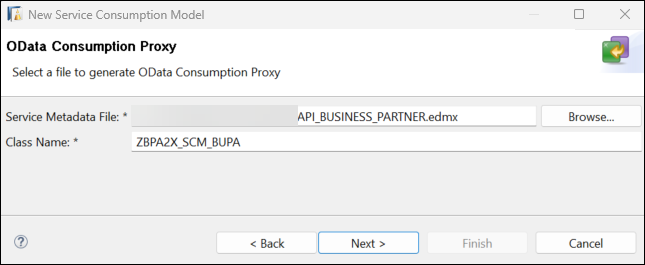
Create Service Consumption Model 3 Choose Next
On the Components of OData Service screen, Choose Next
On the ETag Support screen, choose Next
No transport request is necessary, as change recording is not enabled. Choose Finish
The creation of the Service Consumption Model can take a few seconds. Save and activate the Service Consumption Model.
Create a console application, which consists of an ABAP class implementing the interface if_oo_adt_classrun. The distinctive feature of this interface is that it allows to execute code directly in ADT.
In ADT, mark the created package under
ZLOCALor in Favorite Packages and click on File and choose New > Other… > ABAP Class:
Create Console Application Provide:
Choose Next
No transport request is necessary, as change recording is not enabled. Choose Finish
You will now implement the outbound service call in your console application. The previously maintained communication artifacts are used together with the service consumption model to create compact and understandable code.
- Open the Service Consumption Model
ZBPA2X_SCM_BUPA
Paste the code into the implementation part of the
if_oo_adt_classrun~mainmethod of theZBPA2X_CL_CLASSRUNclass you created in the previous step.Adjust the class as follows:
" Test stuff
CLASS zbpa2x_cl_classrun DEFINITION

  PUBLIC
  FINAL
  CREATE PUBLIC .

  PUBLIC SECTION.
    TYPES:
      BEGIN OF tys_a_business_partner_ty,
        business_partner          TYPE c LENGTH 10,
        business_partner_category TYPE c LENGTH 1,
        first_name                TYPE c LENGTH 40,
        last_name                 TYPE c LENGTH 40,
      END OF tys_a_business_partner_ty.

    INTERFACES if_oo_adt_classrun .
  PROTECTED SECTION.
  PRIVATE SECTION.
ENDCLASS.

CLASS zbpa2x_cl_classrun IMPLEMENTATION.

  METHOD if_oo_adt_classrun~main.
    DATA:
      ls_business_partner TYPE tys_a_business_partner_ty,
      lo_http_client      TYPE REF TO if_web_http_client,
      lo_client_proxy     TYPE REF TO /iwbep/if_cp_client_proxy,
      lo_request          TYPE REF TO /iwbep/if_cp_request_create,
      lo_response         TYPE REF TO /iwbep/if_cp_response_create.

    TRY.
        " Create http client
        DATA(lo_destination) = cl_http_destination_provider=>create_by_comm_arrangement(
                                 comm_scenario  = 'ZBPA2X_CS_BUPA'
                                 service_id     = 'ZBPA2X_OBS_BUPA_REST' ).

        lo_http_client = cl_web_http_client_manager=>create_by_http_destination( lo_destination ).
        lo_client_proxy = /iwbep/cl_cp_factory_remote=>create_v2_remote_proxy(
          EXPORTING
            is_proxy_model_key = VALUE #( repository_id = 'DEFAULT'
            proxy_model_id = 'ZBPA2X_SCM_BUPA'
            proxy_model_version = '0001' )
            io_http_client = lo_http_client
            iv_relative_service_root = ''
"            iv_relative_service_root = '/sap/opu/odata/sap/API_BUSINESS_PARTNER'
            ).

        ASSERT lo_http_client IS BOUND.
        " Navigate to the resource and create a request for the create operation
        lo_request = lo_client_proxy->create_resource_for_entity_set( zbpa2x_scm_bupa=>gcs_entity_set-a_business_partner )->create_request_for_create( ).

        DATA(lv_userid) = cl_abap_context_info=>get_user_technical_name( ).

        SELECT SINGLE *
        FROM i_businessuser
            WITH PRIVILEGED ACCESS
        WHERE userid = @lv_userid INTO
        @DATA(ls_businessuser).

        IF sy-subrc <> 0.
          out->write( |Error retrieving business user { lv_userid }| ).
          RETURN.
        ENDIF.

        ls_business_partner = VALUE #(
           business_partner_category = '1'
           first_name = ls_businessuser-firstname
           last_name = ls_businessuser-lastname

         ).

        " Set the business data for the created entity
        lo_request->set_business_data( ls_business_partner ).
        " Execute the request
        lo_response = lo_request->execute( ).
        " Get the after image
        lo_response->get_business_data( IMPORTING es_business_data = ls_business_partner ).
        out->write( |Business partner { ls_business_partner-business_partner } was created| ).

      CATCH cx_root INTO DATA(lx_exception).
        " Handle remote Exception
        " It contains details about the problems of your http(s) connection
        out->write( lx_exception->get_text( ) ).
    ENDTRY.

  ENDMETHOD.
ENDCLASS.Remember to replace the name of all objects created in the tutorial unless you did not use the suggested names. Here the object names and the suggested naming:
- Save and activate your class.
The implementation uses the custom communication scenario and outbound service to create a destination object. This is in turn used to instantiate an HTTP client, which is used to handle the HTTP communication. The service consumption model is used to instantiate a client proxy, which offers standard methods to easily build the request payload directly from your ABAP code. In this example, the request creates a single business partner in the target system and writes its ID to the console.
The ABAP Console Application you created in the previous step cannot be executed just yet, as an administrator still needs to configure the outbound connectivity, specifying a target system and a communication user. This will be done in the next tutorial of this group.
You can check this by running the class: right click on the class and choose Run As > ABAP Application (Console):

Since the outbound connectivity has not been set up yet, the class cannot create a Business Partner yet.
Resources
Discussion
Share feedback on this tutorial or join the conversation in SAP Community.