
Overview
You will learn
- How to generate a Business Configuration Maintenance Object


Prerequisites
Prerequisites
- You need an SAP BTP, ABAP environment license or a trial user.
- This tutorial also works in an SAP S/4HANA Cloud, public edition system.
- This is the first tutorial of group Create a SAP Fiori based Table Maintenance app. You must complete the tutorials in the specified order.
- Install ABAP Development Tools (3.26.2 or higher). You can also follow step 1 of this tutorial to install ADT.
Steps
Intro
This tutorial shows you how to create an SAP Fiori based Table Maintenance app using the ABAP RESTful Application Programming Model (RAP) and the Custom Business Configurations (CUBCO) app. This tutorial is based on a simplified error code database model: a table to store the error codes and a table to store the language-dependent error code descriptions.
You first create the database tables and then use the ABAP Repository Generator to create the required repository objects.
Hint: For more information, see the documentation for this programming model.
Hint: Do not forget to replace all occurrences of the ### placeholder with your ID of your choice in the subsequent exercise steps. To do this, you can use the ADT function Replace All (
Ctrl+F).
Open your ABAP Development Tools, log on to your ABAP system, right-click
ZLOCAL(or$TMP) and choose New > ABAP Package.
New package Create a new package:
- Name:
Z_ERROR_CODES_### - Description:
Error Codes ### - Super package:
ZLOCAL - Select Add to favorite packages

Enter new package Click Next >. Confirm the basic package properties by clicking Next > again.
- Name:
If change recording is not enabled, you cannot enter a new transport request. Instead, simply click Finish.
Right-click
Z_ERROR_CODES_###and choose New > Other ABAP Repository Object.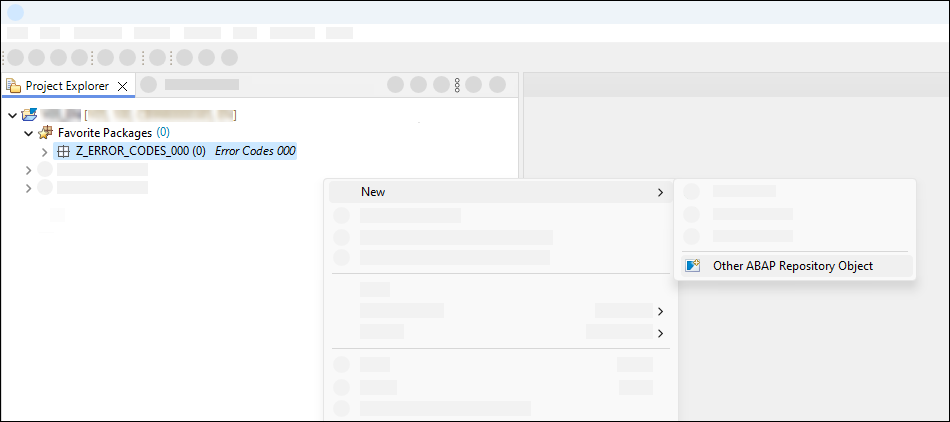
New Data Element Search for
Data Element, select it, and click Next >.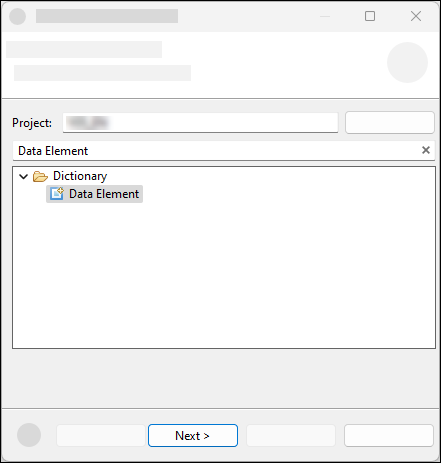
Select Data Element Create a data element. You use data elements instead of predefined ABAP types because the field labels on the user interface are derived from the data element definition. In addition, a data element is required to define a foreign key relationship between two tables. Note: For character-like key fields, you must associate the data element with a domain. This ensures that case-sensitivity is applied correctly, thus avoiding problems when transporting the content.
- Name:
Z_ERROR_CODE_### - Description:
Error Code

Enter new Data Element Click Next >.
- Name:
Click Finish.
Select
Predefined Typeas Category,NUMCas Data type, 3 as Length and enterError Codeas Field Labels:
Data Element definition Save and activate.
Repeat steps 2.1. - 2.5 to create a second Data Element:
- Name:
Z_CODE_DESCRIPTION_### - Description:
Error Code Description - Category:
Predefined Type - Data Type:
CHAR - Length:
120 - Short Field Label:
Text - Other Field Labels:
Description

Data Element definition - Name:
Save and activate.
Right-click Type Group Dictionary in package
Z_ERROR_CODES_###and choose New > Database Table.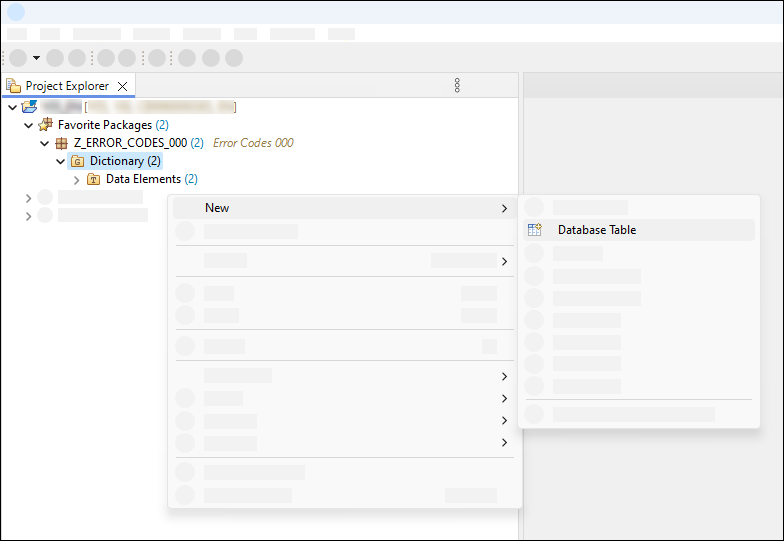
New database table Create the error code database table:
- Name:
ZERRCODE_### - Description:
Error Code ###
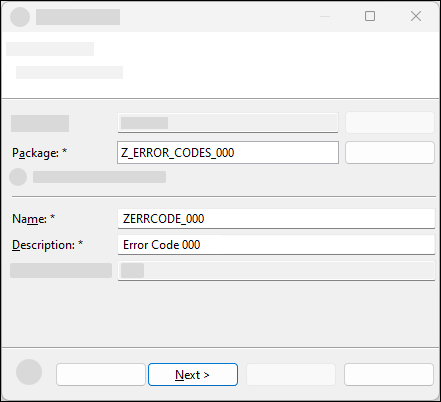
Create database table Click Next >.
- Name:
Click Finish.
Replace your code as follows. The timestamp fields are used for optimistic concurrency control for draft processing and OData consumer. If you add the field
CONFIGDEPRECATIONCODEof typeCONFIG_DEPRECATION_CODEto the database table, the ABAP generator that you use in step 5 can extend the generated RAP BO to manage the validity of the configuration entries.
@EndUserText.label : 'Error Code ###'
@AbapCatalog.enhancement.category : #NOT_EXTENSIBLE
@AbapCatalog.tableCategory : #TRANSPARENT
@AbapCatalog.deliveryClass : #C
@AbapCatalog.dataMaintenance : #ALLOWED
@AbapCatalog.primaryKey.invertedIndividualIndex : true
define table zerrcode_### {
  key client            : abap.clnt not null;
  key error_code        : z_error_code_### not null;
  last_changed_at       : abp_lastchange_tstmpl;
  local_last_changed_at : abp_locinst_lastchange_tstmpl;
}
Save and activate.
Repeat the steps 3.1.- 3.4 and create the database table for the error code description. An additional database table is considered as a text table by the ABAP generator that you use in step 5 if the annotation
@AbapCatalog.foreignKey.keyType : #TEXT_KEYis used.- Name:
ZERRCODET_### - Description:
Error Code Description ###
- Name:
@EndUserText.label : 'Error Code Description ###'
@AbapCatalog.enhancement.category : #NOT_EXTENSIBLE
@AbapCatalog.tableCategory : #TRANSPARENT
@AbapCatalog.deliveryClass : #C
@AbapCatalog.dataMaintenance : #ALLOWED
@AbapCatalog.primaryKey.invertedIndividualIndex : true
define table zerrcodet_### {
  key client            : abap.clnt not null;
  @AbapCatalog.textLanguage
  key langu             : abap.lang not null;
  @AbapCatalog.foreignKey.keyType : #TEXT_KEY
  @AbapCatalog.foreignKey.screenCheck : false
  key error_code        : z_error_code_### not null
    with foreign key [0..*,1] zerrcode_###
      where client = zerrcodet_###.client
        and error_code = zerrcodet_###.error_code;
  description           : z_code_description_###;
  local_last_changed_at : abp_locinst_lastchange_tstmpl;
}- Save and activate.
A Business Configuration Maintenance Object declares a Service Binding as relevant for business configuration. They are listed in the Custom Business Configurations app. Selecting an entry in the app renders an SAP Fiori elements-based UI to maintain the business configuration.
ABAP Repository Generator allows you to create the required repository objects, including RAP business object, service binding, and business configuration maintenance object.
Hint: For more information, see ABAP Repository Generator documentation.
Right-click the
ZERRCODE_###table and choose Generate ABAP Repository Objects….
Start ABAP Repository Objects generator Select
Maintenance Objectand click Next >.
Select generator Enter the target package and click Next >.
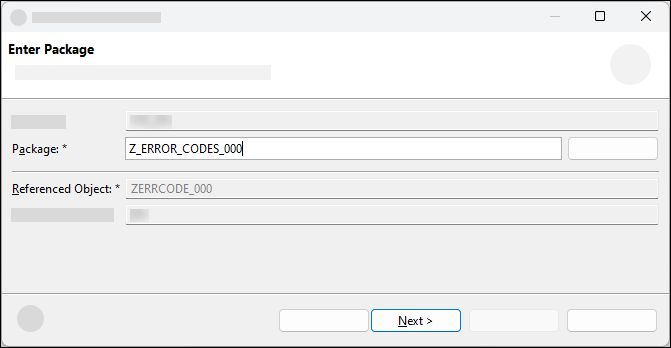
Select package The system generates a proposal for all input fields based on the description of the table by following these naming conventions. If you receive an error message stating that a specific object already exists, change the corresponding name in the wizard. Select
Manual with preselectionfor Transport Selection and check the box forEnable Transport Selection Strip. Note that for configurations to be adjusted in every client you would selectNo transportfor Transport Selection. If you have an SAP BTP trial account, change the option Transport selection toNo transportas you cannot create any customizing transport requests.Click Next >.

Generator proposal The list of repository objects that are generated is displayed. Click Next >.
Click Finish.
When the generation is complete, the new business configuration maintenance object is displayed. You can find the documentation for the object attributes here. In the next tutorial, you will create the necessary authorization objects for using the business configuration maintenance object in the CUBCO app. You can adapt the generated RAP BO to your needs, see also CDS Annotations for Metadata-Driven UIs. For example, you can adjust the visibility, positioning, and labels of the fields. See also this collection of blog posts about advanced functionality you can implement like collaborative draft, sorting and associations.
If you have a license for SAP BTP, ABAP environment or you are working in an SAP S/4HANA Cloud, public edition system, you can now set this step to Done and continue with the next step Test yourself. Only if you have an SAP BTP trial account, you need to make the following adjustments because you cannot create business user roles. You can then also skip the following tutorial Provide authorization control for a Business Configuration Maintenance Object and continue with tutorial Use Custom Business Configurations app. In SAP S/4HANA Private Cloud Edition, IAM apps are not available. You can read this blog to learn how to create the required PFCG Role in SAP S/4HANA Private Cloud Edition.
Edit class
ZBP_I_ERRORCODE###_S, section Local Types. Delete the content of the following methods. Then save and activate the class.LHC_ZI_ERRORCODE###_S→GET_GLOBAL_AUTHORIZATIONS
Set the annotation @AccessControl.authorizationCheck in all generated CDS views to
#NOT_ALLOWED. Save and activate.Publish the
Local Service Endpointof theZUI_ERRORCODE###_O4service binding

Publish Service Binding
Resources
Discussion
Share feedback on this tutorial or join the conversation in SAP Community.