
Overview
You will learn
- How to create a behavior definition
- How to create a behavior implementation
- How to create a service definition
- How to create a service binding
- How to test a service


Prerequisites
Prerequisites
- You need an SAP BTP, ABAP environment trial user.
- ADT version 2.96 or higher
Steps
Intro
In this tutorial, wherever XXX appears, use a number (e.g. 000).
Right-click on
Z_I_ROOM_XXX(data definition) and select New Behavior Definition.
Create behavior definition Create your behavior definition:
- Name:
Z_I_ROOM_XXX - Description:
Behavior for Z_I_ROOM_XXX - Root Entity:
Z_I_ROOM_XXX
Click Next>.
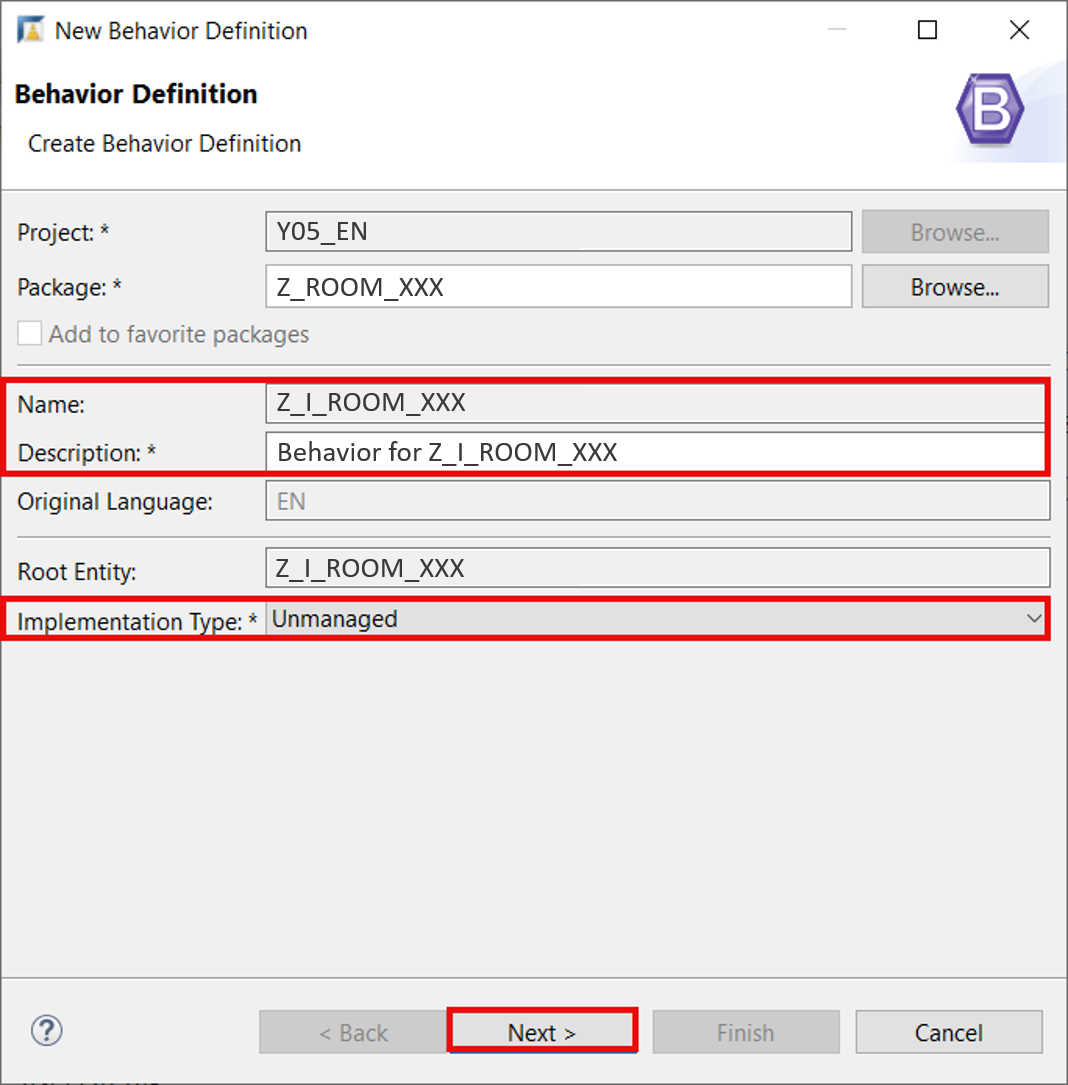
Create behavior definition - Name:
Click Finish.
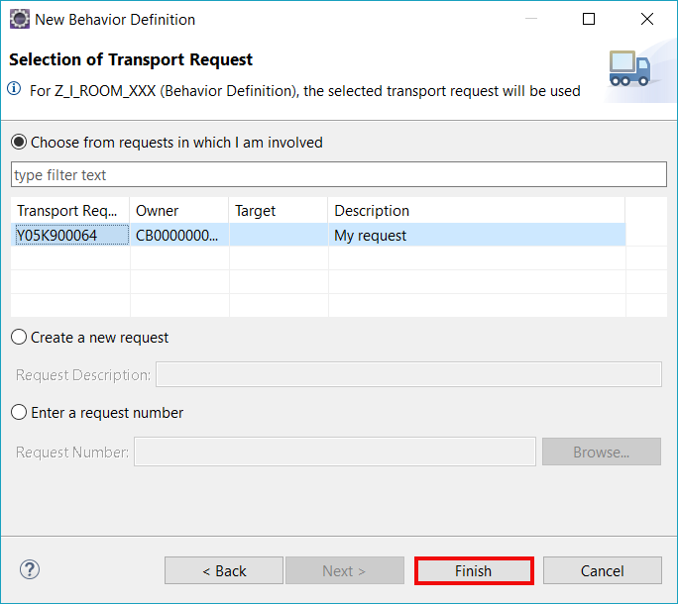
Create behavior definition Create your behavior definition with following coding:
ABAPunmanaged implementation in class Z_I_ROOM_BEHAVE_XXX unique; define behavior for Z_I_ROOM_XXX alias room lock master etag master lastchangeddatetime { create; update; delete; field (mandatory) id; field (readonly) lastchangedbyuser, lastchangeddatetime; }Save and activate.
In your behavior definition
Z_I_ROOM_XXXset the cursor before the implementation classZ_I_ROOM_BEHAVE_XXXand clickCTRL+ 1. Double-click on Create behavior implementation classZ_I_ROOM_BEHAVE_XXXto create your implementation class.
Create behavior implementation Create your behavior implementation:
- Name:
Z_I_ROOM_BEHAVE_XXX - Description:
Behavior implementation for Z_I_ROOM_XXX - Behavior Definition:
Z_I_ROOM_XXX
Click Next>.
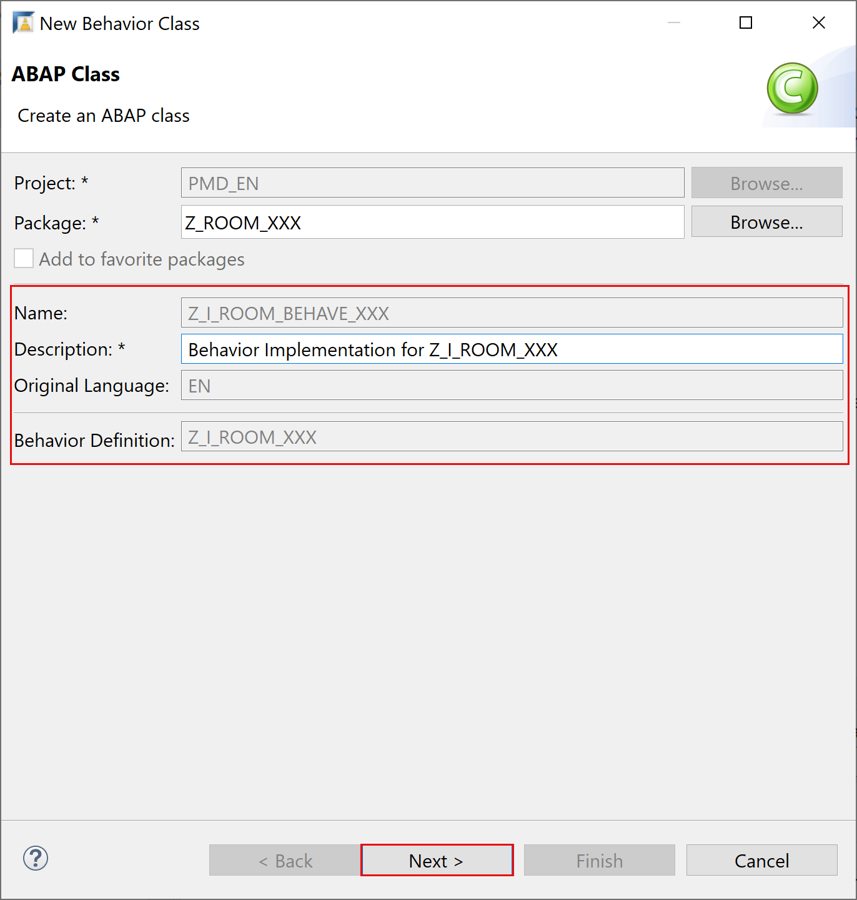
Create behavior implementation - Name:
Click Finish.

Create behavior implementation Create your behavior implementation with following coding:
ABAPCLASS lcl_handler DEFINITION INHERITING FROM cl_abap_behavior_handler. PUBLIC SECTION. CLASS-DATA: mt_root_to_create TYPE STANDARD TABLE OF zroom_xxx WITH NON-UNIQUE DEFAULT KEY, mt_root_to_update TYPE STANDARD TABLE OF zroom_xxx WITH NON-UNIQUE DEFAULT KEY, mt_root_to_delete TYPE STANDARD TABLE OF zroom_xxx WITH NON-UNIQUE DEFAULT KEY. PRIVATE SECTION. TYPES: ty_action(2) TYPE c, tt_message TYPE TABLE OF symsg, tt_room_failed TYPE TABLE FOR FAILED z_i_room_xxx, tt_room_reported TYPE TABLE FOR REPORTED z_i_room_xxx. CONSTANTS: BEGIN OF cs_action, create TYPE ty_action VALUE '01', update TYPE ty_action VALUE '02', delete TYPE ty_action VALUE '03', END OF cs_action. METHODS: create FOR MODIFY IMPORTING roots_to_create FOR CREATE room, update FOR MODIFY IMPORTING roots_to_update FOR UPDATE room, delete FOR MODIFY IMPORTING roots_to_delete FOR DELETE room, lock FOR BEHAVIOR IMPORTING roots_to_lock FOR LOCK room, read FOR BEHAVIOR IMPORTING roots_to_read FOR READ room RESULT et_room, validate IMPORTING iv_action TYPE ty_action is_room TYPE zroom_xxx RETURNING VALUE(rv_message) TYPE string. ENDCLASS. CLASS lcl_handler IMPLEMENTATION. METHOD create. LOOP AT roots_to_create INTO DATA(ls_root_to_create). DATA(lv_message) = validate( iv_action = cs_action-create is_room = CORRESPONDING zroom_xxx( ls_root_to_create ) ). IF lv_message IS INITIAL. ls_root_to_create-lastchangedbyuser = sy-uname. GET TIME STAMP FIELD ls_root_to_create-lastchangeddatetime. INSERT CORRESPONDING #( ls_root_to_create ) INTO TABLE mapped-room. INSERT CORRESPONDING #( ls_root_to_create ) INTO TABLE mt_root_to_create. ELSE. APPEND VALUE #( %cid = ls_root_to_create-%cid id = ls_root_to_create-id %fail = VALUE #( cause = if_abap_behv=>cause-unspecific ) ) TO failed-room. APPEND VALUE #( %cid = ls_root_to_create-%cid id = ls_root_to_create-id %msg = new_message_with_text( severity = if_abap_behv_message=>severity-error text = lv_message ) ) TO reported-room. ENDIF. ENDLOOP. ENDMETHOD. METHOD update. LOOP AT roots_to_update INTO DATA(ls_root_to_update). SELECT SINGLE FROM zroom_xxx FIELDS * WHERE id = @ls_root_to_update-id INTO @DATA(ls_room). DATA(lt_control_components) = VALUE string_table( ( `id` ) ( `seats` ) ( `location` ) ( `hasbeamer` ) ( `hasvideo` ) ( `userrating` ) ( `lastchangedbydatetime` ) ( `lastchangedbyuser` ) ). LOOP AT lt_control_components INTO DATA(lv_component_name). ASSIGN COMPONENT lv_component_name OF STRUCTURE ls_root_to_update-%control TO FIELD-SYMBOL(<lv_control_value>). CHECK <lv_control_value> = cl_abap_behavior_handler=>flag_changed. ASSIGN COMPONENT lv_component_name OF STRUCTURE ls_root_to_update TO FIELD-SYMBOL(<lv_new_value>). ASSIGN COMPONENT lv_component_name OF STRUCTURE ls_room TO FIELD-SYMBOL(<lv_old_value>). <lv_old_value> = <lv_new_value>. ENDLOOP. DATA(lv_message) = validate( iv_action = cs_action-update is_room = ls_room ). IF lv_message IS INITIAL. ls_root_to_update-lastchangedbyuser = sy-uname. GET TIME STAMP FIELD ls_root_to_update-lastchangeddatetime. INSERT ls_room INTO TABLE mt_root_to_update. ELSE. APPEND VALUE #( %cid = ls_root_to_update-%cid_ref id = ls_root_to_update-id %fail = VALUE #( cause = if_abap_behv=>cause-unspecific ) ) TO failed-room. APPEND VALUE #( %cid = ls_root_to_update-%cid_ref id = ls_root_to_update-id %msg = new_message_with_text( severity = if_abap_behv_message=>severity-error text = lv_message ) ) TO reported-room. ENDIF. ENDLOOP. ENDMETHOD. METHOD delete. LOOP AT roots_to_delete INTO DATA(ls_root_to_delete). SELECT SINGLE FROM zroom_xxx FIELDS * WHERE id = @ls_root_to_delete-id INTO @DATA(ls_room). DATA(lv_message) = validate( iv_action = cs_action-delete is_room = ls_room ). IF lv_message IS INITIAL. INSERT CORRESPONDING #( ls_root_to_delete ) INTO TABLE mt_root_to_delete. ELSE. APPEND VALUE #( %cid = ls_root_to_delete-%cid_ref id = ls_root_to_delete-id %fail = VALUE #( cause = if_abap_behv=>cause-unspecific ) ) TO failed-room. APPEND VALUE #( %cid = ls_root_to_delete-%cid_ref id = ls_root_to_delete-id %msg = new_message_with_text( severity = if_abap_behv_message=>severity-error text = lv_message ) ) TO reported-room. ENDIF. ENDLOOP. ENDMETHOD. METHOD lock. LOOP AT roots_to_lock INTO DATA(ls_root_to_lock). TRY. cl_abap_lock_object_factory=>get_instance( iv_name = 'EZROOMXXX')->enqueue( it_table_mode = VALUE if_abap_lock_object=>tt_table_mode( ( table_name = 'ZROOM_XXX' ) ) it_parameter = VALUE if_abap_lock_object=>tt_parameter( ( name = 'ID' value = REF #( ls_root_to_lock-id ) ) ) ). CATCH cx_abap_foreign_lock INTO DATA(lx_lock). APPEND VALUE #( id = ls_root_to_lock-id %fail = VALUE #( cause = if_abap_behv=>cause-locked ) ) TO failed-room. APPEND VALUE #( id = ls_root_to_lock-id %msg = new_message_with_text( severity = if_abap_behv_message=>severity-error text = lx_lock->get_text( ) ) ) TO reported-room. CATCH cx_abap_lock_failure. ASSERT 1 = 0. ENDTRY. ENDLOOP. ENDMETHOD. METHOD read. LOOP AT roots_to_read INTO DATA(ls_root_to_read). SELECT SINGLE FROM z_i_room_xxx FIELDS * WHERE id = @ls_root_to_read-id INTO @DATA(ls_room). INSERT ls_room INTO TABLE et_room. ENDLOOP. ENDMETHOD. METHOD validate. "Add method from Tutorial: Create authorization in SAP BTP, ABAP environment (Step 4) ENDMETHOD. ENDCLASS. CLASS lcl_saver DEFINITION INHERITING FROM cl_abap_behavior_saver. PROTECTED SECTION. METHODS finalize REDEFINITION. METHODS check_before_save REDEFINITION. METHODS save REDEFINITION. ENDCLASS. CLASS lcl_saver IMPLEMENTATION. METHOD finalize. ENDMETHOD. METHOD check_before_save. ENDMETHOD. METHOD save. INSERT zroom_xxx FROM TABLE @lcl_handler=>mt_root_to_create. UPDATE zroom_xxx FROM TABLE @lcl_handler=>mt_root_to_update. DELETE zroom_xxx FROM TABLE @lcl_handler=>mt_root_to_delete. ENDMETHOD. ENDCLASS.
Save and activate.
Right-click on data definition
Z_I_ROOM_XXXand select New Service Definition.
Create service definition Create your service definition: - Name:
Z_I_ROOM_SRV_XXX- Description:Room
Click Next>.

Click Finish.

Create service definition Edit your service definition:
@EndUserText.label: 'Room'
define service Z_I_ROOM_SRV_XXX {
  expose Z_I_ROOM_XXX as Room;
}
Save and activate.
Right-click on
Z_I_ROOM_SRV_XXXand select New Service Binding.
Create service binding Create your service binding: - Name:
Z_I_ROOM_BND_XXX- Description:Room- Binding Type:ODATA V2- Service Definition:Z_I_ROOM_SRV_XXX
Click Next>.

Click Finish.

Create service binding Click Activate to activate your service binding.

Create service binding
Click on Service URL to open your service.

Test service with browser Logon with your developer user.

Test service with browser Check your metadata.

Test service with browser
Right-click on
Room(Entity Set and Association) and select Open Fiori Elements App Preview.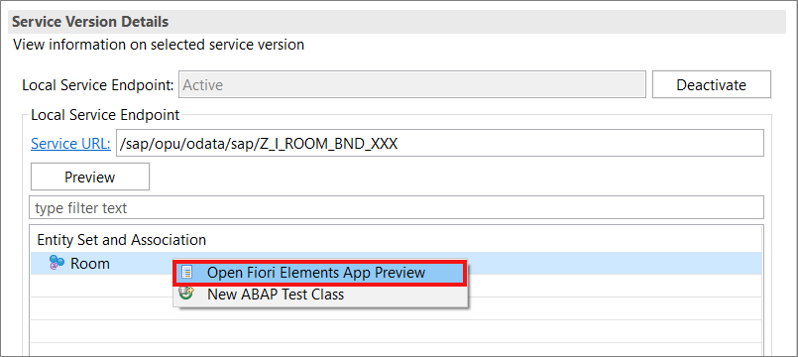
Open Preview for Fiori Elements App Logon with your developer user.

Open Preview for Fiori Elements App Check your result.
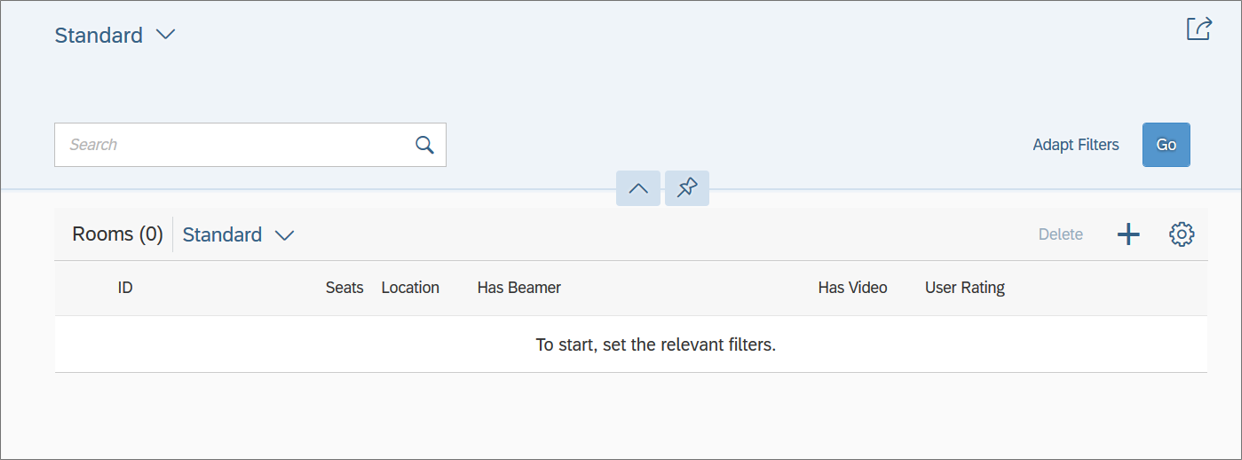
Open Preview for Fiori Elements App
Resources
Discussion
Share feedback on this tutorial or join the conversation in SAP Community.