
Overview
You will learn
- How to create a secure RFC connection between your SAP BTP, ABAP Environment and an on-premise SAP System, e.g. SAP S/4HANA
- How to test the connection using an ABAP handler class
- IMPORTANT: This tutorial cannot be completed on a trial account. If you want to explore some of the concepts of this mission on a trial account, using OData or SOAP rather than RFC, see the following workshop: SAP BTP, ABAP Environment: Connectivity and Integration This tutorial mission was written for SAP BTP ABAP Environment. However, you should also be able to use it in SAP S/4HANA Cloud Environment in the same way. Throughout this tutorial, replace
000with your initials or group number. The challenge: There are two challenges when setting up connectivity between the SAP BTP, ABAP Environment and an on-premise ABAP System: - The ABAP Environment is generally located in front of any firewall, but customer on-premise systems are generally behind it
- Remote Function Call (RFC) is not internet-enabled The solution: Set up a secure connection from the on-premise system to the SAP BTP, ABAP Environment. Technically: 1. SAP Cloud Connector opens a tunnel connection to the ABAP environment tenant using its public tenant URL 2. After the tunnel is established, it can be used for actual data connection using the RFC or HTTP(S) protocols.
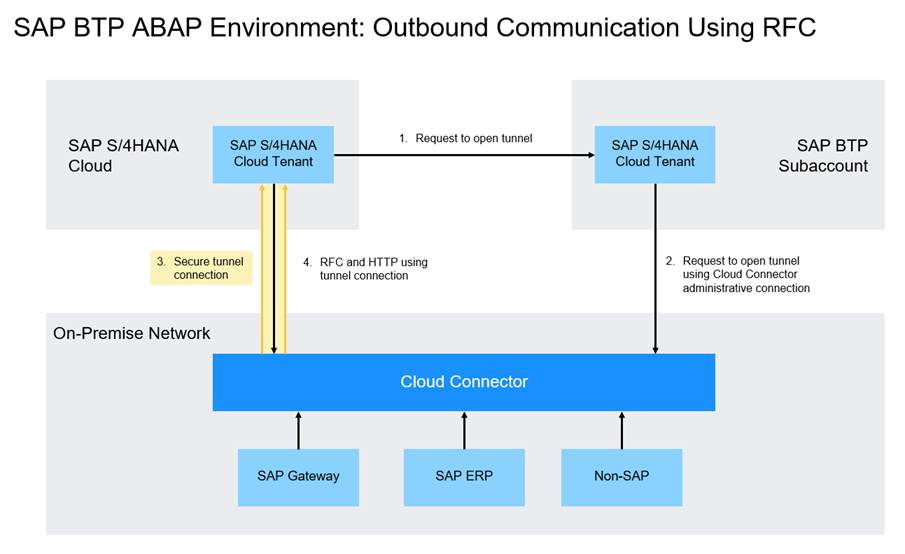
step0-overview-2402


Prerequisites
Prerequisites
- You have set up SAP Business Technology Platform (BTP), ABAP Environment, for example by using the relevant booster: Using a Booster to Automate the Setup of the ABAP Environment
- Tutorial: Set Up SAP BTP, ABAP Environment and create Your First Console Application, for a licensed user, steps 1-2
- You have a user in an ABAP on-premise system. Examples of such on-premise systems include:
- You have connected SAP Cloud Connector, to your BTP subaccount
- You have assigned the business catalog **``SAP_CORE_BC_COM in a business role assigned to your user, e.g.
SAP_BR_ADMINISTRATOR (Administrator); you will need it to create communication artifacts - You may need to define the relevant homepage structure that should be exposed to the launchpad. In Manage Launchpad Settings, set the relevant value for EXPOSURE_HOMEPAGE_STRUCTURE. See Manage Launchpad Settings
Steps
Step 1
Test yourself
Step 2
More Information
This tutorial is based on an excellent blog post by André Fischer:
For OData services in general:
- Mission: Take a Deep Dive into OData
For SAP Gateway in general, see:
- OData service development with SAP Gateway using CDS - pertains to on-premise Systems, but contains lots of useful background information on the relationships between CDS views and OData services
For connectivity in this context, see:
SAP Help Portal: SAP Cloud Connector
SAP Help Portal: RFC Communication via Communication Arrangements
For SAP Business Technology Platform (BTP):
SAP Help Portal: What is SAP Business Technology Platform (BTP)
SAP Help Portal: Getting Started With a Customer Account - If you use the booster, these steps are performed automatically for you, but you may be interested in the background information
Resources
Discussion
Share feedback on this tutorial or join the conversation in SAP Community.