
Overview
You will learn
- How to create an Data Dictionary structure


Prerequisites
Prerequisites
- You have a valid instance of an on-premise AS ABAP server, version 7.51 or higher (some ABAP Development Tools may not be available in earlier versions)
- Tutorial: Create an ABAP Project in ABAP Development Tools (ADT)
Steps
Now, you will create a global Data Dictionary (“DDIC”) structure: In the toolbar, select New, then choose Other ABAP Repository Object.

In the wizard that appears, filter the list of ABAP repository object types by entering **struct**.

Then enter the following and choose Finish.
- Name =
ZSO_INVOICE_ITEM - Description = for example, Invoice item structure

A new text editor is opened showing the content of the newly created Data Dictionary structure.
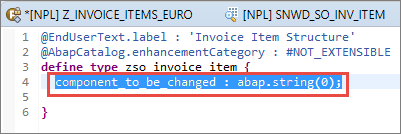
Remove the generated example component component_to_be_changed from the structure:
In the item structure, define the fields company_name, amount, currency_code, and payment_status, and assign them to the relevant data elements as follows:
  company_name   : snwd_company_name;
  amount         : snwd_ttl_gross_amount;
  currency_code  : snwd_curr_code;
  payment_status : snwd_soi_payment_status_code;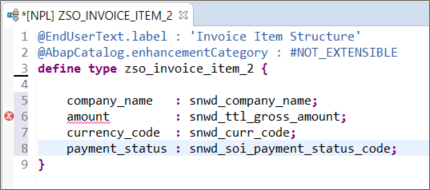
The editor shows a syntax error because the amount has not yet been bound to the currency code.
To bind the amount to the currency code:
Add a new line in front of the field
amount, add@and open code completion, by entering Ctrl+Space. A list of all possible annotations is shown.Select the annotation
@Semantics.amount.currencyCode.
Image depicting step12a-select-annotation Trigger the code completion again: enter
: 'after@Semantics.amount.currencyCode, then choose Ctrl+Space, then choose the annotationzso_invoice_item.currency_code:
Image depicting step12b-choose-annotation-currency-code Finally choose Save (Ctrl+S)
You should no longer get a syntax error.
Back in the structure ZSO_INVOICE_ITEM, choose Check ABAP Development Object (Ctrl+F2). Then choose Activate (Ctrl+F3).
The Data Dictionary structure ZSO_INVOICE_ITEM is now activated.
Your code should look like this:
@EndUserText.label : 'Invoice Item Structure'
@AbapCatalog.enhancementCategory : #NOT_EXTENSIBLE
define type zso_invoice_item {
  company_name   : snwd_company_name;
  @Semantics.amount.currencyCode : 'zso_invoice_item.currency_code'
  amount         : snwd_ttl_gross_amount;
  currency_code  : snwd_curr_code;
  payment_status : snwd_soi_payment_status_code;

}Resources
Discussion
Share feedback on this tutorial or join the conversation in SAP Community.