
SAP HANA XS Advanced, Creating an OData Service with Create Operation and XSJS Exit
Creating an the basic database artifacts, an OData Service with Create Operation and XSJS Exit to insert data into Entities
Overview
You will learn
- Now to expand your code to include an XSJS exit


Prerequisites
Prerequisites
- This tutorial is designed for SAP HANA on premise and SAP HANA, express edition. It is not designed for SAP HANA Cloud.
Steps
You will first create the entities that will be modified by the XSJS exit in your OData service. The exit will create a new User in the User table.
In your db\src\data folder, create a file called User.hdbtable.
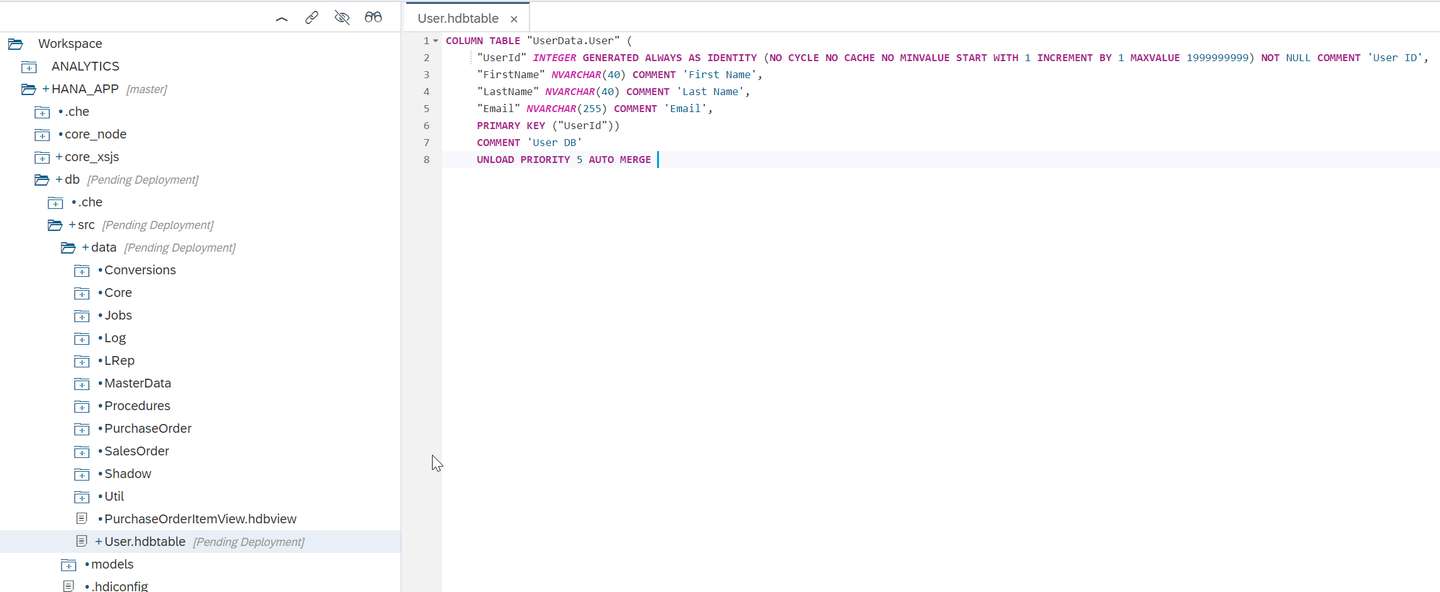
Delete any existing content and paste the following entities definition:
COLUMN TABLE "UserData.User" (
     "UserId" INTEGER GENERATED ALWAYS AS IDENTITY (NO CYCLE NO CACHE NO MINVALUE START WITH 1 INCREMENT BY 1 MAXVALUE 1999999999) NOT NULL COMMENT 'User ID',
	 "FirstName" NVARCHAR(40) COMMENT 'First Name',
	 "LastName" NVARCHAR(40) COMMENT 'Last Name',
	 "Email" NVARCHAR(255) COMMENT 'Email',
	 PRIMARY KEY ("UserId"))
	 COMMENT 'User DB'
	 UNLOAD PRIORITY 5 AUTO MERGE
Save and Build the src folder.
In the core_xsjs/lib/xsjs folder create the file usersCreateMethod.xsjslib. This is a server-side JavaScript library. This will be the exit code that performs the validation before the insert of the new record. Here is the code for this file.
/*eslint no-console: 0, no-unused-vars: 0, dot-notation: 0, no-use-before-define: 0, no-redeclare: 0*/
"use strict";

$.import("xsjs", "session");
var SESSIONINFO = $.xsjs.session;

function validateEmail(email) {
	var re =
		/^(([^<>()[\]\\.,;:\s@\"]+(\.[^<>()[\]\\.,;:\s@\"]+)*)|(\".+\"))@((\[[0-9]{1,3}\.[0-9]{1,3}\.[0-9]{1,3}\.[0-9]{1,3}\])|(([a-zA-Z\-0-9]+\.)+[a-zA-Z]{2,}))$/;
	return re.test(email);
}

/**
@param {connection} Connection - The SQL connection used in the OData request
@param {beforeTableName} String - The name of a temporary table with the single entry before the operation (UPDATE and DELETE events only)
@param {afterTableName} String -The name of a temporary table with the single entry after the operation (CREATE and UPDATE events only)
*/
function usersCreate(param) {

	try {
		var after = param.afterTableName;

		//Get Input New Record Values
		var pStmt = param.connection.prepareStatement("select * from \"" + after + "\"");
		var rs = null;
		var User = SESSIONINFO.recordSetToJSON(pStmt.executeQuery(), "Details");
		pStmt.close();
		console.log(JSON.stringify(User));
		console.log(User.Details[0].FirstName);
		//Validate Email
		if (!validateEmail(User.Details[0].Email)) {
			throw "Invalid email for " + User.Details[0].FirstName +
				" No Way! E-Mail must be valid and " + User.Details[0].Email + " has problems";
		}

		pStmt = param.connection.prepareStatement("insert into \"UserData.User\" (\"FirstName\", \"LastName\", \"Email\") values(?,?,?)");

		pStmt.setString(1, User.Details[0].FirstName.toString());
		pStmt.setString(2, User.Details[0].LastName.toString());
		pStmt.setString(3, User.Details[0].Email.toString());

		pStmt.executeUpdate();
		pStmt.close();
		//		}
	} catch (e) {
		console.error(e);
		throw e;
	}
}Create another OData service named user.xsodata in core_xsjs/lib/xsodata for User.Details. You will link the Create operation to the usersCreate function on the server-side JavaScript library you have just created.
service {
    "UserData.User" as "Users"
     create using
	"xsjs:usersCreateMethod.xsjslib::usersCreate";
}
And it should look like this: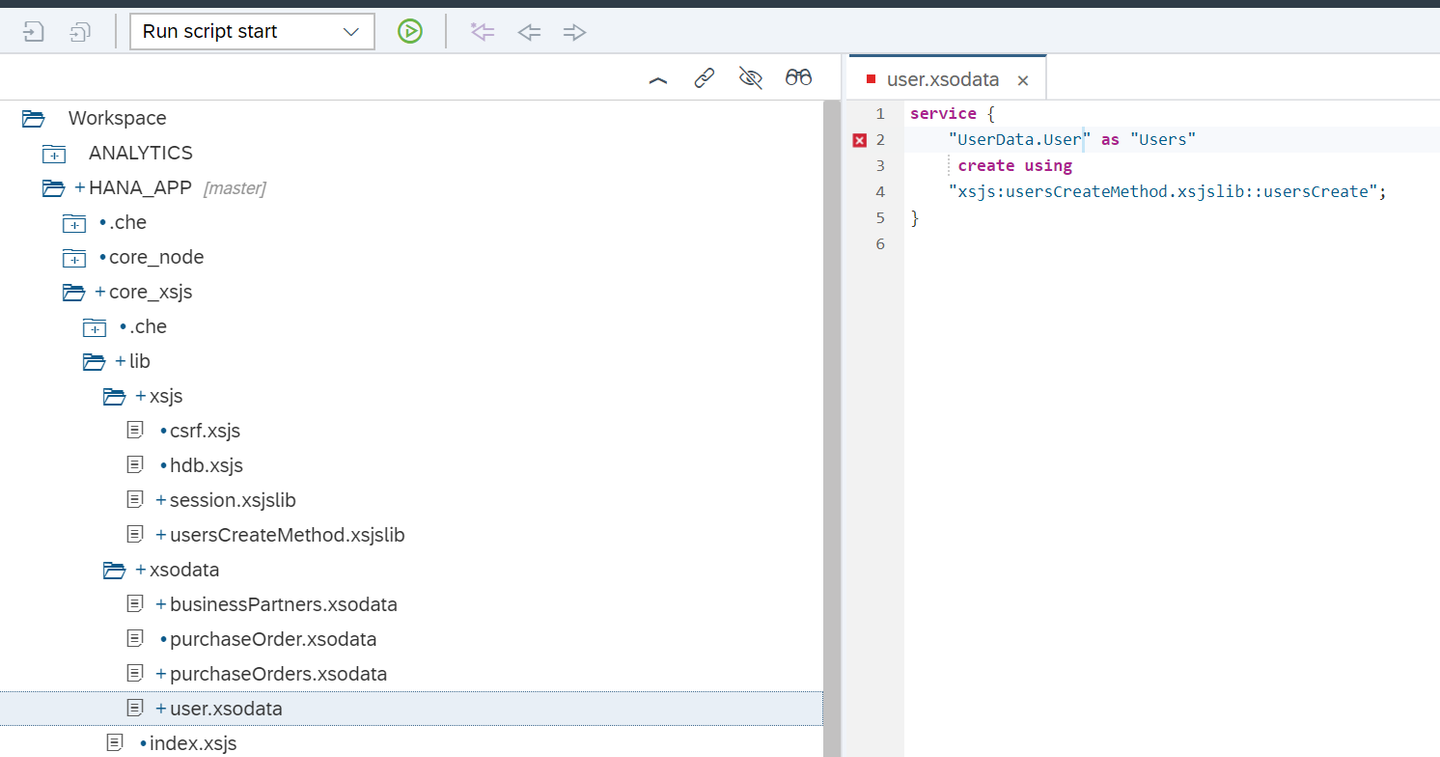
Create another file in the core_xsjs/lib/xsjs folder named session.xsjslib. This is just a reusable library that will help use convert XSJS record sets to JSON. Here is the code for this file.
/*eslint no-console: 0, no-unused-vars: 0, dot-notation: 0, no-use-before-define: 0, no-redeclare: 0*/
"use strict";

/**
@function Outputs the Session user and Language as JSON in the Response body
*/
function fillSessionInfo() {
	var body = "";
	body = JSON.stringify({
		"session": [{
			"UserName": $.session.getUsername(),
			"Language": $.session.language
		}]
	});
	$.response.contentType = "application/json";
	$.response.setBody(body);
	$.response.status = $.net.http.OK;
}

/**
@function Escape Special Characters in JSON strings
@param {string} input - Input String
@returns {string} the same string as the input but now escaped
*/
function escapeSpecialChars(input) {
	if (typeof (input) !== "undefined" && input !== null) {
		return input
			.replace(/[\\]/g, "\\\\")
			.replace(/[\"]/g, "\\\"")
			.replace(/[\/]/g, "\\/")
			.replace(/[\b]/g, "\\b")
			.replace(/[\f]/g, "\\f")
			.replace(/[\n]/g, "\\n")
			.replace(/[\r]/g, "\\r")
			.replace(/[\t]/g, "\\t");
	} else {

		return "";
	}
}

/**
@function Escape Special Characters in Text strings (CSV and Tab Delimited)
@param {string} input - Input String
@returns {string} the same string as the input but now escaped
*/
function escapeSpecialCharsText(input) {
	if (typeof (input) !== "undefined" && input !== null) {
		input.replace(/[\"]/g, "\"\"");
		if (input.indexOf(",") >= 0 ||
			input.indexOf("\t") >= 0 ||
			input.indexOf(";") >= 0 ||
			input.indexOf("\n") >= 0 ||
			input.indexOf("\"") >= 0) {
			input = "\"" + input + "\"";
		}

		return input;
	} else {

		return "";
	}
}

/**
@function Converts any XSJS RecordSet object to a Text String output
@param {object} rs - XSJS Record Set object
@param {optional Boolean} bHeaders - defines if you want column headers output as well; defaults to true
@param {optional String} delimiter - supplies the delimiter used between columns; defaults to tab (\\t)
@returns {String} The text string with the contents of the record set
*/
function recordSetToText(rs, bHeaders, delimiter) {
	bHeaders = typeof bHeaders !== "undefined" ? bHeaders : true;
	delimiter = typeof delimiter !== "undefined" ? delimiter : "\t"; //Default to Tab Delimited

	var outputString = "";
	var value = "";
	var meta = rs.getMetaData();
	var colCount = meta.getColumnCount();

	//Process Headers
	if (bHeaders) {
		for (var i = 1; i <= colCount; i++) {
			outputString += escapeSpecialCharsText(meta.getColumnLabel(i)) + delimiter;
		}
		outputString += "\n"; //Add New Line
	}
	while (rs.next()) {
		for (var i = 1; i <= colCount; i++) {
			switch (meta.getColumnType(i)) {
			case $.db.types.VARCHAR:
			case $.db.types.CHAR:
				value += rs.getString(i);
				break;
			case $.db.types.NVARCHAR:
			case $.db.types.NCHAR:
			case $.db.types.SHORTTEXT:
				value += rs.getNString(i);
				break;
			case $.db.types.TINYINT:
			case $.db.types.SMALLINT:
			case $.db.types.INT:
			case $.db.types.BIGINT:
				value += rs.getInteger(i);
				break;
			case $.db.types.DOUBLE:
				value += rs.getDouble(i);
				break;
			case $.db.types.DECIMAL:
				value += rs.getDecimal(i);
				break;
			case $.db.types.REAL:
				value += rs.getReal(i);
				break;
			case $.db.types.NCLOB:
			case $.db.types.TEXT:
				value += rs.getNClob(i);
				break;
			case $.db.types.CLOB:
				value += rs.getClob(i);
				break;
			case $.db.types.BLOB:
				value += $.util.convert.encodeBase64(rs.getBlob(i));
				break;
			case $.db.types.DATE:
				value += rs.getDate(i);
				break;
			case $.db.types.TIME:
				value += rs.getTime(i);
				break;
			case $.db.types.TIMESTAMP:
				value += rs.getTimestamp(i);
				break;
			case $.db.types.SECONDDATE:
				value += rs.getSeconddate(i);
				break;
			default:
				value += rs.getString(i);
			}
			outputString += escapeSpecialCharsText(value) + delimiter;
			value = "";
		}
		outputString += "\n"; //Add New Line
	}

	return outputString;
}

/**
@function Converts any XSJS RecordSet object to a JSON Object
@param {object} rs - XSJS Record Set object
@param {optional String} rsName - name of the record set object in the JSON
@returns {object} JSON representation of the record set data
*/
function recordSetToJSON(rs, rsName) {
	rsName = typeof rsName !== "undefined" ? rsName : "entries";

	var meta = rs.getMetaData();
	var colCount = meta.getColumnCount();
	var values = [];
	var table = [];
	var value = "";
	while (rs.next()) {
		for (var i = 1; i <= colCount; i++) {
			value = "\"" + meta.getColumnLabel(i) + "\" : ";
			switch (meta.getColumnType(i)) {
			case $.db.types.VARCHAR:
			case $.db.types.CHAR:
				value += "\"" + escapeSpecialChars(rs.getString(i)) + "\"";
				break;
			case $.db.types.NVARCHAR:
			case $.db.types.NCHAR:
			case $.db.types.SHORTTEXT:
				value += "\"" + escapeSpecialChars(rs.getNString(i)) + "\"";
				break;
			case $.db.types.TINYINT:
			case $.db.types.SMALLINT:
			case $.db.types.INT:
			case $.db.types.BIGINT:
				value += rs.getInteger(i);
				break;
			case $.db.types.DOUBLE:
				value += rs.getDouble(i);
				break;
			case $.db.types.DECIMAL:
				value += rs.getDecimal(i);
				break;
			case $.db.types.REAL:
				value += rs.getReal(i);
				break;
			case $.db.types.NCLOB:
			case $.db.types.TEXT:
				value += "\"" + escapeSpecialChars(rs.getNClob(i)) + "\"";
				break;
			case $.db.types.CLOB:
				value += "\"" + escapeSpecialChars(rs.getClob(i)) + "\"";
				break;
			case $.db.types.BLOB:
				value += "\"" + $.util.convert.encodeBase64(rs.getBlob(i)) + "\"";
				break;
			case $.db.types.DATE:
				//	var dateTemp = new Date();
				//	dateTemp.setDate(rs.getDate(i));
				var dateString = rs.getDate(i).toJSON();
				value += "\"" + dateString + "\"";
				break;
			case $.db.types.TIME:
				//	var dateTemp = new Date();
				//	dateTemp.setDate(rs.getTime(i));
				var dateString = rs.getTime(i).toJSON();
				value += "\"" + dateString + "\"";
				break;
			case $.db.types.TIMESTAMP:
				//	var dateTemp = new Date();
				//	dateTemp.setDate(rs.getTimestamp(i));
				var dateString = rs.getTimestamp(i).toJSON();
				value += "\"" + dateString + "\"";
				break;
			case $.db.types.SECONDDATE:
				//	var dateTemp = new Date();
				//	dateTemp.setDate(rs.getSeconddate(i));
				var dateString = rs.getSeconddate(i).toJSON();
				value += "\"" + dateString + "\"";
				break;
			default:
				value += "\"" + escapeSpecialChars(rs.getString(i)) + "\"";
			}
			values.push(value);
		}
		table.push("{" + values + "}");
	}
	return JSON.parse("{\"" + rsName + "\" : [" + table + "]}");
}Save and run the Node.js and then run the web module. Change the URL to /xsodata/user.xsodata to see if the service is available.
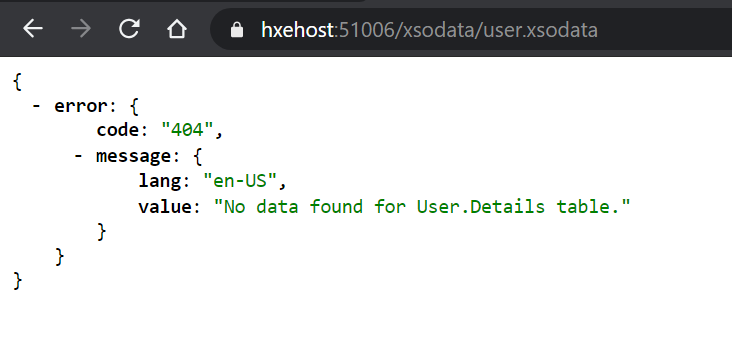
Unfortunately its much more complicated to test Create/Update/Delete methods from the browser as they utilize other HTTP verbs. Browse into the next steps in the XS Advanced tutorials Consume an OData Service with Create Option for SAPUI5 interfaces to employ these services.
Resources
Discussion
Share feedback on this tutorial or join the conversation in SAP Community.