
Overview
You will learn
- What local configuration is
- How to set up local configuration in SOAMANAGER


Prerequisites
Prerequisites
- Basic knowledge about web services and SOAMANAGER
- User in two development systems with permission to run transaction SOAMANAGER
- Two development systems in which no local configuration exists yet
- Service definition and a service group containing a service consumer, e.g.
srt_test_groupandsrt_test_provider(available in every ABAP system) - You can use your own service group and service definition.
- Important: The service consumer must not already be used by another local configuration.
Steps
Intro
In this tutorial, wherever XXX appears, use a number (e.g. 000).
In this case, system A acts as consumer and system B as provider.
Local configuration is a technique to automatically create the runtime configuration of multiple proxy entities by defining a so-called integration scenario once in both systems.
In general, endpoints and logical ports often rely on the same settings, such as security settings. Creating single configurations manually for these entities is therefore repetitive and time-consuming. The local configuration acts as a mass configuration tool. A profile describes the common configuration settings of the endpoints.
A set of consumer proxies is collected within a service group. The service definitions in the underlying profile create a relationship between the service group. In result, they can automatically configure the corresponding endpoints for each service definition and the corresponding logical ports for each consumer proxy.
Another advantage is that the local configuration of a service group makes it possible to define so-called logical receiver determinations to route web service messages to different provider systems.
In older releases or documentation, local configuration is often called smart configuration or mass configuration.

Local configuration in SAP NetWeaver is based on the following entities:
- Profile
- Logon data assignment
- Provider system
- Business scenario
In this tutorial, you are going to create these entities step by step.
In a profile, a certain set of parameters is included which is then used for configuration of end points for service definitions and logical ports for consumer proxies.
- Run transaction SOAMANAGER in system A.
- On tab Technical Administration, choose Profiles.
- Choose Create Profile.
- Name:
MYPROFILE_XXX - Profile Description:
MYPROFILE - Uncheck Old Profile Mode if necessary.
- Name:
- Choose Next.
- In the step Security under Authentication Method > Transport Channel Authentication, choose User ID/Password.
- Choose Next.
- Choose Finish.
- Activate the profile by choosing Yes in the pop-up window.
A user account stores credentials. These are then used to store them in the corresponding logical port. When the endpoint is called via the logical port of the consumer proxy, these stored credentials are used.
- On tab Service Administration, choose Logon Data Management.
- Choose Create.
- Logon Data Name:
MYUSER_XXX - Description:
Logon User
- Logon Data Name:
- Choose Next.
- In the step Credentials, choose User/Password or X.509 from the list.
- Enter the credentials of system B.
- Choose Finish.
- Activate the logon data by choosing Yes in the pop-up window.
A provider system describes the parameters and access to a system that contains the service definitions. In a provider system, a profile/version is referenced. The profile is then used during configuration to create parameters for the logical port.
On tab Technical Administration, choose Provider Systems.
Choose Create.
- Name:
PROVIDER_SYSTEM_A_XXX - Profile Description:
Provider System for System A - Profile Name:
MYPROFILE_XXX.
- Name:
Choose Next.
Uncheck Use Services Registry as this requires a services registry connection. In this tutorial, the connection is configured only WSIL based.
Enter access URL for WSIL.
Run transaction SOAMANAGER in system B.
Copy the SOAMANAGER URL of system B.
We recommend to open a text editor of your choice. Paste the URL you’ve copied.
Copy the highlighted part to /sap/bc/:

System URL Go back to the SOAMANAGER of system A. Add the part from /sap/bc of the placeholder URL to the part you have copied in step 4. Add the corresponding client of system B.

Access URL for WSIL In this example, this results in:

WSIL URL
Enter the credentials of a user in system B with permission to display the WSIL.
Check Use WSIL user.
Your settings should look like this:
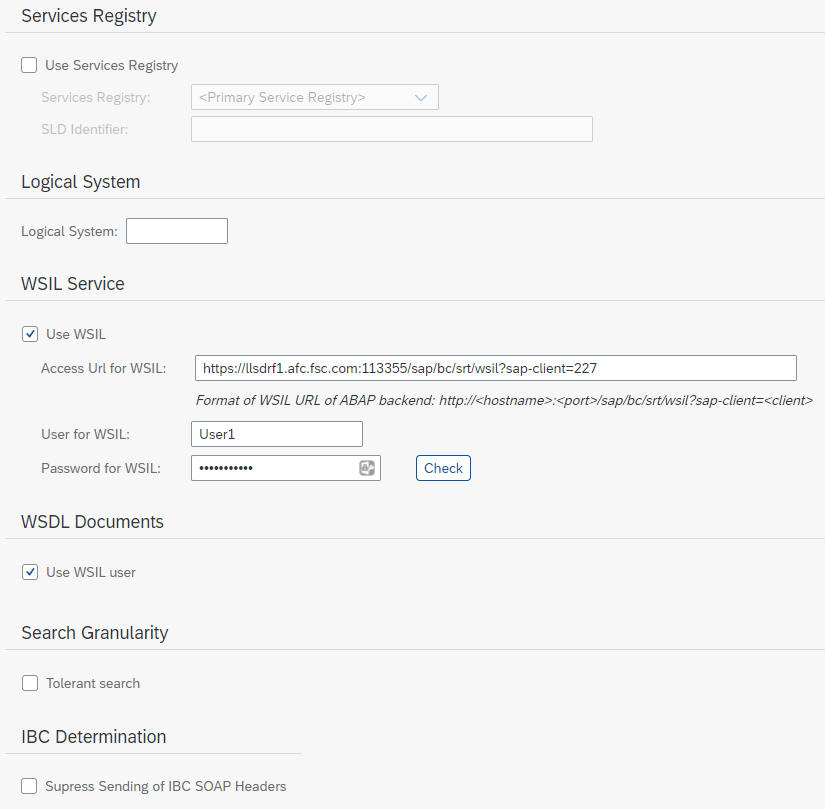
Services Registry settingsL Choose Next.
Choose Retrieve Business Applications and Finish.
Activate the system by choosing Yes in the pop-up window.
In system B, Repeat step 3 with the same settings as in system A, and 5 with the provider system settings below. Do not repeat step 4.
In order to ensure that the consumer proxy configuration (logical port) can work with a service definition configuration (end-point), create the profile with exactly the same settings and name as in the provider.
Use the following provider system settings:
- Name:
PROVIDER_SYSTEM_B_XXX - Description:
Provider System for System B - Profile Name:
MYPROFILE_XXX. - Access URL for WSIL: Use the same WSIL URL as in step 5 (see step 5 Enter access URL for WSIL).
In system B, the service definitions are assigned to profiles which result in end points for the service definitions after configuration. The profile information is used during configuration to enrich the end points with the required parameter settings.
On tab Service Administration, choose Local Integration Scenario Configuration.
Choose Create.
- Name:
MYSCENARIO_B_XXX - Description:
Scenario B
- Name:
Choose Next.
In step Service Definitions, choose Add and search for your service definition. In this case, the service definition is
SRT_TEST_PROVIDER.Choose Assign Profiles, choose your profile from the list, and click Assign Profiles.
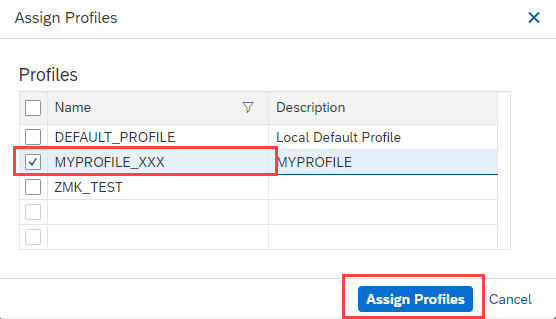
Assign profile in consumer Skip step Service Groups.
Go to step Logon Data Assignment and choose Finish.
Activate the integration scenario by choosing Yes in the pop-up window.
In a business scenario, the setup is prepared for the logical ports and endpoints.
On consumer side, it is specified which consumer proxies need to be configured for which provider systems (or business applications). With this information, the logical ports for the consumer proxies are created. As in the system connection, the profile is also assigned. This information is also used to create the logical ports.
In system A on tab Service Administration, choose Local Integration Scenario Configuration.
Choose Create.
- Name:
MYSCENARIO_A_XXX - Description:
Consumer Scenario
- Name:
Skip step Service Definitions.
Go to step Service Groups.
Choose Add.
Search for your service group, choose it, and click OK. In this case, the service group is
srt_test_group.Choose Assign IBC Reference.
Choose your provider system from the list. Ignore this Is Configured checkbox and choose Assign to Service Group.
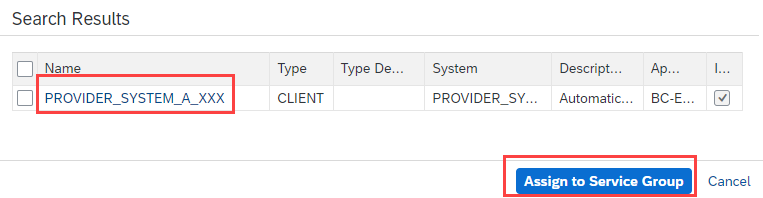
Service Group Assignment Choose Next.
In the step Logon Data Assignment, choose your logon data from the list.
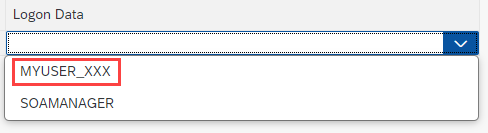
Logon Data Choose Finish.
Activate the integration scenario by choosing Yes in the pop-up window.
To apply your profiles and business scenarios, you have to process the pending tasks in both systems. Start with the system that contains the service definition. In this case, start with system B and then proceed with system A.
On tab Service Administration, choose Pending Tasks.
Choose Process List.
- If Process List is greyed out, choose Rebuild List and afterward Process List.
In the SOAMANAGER of system A, go to tab Service Administration and choose Web Service Configuration.
Search for your consumer proxy. It is named like the service definition with the prefix
CO_. You can also search for your service definition and choose the consumer proxy from the search results. In this case, it isCO_SRT_TEST_PROVIDER.
Consumer proxy Click on the consumer proxy.
Copy the name of the logical port. In the column Creation Type, you can see that the logical port is created based on your profile.

Logical port of consumer proxy Logon to system A in SAP GUI.
Run transaction
SPROXY_START.Enter the name of your consumer proxy. In this case, it is
CO_SRT_TEST_PROVIDER.Choose Test (F8).
Paste the logical port name you have copied in step 4.
Choose Execute (F8). The request opens.
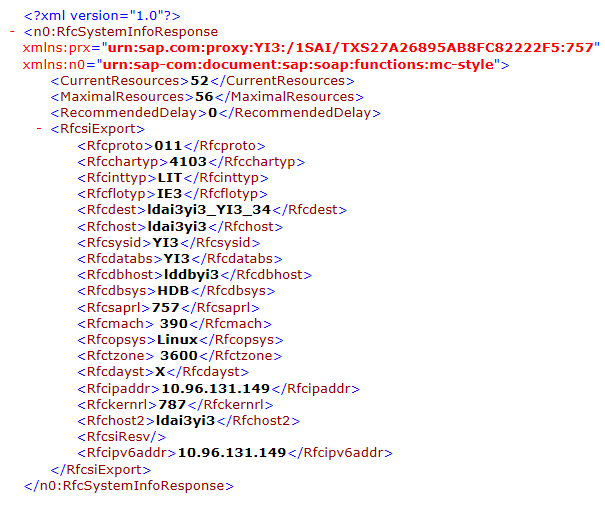
Choose Execute (F8). The response opens. In this case, the result should look like this:
Logical port of consumer proxy
Resources
Discussion
Share feedback on this tutorial or join the conversation in SAP Community.