
Overview
You will learn
- How to discover APIs in SAP Business Accelerator Hub
- How to test APIs in SAP Business Accelerator Hub
- How to test an API trigger of a business process
- How to start the business process from other services


Prerequisites
Prerequisites
Steps
Once you have successfully deployed the business process with an API trigger, you can view the API trigger in the Overview section under the tab Triggers.

To view the context of the workflow API, navigate to the Lobby by clicking on the SAP logo.

Lobby Choose Control Tower > Environments.

Environments Choose the environment in which the project is deployed.

Environment You can view the trigger in the Triggers tab.
If there are a lot of projects and triggers, you can view only yours by selecting your project in the project filter.
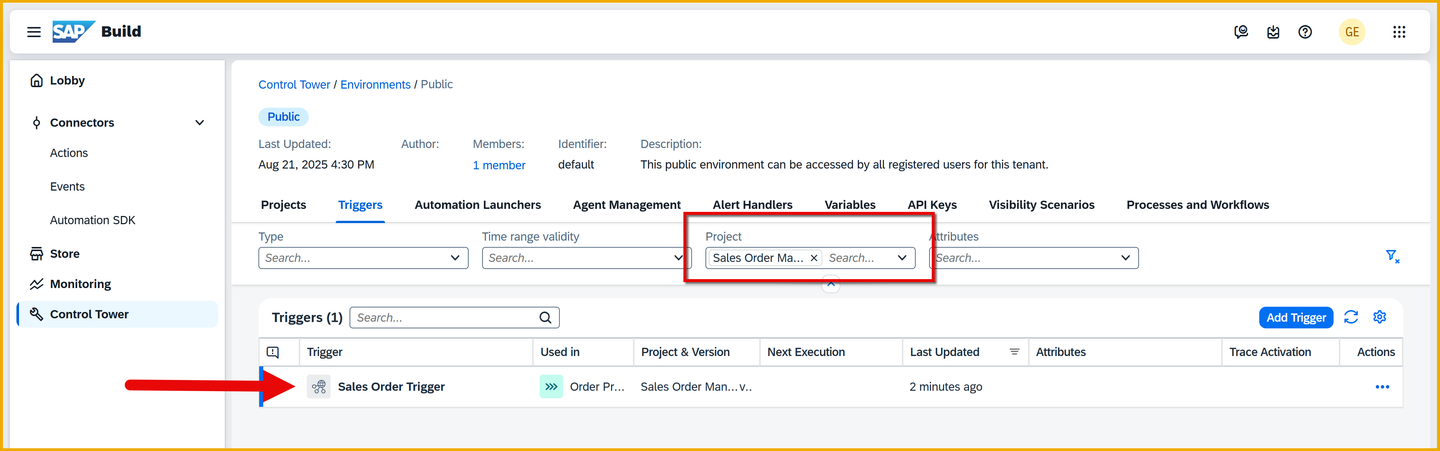
Trigger Click View for your trigger.

View You will see the details of the API: the URL, the required payload and more.

Trigger details We will trigger the process with the tools in SAP Build Process Automation and not call the API directly.
Again, generally you will trigger the process via an API. For more information the API, you can explore the SAP Business Accelerator Hub and the SAP Build Process Automation APIs, specifically, the Workflow package.

And even more specific, the workflow-instances API call.

BUT … we will NOT call the API but trigger the process through the tools of SAP Build Process Automation.
Go to the Control Tower, open the Environments tile, and then open the Public environment.

Open Public Select the Process and Workflows tab, then filter the list by your project, and find your process.

Find process With your process selected, click Start New Instance.
In the dialog, delete everything and replace with the following:
JavaScript{ "salesorderdetails": { "orderNumber": "156789", "orderAmount": 40000, "customerName": "ABC Widgets", "orderDate": "2025-11-23", "shippingCountry": "Germany", "expectedDeliveryDate": "2025-12-25" } }Click Start New Instance and Close.

Start instance If all goes well, you should get a confirmation.

Confirmation
Let’s see what we you have wrought.
In the home page of SAP Build, click Monitoring, and then select the Process and Workflow Instances tile.

Open monitoring Find the process you triggered by filtering by your project.

Find project Click on the process you started, and you will see:
General information, like when the process instance was started, by whom, the process definition ID it is based on, status, and more.
Logs, which show what steps were started and completed, and additional information about each one. For example, for an approval task, you can see who has been assigned the task.
Context, all the information that has passed through the instance, such as the input parameters passed in, any data retrieved via actions inside the process, the custom variables, and more.

Instance information
Resources
Discussion
Share feedback on this tutorial or join the conversation in SAP Community.