
Overview
You will learn
- Creating a new streaming project: a project contains one or more input streams/windows and then directs the flow of data through continuous queries and/or custom operators, publishing output events via adapters.
- Defining an input stream to receive incoming events: All incoming events enter a project via an input stream or input window. The schema of the input stream (or window) defines the fields that events on that stream will (or may) contain.


Prerequisites
Prerequisites
Steps
Click the File menu. You can also press Alt+f. Then click the New > Project…. You can also press r.
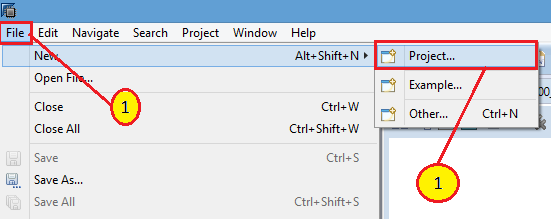
Create a new Project Click New Streaming Project, then click Next.

Select Streaming Project Enter
freezer_monitoringin the Name box (be sure and only use lower case) and accept the default Directory location.
Provide name and location Click Finish. You can also press Alt+f.

Click Finish
Go to SAP HANA Administration Console perspective, then Systems view. Right click the system you are working with.

open file Select Open SQL Console menu item to open a console that will automatically connect to your system.

open file Select the newly created SQL console tab. The tab window will have the title in the format of
<Your System Name> - SQL Console <Window Number>
open file Copy the code below into the SQL window.
SQL--These are the SQL commands to set up the back-end tables for the Freezer Monitoring hands-on exercise. CREATE COLUMN TABLE "SYSTEM"."ACTIVITY_HIST" ( "MACHINEID" VARCHAR(15), "EVENT_TIME" TIMESTAMP, "EVENT_NAME" VARCHAR(20), "EVENT_DESCRIPTION" VARCHAR(30), "EVENT_VALUE" VARCHAR(30) ); CREATE COLUMN TABLE "SYSTEM"."DASHBOARD" ( "MACHINEID" VARCHAR(15) NOT NULL , "POWER_STATUS" VARCHAR(30), "CURR_TEMP" DECIMAL(4,2), PRIMARY KEY ("MACHINEID") ); CREATE COLUMN TABLE "SYSTEM"."MACHINE_REF" ( "MACHINEID" VARCHAR(15) NOT NULL , "MACHINETYPE" VARCHAR(15), "MAX_TEMP" DECIMAL(4,2), "MIN_TEMP" DECIMAL(4,2), "LOCATION" VARCHAR(25), "TEMP_UNIT" VARCHAR(2), PRIMARY KEY ("MACHINEID") ); CREATE COLUMN TABLE "SYSTEM"."POWER_OUTAGES" ( "MACHINEID" VARCHAR(15), "POWER_OFF_TIME" LONGDATE, "POWER_ON_TIME" LONGDATE, "DURATION_MIN" DOUBLE CS_DOUBLE ); INSERT INTO "SYSTEM"."MACHINE_REF"("MACHINEID", "MACHINETYPE", "MAX_TEMP", "MIN_TEMP", "LOCATION", "TEMP_UNIT") VALUES ( '2DDDBW3TP','VEND',50,35,'WALG31','F'); INSERT INTO "SYSTEM"."MACHINE_REF"("MACHINEID", "MACHINETYPE", "MAX_TEMP", "MIN_TEMP", "LOCATION", "TEMP_UNIT") VALUES ( 'EKM49RTXK','COOL',50,35,'FRI7','F'); INSERT INTO "SYSTEM"."MACHINE_REF"("MACHINEID", "MACHINETYPE", "MAX_TEMP", "MIN_TEMP", "LOCATION", "TEMP_UNIT") VALUES ( 'RB82KMY3S','VEND',50,35,'JRB235','F'); INSERT INTO "SYSTEM"."MACHINE_REF"("MACHINEID", "MACHINETYPE", "MAX_TEMP", "MIN_TEMP", "LOCATION", "TEMP_UNIT") VALUES ( '4CBH7792RN','COOL',50,35,'WALG33','F'); INSERT INTO "SYSTEM"."MACHINE_REF"("MACHINEID", "MACHINETYPE", "MAX_TEMP", "MIN_TEMP", "LOCATION", "TEMP_UNIT") VALUES ( 'JMD51RTKK','VEND',10,2,'BP762','C'); INSERT INTO "SYSTEM"."MACHINE_REF"("MACHINEID", "MACHINETYPE", "MAX_TEMP", "MIN_TEMP", "LOCATION", "TEMP_UNIT") VALUES ( 'GGR23RTXK','FREEZE',32,0,'HIN88','F'); INSERT INTO "SYSTEM"."MACHINE_REF"("MACHINEID", "MACHINETYPE", "MAX_TEMP", "MIN_TEMP", "LOCATION", "TEMP_UNIT") VALUES ( '8HRT4WX2','VEND',50,35,'ORD311','F');Execute the SQL script by pressing the Execute button.

execute query Confirm that they executed correctly. You should have these tables.

check tables Check to see that all tables created are empty except for
MACHINE_REFwhich will have 7 rows of data.
check content
When you created the project, it created an input stream called “NEWSTREAM” by default.

add a stream Click the icon to the left of the name NEWSTREAM and change the name of this stream to MACHINEDATA, then press Enter key.
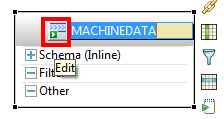
rename a stream Click on the + to the left of Schema to expand it.

show schema Now hover the cursor over the right edge of the MACHINEDATA shape so that the toolbar appears. Click on the Add Column tool.

add column Repeat step 5 three more times, so there are a total of 5 columns.
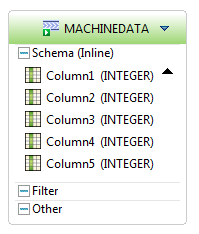
add 5 columns Double click on the name
Column1and change the name of this column to MACHINEID.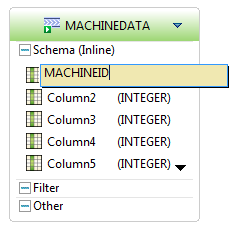
rename column Double click on (INTEGER) to the right of MACHINEID to change the datatype for this column to string. (after double clicking, click the drop down arrow, and select string)
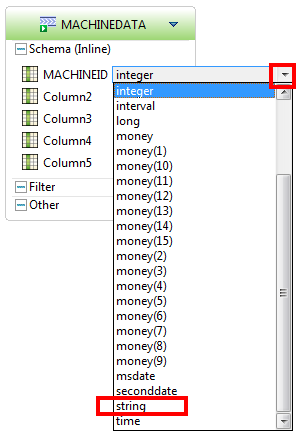
select column type Change the rest of the column names and data types as shown:

all columns Click here - to collapse the shape.

minimize Note: You can just drag the shape to a new position to organize our diagram.

drag stream
Resources
Discussion
Share feedback on this tutorial or join the conversation in SAP Community.