
Access Protected SAP Analytics Cloud Resources with OAuth Two-Legged Flow
Develop a sample client application that embeds an SAP Analytics Cloud story and configure the OAuth two-legged flow to provide access to the API.
Overview
You will learn
- How to configure secure access to SAP Analytics Cloud resources with a two-legged OAuth flow
- The roles involved in the two- and three-legged OAuth flows


Prerequisites
Prerequisites
- An administrator account on an SAP Analytics Cloud tenant
- An administrator account in the SAP Cloud Identity Authentication service tenant
- An administrator account on SAP Business Technology Platform
Steps
Intro
SAP Analytics Cloud (SAC) leverages the OAuth 2.0 framework to provide secure access to its resources exposed via REST APIs, for example, story APIs. SAC provides support for both two-legged and three-legged OAuth flows.
Both flows involve the following roles:
Resource Owner: User
The resource owner is the user who authorizes an application to access his or her account. The application’s access to the user account is limited to the “scope” of the authorization granted – for example, read or write access.
Client: Application
The client is the application that wants to access the user account. Before it can do so, the user must authorize the access, and the API must validate the authorization.
Resource / Authorization Server: API
The resource server hosts the protected user accounts. The authorization server verifies the identity of the user and, then, issues access tokens to the application.
In the three-legged flow, all three roles are actively involved. For example, the user must explicitly authorize the client application to access the resources that the user owns.
In the two-legged flow, on the other hand, the user is not actively involved. Instead, the SAML bearer assertion token obtained during the login to the client application is exchanged with the SAP Analytic Cloud OAuth token behind the scenes.
An important factor to consider when you choose between the three-legged and two-legged flows is the customer landscape. Typically, you find a central IDP in an enterprise landscape. The purpose of a central IDP within an enterprise is to manage Identity federation and provide an SSO experience to end users across different applications. With this landscape, you should implement the two-legged flow to ensure a seamless OEM experience.
The two-legged flow requires heavy configuration so before you start, review the following diagram and description for an overview of what you want to accomplish:
- Fetch the SAML bearer assertion token.
- The user tries to access the sample web application. The web application (or service provider) redirects the user to the IDP (Identity Provider).
- The service provider that embeds the SAP Analytics Cloud resources via REST API acts as an OAuth Client and sends the SAML bearer assertion token to fetch the OAuth token.
Start by creating a sample web application and deploying it in SAP Business Technology Platform.
Download the application from the following git repository:
https://github.com/SAP/analytics-cloud-api-embedsac-oauth-saml/
To create the war file, run the following command: ‘maven clean install’.
Deploy the war file in SAP Business Technology Platform.
Log into your SAP Business Technology Platform account and go to Applications > Java Applications. Click Deploy Application.

Deploy Application Select the war file from your local folder and the runtime Java Web.
Then, click Deploy.

War File Location
With the sample web application deployed, you can now configure authentication via an Identity Provider.
For the purposes of this example, you configure SAP Business Technology Platform to act as a Service Provider and the SAP Business Technology Platform Identity Authentication tenant as an Identity Provider.
For more information about this configuration, see Configuring SAML SSO for SAP Business Technology Platform Using Custom Identity Provider.
Log into the SAP Business Technology Platform cockpit, go to Security > Trust, and click Edit.
Select the configuration type Custom.
The Local Provider Name is populated automatically. If not, use a URI as the local provider name.
Click Generate Key Pair and click Save.

Generate Key Pair To establish trust between the Service Provider and Identity Provider, exchange their respective metadata files.
Click Get Metadata to download the Service Provider Metadata file and save it in a local folder.
Log into the SAP Business Technology Platform Identity Authentication Tenant, with your administrator account, and go to Application & Resources > Applications.
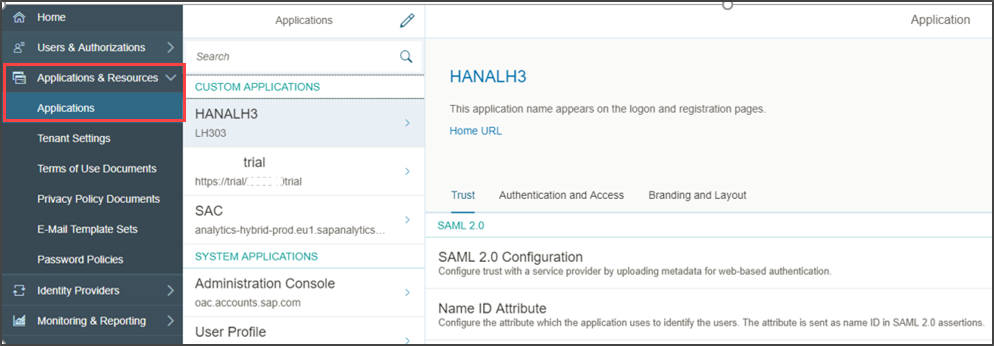
Navigation to Applications Click Add to add the Service Provider as an application.
To configure trust, select the application created and go to Trust > SAML 2.0 Configuration.

Add Next to the Metadata File field, click Browse, select the Service Provider Metadata file for upload, and click Save.

Browse Go to Name ID Attribute and select E-Mail. Click Save.
This saves your configuration.

Email To exchange the IDP metadata with the Service Provider, you need to download the metadata in XML format.
In your browser, enter the IDP URL and add the suffix:
/saml2/metadata
Add suffix Execute the link and save the metadata in
xmlformat in a local folder.
Save Metadata In the SAP Business Technology Platform Cockpit go to Security > Trust and click the Application Identity Provider tab.
Then, click Add Trusted Identity Provider.

Add Trusted Identity Provider Next to the Metadata File field, click Browse and select the IDP metadata
xml.
Trusted Identity Provider Change the signature algorithm from
SHA-1toSHA-256.Select the newly created Trusted Identity Provider as the default and click Save.
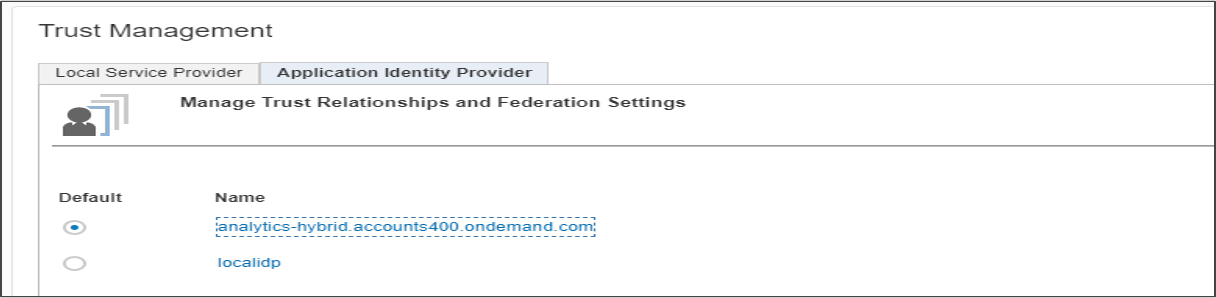
Default Trusted Identity Provider
At this point, you can verify if all the configurations were done properly by launching the sample web application.
If the browser redirects you to the IDP to offer the login page to the user, then you’ve done everything correctly.
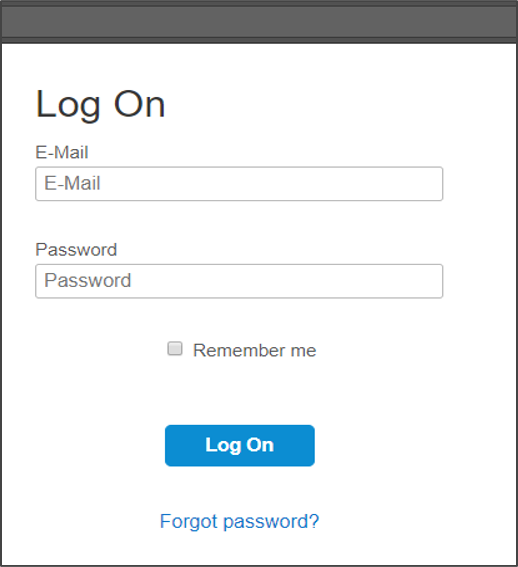
This concludes the first part (Fetch SAML Bearer Assertion Token) of setting up the OAuth two-legged flow.
The sample web application that you created needs to get the OAuth token to access the protected resources on SAP Analytics Cloud so the administrator should create an OAuth client on the SAP Analytics Cloud tenant.
For more information, see Managing OAuth Clients and Trusted Identity Providers.
Log into SAP Analytics Cloud and, from the menu, select System > Administration.
Select App Integration for managing OAuth.
To create a new OAuth Client, click Add a New OAuth Client.

Add a New OAuth Client Enter the OAuth name and client ID.
In Authorization Grant, select Client Credentials.
Enter the token lifetime and details and click Save.

OAuth Client details On the App Integration tab.
Take note of the Token URL end point. You’ll need it later on.

Token URL
You also need to maintain the Trusted Identity Provider for the SAML bearer assertion flow to maintain trust between SAP Business Technology Platform and SAP Analytics Cloud to pass SAML bearer assertion token.
Log into SAP Business Technology Platform and go to Security > Trust.
Copy the information from the Signing Certificate field for your local Service Provider.

Signing Certificate Log into SAP Analytics Cloud and, from the menu, select System > Administration.
Select App Integration for managing OAuth.
To create a new Trusted Identity Provider, click **Add a Trusted Identity Provider**.
Add Trusted Identity Provider Enter the name, provider name, and the signing certificate.
Enter the same provider name as the one specified in SAP Business Technology Platform and the signing certificate information that you copied previously.
Save the settings.
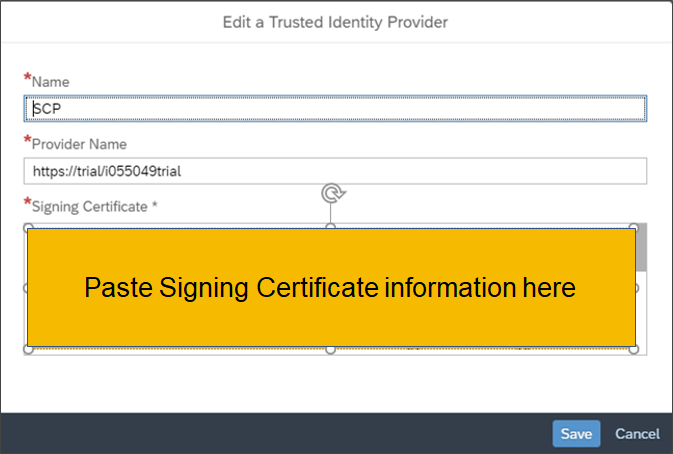
Add Trusted Identity Provider Provide a Trusted Origin.
Click Add a Trusted Origin and enter the domain of the web application as the Trusted Origin.
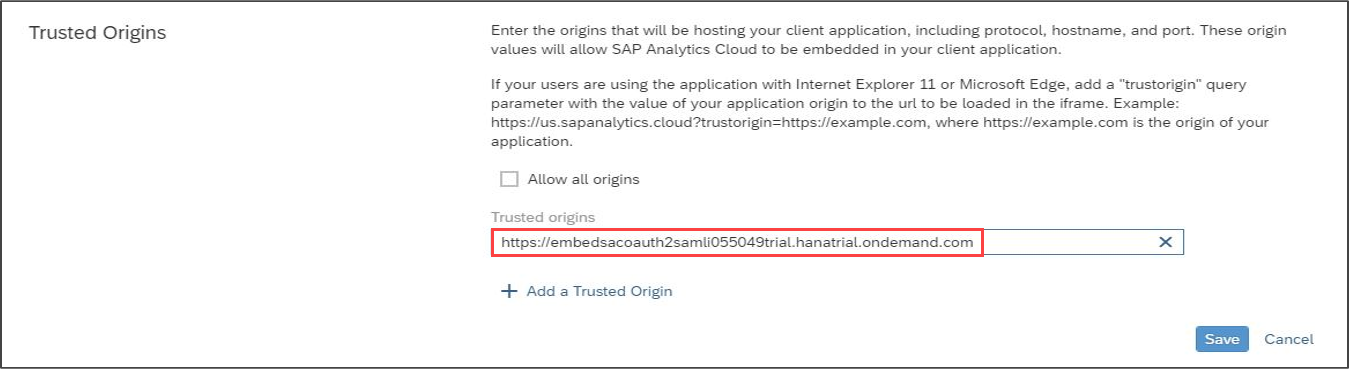
Trusted Origin Provide Custom IDP within SAP Analytics Cloud.
For instructions on doing this, see: Embedding SAP Analytics Cloud Story with URL API and SAML2 SSO based on WSO2 Identity Server.
Finally, because the sample web application will consume REST APIs, you need to create a new connectivity destination in SAP Business Technology Platform.
You can use the connectivity destination to connect the sample web application to an internet service which, in this case, happens to be provided by SAP Analytics Cloud.
In the SAP Business Technology Platform Cockpit, go to Connectivity > Destinations.
Click **New Destinations**.
New Destinations Enter the following details:
Authentication method:
OAuth2SAMLBearerAssertionURL: Your SAC tenant URL
Client key: The OAuth client ID created earlier
Token Service URL: Available on system via Administration > App Integration tab.
Token Service User: OAuth client ID
Token Service Password: OAuth Client Secret
Then, to set up some additional properties, click the New Property button. Namely, add the following:
authnContextClassRef:urn:oasis:names:tc:SAMLTrustAll : true

Destination Configuration
Click Save.
Before you test the entire flow, remember to set the browser to accept cookies from SAP Analytics Cloud by specifying the tenant URL in the Allow cookies section of the browser settings.
Launch the application.
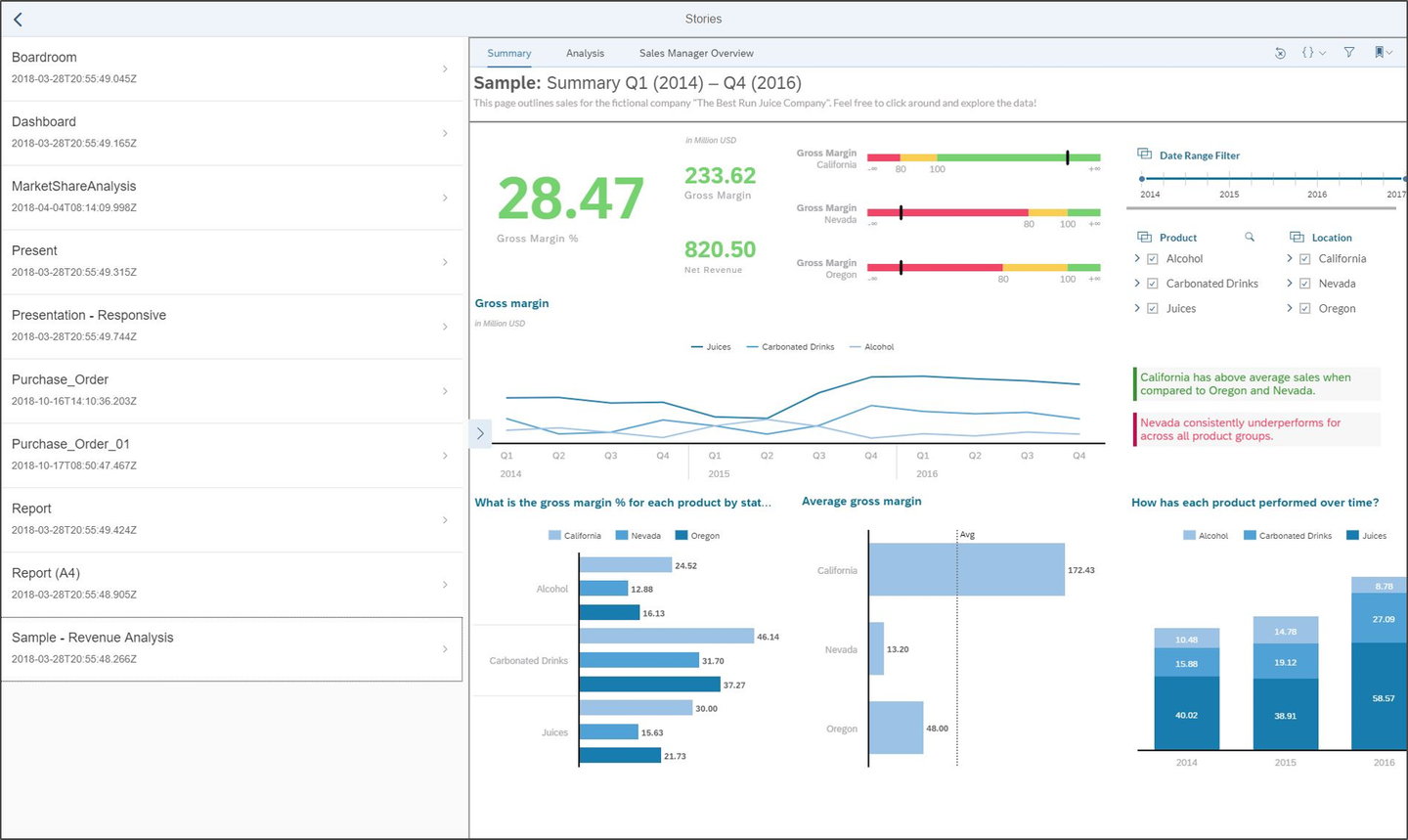
Once the application is rendered in the browser, click My Stories to display an SAP Analytics Cloud Story within the
Iframe.
My Stories The My Stories tile launches a Master Detail UI where the list of Stories that the user is authorized to view. Selecting a story from the list renders it.
Resources
Discussion
Share feedback on this tutorial or join the conversation in SAP Community.