
Overview
You will learn
- How to install a mock server in the SAP BTP, Cloud Foundry runtime.
- How to create a destination to the mock server in the same subaccount.


Prerequisites
Prerequisites
- You have an enterprise global account in SAP BTP. To use services for free, you can sign up for an SAP BTPEA (SAP BTP Enterprise Agreement) or a Pay-As-You-Go for SAP BTP global account and use the free tier services only. See Using Free Service Plans.
- You have a platform user. See User and Member Management.
- You’re an administrator of the global account in SAP BTP.
- You have a subaccount in SAP BTP to deploy the services and applications.
- You have one of the following browsers that are supported for working in SAP Business Application Studio:
- Mozilla Firefox
- Google Chrome
- Microsoft Edge
OUT OF MAINTENANCE
This tutorial is no longer maintained. For an up-to-date version and support with any issues, refer to the Develop a Side-by-Side CAP-Based Extension Application Following the SAP BTP Developer’s Guide mission in the SAP Discovery Center.
Steps
If you don’t have access to an SAP back end system (SAP ECC, SAP S/4HANA Cloud or an SAP on-premise system) but still need OData services with some data, you can use this mock server application. It contains entities of SAP OData services with sample data.
You need to:
Install the mock server using SAP Business Application Studio.
Create a destination to the mock server in the same subaccount in SAP BTP.
The installation of the mock server is only needed if you want to test an application deployed in the SAP BTP, Cloud Foundry runtime. For local development testing, you can use the local mock server.
In SAP Business Application Studio, go to your IncidentManagement dev space.
Make sure the IncidentManagement dev space is in status RUNNING.
Choose the burger menu and choose Terminal → New Terminal.

Terminal Navigate to the projects folder:
From the root directory run
cd projectsin the terminal.From the incident-management folder run
cd ..in the terminal.
Clone the mock server GitHub repository:
Shellgit clone -b mock https://github.com/SAP-samples/cloud-extension-ecc-business-process.gitIn the menu, choose File → Open Folder….
Type
/home/user/projects/in the field and selectcloud-extension-ecc-business-process. Choose OK to open the project in SAP Business Application Studio.
Choose mock app folder
In the SAP BTP cockpit:
Navigate to your subaccount and choose Overview.
Copy the values from the Org Name and API Endpoint parameters in a text editor of your choice.
In the left-hand navigation, choose Cloud Foundry → Spaces, copy the space name, and write it in a text editor of your choice.
In SAP Business Application Studio:
Invoke the Command Palette - View → Command Palette or Command + Shift + P for macOS / Ctrl + Shift + P for Windows.
Search for CF Login and select CF: Login to Cloud Foundry.
Enter the Cloud Foundry API endpoint that you’ve copied from the SAP BTP cockpit or take the default API endpoint that is suggested.
When prompted, enter the e-mail and password for your global account in SAP BTP.
Select the Cloud Foundry org. that you’ve copied from the SAP BTP cockpit.
Select the Cloud Foundry space that you’ve copied from the SAP BTP cockpit.
Once you’ve selected the org. and the space, open a new terminal in SAP Business Application Studio and log in with
cf login.
You have successfully created a workspace and connected it to your desired Cloud Foundry org. and sSpace.
In the project folder, right-click on the mta.yaml file and choose Build MTA Project.
When the project is built successfully, you see a new mta_archives folder in your project with the Mockserver_1.0.0.mtar file inside.
Right-click on the mta_archives/Mockserver_1.0.0.mtar file and choose Deploy MTA Archive.
Now, you need to create a destination to the mock server.
In the SAP BTP cockpit, go to your subaccount and navigate to the space where you’ve deployed the mock server. In the Applications section, choose the mock-srv application.
In the application overview screen, copy the value of the Application Route of the mock server.
Go back to the SAP BTP cockpit, navigate to your subaccount overview, and choose Connectivity → Destination. Then, choose Create Destination.
Enter the following values:
- Name =
your-destination-name - Type =
HTTP - URL =
The application route of the mock server - Proxy Type =
Internet - Authentication =
NoAuthentication
- Name =
Select the Use default JDK truststore checkbox.
Save your settings.
Choose Check Connection. You get a
200 OKmessage.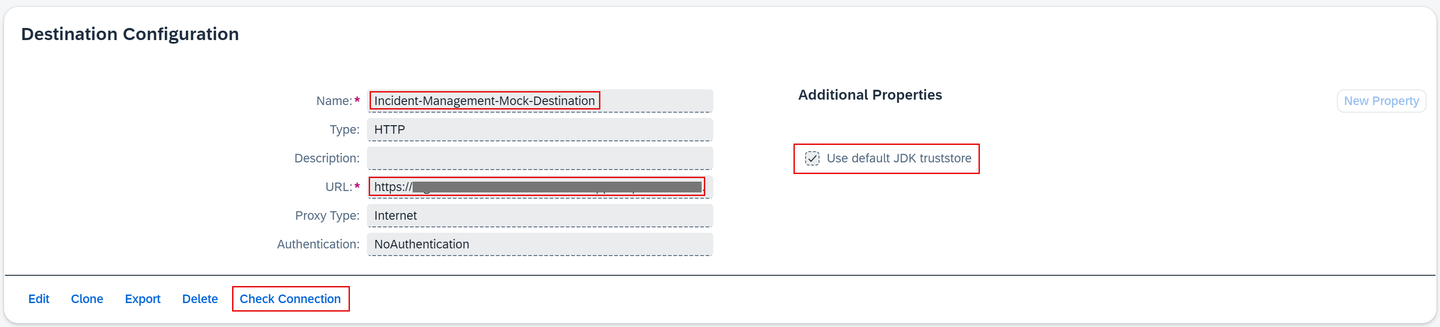
Destination Configuration
Paste the application route that you’ve copied in the address bar of the browser.
Verify that there are a few API endpoints that display data.

Mock server endpoints
Resources
Discussion
Share feedback on this tutorial or join the conversation in SAP Community.