
Overview
You will learn
- The basics about the SAP Business Accelerator Hub.
- About the different SAP products that can generate events.


Prerequisites
Prerequisites
- None.
Steps
Intro
In the SAP Business Accelerator Hub, you can discover, explore, and test the different types of content available for SAP products, as well as third-party products. The content available here can be used to accelerate the development of integrations and extensions required at your company.
Among the artifacts provided by SAP products and that are described in the SAP Business Accelerator Hub:
APIs.
Events.
Business objects.
CDS views.
Business add-ins (BAdIs).
Let’s start by exploring the Events section part of the SAP Business Accelerator Hub.
👉 Navigate to the SAP Business Accelerator Hub, https://hub.sap.com, choose Categories, and select Events.
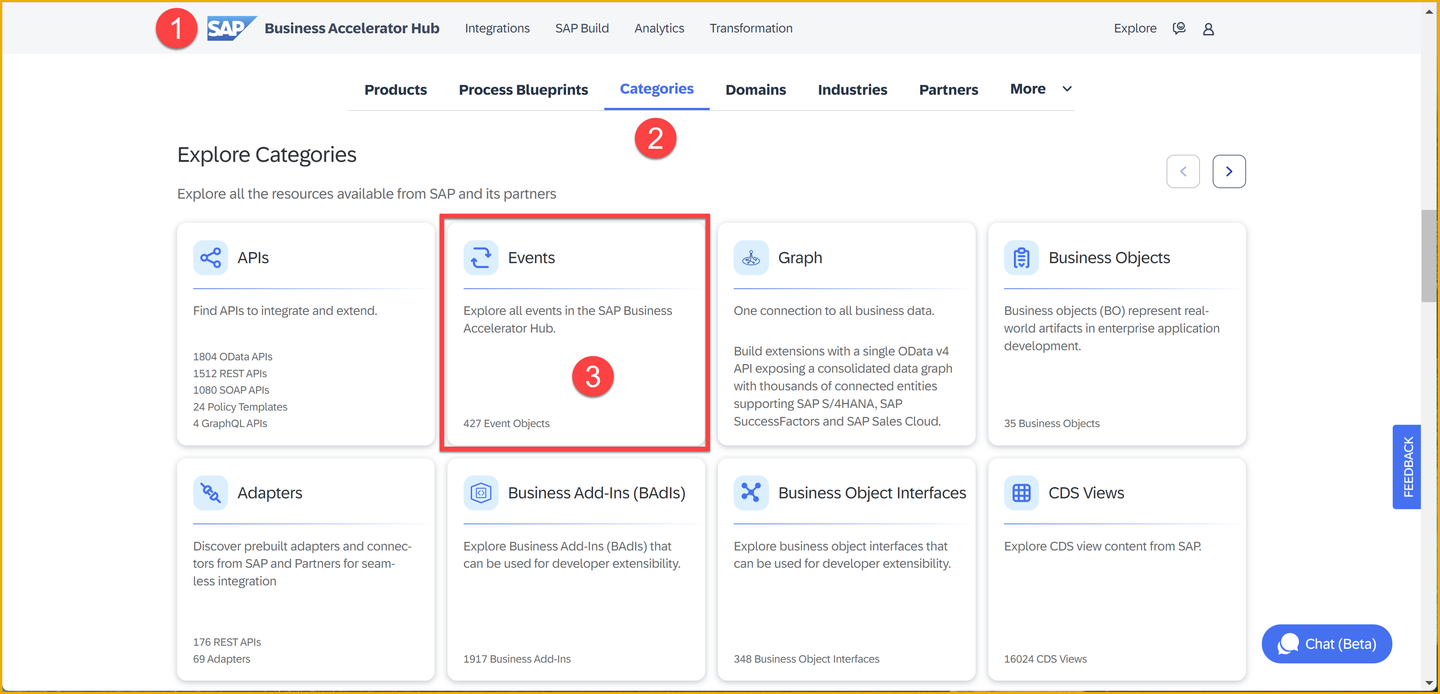
This will list more than 350 events available.
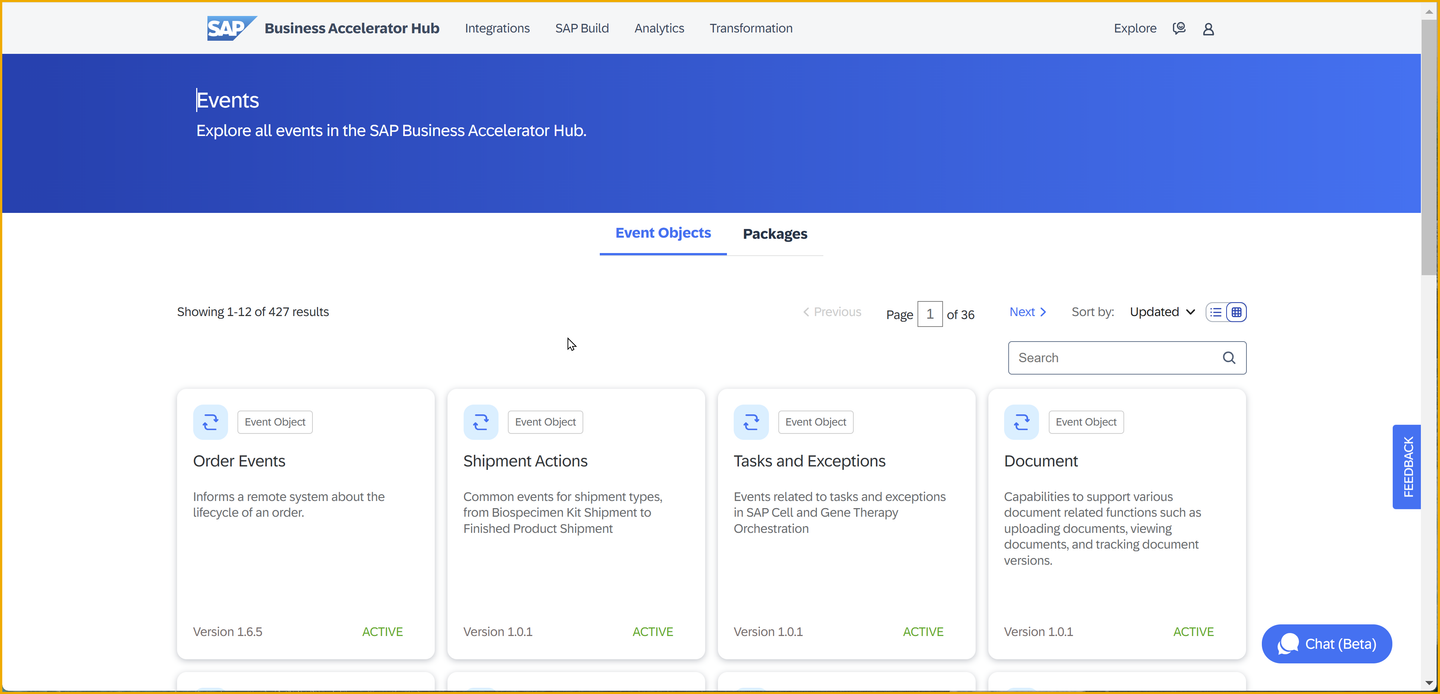
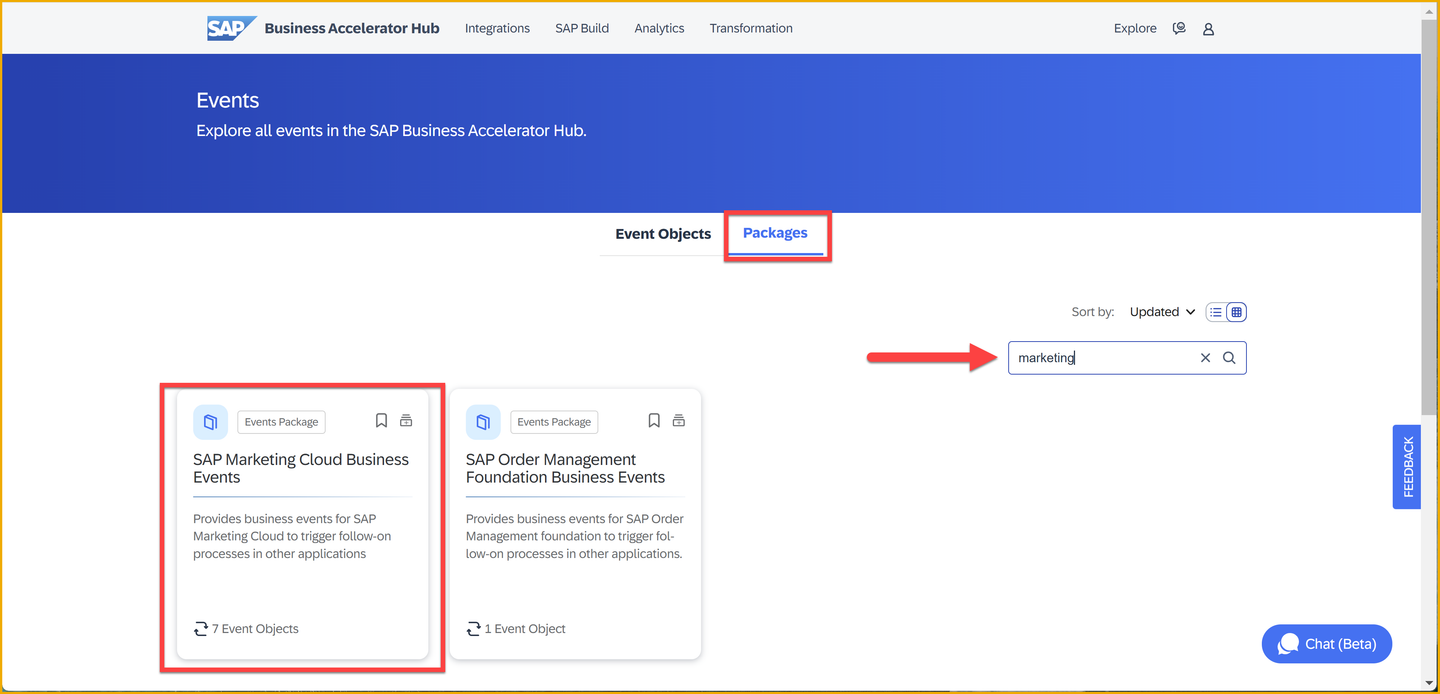
Let’s group these events by SAP application and get familiar with the events produced by a particular SAP application.
👉 Choose the Packages tab, and select the SAP Marketing Cloud Business Events
The two most common types of events that you will normally interact with are known as notification events and data events. They mainly differ in the amount of information included in the payload. Let’s explore this further.
Notification events
A notification event is a message that is sent to inform that something has happened. It is a simple message that does not contain much data. For example, a notification event could be sent to inform that a new customer has been created in a system and within its payload it might just contain an ID.
As an example, let’s use the Marketing Campaign Events available from SAP Marketing Cloud in the SAP Business Accelerator Hub.
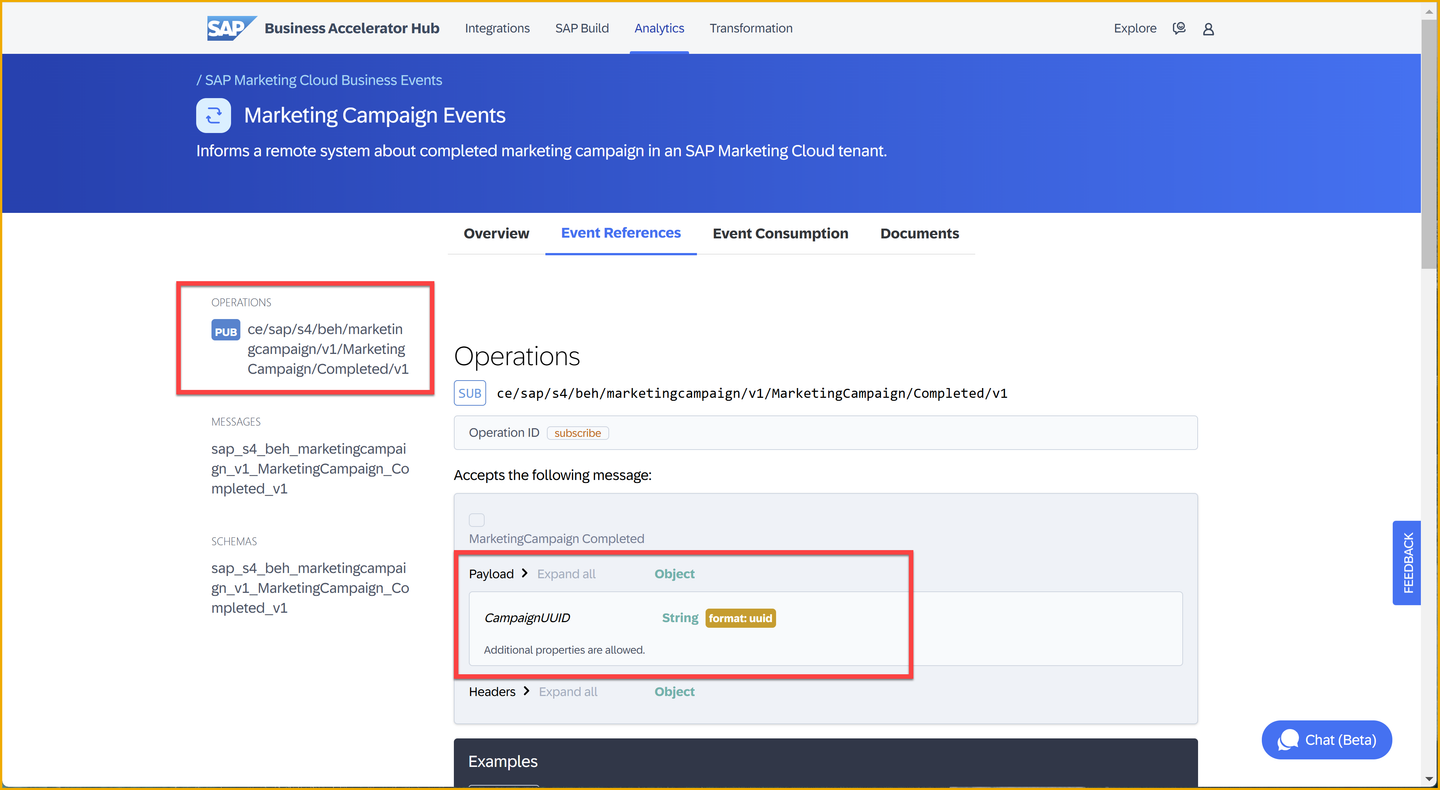
You can see that there is an operation available, ce/sap/s4/beh/marketingcampaign/v1/MarketingCampaign/Completed/v1, and within it you can find the headers and payload of the event. This event is an example of a notification event.
{
  "type": "sap.s4.beh.marketingcampaign.v1.MarketingCampaign.Completed.v1",
  "source": "",
  "datacontenttype": "application/json",
  "specversion": "1.0",
  "subject": "string",
  "id": "QgEK7wzuHtqdhJwqCS+VOA==",
  "time": "2018-04-05T17:31:00Z",
    "data": {
        "CampaignUUID": "265239ce-e1b5-46a9-8c6d-dc68a238fd18"
    }
}
You’ll see another notification event later in this tutorial, for SAP S/4HANA business partners.
Data events
A data event is also a message that is sent to inform that something has happened but different to the notification event, it includes the data that has changed. For example, a data event could be sent to inform that a new customer has been created in a system and include the data of the new customer.
As an example, let’s get familiar with the SAP Digital Vehicle Hub Business Events available from SAP Digital Vehicle Hub. You can see that there is an operation available – Vehicle Created (/sap.dmo.dvh.Vehicle.Created.v1), and within it, you can find an example payload of the event.
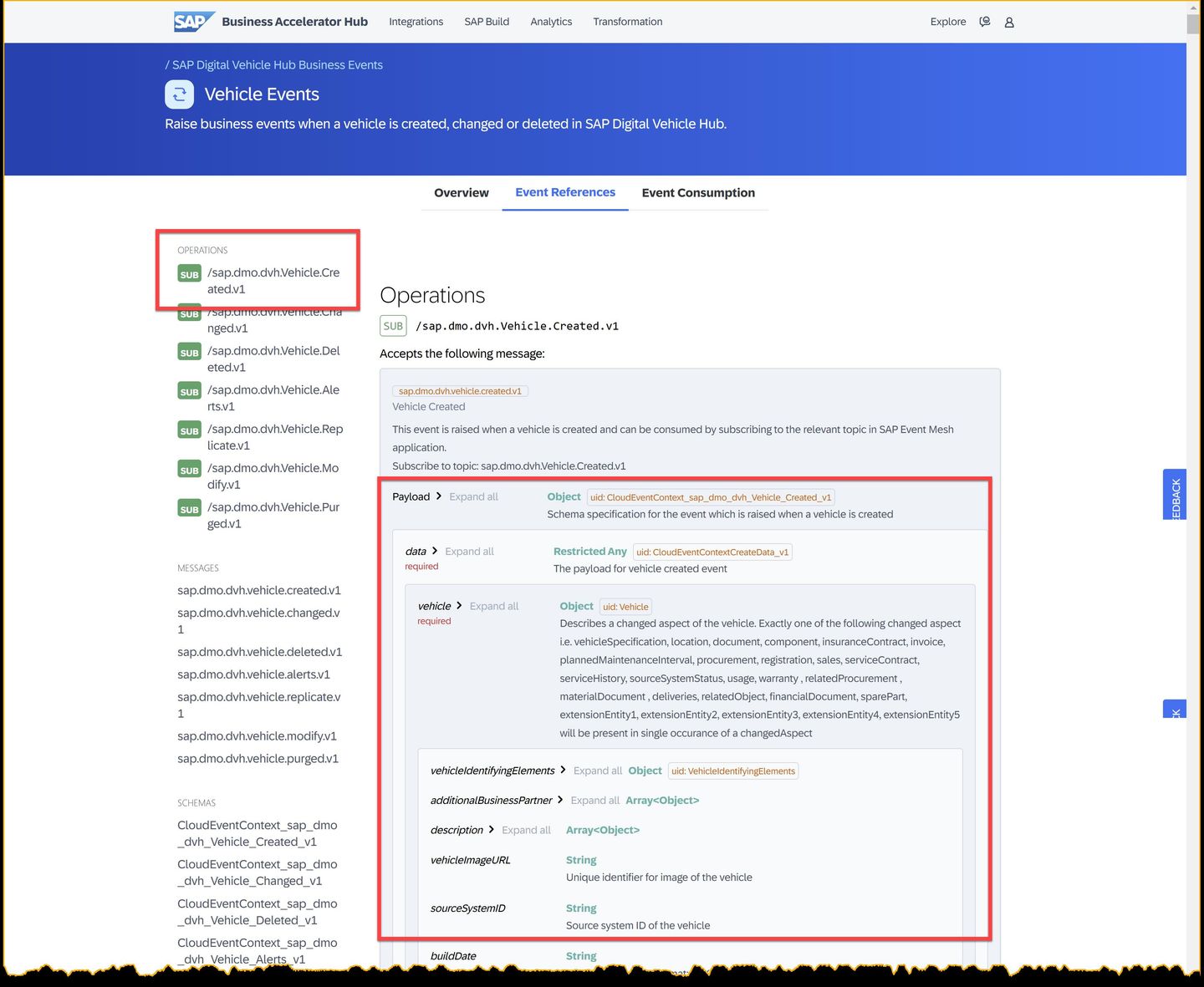
You can see that it contains lots of information – vehicle information, business partner info, storage location, model specification, vehicle specification, tire information, and more. The full sample↓ can be found in the assets folder. This event is an example of a data event.
{
    "specversion": "1.0",
    "type": "sap.dmo.dvh.Vehicle.Created.v1",
    "source": "/eu10/sap.dmo.dvh",
    "subject": "808E6E30B65149978A443429B29FB300",
    "id": "a823e884-5edc-4194-a81a-f3a3632417ee",
    "time": "2018-04-08 08:31:00",
    "datacontenttype": "application/json",
    "sappassport": "string",
    "data": {
        "vehicle": {
            "vehicleIdentifyingElements": {
                "id": "808E6E30B65149978A443429B29FB300",
                "externalID": "vehicle-008",
                "vin": "1234567898888888"
            },
            "additionalBusinessPartner": [
                {
                    "id": "string",
                    "role": "string"
                }
            ],
            "description": [
                {
                    "short": "string",
                    "long": "string",
                    "language": "string"
                }
            ],
            "vehicleImageURL": "string",
            "sourceSystemID": "string",
            "buildDate": "string",
            "plannedIndicator": true,
            "batchNumber": "string",
            "businessTypeCode": "string",
            "availabilityCode": "string",
            "plantID": "string",
            "plantName": "string",
            "storageLocationID": "string",
            "storageLocationDescription": "string",
            "modelSpecification": {
                "modelExternalID": "string",
                "modelName": "string",
                "manufacturerName": "string"
            },
            "vehicleSpecification": {
                "interiorColor": "string",
                "exteriorColor": "string",
                "upholstery": "Leather",
                "upholsteryColor": "string",
                "wheelType": "Alloy",
            ...
}You might have noticed that the notification and data events above follow a specific format. It includes what looks like header fields and a payload within the data node. This is because SAP has adopted the CloudEvents specification as the common format for its systems/applications to publish events.
CloudEvents is a specification for describing event data in a common way. Its goal is to simplify event declaration and delivery across services, platforms and beyond! The specification is now under the Cloud Native Computing Foundation.
Below is an example of what a CloudEvent message will look like:
{
  "specversion" : "1.0",
  "type" : "com.github.pull_request.opened",
  "source" : "https://github.com/cloudevents/spec/pull",
  "subject" : "123",
  "id" : "A234-1234-1234",
  "time" : "2018-04-05T17:31:00Z",
  "comexampleextension1" : "value",
  "comexampleothervalue" : 5,
  "datacontenttype" : "text/xml",
  "data" : "<much wow=\"xml\"/>"
}
You’ll notice that the example above is composed of many attributes. These attributes describe the event and are independent of the event data. Meaning that you can somehow process/inspect the event without needing to process its data. Now, let’s dive a bit into the message itself.
For more information on how SAP has adopted CloudEvents, check out this blog post: https://community.sap.com/t5/application-development-blog-posts/cloudevents-at-sap/ba-p/13620137.
CloudEvents message format
A CloudEvent message is mainly composed of context attributes and data. As you briefly touched on previously, the payload in the data field will depend if it is a notification event or a data event.
Context attributes
Several attributes can be included within the message, these attributes are known as context attributes and the idea is that these context attributes can be used to describe the event. You can think of these context attributes as the header information of our event.
Let’s explore some of the attributes available.
| Name | Required | Description | Example |
|---|---|---|---|
| id | ✅ | Identifies the event. Producers MUST ensure that source + id is unique for each distinct event. | QgEK7wzuHtqdhJwqCS+VOA== |
| source | ✅ | Identifies the context in which an event happened. | https://github.com/cloudevents |
| specversion | ✅ | The version of the CloudEvents specification which the event uses. | 1.0 |
| type | ✅ | Describes the type of the event | sap.s4.beh.businesspartner.v1.BusinessPartner.Created.v1 |
| datacontenttype | Content type of the value in data. | application/json |
Extension context attributes
A CloudEvent message may also include additional context attributes, which are not defined as part of the specification. These additional attributes are known as “extension context attributes” and can be used by the producer systems to include additional metadata to an event, similar to how you can use HTTP custom headers.
👉 Check out the events available for the SAP Digital Vehicle Hub in the SAP Business Accelerator Hub.
For example, in the SAP Digital Vehicle Hub Business Events package, you can see that the event is raised when a vehicle changes – sap.dmo.dvh.Vehicle.Changed.v1 – and it contains the extension context attribute sappassport, which is an SAP-specific tracing identifier.
{
  "specversion": "1.0",
  "type": "sap.dmo.dvh.Vehicle.Changed.v1",
  "source": "/eu10/sap.dmo.dvh",
  "subject": "808E6E30B65149978A443429B29FB300",
  "id": "a823e884-5edc-4194-a81a-f3a3632417ee",
  "time": "2018-04-08T08:31:00",
  "datacontenttype": "application/json",
  "sappassport": "string",
  ....
}
Data field
A CloudEvent message may include a payload but this is not required. If included, it will be in the format specified in the datacontenttype context attribute. Although it is not required, you will generally have a payload in messages. Below you can see an example of an event message that contains a payload.
{
  "specversion": "1.0",
  "type": "sap.dmo.dvh.Vehicle.Changed.v1",
  "source": "/eu10/sap.dmo.dvh",
  "subject": "808E6E30B65149978A443429B29FB300",
  "id": "a823e884-5edc-4194-a81a-f3a3632417ee",
  "time": "2018-04-08T08:31:00",
  "datacontenttype": "application/json",
  "sappassport": "string",
  "data": {
    "BusinessPartner": "10003245"
  }
}
Now that you are familiar with the CloudEvents format, let’s explore the Business Partner events available in SAP S/4HANA Cloud.
As part of this CodeJam, you will interact with the Business Partner data from an SAP S/4HANA Cloud system. In our scenario, the Business Partner event will be used to inform that a Business Partner has been created and it will be triggered with the creation of a new Business Partner in the SAP S/4HANA Cloud system.
👉 Now that you are familiar with how to get around the SAP Business Accelerator Hub, search for the Business Partner events available for SAP S/4HANA Cloud Public Edition. Check out the different operations and get acquainted with the payload for the Business Partner changed event, https://hub.sap.com/event/CE_BUSINESSPARTNEREVENTS/resource.
{
    "type": "sap.s4.beh.businesspartner.v1.BusinessPartner.Changed.v1",
    "specversion": "1.0",
    "source": "/default/sap.s4.beh/244572008",
    "id": "194780e0-b5db-1ede-b58a-4550178dff9e",
    "time": "2024-02-26T02:53:06Z",
    "datacontenttype": "application/json",
    "data": {
        "BusinessPartner": "1000667"
    }
}
The event shared above would be considered a notification event, as it only contains the Business Partner ID that has been changed. As you can see it doesn’t contain any information about the Business Partner itself, just the ID.
If you would like to get more information about the Business Partner, you would need to call the Business Partner (A2X) API, available in SAP S/4HANA Cloud, to get the details.
🧭 Take some time to explore what’s documented on the Business Partner events - Overview page. You will be able to find lots of valuable information here, for example, event reference, event specifications (in JSON and YAML format), and a link to the documentation.
Now, you might have noticed that the event samples shared in this exercise are in JSON format and follow a specific format. They all contain a similar structure, some header information (metadata) describing the message (like id, type, specversion, source, type, datacontenttype) and a data node, which includes the actual payload. This is because SAP has adopted the CloudEvents specification as the common format for its systems/applications to publish events.
To expand your learning, you might want to check out the links below and think about the open questions included in this section.
Things to Ponder
- Can you think of reasons why would you prefer publishing notification events instead of data events?
- Which format is used to document the Business Partner event specification?
Resources
Discussion
Share feedback on this tutorial or join the conversation in SAP Community.