
Overview


Prerequisites
Steps
Prerequisites and Assumptions
- User knows how to install packages and develop using Node.js
- Setup:
HANA, express editionorSAP HANA Cloudmust be running and accessible from your client platform. For instructions on how to setup aHANA, express editionsee the HANA Express database deploy tutorial. For instructions on startingSAP HANA Cloudtrial see the Help Thomas Get Started with SAP HANA. - This tutorial assumes that you have a database login that can access the
M_DATABASEview in theHANA, express editionSystemDBor inSAP HANA Cloud. - Tutorials: Setup Node.js to connect to SAP HANA
Install support package for Node.js and Express:
Install the Node.js package called express-generator globally:
npm install -g express-generatorCreate a simple standalone node.js app:
% mkdir hxeapp
% cd hxeapp
Edit a file named hxeapp.js with the following content:
console.log ("Hello Node World!")Test the simple app created in the previous step
cd hxeapp
node hxeapp.js
Access the HANA content from this Node application. First install HANA database driver to Node. Ignore any warnings that it may produce.
npm install sap-hdbext-promisfiedCreate a Node application that allows you to access SAP HANA, express edition or HANA Cloud data.
Open the hxeapps.js file and add the following content:
// Reference HANA driver in the Node app and update the connection details
let dbClass = require('sap-hdbext-promisfied')

// Modify the host IP and password based on your system information
let hanaConfig = {
    host: '<HANA hostname>',
    port: `<HANA Port>`,
    sslValidateCertificate: false,
    encrypt: true,
    user: `<SYSTEM|DBADMIN>`,
    password: '<HANA SYSTEM or DBADMIN user password>'
}

// Execute the query and output the results
async function intro() {
    try {
        let db = new dbClass(await dbClass.createConnection(hanaConfig))
        let rows = await db.execSQL("select * from m_database")
        console.log('Results:', rows)
    } catch (error) {
        return console.error(error)
    }
}
intro()
Replace the <HANA hostname> with the IP address or host name of your HANA Express or HANA Cloud database server. Replace user with SYSTEM if targeting HANA Express or DBADMIN if targeting HANA Cloud. Replace HANA Port with the SQL port for your HANA system. Replace the <HANA SYSTEM or DBADMIN user password> with your database system user password. Then save changes.
Start your application:
node hxeapp.jsThe above command should produce results something like the below:
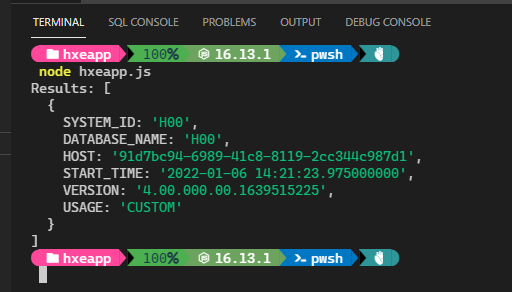
Modify this app to be a WebApp.
Install support packages for Node.js and Express.
npm install expressExecute express to create a template for developing WebApp
expressAbove step will create template files with dependencies.
Note: It was installed manually previously. We want to do it automatically along with other packages
Modify package.json to include @sap/hdbext driver.
Edit package.json and add below line in the dependencies section.
"sap-hdbext-promisfied": "latest"After the edits, your package.json file would looks something like:
{
  "name": "hxeapp",
  "version": "0.0.0",
  "private": true,
  "scripts": {
    "start": "node ./bin/www"
  },
  "dependencies": {
    "cookie-parser": "~1.4.4",
    "debug": "~2.6.9",
    "express": "~4.16.1",
    "http-errors": "~1.6.3",
    "jade": "~1.11.0",
    "morgan": "~1.9.1",
    "sap-hdbext-promisfied": "latest"
  }
}
Call npm install to pull the dependencies
npm installCreate an app that does what our hxeapp.js does, but now we should modify the template file to do it.
Your directory content would look something like:
app.js
hxeapp.js
public/
views/
bin/
node_modules/
package.json
routes/$ ls routes/
index.js users.jsModify the index.js file to include the following code snippet:
var express = require('express')
let dbClass = require('sap-hdbext-promisfied')
var router = express.Router()
var hanaConfig = {
  host: '<HANA hostname>',
  port: `<HANA Port>`,
  sslValidateCertificate: false,
  encrypt: true,
  user: `<SYSTEM|DBADMIN>`,
  password: '<HANA SYSTEM or DBADMIN user password>'
}

/* GET home page. */
router.get('/', async function (req, res, next) {
  try {
    let db = new dbClass(await dbClass.createConnection(hanaConfig))
    let rows = await db.execSQL("select * from m_database")
    res.render('index', { title: 'Sample Node.js on HANA ', datarow: rows })
  } catch (error) {
    res.send(error.toString()).status(500)
    return console.error(error)
  }
})
module.exports = router
Replace the <HANA hostname> with the IP address or host name of your SAP HANA, express edition or SAP HANA Cloud database server. Replace user with SYSTEM if targeting HANA Express or DBADMIN if targeting SAP HANA Cloud. Replace HANA Port with the SQL port for your SAP HANA system. Replace the <HANA SYSTEM or DBADMIN user password> with your database system user password. Then save changes.
Edit the file views/index.jade that controls the WebApp output layout as follows:
extends layout

block content
  h1= title
  - each v, k in datarow[0]
    p #{k} : #{v}
Start the application
npm startOpen a new browser and access http://localhost:3000/
Notice that the browser displays information like what was displayed in earlier output.
- View similar How-Tos or View all How-Tos
- Go to SAP HANA tutorials page
Resources
Discussion
Share feedback on this tutorial or join the conversation in SAP Community.