
Access and Query a Data Product in SAP HANA Cloud
Learn how to share a data product that has been published in the SAP Business Data Cloud (SAP BDC) with SAP HANA Cloud so that its contents can be queried as virtual tables. Data products are read-only curated data that has been produced by an SAP application such as SAP S/4HANA, SAP SuccessFactors, SAP Ariba, and Concur among others. They provide access to SAP data without the need for complex data preparation steps. SAP Business Data Cloud (SAP BDC) is a data platform that harmonizes all data from SAP and non-SAP sources, into a unified semantic layer of trusted data, to power advanced analytics and to build AI applications. SAP HANA Cloud is an in-memory database that provides a multi model engine, access to both structured and unstructured data, and embedded libraries for machine learning enabling it to provide real time analytics.
Overview


Prerequisites
Prerequisites
- Access to SAP Business Data Cloud and a productive SAP HANA Cloud instance
Steps
For additional details on these topics see:
A formation is a logical grouping of SAP systems that simplify the connectivity setup and to provide a unified view of the systems. For further details see How Data Products Become Available in SAP HANA Cloud, Automating Integrations Using Formations, Creating SAP Business Data Cloud Formations, and Introductory Guide to Provisioning of SAP Business Data Cloud.
Navigate to formations in the SAP Business Technology (SAP BTP) Cockpit and select Create Formation.

Formations in SAP BTP Cockpit Create a new formation of type Integrations with SAP Business Data Cloud.

Step 1 of create formation Select the products to be part of the formation.

Step 2 of create formation Complete the formation.
Now that trust has been established between SAP BDC and SAP HANA Cloud, a data product can be located in SAP BDC and shared to SAP HANA Cloud.
In the SAP BDC cockpit, select Catalog & Marketplace and search for a data product.

Find a data product The details of the data product including the description and its properties can be examined.
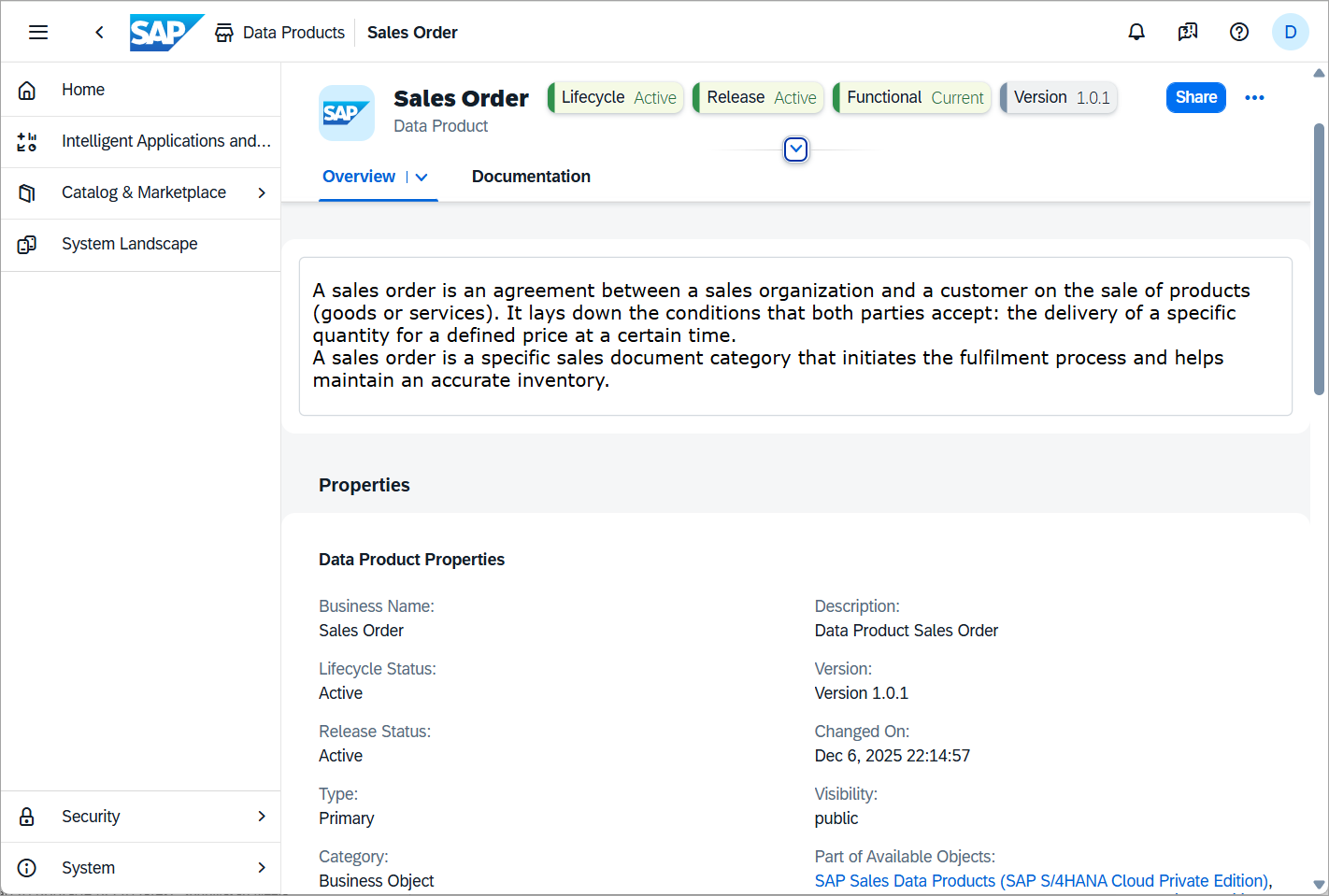
View the description and properties Details of the objects included can be displayed by examining the API.
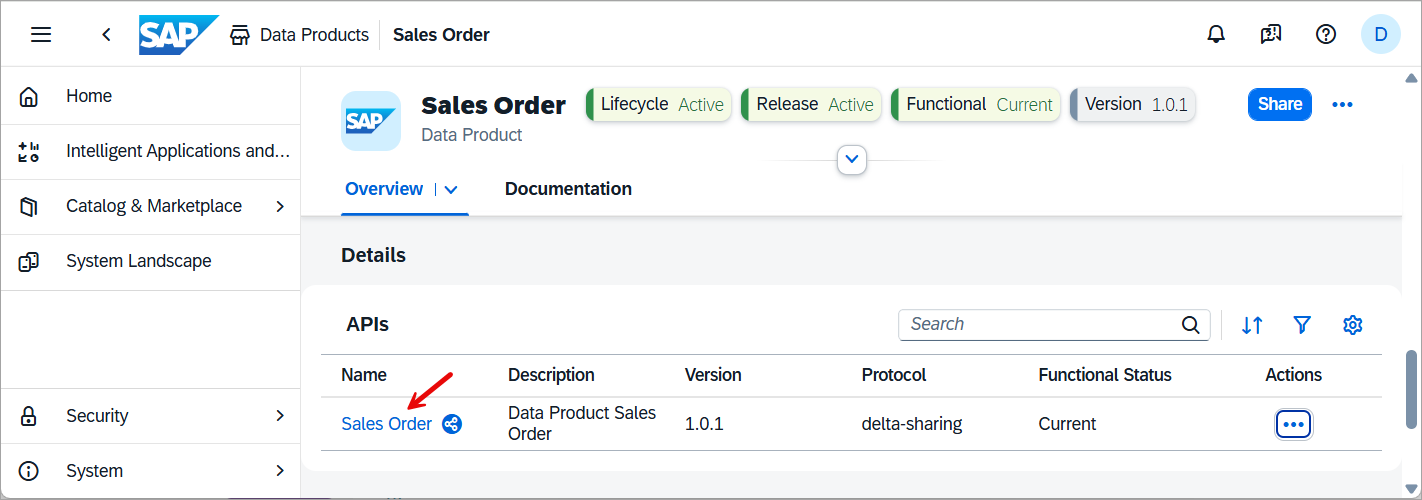
View the objects It is also possible to examine the columns of each object by clicking View Columns.
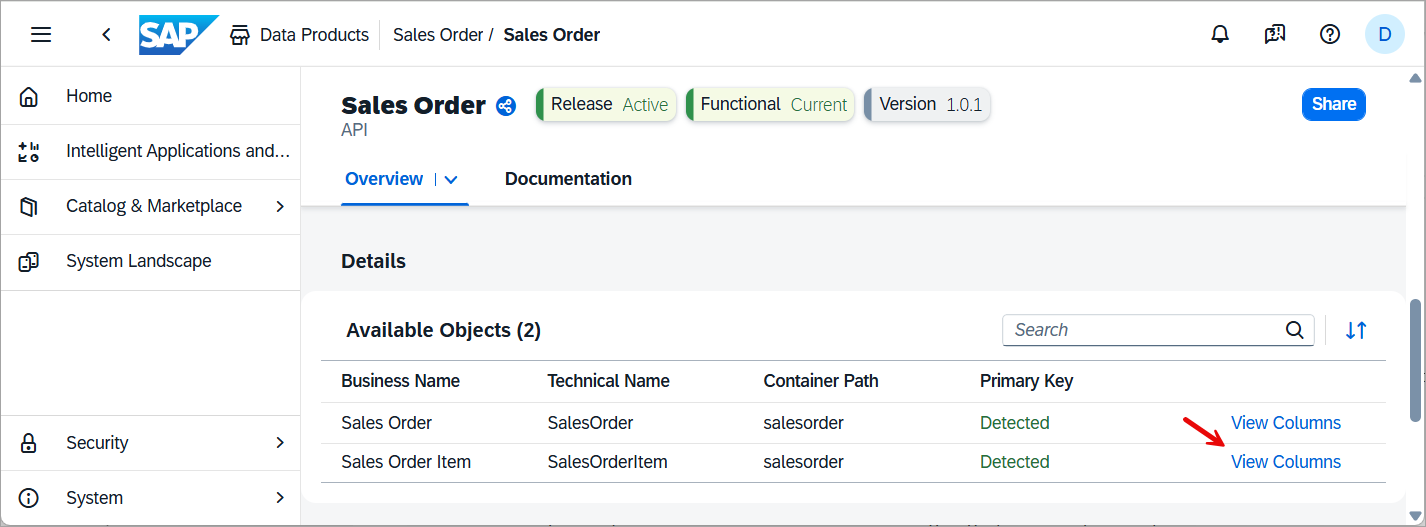
View the objects 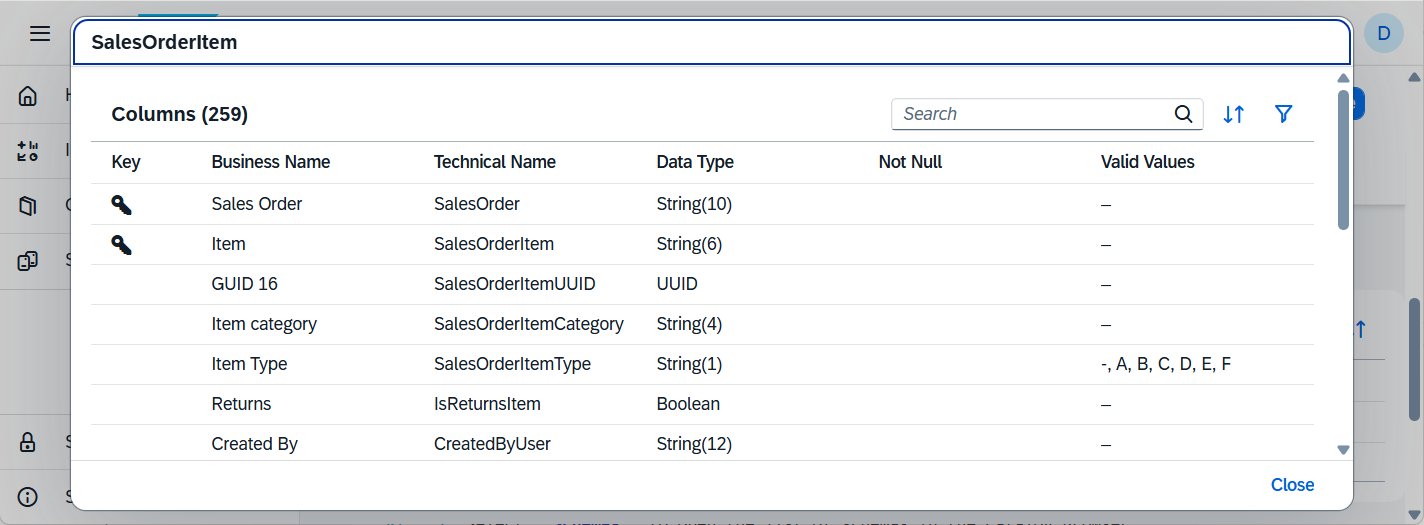
View the objects
Once a data product has been identified that you wish to be able to access from SAP HANA Cloud, select the Share button in the top right of its details page.
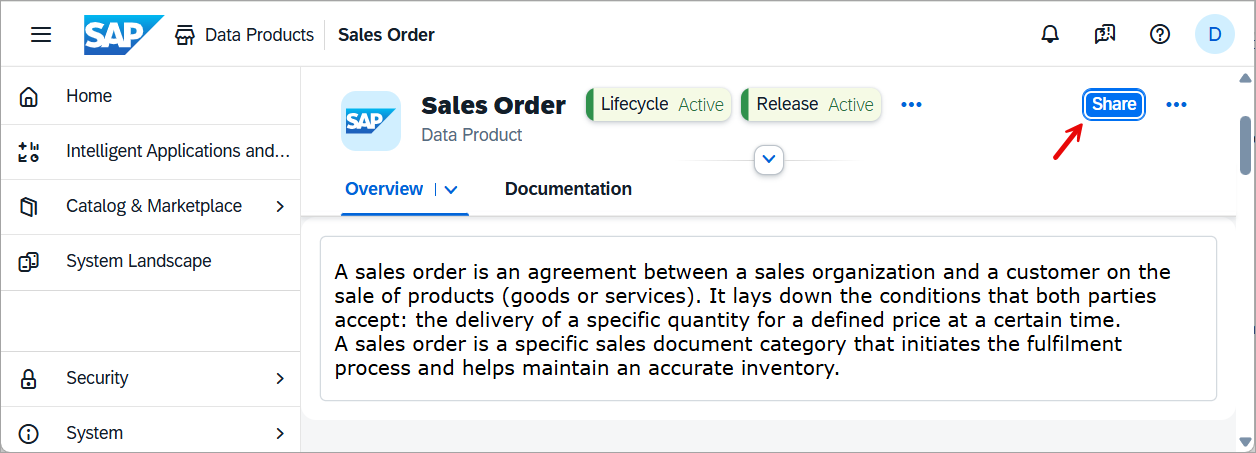
Share a data product Specify the system to share the data product with by pressing Add a Target.
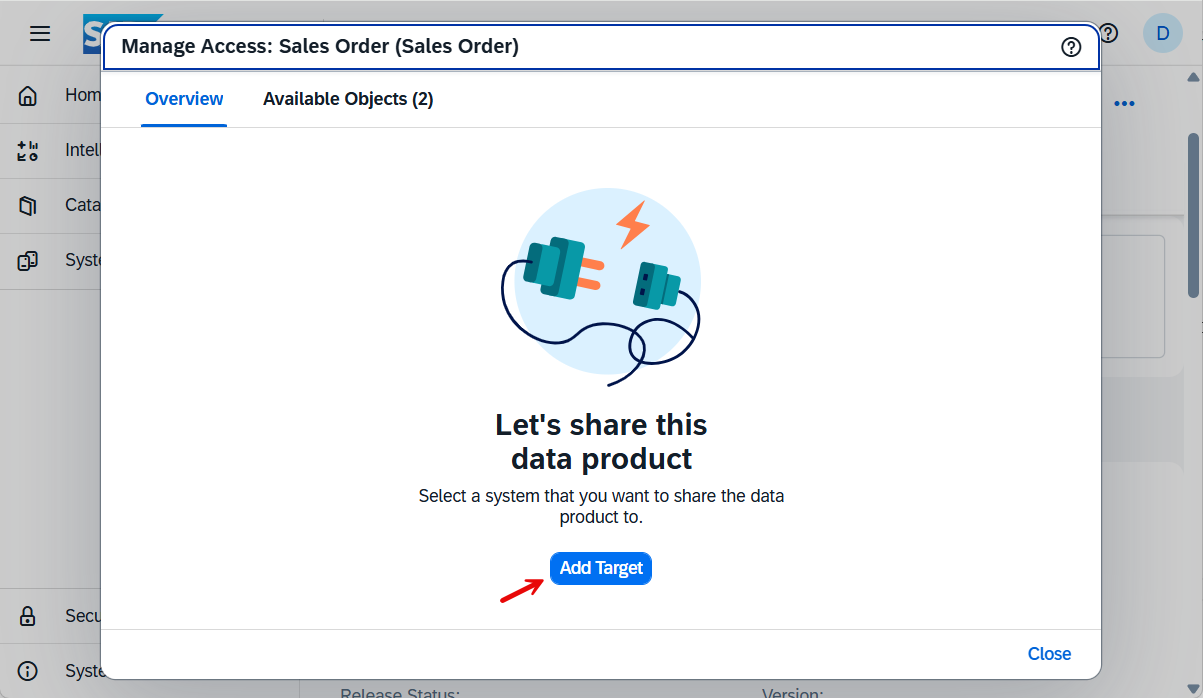
Choose to add a target Specify an SAP HANA Cloud system as a target.
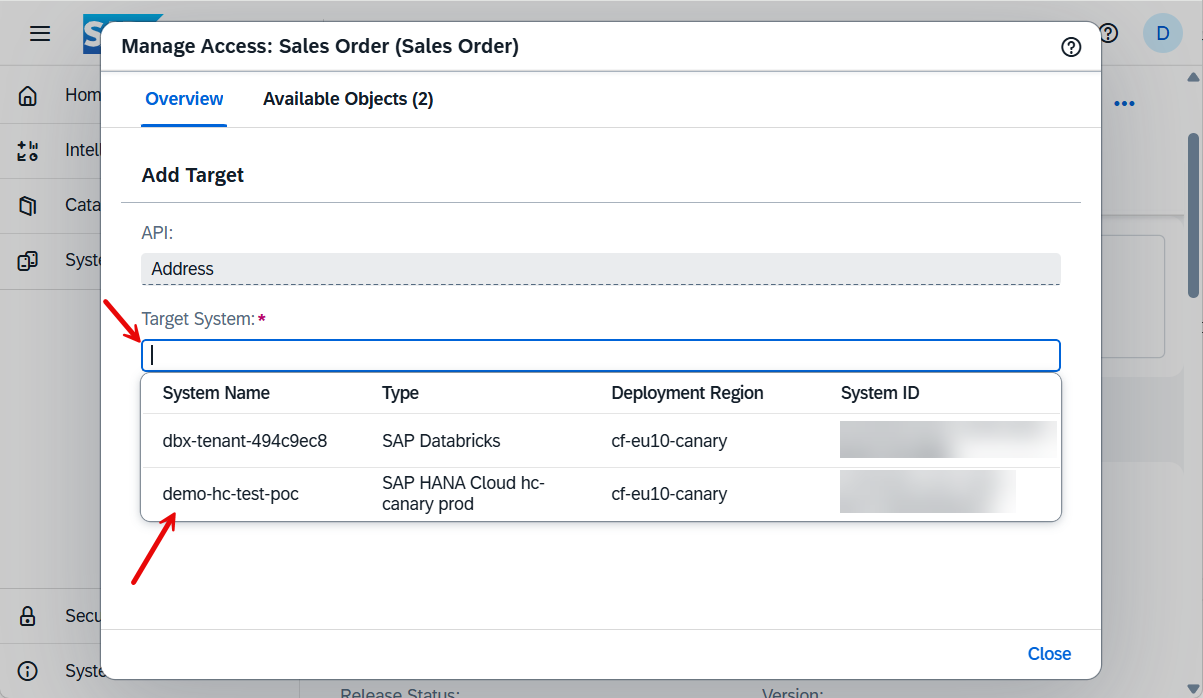
Specify the target to be shared to Finally complete the process by pressing Share.
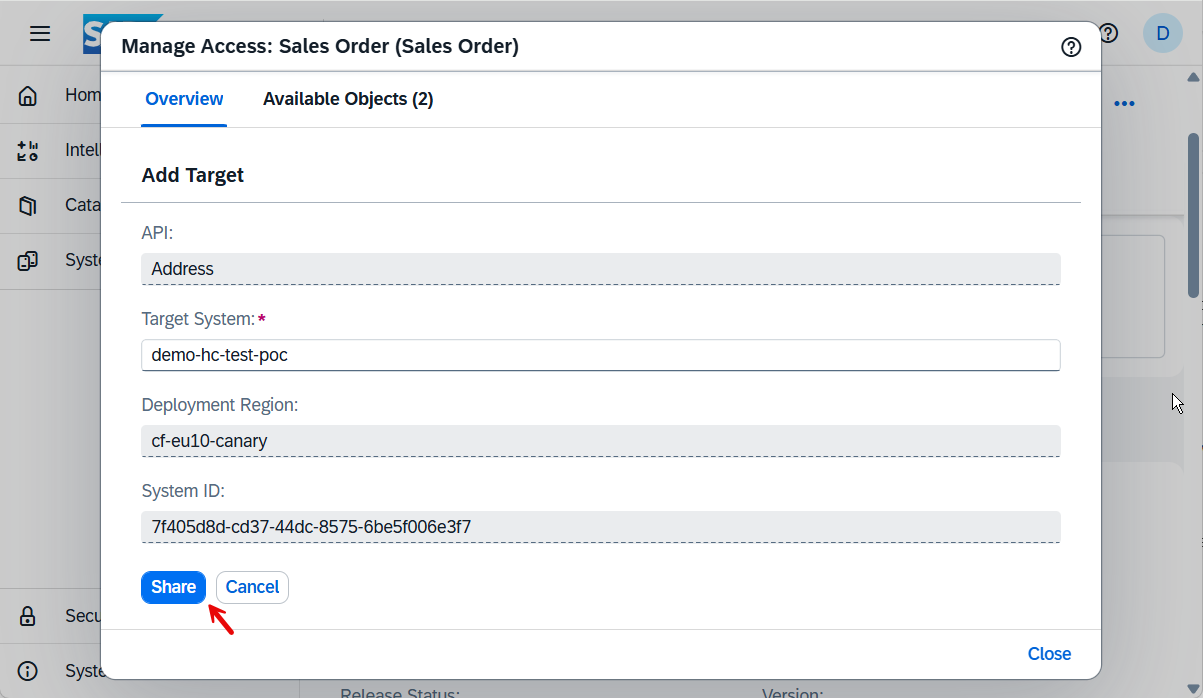
Complete the sharing of the data product
The data product that was previously shared can now be installed into SAP HANA Cloud which will create a remote source to the data product and create virtual tables for each object in the data product.
Open SAP HANA Cloud Central and select the SAP HANA Cloud instance in which you wish to install the data product.

View the shared data products Select the previously shared data product and choose install.

Install the data product The database user that is currently connected will be granted read access to the virtual tables. The below SQL is an example of granting an additional user access to the schema that contains the virtual tables.
SQLGRANT SELECT ON SCHEMA "_SAP_DATAPRODUCT_sap_s4com_dataProduct_SalesOrder_v1_4a6dc5d7-7af5-4b74-8ac7-b9ed0d1e6e95" TO USER1;
Start by selecting the schema of the data product.

Select the schema The database objects app will now open with a schema filter applied.

database objects app filtered on schema As shown above a virtual table was created for each object in the data product.
A remote source was created that provides the connection to the data product.

database objects app filtered on schema Further details on remote sources can be found at CREATE REMOTE SOURCE.
The data in the data product can now be queried using the virtual tables. An example is shown below.
SET SCHEMA "_SAP_DATAPRODUCT_sap_s4com_dataProduct_SalesOrder_v1_5aad3293-2564-4873-8c15-188e653f781b";
SELECT COUNT(*) FROM "_SAP_DATAPRODUCT_c9429f3e-0d0b-4d0b-9364-cec9e77daebe_salesorder.SalesOrder" AS SALES_ORDER;
SELECT COUNT(*) FROM "_SAP_DATAPRODUCT_c9429f3e-0d0b-4d0b-9364-cec9e77daebe_salesorder.SalesOrderItem" AS SALES_ORDER_ITEM;
SELECT * FROM "_SAP_DATAPRODUCT_c9429f3e-0d0b-4d0b-9364-cec9e77daebe_salesorder.SalesOrder" AS SALES_ORDER;
SELECT * FROM "_SAP_DATAPRODUCT_c9429f3e-0d0b-4d0b-9364-cec9e77daebe_salesorder.SalesOrderItem" AS SALES_ORDER_ITEM;
SELECT "SalesOrderItemText", COUNT("SalesOrderItemText") FROM "_SAP_DATAPRODUCT_c9429f3e-0d0b-4d0b-9364-cec9e77daebe_salesorder.SalesOrderItem"
        AS SALES_ORDER_ITEM GROUP BY "SalesOrderItemText" ORDER BY COUNT("SalesOrderItemText") DESC;
Congratulations! You have now learned how to install and query a data product using SAP HANA Cloud. See the blog post Consuming Data Products in SAP HANA Cloud via SAP Business Application Studio/SAP Build Code to learn how to use a data product from within a calculation view.
Resources
Discussion
Share feedback on this tutorial or join the conversation in SAP Community.