
Automating SAP HANA Cloud Tasks with the SAP Automation Pilot Service
Learn how to use the SAP Automation Pilot service to execute administrative tasks for an SAP HANA Cloud instance.
Overview
You will learn
- About the catalogs provided in SAP Automation Pilot relating to SAP HANA Cloud
- How to import a catalog containing examples of automation commands
- How to edit inputs and run the commands from the imported catalog


Prerequisites
Prerequisites
- An SAP BTP account
- An SAP HANA Cloud instance
Steps
The SAP Automation Pilot is a service within the SAP BTP that can be used to schedule and automate tasks.

Once subscribed to the service, the tool can be opened by clicking on the application link.
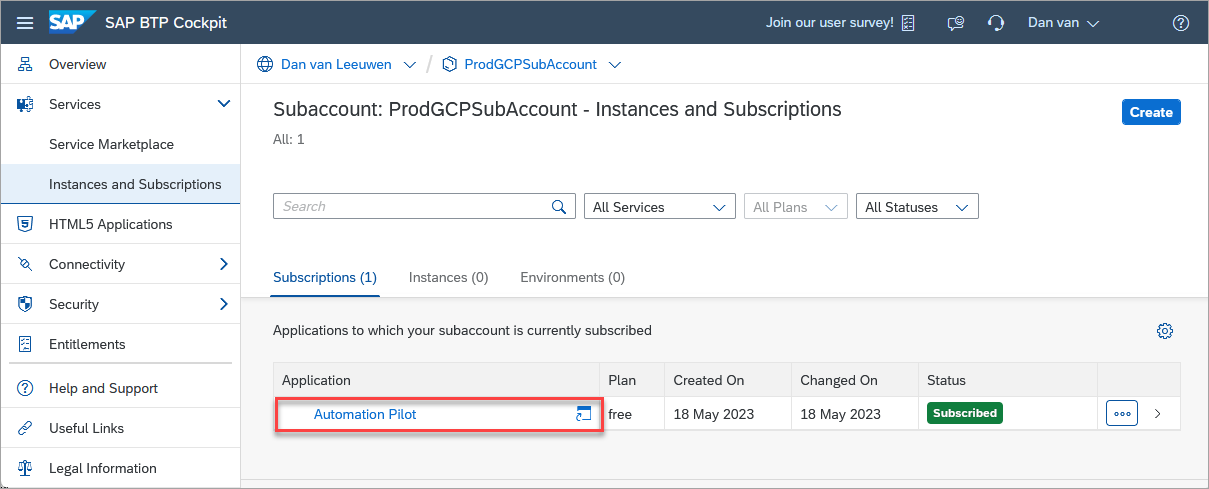
It provides a visual tool for constructing commands.

The SAP Automation Pilot provides the following catalogs to aid in managing an SAP HANA Cloud instance:
sm-sapcp contains commands to perform tasks within a BTP subaccount.

sm-sapcp catalog dblm-sapcp contains commands to start, stop, or upgrade an SAP HANA Cloud instance provisioned in Cloud Foundry.
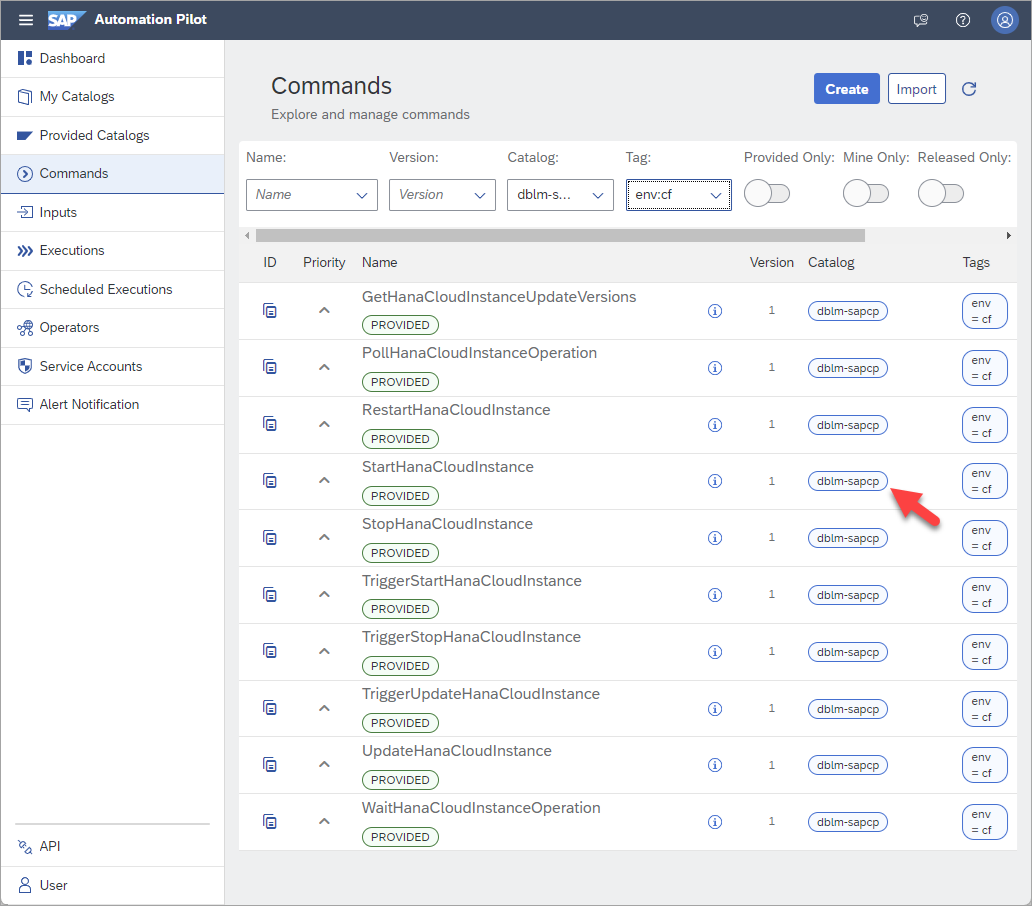
dblm-sapcp catalog cf-sapcp contains commands to perform tasks within Cloud Foundry.
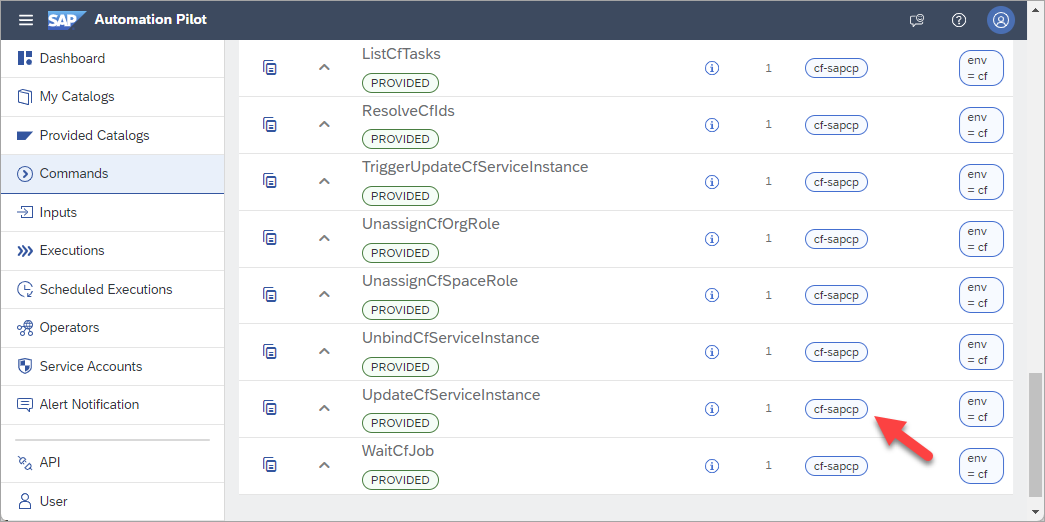
cf-sapcp catalog sql-sapcp contains a command to execute SQL commands.
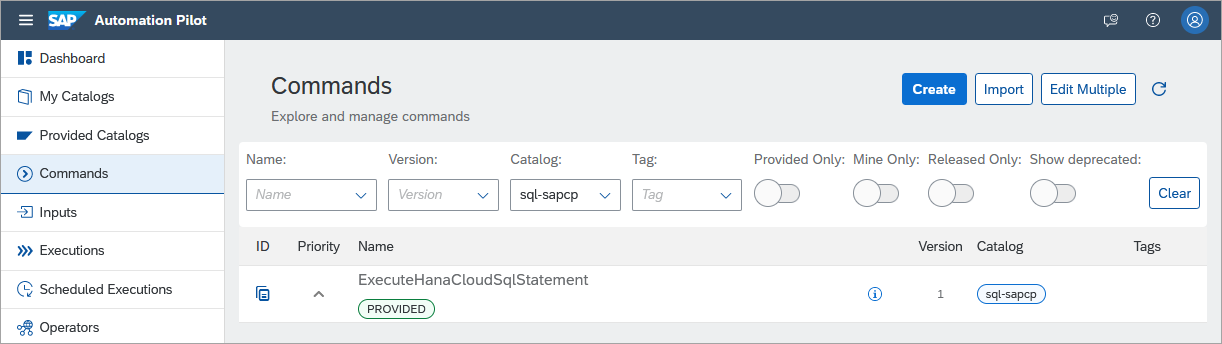
sql-sapcp catalog SQL commands can also be executed in a Python application running in the SAP Automation Pilot. For additional details, see Execute SQL Commands and Create Custom Notifications with SAP Automation Pilot and SAP Alert Notification Service.
http-sapcp contains commands to execute HTTP requests such as REST calls to retrieve metrics or alerts about SAP HANA Cloud instances. Details of the REST APIs relevant to SAP HANA Cloud instances can be seen at the Business Accelerator Hub.

http-sapcp catalog
In addition, SAP Automation Pilot provides an option to schedule commands and provides integration with the SAP Alert Notification service which is used to send an email or create an incident in various ticketing systems. If you do not already have the SAP Automation Pilot configured, step 1 of the tutorial Take Action Following a SAP HANA Cloud Database Alert with SAP Automation Pilot and the tutorial Get Started with SAP Automation Pilot demonstrate how to get started.
The catalog below contains examples of commands and inputs for those commands that can be used to automate SAP HANA Cloud tasks.
Import the catalog below into the SAP Automation Pilot.

import catalog JSON{ "id": "Automation-<<<TENANT_ID>>>", "technicalName": "Automation", "name": "Automation", "description": "Collection of commands to demonstrate automating tasks in SAP HANA Cloud", "owner": "<<<TENANT_ID>>>", "inputs": [ { "id": "Automation-<<<TENANT_ID>>>:CFInstanceDetails:1", "name": "CFInstanceDetails", "description": "The details of an SAP HANA Cloud instance provisioned in Cloud Foundry", "catalog": "Automation-<<<TENANT_ID>>>", "owner": null, "version": 1, "keys": { "resourceGroup": { "type": "string", "sensitive": false, "description": "Cloud Foundry space name (dev)" }, "resourceName": { "type": "string", "sensitive": false, "description": "The name of an instance (HC_HDB_CF)" }, "region": { "type": "string", "sensitive": false, "description": "cf- value from API Endpoint (cf-us10-001)" }, "subAccount": { "type": "string", "sensitive": false, "description": "The Cloud Foundry org name (2fb68c96trial)" } }, "values": { "resourceGroup": "dev", "resourceName": "HC_HDB_CF", "region": "cf-us10-001", "subAccount": "2fb68c96trial" }, "tags": {} }, { "id": "Automation-<<<TENANT_ID>>>:CFTechnicalUser:1", "name": "CFTechnicalUser", "description": "A user that has space developer role in a Cloud Foundry space", "catalog": "Automation-<<<TENANT_ID>>>", "owner": null, "version": 1, "keys": { "password": { "type": "string", "sensitive": true, "description": "" }, "user": { "type": "string", "sensitive": false, "description": "A Cloud Foundry user" } }, "values": { "user": "", "password": "" }, "tags": {} }, { "id": "Automation-<<<TENANT_ID>>>:Description:1", "name": "Description", "description": "Update description JSON for an SAP HANA Cloud instance", "catalog": "Automation-<<<TENANT_ID>>>", "owner": null, "version": 1, "keys": { "parameters": { "type": "object", "sensitive": false, "description": "JSON parameter to update its description" } }, "values": { "parameters": "{\n \"metadata\": {\n \"ui.hc.sap.com/description\": \"Updated by the SAP Automation Pilot\"\n }\n}" }, "tags": {} }, { "id": "Automation-<<<TENANT_ID>>>:InstanceDetails:1", "name": "InstanceDetails", "description": "The details of an SAP HANA Cloud Instance deployed to an SAP BTP subaccount", "catalog": "Automation-<<<TENANT_ID>>>", "owner": null, "version": 1, "keys": { "instanceId": { "type": "string", "sensitive": false, "description": "The instance ID" }, "instanceName": { "type": "string", "sensitive": false, "description": "The name of an SAP HANA Cloud instance" }, "instanceBindingKey": { "type": "object", "sensitive": false, "description": "An optional binding key on an SAP HANA Cloud Instance used to access alerts and metrics" }, "servicePlanId": { "type": "string", "sensitive": false, "description": "Required for MassUpgradeHC when attempting to get a list of all the SAP HANA Cloud database instances in a subaccount. Obtained via btp list services/plan --fields-filter \"name contains 'hana'\" " }, "smBindingKey": { "type": "object", "sensitive": false, "description": "An optional binding key from a service manager instance used to perform management tasks against multiple instances in a BTP subaccount." } }, "values": { "instanceId": "b00eac16-5486-4f27-a52b-359f250273c3", "instanceName": "HC_HDB", "instanceBindingKey": "{}", "servicePlanId": "e573479c-39f8-4774-80a9-12d762b0f159", "smBindingKey": "{}" }, "tags": {} }, { "id": "Automation-<<<TENANT_ID>>>:Start:1", "name": "Start", "description": "Start JSON for an SAP HANA Cloud instance", "catalog": "Automation-<<<TENANT_ID>>>", "owner": null, "version": 1, "keys": { "parameters": { "type": "object", "sensitive": false, "description": "JSON parameter to start an SAP HANA Cloud instance" } }, "values": { "parameters": "{\n \"data\": {\n \"serviceStopped\": false\n }\n}" }, "tags": {} }, { "id": "Automation-<<<TENANT_ID>>>:Stop:1", "name": "Stop", "description": "Stop JSON for an SAP HANA Cloud instance", "catalog": "Automation-<<<TENANT_ID>>>", "owner": null, "version": 1, "keys": { "parameters": { "type": "object", "sensitive": false, "description": "JSON parameter to stop an SAP HANA Cloud instance" } }, "values": { "parameters": "{\n \"data\": {\n \"serviceStopped\": true\n }\n}" }, "tags": {} }, { "id": "Automation-<<<TENANT_ID>>>:Upgrade:1", "name": "Upgrade", "description": "Upgrade JSON for an SAP HANA Cloud instance", "catalog": "Automation-<<<TENANT_ID>>>", "owner": null, "version": 1, "keys": { "parameters": { "type": "object", "sensitive": false, "description": "JSON parameter to upgrade an instance in the subaccount" } }, "values": { "parameters": "{\n \"data\": {\n \"productVersion\": {\n \"releaseCycle\":\"generally-available-quarterly\",\n \"track\": \"2023.40\",\n \"id\": \"2023.40.7\"\n }\n }\n}\n" }, "tags": {} } ], "commands": [ { "configuration": { "values": [ { "alias": "CFUser", "valueFrom": { "inputReference": "Automation-<<<TENANT_ID>>>:CFTechnicalUser:1", "inputKey": null } }, { "alias": "CFInstanceDetails", "valueFrom": { "inputReference": "Automation-<<<TENANT_ID>>>:CFInstanceDetails:1", "inputKey": null } } ], "output": { "instanceParameters": "$(.getDetails.output.parameters) " }, "executors": [ { "execute": "cf-sapcp:GetCfServiceInstance:1", "input": { "password": "$(.CFUser.password)", "org": "$(.CFInstanceDetails.subAccount)", "serviceInstance": "$(.CFInstanceDetails.resourceName)", "region": "$(.CFInstanceDetails.region)", "user": "$(.CFUser.user)", "includeParameters": "true", "space": "$(.CFInstanceDetails.resourceGroup)" }, "alias": "getDetails", "progressMessage": null, "initialDelay": null, "pause": null, "when": null, "validate": null, "autoRetry": null, "repeat": null, "errorMessages": [] } ], "listeners": [] }, "id": "Automation-<<<TENANT_ID>>>:CFGetInstanceParameters:1", "name": "CFGetInstanceParameters", "description": "Get details on available upgrades for an SAP HANA Cloud Instance provisioned in Cloud Foundry", "catalog": "Automation-<<<TENANT_ID>>>", "version": 1, "inputKeys": {}, "outputKeys": { "instanceParameters": { "type": "string", "sensitive": false, "description": null } }, "tags": {} }, { "configuration": { "values": [ { "alias": "CFUser", "valueFrom": { "inputReference": "Automation-<<<TENANT_ID>>>:CFTechnicalUser:1", "inputKey": null } }, { "alias": "CFInstanceDetails", "valueFrom": { "inputReference": "Automation-<<<TENANT_ID>>>:CFInstanceDetails:1", "inputKey": null } } ], "output": {}, "executors": [ { "execute": "dblm-sapcp:StartHanaCloudInstance:1", "input": { "resourceGroup": "$(.CFInstanceDetails.resourceGroup)", "password": "$(.CFUser.password)", "resourceName": "$(.CFInstanceDetails.resourceName)", "region": "$(.CFInstanceDetails.region)", "user": "$(.CFUser.user)", "subAccount": "$(.CFInstanceDetails.subAccount)" }, "alias": "CFStartHC", "progressMessage": null, "initialDelay": null, "pause": null, "when": null, "validate": null, "autoRetry": null, "repeat": null, "errorMessages": [] } ], "listeners": [] }, "id": "Automation-<<<TENANT_ID>>>:CFStartHC:1", "name": "CFStartHC", "description": "Start an SAP HANA Cloud Instance provisioned in Cloud Foundry", "catalog": "Automation-<<<TENANT_ID>>>", "version": 1, "inputKeys": {}, "outputKeys": {}, "tags": {} }, { "configuration": { "values": [ { "alias": "CFUser", "valueFrom": { "inputReference": "Automation-<<<TENANT_ID>>>:CFTechnicalUser:1", "inputKey": null } }, { "alias": "CFInstanceDetails", "valueFrom": { "inputReference": "Automation-<<<TENANT_ID>>>:CFInstanceDetails:1", "inputKey": null } } ], "output": {}, "executors": [ { "execute": "dblm-sapcp:StopHanaCloudInstance:1", "input": { "resourceGroup": "$(.CFInstanceDetails.resourceGroup)", "password": "$(.CFUser.password)", "resourceName": "$(.CFInstanceDetails.resourceName)", "region": "$(.CFInstanceDetails.region)", "user": "$(.CFUser.user)", "subAccount": "$(.CFInstanceDetails.subAccount)" }, "alias": "CFStopHC", "progressMessage": null, "initialDelay": null, "pause": null, "when": null, "validate": null, "autoRetry": null, "repeat": null, "errorMessages": [] } ], "listeners": [] }, "id": "Automation-<<<TENANT_ID>>>:CFStopHC:1", "name": "CFStopHC", "description": "Stop an SAP HANA Cloud Instance provisioned in Cloud Foundry", "catalog": "Automation-<<<TENANT_ID>>>", "version": 1, "inputKeys": {}, "outputKeys": {}, "tags": {} }, { "configuration": { "values": [ { "alias": "CFUser", "valueFrom": { "inputReference": "Automation-<<<TENANT_ID>>>:CFTechnicalUser:1", "inputKey": null } }, { "alias": "CFInstanceDetails", "valueFrom": { "inputReference": "Automation-<<<TENANT_ID>>>:CFInstanceDetails:1", "inputKey": null } }, { "alias": "description", "valueFrom": { "inputReference": "Automation-<<<TENANT_ID>>>:Description:1", "inputKey": null } } ], "output": {}, "executors": [ { "execute": "cf-sapcp:UpdateCfServiceInstance:1", "input": { "password": "$(.CFUser.password)", "org": "$(.CFInstanceDetails.subAccount)", "serviceInstance": "$(.CFInstanceDetails.resourceName)", "region": "$(.CFInstanceDetails.region)", "deadline": "30", "user": "$(.CFUser.user)", "parameters": "$(.description.parameters)", "space": "$(.CFInstanceDetails.resourceGroup)" }, "alias": "CFUpdateHC", "progressMessage": null, "initialDelay": null, "pause": null, "when": null, "validate": null, "autoRetry": null, "repeat": null, "errorMessages": [] } ], "listeners": [] }, "id": "Automation-<<<TENANT_ID>>>:CFUpdateHC:1", "name": "CFUpdateHC", "description": "Update the description of an SAP HANA Cloud Instance provisioned in Cloud Foundry", "catalog": "Automation-<<<TENANT_ID>>>", "version": 1, "inputKeys": {}, "outputKeys": {}, "tags": {} }, { "configuration": { "values": [ { "alias": "CFUser", "valueFrom": { "inputReference": "Automation-<<<TENANT_ID>>>:CFTechnicalUser:1", "inputKey": null } }, { "alias": "CFInstanceDetails", "valueFrom": { "inputReference": "Automation-<<<TENANT_ID>>>:CFInstanceDetails:1", "inputKey": null } } ], "output": { "availableUpgradeVersions": "$(.getParams.output.parameters.availableUpgradeVersions)", "appliedVersion": "$(.generateJSON.output.output[0])", "previousProductVersion": "$(.getParams.output.parameters.currentProductVersion)" }, "executors": [ { "execute": "cf-sapcp:GetCfServiceInstance:1", "input": { "password": "$(.CFUser.password)", "org": "$(.CFInstanceDetails.subAccount)", "serviceInstance": "$(.CFInstanceDetails.resourceName)", "region": "$(.CFInstanceDetails.region)", "user": "$(.CFUser.user)", "includeParameters": "true", "space": "$(.CFInstanceDetails.resourceGroup)" }, "alias": "getParams", "progressMessage": null, "initialDelay": null, "pause": null, "when": null, "validate": { "semantic": "OR", "conditions": [ { "semantic": "OR", "cases": [ { "expression": "$(.getParams.output.parameters.availableUpgradeVersions) | length", "operator": "GREATER_THAN", "semantic": "OR", "values": [ "0" ] } ] } ] }, "autoRetry": null, "repeat": null, "errorMessages": [ { "message": "No patches or updates found", "when": { "semantic": "OR", "conditions": [ { "semantic": "OR", "cases": [ { "expression": "$(.execution.error.originalMessage)", "operator": "STARTS_WITH", "semantic": "OR", "values": [ "Validation" ] } ] } ] } } ] }, { "execute": "scripts-sapcp:ExecuteScript:2", "input": { "stdin": "$(.getParams.output.parameters)", "script": "#!/usr/bin/env python3\n\nimport json\nimport sys\n\ninput = sys.stdin.read()\nparameters = json.loads(input)\n\n#There is only ever the latest patch per QRC\n#There can be up to two QRCs\n#So at most there could be two patches and two QRCs\n#For simplicity, select the first entry in the list of availableUpgradeVersions\n#Logic could be added here to: \n# favour QRC upgrades over patches or vice versa\n# Check the expirationDate of the currentProductVersion\n\nversionParameter= {'data': {'productVersion': {'releaseCycle':'generally-available-quarterly', 'track': parameters['availableUpgradeVersions'][0]['track'], 'id': parameters['availableUpgradeVersions'][0]['id']} } }\n\nprint(json.dumps(versionParameter))" }, "alias": "generateJSON", "progressMessage": null, "initialDelay": null, "pause": null, "when": null, "validate": null, "autoRetry": null, "repeat": null, "errorMessages": [] }, { "execute": "cf-sapcp:UpdateCfServiceInstance:1", "input": { "password": "$(.CFUser.password) ", "org": "$(.CFInstanceDetails.subAccount) ", "serviceInstance": "$(.CFInstanceDetails.resourceName) ", "region": "$(.CFInstanceDetails.region) ", "user": "$(.CFUser.user)", "parameters": "$(.generateJSON.output.output[0])", "space": "$(.CFInstanceDetails.resourceGroup) " }, "alias": "upgrade", "progressMessage": null, "initialDelay": null, "pause": null, "when": null, "validate": null, "autoRetry": null, "repeat": null, "errorMessages": [] } ], "listeners": [] }, "id": "Automation-<<<TENANT_ID>>>:CFUpgradeHC:1", "name": "CFUpgradeHC", "description": "Upgrade an SAP HANA Cloud Instance provisioned in Cloud Foundry", "catalog": "Automation-<<<TENANT_ID>>>", "version": 1, "inputKeys": {}, "outputKeys": { "availableUpgradeVersions": { "type": "string", "sensitive": false, "description": null }, "appliedVersion": { "type": "string", "sensitive": false, "description": null }, "previousProductVersion": { "type": "string", "sensitive": false, "description": null } }, "tags": {} }, { "configuration": { "values": [], "output": { "EchoAsString": "$(.execution.input.InputArray[])", "AlternateSelectOddNumbers": "$(.execution.input.InputArray | map(select(. %2 == 1)))", "ReverseArray": "$(.execution.input.InputArray | reverse)", "NotFirstNotLast": "$(.execution.input.InputArray | .[1:-1] )", "Add100": "$( [.execution.input.InputArray[] | . + 100 ] )", "EchoInputArray": "$(.execution.input.InputArray)", "SelectOddNumbers": "$( [ .execution.input.InputArray[] | select (. %2 == 1 ) ] )", "ValuesGreaterThan1": "$(.execution.input.InputArray | map(select(. >1) ) )" }, "executors": [], "listeners": [] }, "id": "Automation-<<<TENANT_ID>>>:ExampleCommand:1", "name": "ExampleCommand", "description": "An example command that demonstrates how inputs can be manipulated using jq or dynamic expressions.", "catalog": "Automation-<<<TENANT_ID>>>", "version": 1, "inputKeys": { "InputArray": { "type": "array", "sensitive": false, "required": false, "minSize": null, "maxSize": null, "minValue": null, "maxValue": null, "allowedValues": null, "allowedValuesFromInputKeys": null, "suggestedValues": null, "suggestedValuesFromInputKeys": null, "defaultValue": "[1, 2, 3, 4, 5]", "defaultValueFromInput": null, "description": null } }, "outputKeys": { "EchoAsString": { "type": "string", "sensitive": false, "description": null }, "AlternateSelectOddNumbers": { "type": "array", "sensitive": false, "description": "" }, "ReverseArray": { "type": "array", "sensitive": false, "description": null }, "NotFirstNotLast": { "type": "array", "sensitive": false, "description": null }, "Add100": { "type": "array", "sensitive": false, "description": null }, "EchoInputArray": { "type": "array", "sensitive": false, "description": null }, "SelectOddNumbers": { "type": "array", "sensitive": false, "description": null }, "ValuesGreaterThan1": { "type": "array", "sensitive": false, "description": null } }, "tags": {} }, { "configuration": { "values": [ { "alias": "InstanceDetails", "valueFrom": { "inputReference": "Automation-<<<TENANT_ID>>>:InstanceDetails:1", "inputKey": null } } ], "output": { "CommandOutput": "$(.getDetails.output.parameters)" }, "executors": [ { "execute": "sm-sapcp:GetServiceInstanceParameters:1", "input": { "instanceId": "$(.InstanceDetails.instanceId)", "serviceKey": "$(.InstanceDetails.smBindingKey)" }, "alias": "getDetails", "progressMessage": null, "initialDelay": null, "pause": null, "when": null, "validate": null, "autoRetry": null, "repeat": null, "errorMessages": [] } ], "listeners": [] }, "id": "Automation-<<<TENANT_ID>>>:GetInstanceParameters:1", "name": "GetInstanceParameters", "description": "Get the instance parameter details", "catalog": "Automation-<<<TENANT_ID>>>", "version": 1, "inputKeys": {}, "outputKeys": { "CommandOutput": { "type": "object", "sensitive": false, "description": "Instance parameters" } }, "tags": {} }, { "configuration": { "values": [ { "alias": "InstanceDetails", "valueFrom": { "inputReference": "Automation-<<<TENANT_ID>>>:InstanceDetails:1", "inputKey": null } }, { "alias": "Upgrade", "valueFrom": { "inputReference": "Automation-<<<TENANT_ID>>>:Upgrade:1", "inputKey": null } } ], "output": { "result": "$(.upgrade.output.outputs[])", "instancesFound": "$(.getInstances.output.serviceInstances | map({name: .name, env: .context.env_type, instanceId: .id, service_plan: .service_plan_id}))", "instanceList": "$(.getInstances.output.serviceInstances)" }, "executors": [ { "execute": "sm-sapcp:ListServiceInstances:1", "input": { "fieldSelector": "service_plan_id eq '$(.InstanceDetails.servicePlanId)' and context/env_type eq 'sapcp'", "serviceKey": "$(.InstanceDetails.smBindingKey)" }, "alias": "getInstances", "progressMessage": null, "initialDelay": null, "pause": null, "when": null, "validate": { "semantic": "OR", "conditions": [ { "semantic": "OR", "cases": [ { "expression": "$(.getInstances.output.totalResultsCount) ", "operator": "GREATER_THAN", "semantic": "OR", "values": [ "0" ] } ] } ] }, "autoRetry": null, "repeat": null, "errorMessages": [ { "message": "No instances found to update", "when": { "semantic": "OR", "conditions": [ { "semantic": "OR", "cases": [ { "expression": "$(.execution.error.originalMessage)", "operator": "STARTS_WITH", "semantic": "OR", "values": [ "Validation" ] } ] } ] } } ] }, { "execute": "utils-sapcp:ForEach:1", "input": { "inputs": "$(.getInstances.output.serviceInstances | map({ instanceId: .id })) ", "defaultValues": "{ \"parameters\": $(.Upgrade.parameters), \"serviceKey\": $(.InstanceDetails.smBindingKey) }", "command": "sm-sapcp:TriggerUpdateServiceInstance:1" }, "alias": "upgrade", "progressMessage": null, "initialDelay": null, "pause": null, "when": null, "validate": null, "autoRetry": null, "repeat": null, "errorMessages": [] } ], "listeners": [] }, "id": "Automation-<<<TENANT_ID>>>:MassUpgradeHC:1", "name": "MassUpgradeHC", "description": "Update the description of an SAP HANA Cloud instance provisioned to an SAP BTP subaccount", "catalog": "Automation-<<<TENANT_ID>>>", "version": 1, "inputKeys": {}, "outputKeys": { "result": { "type": "string", "sensitive": false, "description": null }, "instancesFound": { "type": "string", "sensitive": false, "description": null }, "instanceList": { "type": "string", "sensitive": false, "description": null } }, "tags": { "feature:priority": "medium" } }, { "configuration": { "values": [ { "alias": "InstanceDetails", "valueFrom": { "inputReference": "Automation-<<<TENANT_ID>>>:InstanceDetails:1", "inputKey": null } } ], "output": { "CommandOutput": "$(.metricRequest.output.body)", "Count": "$(.metricRequest.output.body | toObject.data[0].values | map(select(.value >= 100)) | length)", "FilteredOutput": "$(.metricRequest.output.body | toObject.data[0].values | map(select(.value >= 100)))" }, "executors": [ { "execute": "http-sapcp:SensitiveHttpRequest:1", "input": { "password": "$(.InstanceDetails.instanceBindingKey.uaa.clientsecret)", "method": "GET", "user": "$(.InstanceDetails.instanceBindingKey.uaa.clientid)", "url": "$(.InstanceDetails.instanceBindingKey.uaa.url)/oauth/token?grant_type=client_credentials" }, "alias": "getToken", "progressMessage": null, "initialDelay": null, "pause": null, "when": null, "validate": null, "autoRetry": null, "repeat": null, "errorMessages": [] }, { "execute": "http-sapcp:HttpRequest:1", "input": { "method": "GET", "authorizationHeader": "Bearer $(.getToken.output.body | toObject.access_token)", "url": "https://api.gateway.orchestration.prod-us10.hanacloud.ondemand.com/metrics/v1/serviceInstances/$(.InstanceDetails.instanceId)/values?names=HDBConnectionCount&$filter=dimensions/service_name%20eq%20indexserver" }, "alias": "metricRequest", "progressMessage": null, "initialDelay": null, "pause": null, "when": null, "validate": null, "autoRetry": null, "repeat": null, "errorMessages": [] } ], "listeners": [] }, "id": "Automation-<<<TENANT_ID>>>:MetricRequest:1", "name": "MetricRequest", "description": "Start an SAP HANA Cloud instance provisioned to an SAP BTP subaccount", "catalog": "Automation-<<<TENANT_ID>>>", "version": 1, "inputKeys": {}, "outputKeys": { "CommandOutput": { "type": "string", "sensitive": false, "description": null }, "Count": { "type": "string", "sensitive": false, "description": null }, "FilteredOutput": { "type": "string", "sensitive": false, "description": null } }, "tags": {} }, { "configuration": { "values": [ { "alias": "InstanceDetails", "valueFrom": { "inputReference": "Automation-<<<TENANT_ID>>>:InstanceDetails:1", "inputKey": null } }, { "alias": "start", "valueFrom": { "inputReference": "Automation-<<<TENANT_ID>>>:Start:1", "inputKey": null } } ], "output": {}, "executors": [ { "execute": "sm-sapcp:UpdateServiceInstance:1", "input": { "instanceId": "$(.InstanceDetails.instanceId)", "displayName": "$(.InstanceDetails.instanceName)", "serviceKey": "$(.InstanceDetails.smBindingKey)", "parameters": "$(.start.parameters)" }, "alias": "update", "progressMessage": null, "initialDelay": null, "pause": null, "when": null, "validate": null, "autoRetry": null, "repeat": null, "errorMessages": [] } ], "listeners": [] }, "id": "Automation-<<<TENANT_ID>>>:StartHC:1", "name": "StartHC", "description": "Start an SAP HANA Cloud instance provisioned to an SAP BTP subaccount", "catalog": "Automation-<<<TENANT_ID>>>", "version": 1, "inputKeys": {}, "outputKeys": {}, "tags": {} }, { "configuration": { "values": [ { "alias": "InstanceDetails", "valueFrom": { "inputReference": "Automation-<<<TENANT_ID>>>:InstanceDetails:1", "inputKey": null } }, { "alias": "stop", "valueFrom": { "inputReference": "Automation-<<<TENANT_ID>>>:Stop:1", "inputKey": null } } ], "output": {}, "executors": [ { "execute": "sm-sapcp:UpdateServiceInstance:1", "input": { "instanceId": "$(.InstanceDetails.instanceId)", "displayName": "$(.InstanceDetails.instanceName)", "serviceKey": "$(.InstanceDetails.smBindingKey)", "parameters": "$(.stop.parameters)" }, "alias": "update", "progressMessage": null, "initialDelay": null, "pause": null, "when": null, "validate": null, "autoRetry": null, "repeat": null, "errorMessages": [] } ], "listeners": [] }, "id": "Automation-<<<TENANT_ID>>>:StopHC:1", "name": "StopHC", "description": "Stop an SAP HANA Cloud instance provisioned to an SAP BTP subaccount", "catalog": "Automation-<<<TENANT_ID>>>", "version": 1, "inputKeys": {}, "outputKeys": {}, "tags": {} }, { "configuration": { "values": [ { "alias": "InstanceDetails", "valueFrom": { "inputReference": "Automation-<<<TENANT_ID>>>:InstanceDetails:1", "inputKey": null } }, { "alias": "description", "valueFrom": { "inputReference": "Automation-<<<TENANT_ID>>>:Description:1", "inputKey": null } } ], "output": { "CommandOutput": "$(.update.output.serviceInstance)" }, "executors": [ { "execute": "sm-sapcp:UpdateServiceInstance:1", "input": { "instanceId": "$(.InstanceDetails.instanceId)", "displayName": "$(.InstanceDetails.instanceName)", "serviceKey": "$(.InstanceDetails.smBindingKey)", "parameters": "$(.description.parameters)" }, "alias": "update", "progressMessage": null, "initialDelay": null, "pause": null, "when": null, "validate": null, "autoRetry": null, "repeat": null, "errorMessages": [] } ], "listeners": [] }, "id": "Automation-<<<TENANT_ID>>>:UpdateHC:1", "name": "UpdateHC", "description": "Update the description of an SAP HANA Cloud instance provisioned to an SAP BTP subaccount", "catalog": "Automation-<<<TENANT_ID>>>", "version": 1, "inputKeys": {}, "outputKeys": { "CommandOutput": { "type": "string", "sensitive": false, "description": "" } }, "tags": {} }, { "configuration": { "values": [ { "alias": "InstanceDetails", "valueFrom": { "inputReference": "Automation-<<<TENANT_ID>>>:InstanceDetails:1", "inputKey": null } } ], "output": { "availableUpgradeVersions": "$(.getParams.output.CommandOutput.availableUpgradeVersions)", "appliedVersion": "$(.generateJSON.output.output[0])", "previousProductVersion": "$(.getParams.output.CommandOutput.currentProductVersion)" }, "executors": [ { "execute": "Automation-<<<TENANT_ID>>>:GetInstanceParameters:1", "input": {}, "alias": "getParams", "progressMessage": null, "initialDelay": null, "pause": null, "when": null, "validate": { "semantic": "OR", "conditions": [ { "semantic": "OR", "cases": [ { "expression": "$(.getParams.output.CommandOutput.availableUpgradeVersions) | length", "operator": "GREATER_THAN", "semantic": "OR", "values": [ "0" ] } ] } ] }, "autoRetry": null, "repeat": null, "errorMessages": [ { "message": "No patches or updates found", "when": { "semantic": "OR", "conditions": [ { "semantic": "OR", "cases": [ { "expression": "$(.execution.error.originalMessage)", "operator": "STARTS_WITH", "semantic": "OR", "values": [ "Validation" ] } ] } ] } } ] }, { "execute": "scripts-sapcp:ExecuteScript:2", "input": { "stdin": "$(.getParams.output.CommandOutput)", "script": "#!/usr/bin/env python3\n\nimport json\nimport sys\n\ninput = sys.stdin.read()\nparameters = json.loads(input)\n\n#There is only ever the latest patch per QRC\n#There can be up to two QRCs\n#So at most there could be two patches and two QRCs\n#For simplicity, select the first entry in the list of availableUpgradeVersions\n#Logic could be added here to: \n# favour QRC upgrades over patches or vice versa\n# Check the expirationDate of the currentProductVersion\n\nversionParameter= {'data': {'productVersion': {'releaseCycle':'generally-available-quarterly', 'track': parameters['availableUpgradeVersions'][0]['track'], 'id': parameters['availableUpgradeVersions'][0]['id']} } }\n\nprint(json.dumps(versionParameter))" }, "alias": "generateJSON", "progressMessage": null, "initialDelay": null, "pause": null, "when": null, "validate": null, "autoRetry": null, "repeat": null, "errorMessages": [] }, { "execute": "sm-sapcp:UpdateServiceInstance:1", "input": { "instanceId": "$(.InstanceDetails.instanceId)", "serviceKey": "$(.InstanceDetails.smBindingKey)", "deadline": "30", "parameters": "$(.generateJSON.output.output[0])" }, "alias": "upgrade", "progressMessage": null, "initialDelay": null, "pause": null, "when": null, "validate": null, "autoRetry": null, "repeat": null, "errorMessages": [] } ], "listeners": [] }, "id": "Automation-<<<TENANT_ID>>>:UpgradeHC:1", "name": "UpgradeHC", "description": "Upgrade an SAP HANA Cloud instance provisioned to an SAP BTP subaccount", "catalog": "Automation-<<<TENANT_ID>>>", "version": 1, "inputKeys": {}, "outputKeys": { "availableUpgradeVersions": { "type": "string", "sensitive": false, "description": null }, "appliedVersion": { "type": "string", "sensitive": false, "description": null }, "previousProductVersion": { "type": "string", "sensitive": false, "description": null } }, "tags": {} } ] }The catalog will appear under My Catalogs and is named Automation.

my catalog Should you wish to delete this catalog, perhaps to import a newer version, press the Edit Multiple button for both commands and inputs as a non empty catalog cannot be deleted.
Examine the imported commands and inputs. The list of commands are shown below.
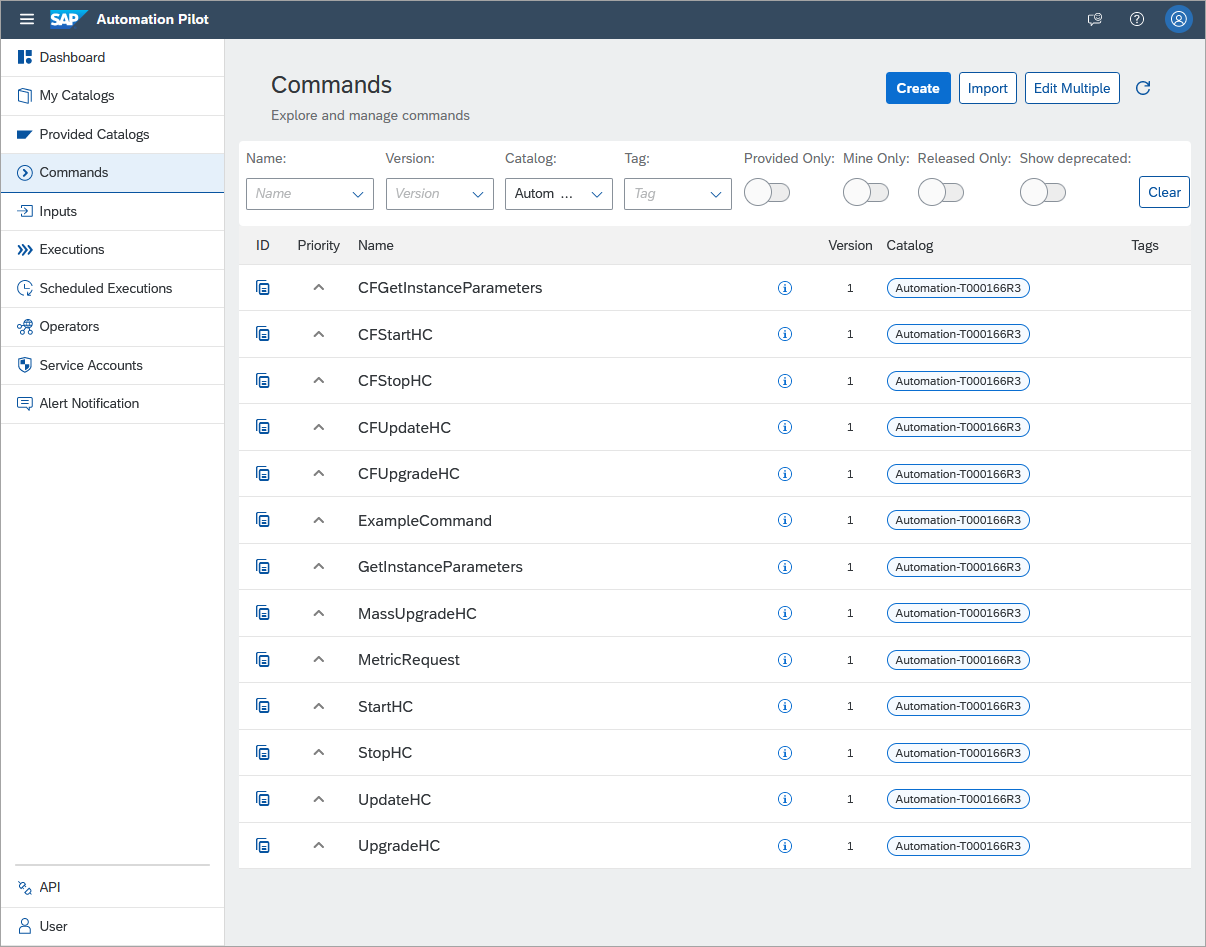
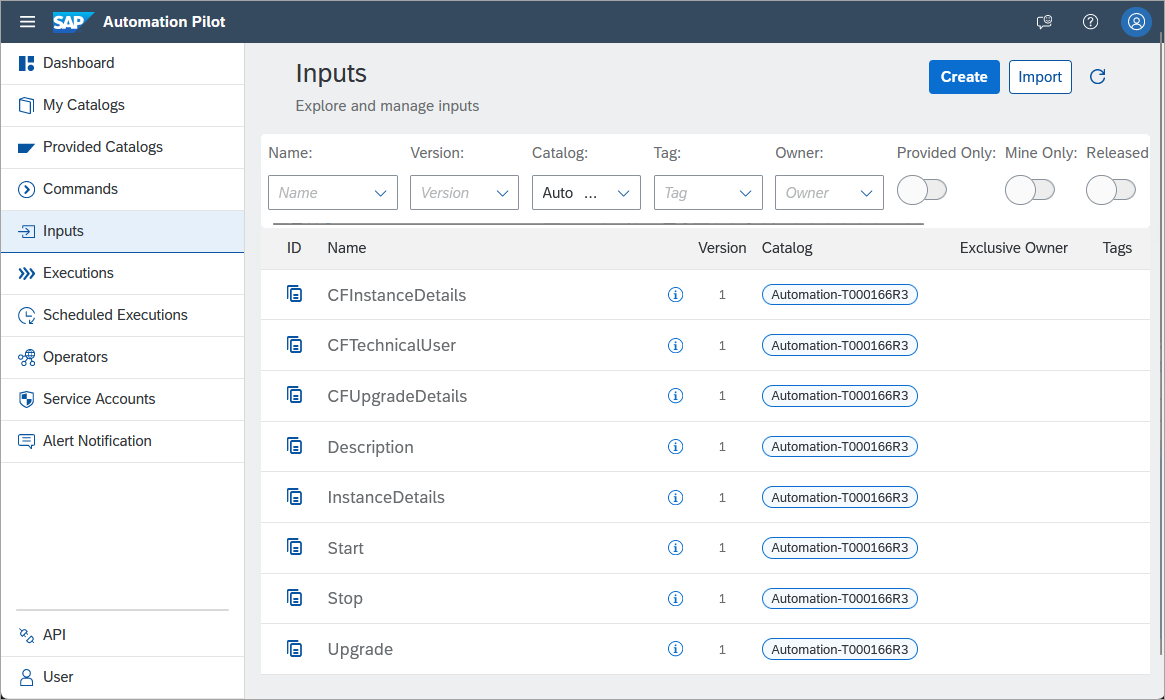
Commands The list of inputs are shown below. Notice that the names that start with CF are for instances that were provisioned to Cloud Foundry.
Inputs Trigger the ExampleCommand. It provides an array input of [1, 2, 3, 4, 5] and transforms the input using dynamic expression which uses jq. A playground is available for jq at jq play.
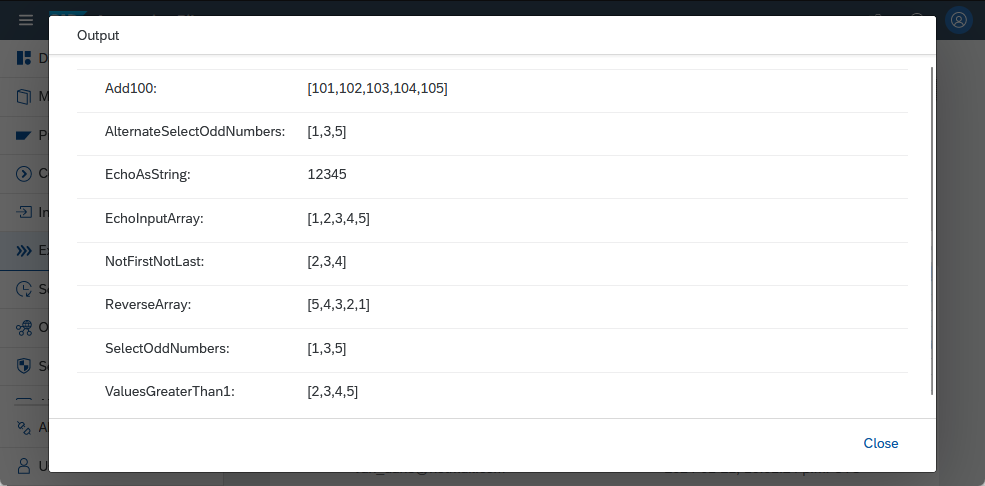
example command 
jq play
Further examples can be found at automation pilot examples.
The examples shown include commands to start, stop, update, access instance metrics, and upgrade an SAP HANA Cloud instance. The commands make use of a common input parameter that specifies the instance to target.
Modify the input key InstanceDetails to match the SAP HANA Cloud instance that you wish to work with.

Update the input instance details The instanceBindingKey value is required the by the MetricRequest command and comes from a service binding key created on an SAP HANA Cloud instance.
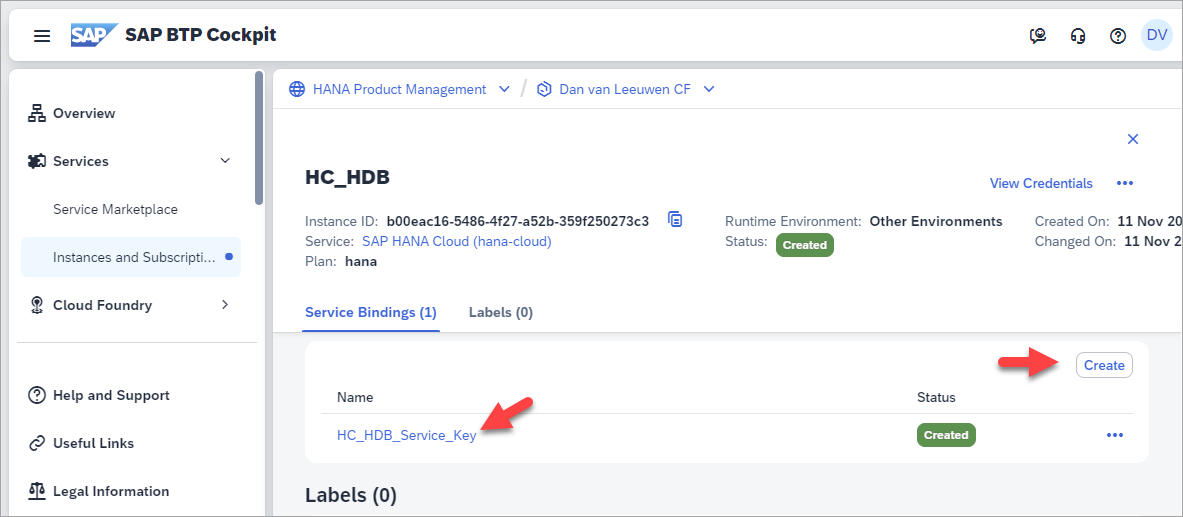
service key on an SAP HANA Cloud instance The smBindingKey value is required for the MassUpgradeHC command and comes from a binding on a service manager instance that was created in the previous tutorial.
The commands StartHC and StopHC can be used to start and stop a SAP HANA Cloud instance.
Open the command StartHC.

inputs for the start command Examine the Additional Values section for the input. Notice that it has as its inputs InstanceDetails which describes which SAP HANA Cloud instance to target and Start which contains the JSON that specifies how to update the serviceStopped state.

serviceStopped JSON parmameter Examine the executor named update. Notice that it makes use of one of the provided commands
sm-sapcp:UpdateServiceInstanceand that its inputs are taken from inputs just examined.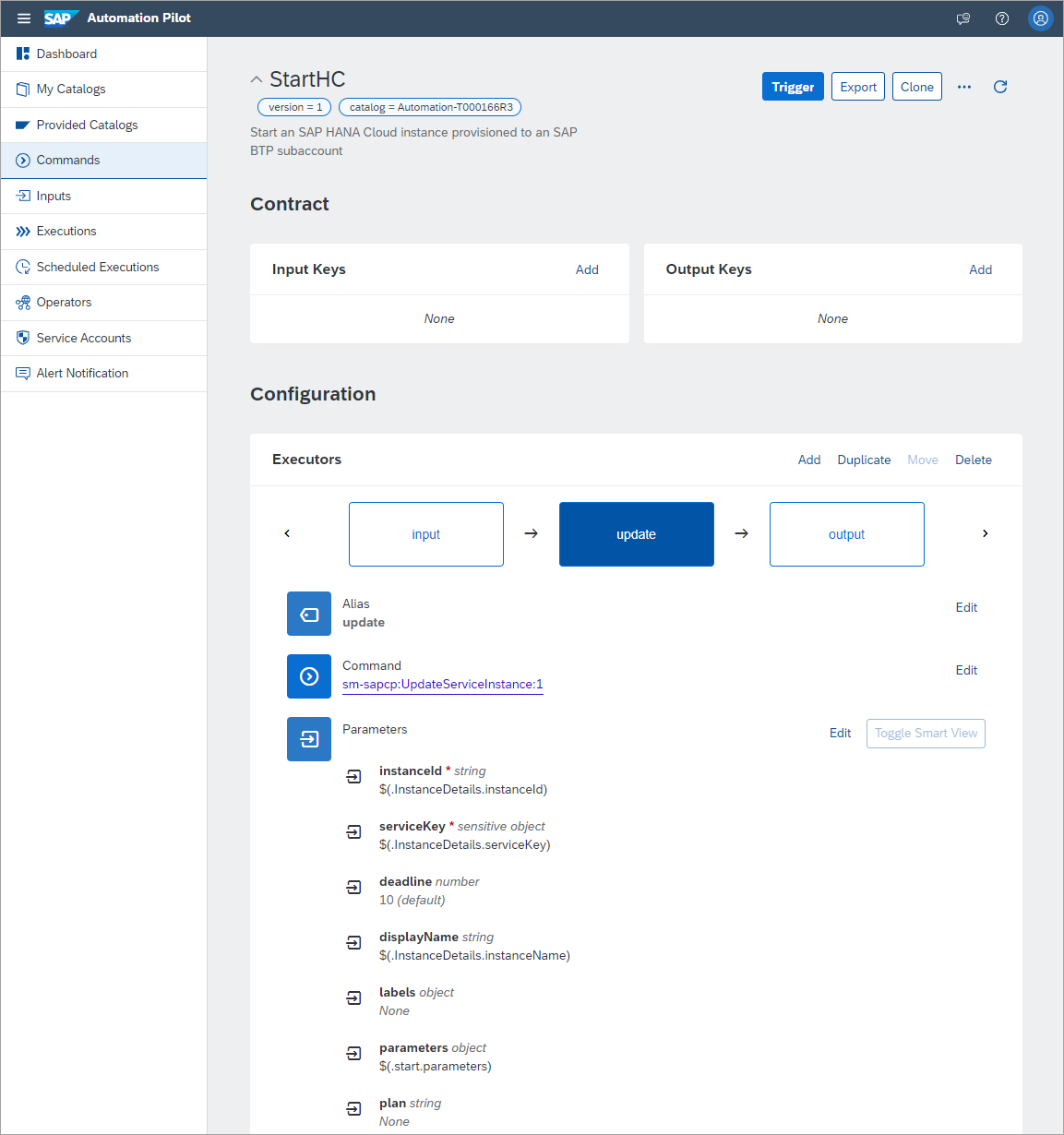
start executor Trigger the command.

Trigger the command No additional inputs are required.
The command will then complete, and its status can be examined.
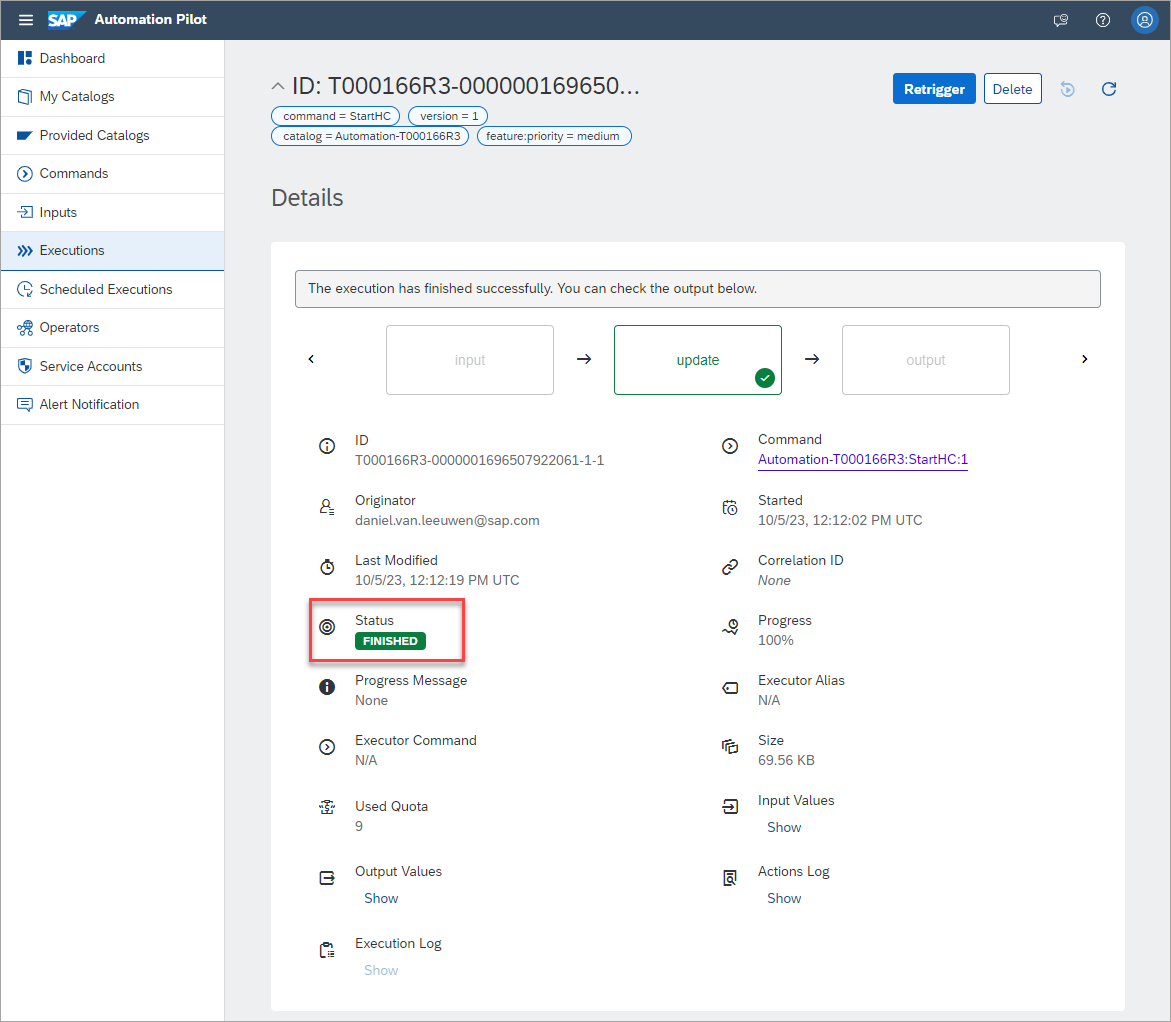
completed command The status of the SAP HANA Cloud instance will update to Starting.
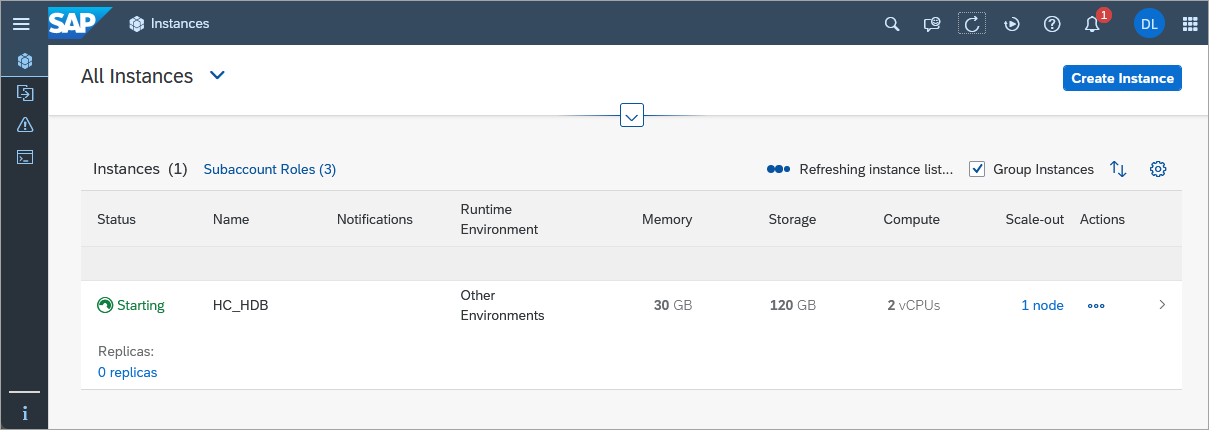
HCC starting
Open the command UpdateHC. It can be used to perform an update of an SAP HANA Cloud instance.
Examine the Description input parameter. This parameter describes the change that will be made.

update the description In this case the update will be to the description of the instance but other parameters could be updated as described at Parameter Reference.
Trigger the command. Once the command has completed, the description will appear as shown below in SAP HANA Cloud Central.
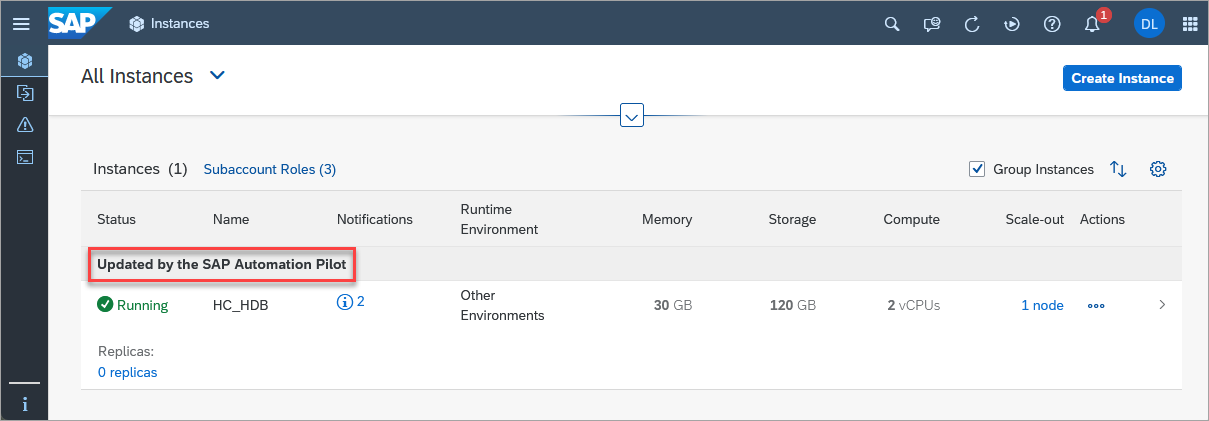
updated description
Open the command CheckMetric. It can be used to access a metric value from an SAP HANA Cloud instance. In this example, the metric HDBConnectionCount will be used which returns the number of open SQL connections and is measured every 60 seconds for the previous hour. The command will request these metrics and then count the number of occurrences where the number of open connections was above a specified threshold. Additional details on accessing database metrics using a REST API can be found at Access SAP HANA Cloud Alerts and Metrics using a REST API. Before proceeding, add a service binding to the SAP HANA Cloud instance that will be used as described in the step 1, substep 1 of the tutorial mentioned above.
Examine the InstanceDetails input parameter. This parameter contains an instanceBindingKey which contains the service binding for an SAP HANA Cloud instance. The contained credentials (clientid and clientsecret) will be used to access the metrics API.

Instance Binding Key Examine the getToken executor. It is used to get a bearer token that can be used as authentication when invoking a REST API call against the metrics or alerts APIs. It makes use of the values uaa.url, clientid, and clientsecret from the instanceBindingKey.

getToken executor Examine the metricRequest executor. It is used to get the metric HDBConnectionCount and uses the bearer or access token returned from the previous executor.
The URL used will need to be updated to match your environment. Note the default URL uses prod-us10.

metricRequest Executor Examine the command’s output.
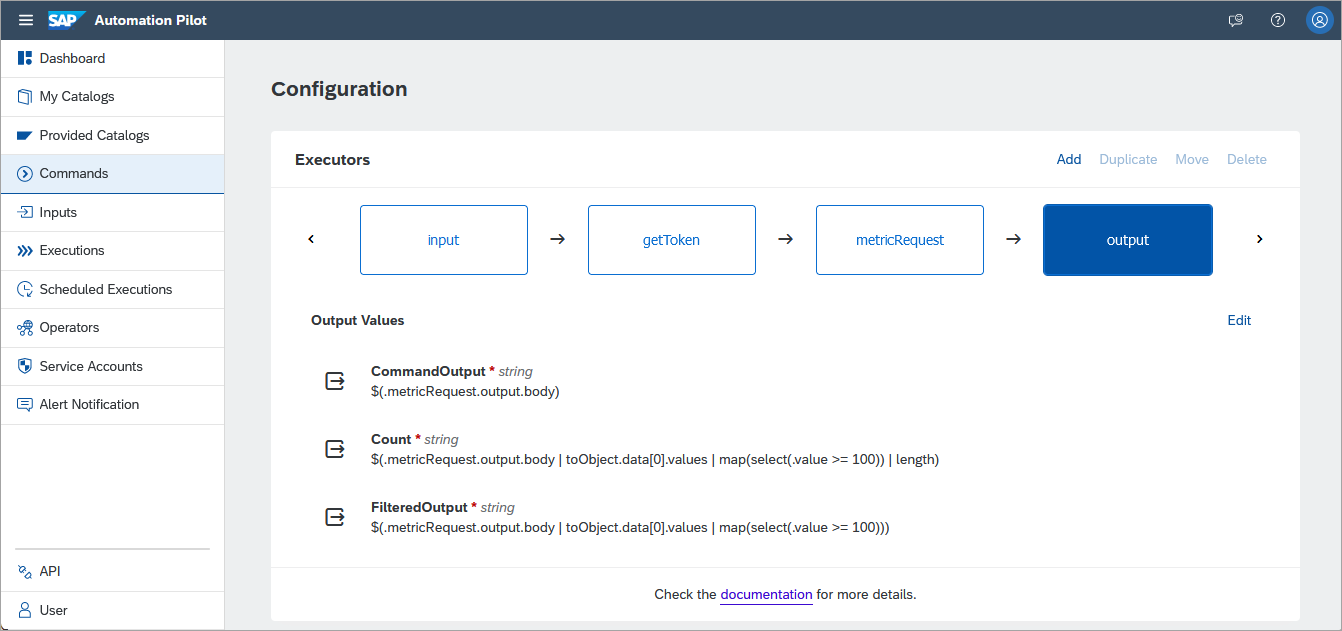
output Trigger the command and view the output. Notice that in the last hour, the number of open SQL connections exceeded 100 four times.
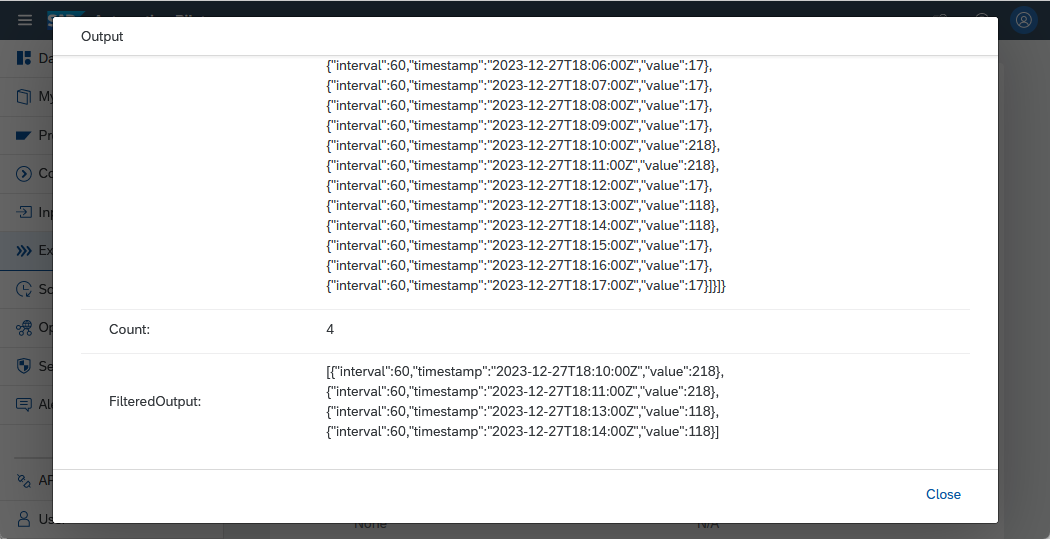
number of times above threshold
This example could be further extended by scheduling this check to run on a set schedule and to send an email if the count was above a certain threshold.
It should be noted that connection details are also available in the system view M_CONNECTIONS. The number of currently open connections can be determined by using a SQL query such as the one shown below.
SQLSELECT * FROM PUBLIC.M_CONNECTIONS WHERE END_TIME is NULL;
CodeOpen the command UpgradeHC. This command takes an input parameter to specify the instance to target. It can be used to perform an upgrade of an SAP HANA Cloud instance and selects the instance to upgrade to from a value returned by a call to GetInstanceParameters. This command could then be scheduled to run nightly or weekly which would then keep the SAP HANA Cloud instance running using the latest available patch or update.

UpgradeHC2 command Prior to triggering the command, examine the instance in SAP HANA Cloud Central.
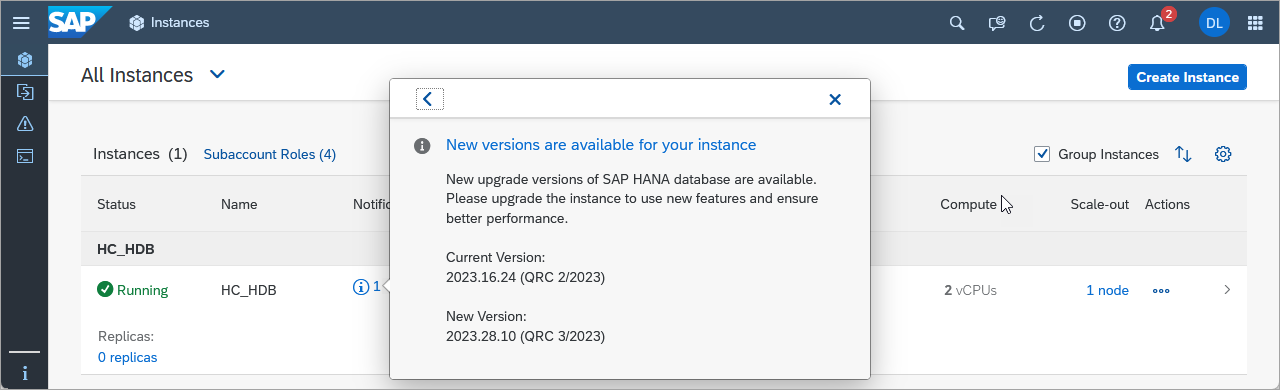
Viewing available upgrade details in HCC Trigger the command and examine the output.

updgrade HC Output Once the command completes, the notification that there is a new version available will disappear and the new version will be shown in SAP HANA Cloud Central.
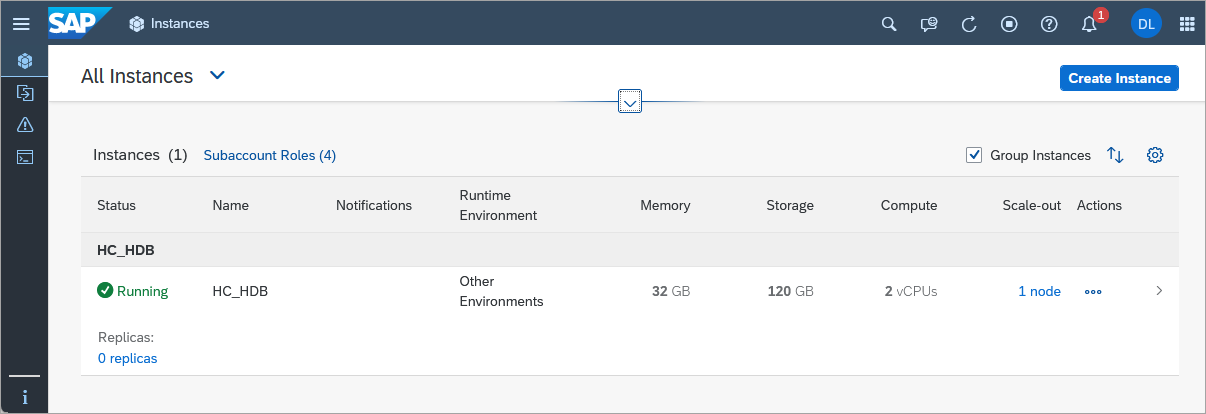
HCC After the upgrade If there is not an available version to update to, an error message is shown.
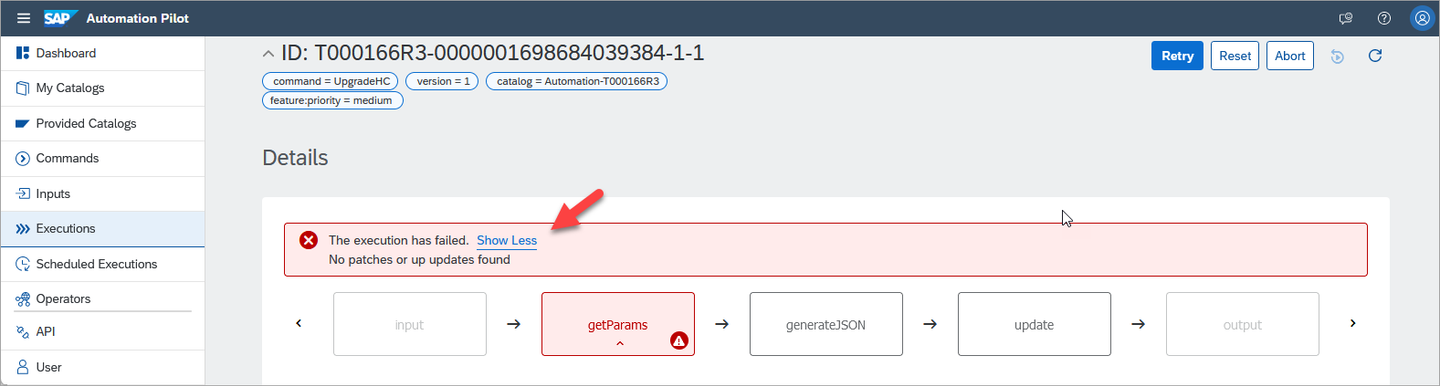
no version to update to This check is performed in the validation step of the command getParams.
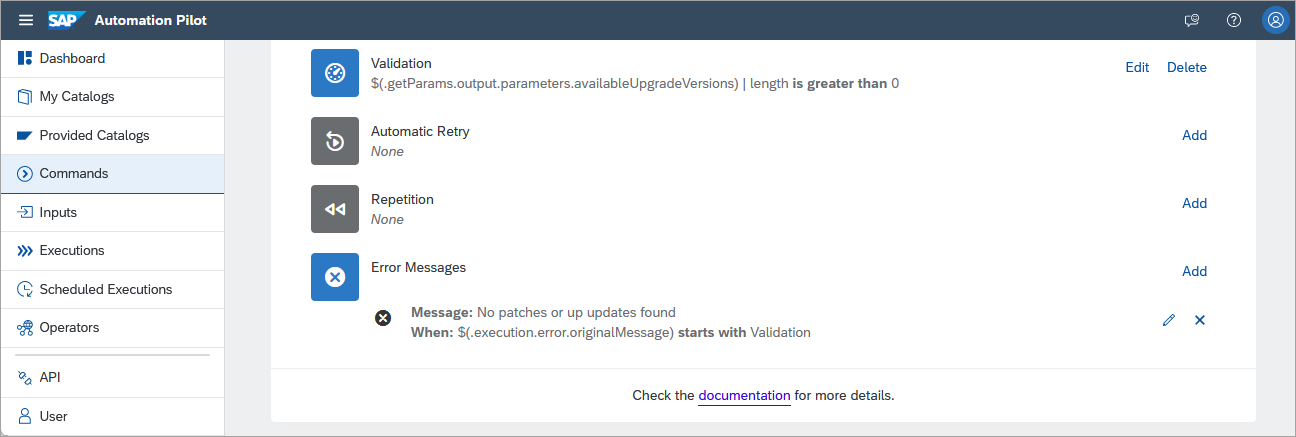
validate step This is performed using a dynamic expression which uses jq. A playground is available for jq at jq play.
Additional customization can be performed in the generateJSON command.

generate Update JSON If no further customization is needed, the JSON could instead be specified directly in the parameter parameters in the upgrade executor using the below JSON.
JSON{ "data": { "productVersion": { "releaseCycle": "generally-available-quarterly", "track": "$(.getParams.output.CommandOutput.availableUpgradeVersions[0].track)", "id": "$(.getParams.output.CommandOutput.availableUpgradeVersions[0].id)" } } }
Open the command MassUpgradeHC. This command takes two input parameters. The parameter InstanceDetails includes the smBindingKey which is used for authentication and the servicePlanId is used as a filter to return only SAP HANA Cloud instances in the getInstances executor. The parameter Upgrade specifies the product version that should be used when upgrading the list of SAP HANA Cloud instances.

UpgradeHC3 command Prior to triggering the command, examine the instances in SAP HANA Cloud Central and note any instances that have an upgrade available to them.
Viewing available upgrade details in HCC The getInstances executor returns the list of SAP HANA Cloud instances that have been deployed to the subaccount. It does not include instances deployed to a Cloud Foundry space.
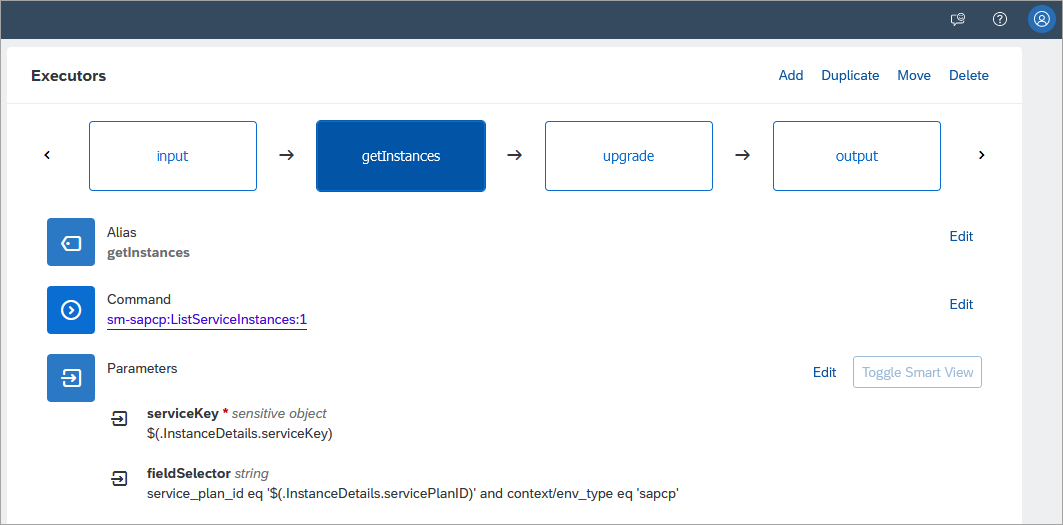
getInstances executor The upgrade executor loops through the list of instances returned by getInstances and attempts to upgrade each instance.

upgrade executor After triggering the command, examine the instances in SAP HANA Cloud Central and note that they now have been upgraded to the specified version.
The output of the command also indicates the list of instances found.
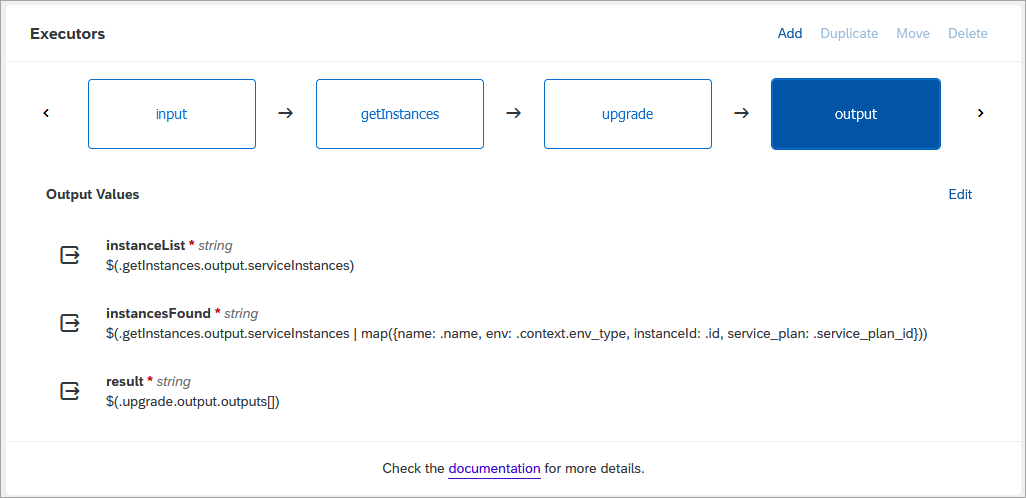
MassupgradeHC output
The examples shown include commands to start, stop, update, and upgrade an SAP HANA Cloud instance. The commands make use of two common input parameters that specify the instance to target and the credentials to use.
Modify the input keys to match the SAP HANA Cloud instances that you wish to work with.
Open CFInstanceDetails.

Update the input instance details The values can be found on the Overview page of the subaccount page. Note that guid values can also be used for the Cloud Foundry Org name and space name. Ensure that there is not a new line character following the values to ensure that an error message about the URL being malformed does not occur.

subaccount overview page Open CFTechnicalUser.
Enter your Cloud Foundry user and password. The user must not have two factor authentication enabled.
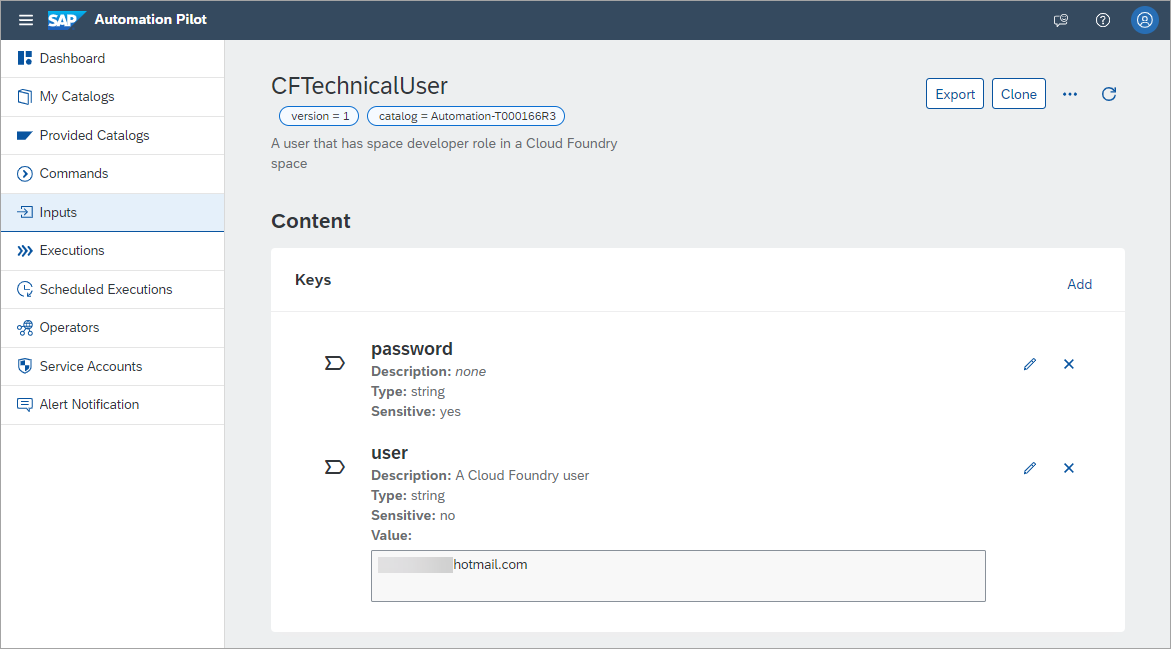
Cloud Foundry technical user
The commands CFStartHC and CFStopHC can be used to start and stop a SAP HANA Cloud instance.
Open the command CFStartHC.
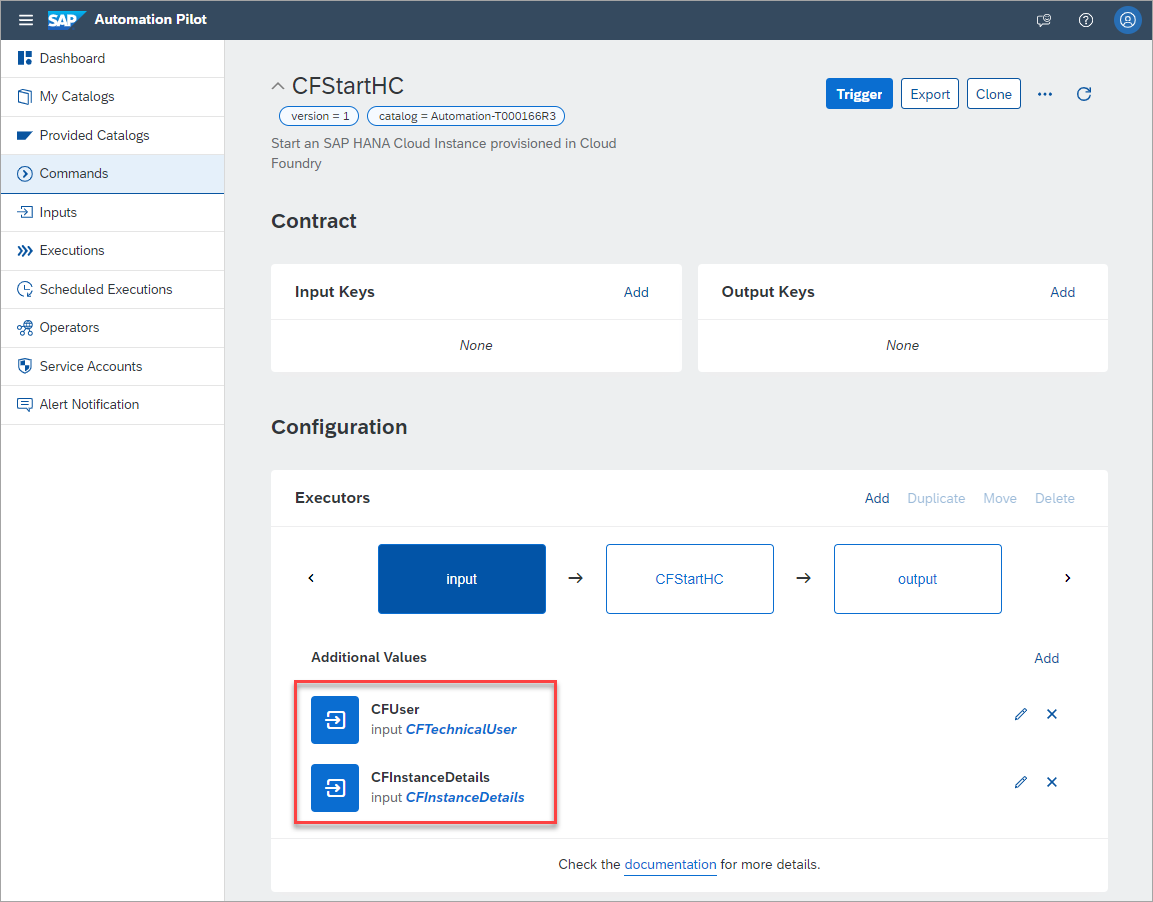
inputs for the start command Notice that it has as its inputs CFUser which provides the technical user details and CFInstanceDetails which describes which SAP HANA Cloud instance to target.
Notice that the executor named CFStartHC makes use of one of the provided commands
dblm-sapcp:StartHanaCloudInstanceand that its inputs are taken from inputs just examined.
cf start executor Trigger the command.

Trigger the command No additional inputs are required.
The command will then complete, and its status can be examined.

completed command The status of the SAP HANA Cloud instance will update to Starting.

HCC starting An addition example that demonstrates how to perform start and stop operations on multiple instances at once is available at Mass Stop/Start HANA Cloud Databases.
Open the command CFUpdateHC. The command can be used to perform an update of an SAP HANA Cloud instance.
Examine the Description input parameter. This parameter describes the change that will be made.
update the description In this case the update will be to the description of the instance but other parameters could be updated as described at Parameter Reference.
Trigger the command and notice that the description will appear as shown below in SAP HANA Cloud Central after the command has finished executing.

updated description
Open the command CFUpgradeHC. It can be used to perform an upgrade of an SAP HANA Cloud instance. This command takes two input parameters; one to specify the instance to target and another for the credentials to use. The command can be used to perform an upgrade of an SAP HANA Cloud instance and selects the instance to upgrade to from a value returned by a call to GetCfServiceInstance. This command could then be scheduled to run nightly or weekly which would then keep the SAP HANA Cloud instance running using the latest available patch or update.

CFUpgradeHC command Prior to triggering the command, examine the instance to be upgraded in SAP HANA Cloud Central.

Viewing available upgrade details in HCC Trigger the command and examine the output once it completes.

updgrade HC Output In SAP HANA Cloud Central, the notification that there is a new version available will disappear and the new version will be shown.
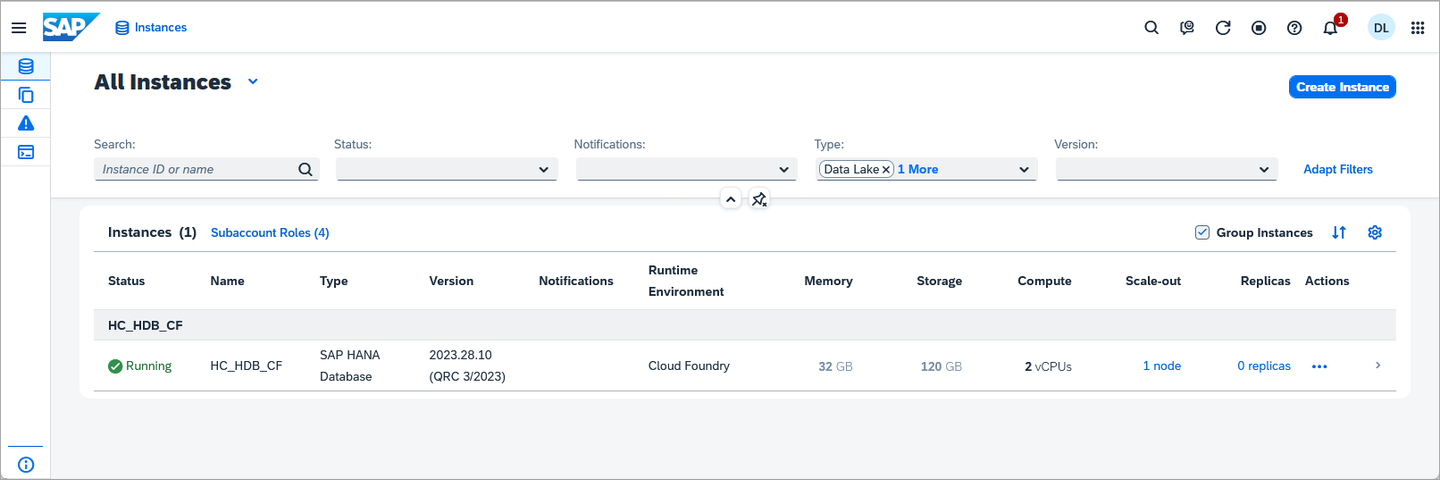
HCC After the upgrade If there is not an available version to update to, an error message is shown.
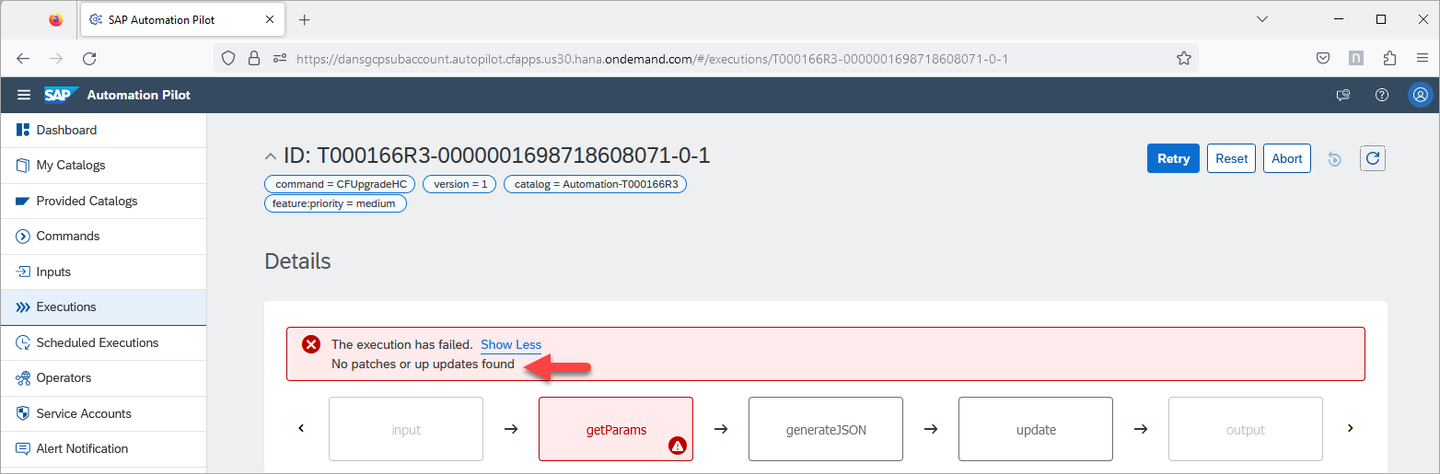
no version to update to This check is performed in the validation step of the command getParams.
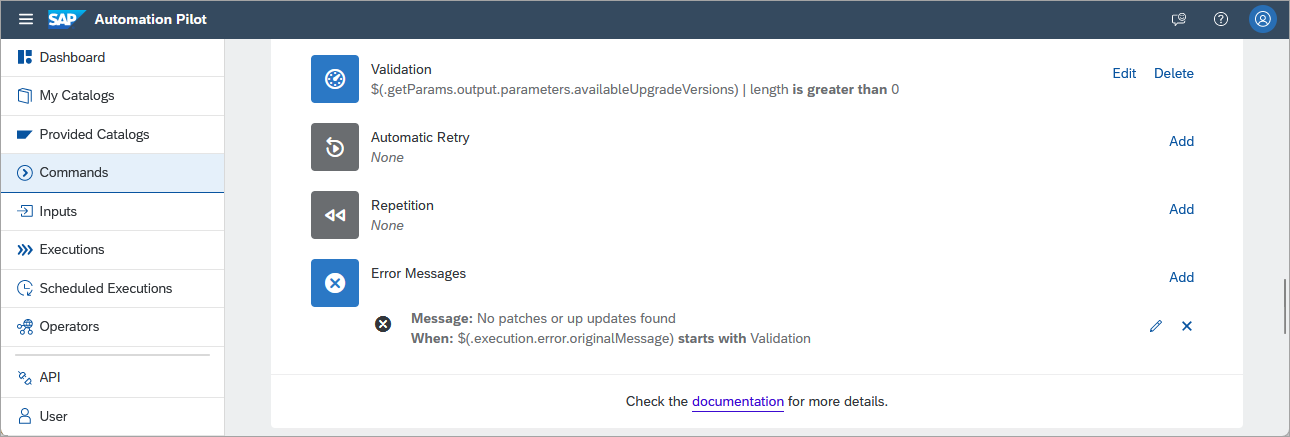
validate step This is performed using a dynamic expression which uses jq. A playground is available for jq at jq play.
Additional customization can be performed in the generateJSON command.

generate Update JSON If no further customization is needed, the JSON could instead be specified directly in the parameter parameters in the upgrade executor using the below JSON.
JSON{ "data": { "productVersion": { "releaseCycle": "generally-available-quarterly", "track": "$(.getParams.output.parameters.availableUpgradeVersions[0].track)", "id": "$(.getParams.output.parameters.availableUpgradeVersions[0].id)" } } }An additional upgrade example is available at Patch Update of HANA Cloud Database.
Congratulations! You have now used the SAP Automation Pilot to run commands against an SAP HANA Cloud instance.
Resources
Discussion
Share feedback on this tutorial or join the conversation in SAP Community.