
Alerts in SAP HANA Database and Data Lake
Learn how to configure and view SAP HANA Cloud alerts and how the SAP Alert Notification service for SAP BTP can be used to send alerts to other channels.
Overview
You will learn
- An overview of alerts
- How to configure, trigger, and access alerts
- How to use the SAP BTP Alert Notification service (ANS) to be notified of alerts


Prerequisites
Prerequisites
- Access to a SAP HANA Cloud instance.
Steps
Intro
Alerts can inform you of potential issues before they occur, such as when the number of rows in a SAP HANA database table is approaching 2 billion, or of an issue currently occurring, such as a user in a data lake Relational Engine is locked out.
You can find details of any raised alerts through the alerts app in SAP HANA Cloud Central or by using the REST API (SAP HANA database). This is known as a pull approach.
Alternatively, alert details can be pushed to several configured channels such as email, Slack, or Microsoft Teams. A list of built-in events can be found at SAP HANA Cloud Service Database Events.
Access help from the SAP community or provide feedback on this tutorial by navigating to the “Feedback” link located on the top right of this page.
In this step, SAP HANA Cloud Central will be used to examine alert definitions.
Open Alerts from HANA Cloud Central.

Open Alerts SAP HANA Cloud Central has an alerts app to view triggered alerts. It displays alerts for all instances in a subaccount and additionally displays additional alerts that do not originate from the SAP HANA embedded statistics server (ESS). Events corresponding to ESS alerts have an alert ID.
The three alerts that will be triggered in step 3 of this tutorial are
HDBCSTableRecordCount,HDBLongRunningStatement, andHDBTestAlert.You can find these alerts by selecting Configure Alert Rules.

Configure Alert Rules Then select an instance and search for the alerts.
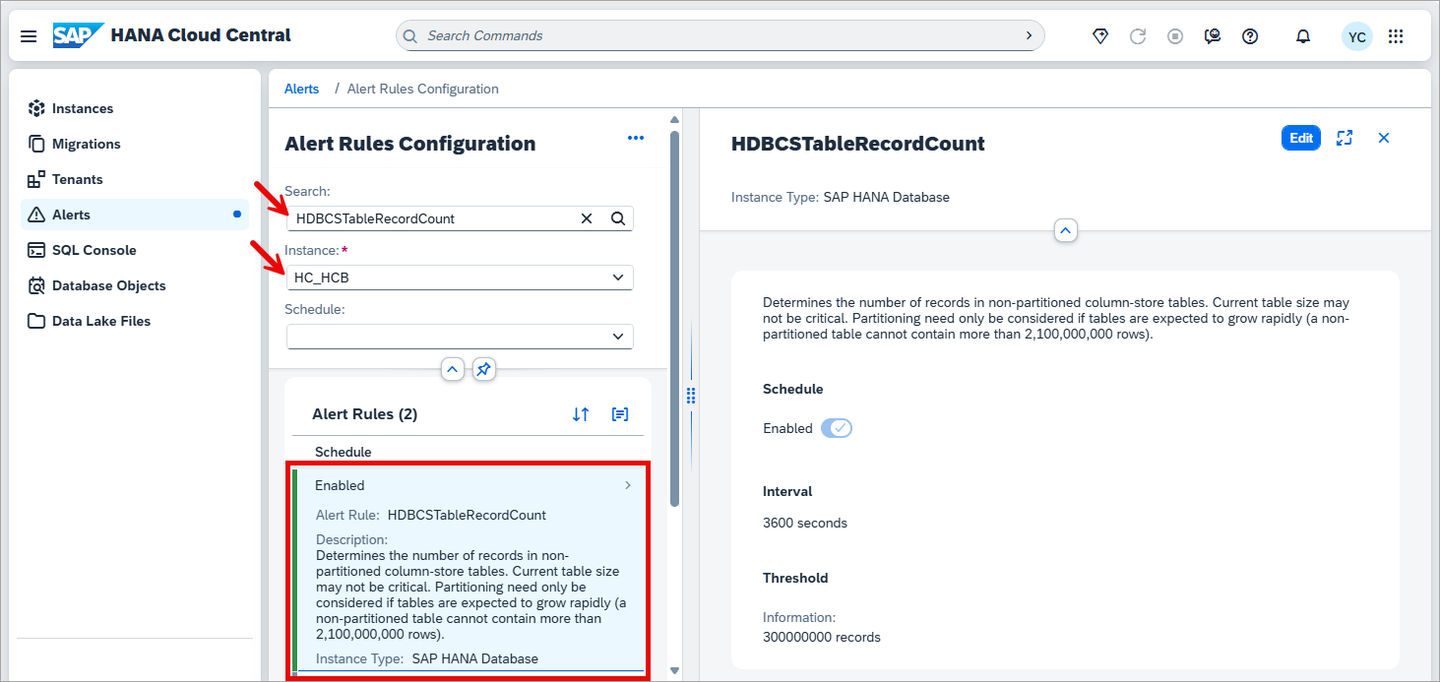
Configure Alert Rules Search Notice that alerts have a name, description, and categories.
The categories are shown below.
SAP HANA Database Categories Description Schedule Checks run at a fixed point in time, such as once a day Interval Checks run repeatedly on a recurring schedule, such as every hour Threshold Triggered when a measured value crosses a defined limit, such as disk usage exceeding 90% Alerts may have threshold levels. As an example, long-running statements, has its threshold values set to 60 minutes for Warning, 45 minutes for Notice, and 30 minutes for Information. These will be set to much lower thresholds of 3, 2 and 1 minutes in step 3.

long running statement updated thresholds Alert checks are scheduled to run at a specified interval and can be enabled or disabled. For example, record count of non-partitioned column-store tables (
HDBCSTableRecordCount) has an interval value of 1 hour, meaning that this check is performed each hour and is currently enabled.
enabled and interval Alerts also have a retention period. Once triggered, depending on their type, they will remain for a set duration such as 14 or 42 days.
For additional details, consult Alerts in SAP HANA Cloud in the SAP HANA Cloud administration guide.
Alert rule sets allow you to define a named collection of alert rules with custom thresholds and apply them to multiple instances at once. This is useful for enforcing consistent alerting standards across an environment without having to configure each instance individually.
SAP HANA Cloud Central makes it possible to manage alert rules across all instances in a subaccount from a single place. Alert rule sets are the recommended approach when the same thresholds should apply to more than one instance.
Navigate to the Configure Alert Rules panel, and select the Alert Rule Sets tab.

Alert Rule Sets tab Click Create Alert Rule Set.
Provide a title for the rule set, then select the alert rules you want to include and configure their thresholds.
Select the instances the rule set should apply to. Instances can be filtered by environment, region, or type, or selected individually.
Review the selected instances and rule set configuration, then click Create to apply. The configured alert thresholds will be applied to all selected instances.
To verify consistency across instances or identify configuration differences, use the Compare Alert Rules button in the Alerts app, located next to Configure Alert Rules.
Select up to 10 instances to compare. The comparison view shows the alert rule configuration for each selected instance side by side, making it easy to spot differences in thresholds or enabled/disabled states.
This is useful for validating that a rule set was applied consistently, identifying configuration drift between instances, or planning standardization before applying a rule set.
The following instructions demonstrate a few examples of triggering alerts in a SAP HANA database.
Perform these actions on a non-production system, such as a trial or free tier account.
Open the SQL console.

Open the database explorer Execute the following query in the SQL console to trigger a high (indicated by the parameter value of 4) severity test alert.
SQLCALL _SYS_STATISTICS.Trigger_Test_Alert(?, 4, 'High test alert');
Severity Test Alert The alert will be viewed in the alerts app in step 3.
Trigger the long-running statements alert.
Click Configure Alert Rules and select your instance. Then, search for the Long-running statements alert (
HDBLongRunningStatement) in search bar.Select Edit and set the thresholds to 180, 120, and 60 seconds. The interval time set to 5 minutes by default.

Threshold setting Execute the following SQL.
SQLDO BEGIN USING SQLSCRIPT_SYNC AS SYNCLIB; CALL SYNCLIB:SLEEP_SECONDS( 300 ); --the SQL runs for 5 minutes -- Now execute a query SELECT * FROM M_TABLES; END;The record count of non-partitioned column-store tables alert can be triggered by executing the following SQL.
SQL--The default threshold for 'Record count of non-partitioned column-store tables' is 300 million -- This SQL may take a minute or two to run -- Create a table and insert more than 300 million rows into it DO BEGIN DECLARE i INT; CREATE TABLE MYTABLE(MYVALUE INT); INSERT INTO MYTABLE VALUES(1); INSERT INTO MYTABLE VALUES(2); INSERT INTO MYTABLE VALUES(3); INSERT INTO MYTABLE VALUES(4); INSERT INTO MYTABLE VALUES(5); FOR i IN 1 .. 26 DO INSERT INTO MYTABLE (SELECT * FROM MYTABLE); END FOR; SELECT COUNT(*) FROM MYTABLE; END; SELECT TOP 100 * FROM MYTABLE; -- To resolve, partition the table -- ALTER TABLE MYTABLE PARTITION BY HASH(MYVALUE) PARTITIONS 5; -- Clean up -- DROP TABLE MYTABLE;Note that two other alerts may also be triggered by the above SQL: table growth of non-partitioned column-store tables and record count of column-store table partitions.
The following instructions will show how to view a triggered SAP HANA database alert in SAP HANA Cloud Central.
In SAP HANA Cloud Central, alerts can be seen for all instances in an SAP BTP subaccount. Navigate to the alerts tab.
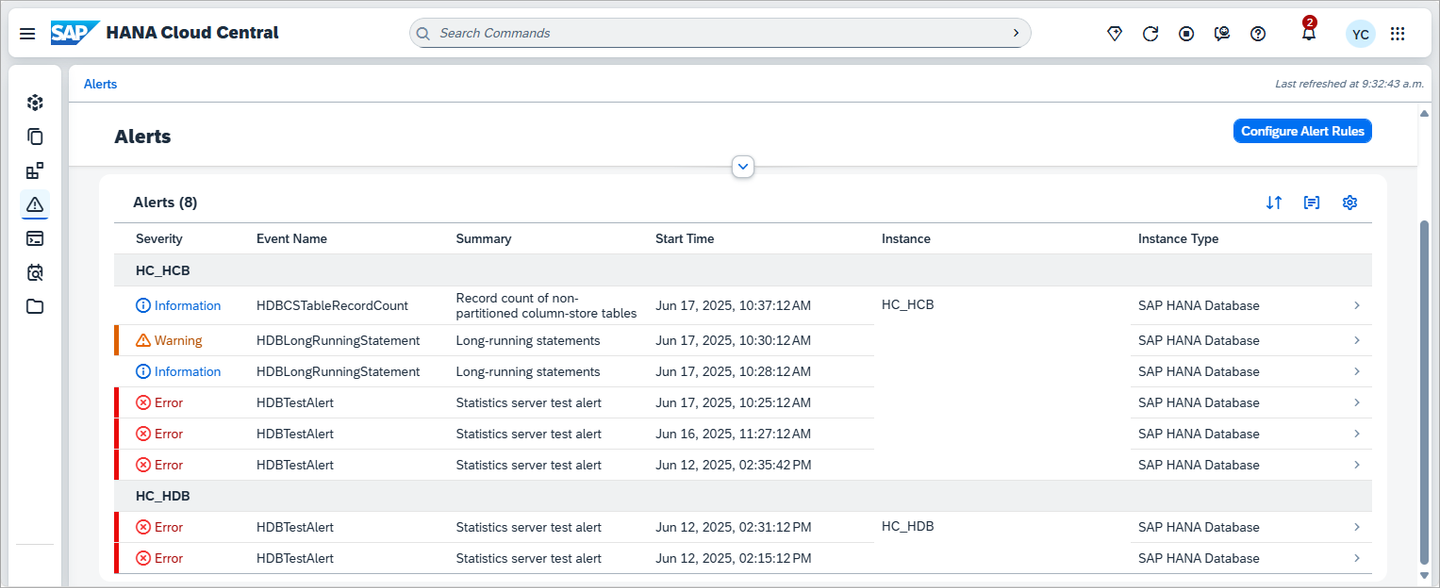
subaccount alerts view A filter can be set for Type, Severity, Instance, Instance Type, Time Range, and Category.

alerts view in HCC Alerts can be filtered by Current or All. Current Alerts have a Start Time value but no End Time value, as the end time is added when the alert is closed. Closed alerts appear in type filter All rather than Current.
Additional details can be found in Open Alerts in SAP HANA Cloud Central.
Details about a SQL statement from a long-running statement alert can be found out with the following query. The statement hash can be found in the alert description.
SQLSELECT STATEMENT_STRING FROM M_SQL_PLAN_CACHE WHERE STATEMENT_HASH='XXXXXXXXXXXXXXXXXXXXX';
using the statement hash You can find the statement hash here:

statement hash The test alert will resolve itself after 5 minutes or be resolved (indicated by the parameter value of 0) by executing the following statement.
SQLCALL _SYS_STATISTICS.Trigger_Test_Alert(?, 0, 'Resolve test alert');Additional details on the test alert are available at SAP Note 3004477 - Usage of statistics server test alert (ID 999).
Active alerts for each instance can also be seen at a glance directly from the Instances page in SAP HANA Cloud Central, without navigating to the Alerts app. The Alerts column displays a count of active alerts per instance, grouped by severity using icons — a warning icon for warnings and an info icon for informational alerts. Navigate to the Alerts app for full details on any triggered alert.

Alerts column on instances page
Alerts can also be accessed via a REST API as shown at Accessing SAP HANA Cloud Alerts and Metrics using a REST API.
The following instructions show one example of triggering the data lake locked user event. The alert will be triggered when a user attempts to log in after the user account has been locked because an incorrect password has been provided too many times.
This alert is not available in trial accounts.
In a SQL console that is connected to a data lake, execute the following SQL to create a login policy and a new user.
SQLCREATE LOGIN POLICY lp max_failed_login_attempts=3; GRANT CONNECT TO user2 IDENTIFIED BY 'Password2'; GRANT SELECT ANY TABLE TO user2; GRANT SET ANY CUSTOMER PUBLIC OPTION to user2; ALTER USER user2 LOGIN POLICY lp;Additional details can be found at Login Policy Options.
The instructions below will attempt to connect to the data lake using user2 but with an incorrect password.
Click on the instance, select the data lake instance, uncheck Use cached credentials if possible.

do not use cachec credentials Enter user2 and an incorrect password.

adding a connection with an incorrect password After pressing OK, an attempt will be made to connect to the data lake. After three failed attempts with an incorrect password, user2 will become locked. This can be seen in the User & Role Management app in SAP HANA Cloud Central.

Locked user2
Attempt to connect one more time after the account has been locked (4th time) to trigger the alert.
The alert can now be seen in the alerts app in SAP HANA Cloud Central.
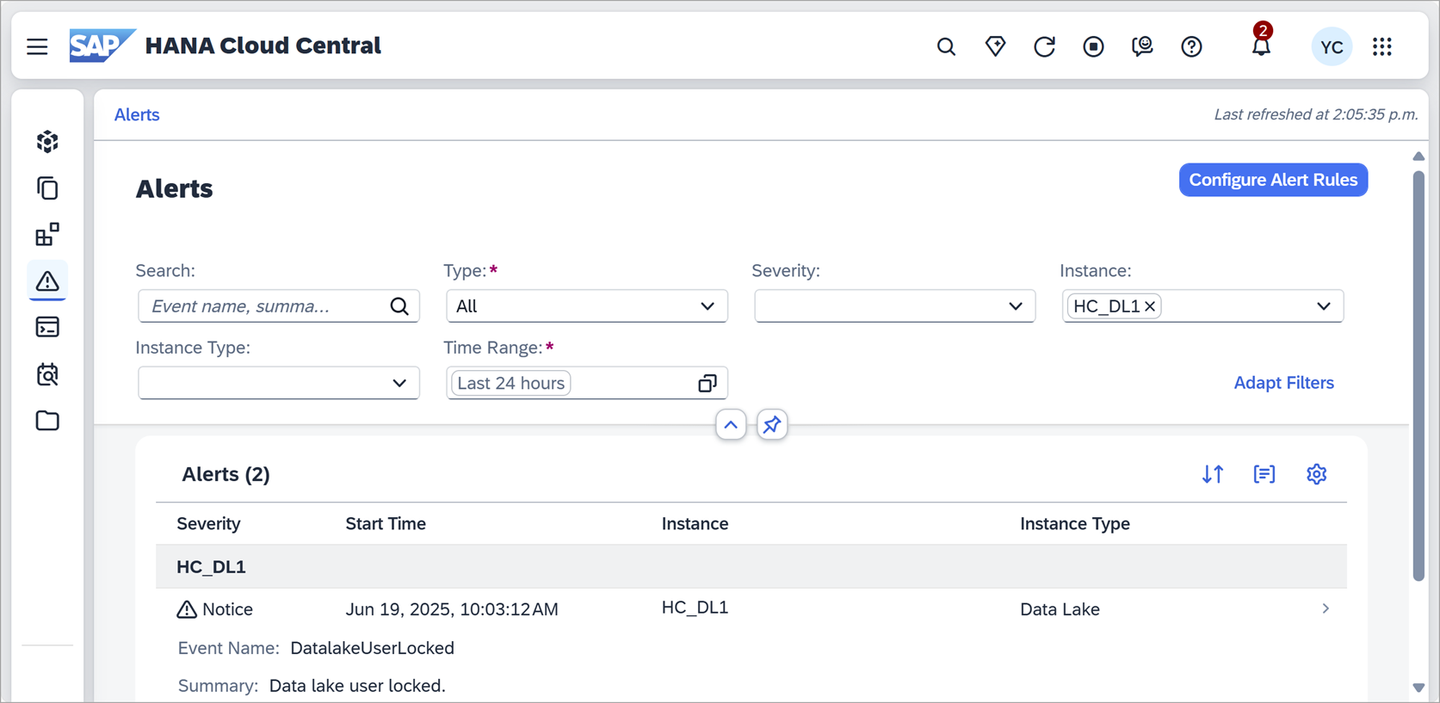
data lake user locked Additional details about users can be seen by calling the procedure
sa_get_user_status. The user can be unlocked using by resetting the login policy.SQLCALL sa_get_user_status; ALTER USER user2 RESET LOGIN POLICY; --DROP USER user2; --DROP LOGIN POLICY lp;The tutorial Monitor a Standalone Data Lake in SAP HANA Cloud may also be of interest as it demonstrates the data lake Relational Engine monitoring views.
The SAP Business Technology Platform (BTP) includes a service called the SAP Alert Notification service for SAP BTP (ANS) that provides a common way for other services or applications running in the SAP BTP to send out notifications such as an email, a post to a Microsoft Teams or Slack channel, the creation of a ticket in ServiceNow, or a webhook to send events to any Internet REST endpoint. The SAP HANA Cloud database and data lake pass on events to the SAP ANS when an alert is triggered.
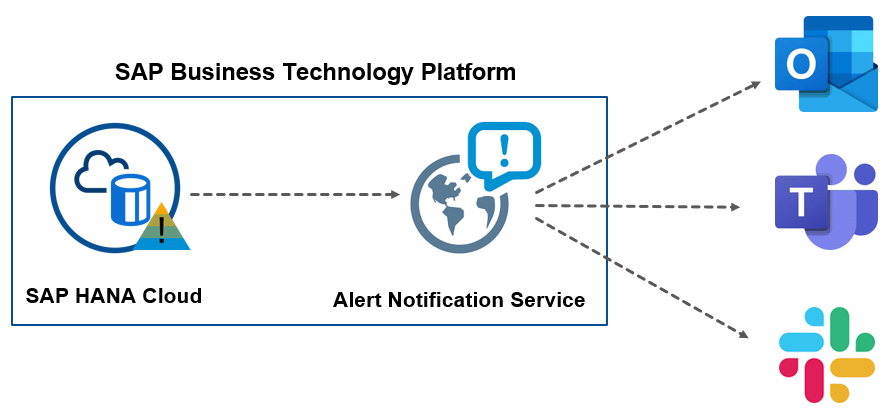
For an overview of the SAP Alert Notification service for SAP BTP and information about the different service plans including free tier, see SAP Alert Notification service for SAP BTP in the SAP Discovery Center and watch the associated video SAP Alert Notification service for SAP BTP - Overview.
In this step, the Alert Notification Service will be configured to act on the incoming notifications by sending an email with the details of the alert. First, an instance of the Alert Notification Service will be created. Then, two conditions will be created; one that matches notifications sent from a SAP HANA database and the other from a data lake. An email action will also be created that describes who to send an email to and what content to include in the email when one of the conditions occurs. Finally, a subscription will be created that will use the two conditions and the action. Having the conditions and actions separate from the subscription enables them to be reused in multiple subscriptions.
Create an instance of the Alert Notification service in the SAP BTP Cockpit.

find the Alert Notification Service The SAP Alert Notification service must be in the same subaccount as the SAP HANA Cloud instances which it will be receiving notifications from.
If the SAP Alert Notification service does not appear, it may be that the entitlement needs to be added to the subaccount. To do so, navigate to the subaccount, select Entitlements, Edit, Add Service Plans, and Alert Notification.

Add entitlements 
Add Alert entitlement Select the Cloud Foundry runtime environment and provide a name for the Alert Notification service instance and press the Create button.

ANS basic information Service Plan Runtime Environment Instance Name Alert Notificationstandard‘Cloud Foundry’ ANS-1Once the instance has been created, click on Manage Instance.

Open ANS instance Create a condition for SAP HANA database alerts by selecting Conditions and then pressing Create.

create condition Specify the condition details and press Create.

create condition details Name Condition HANA-DB-AlertseventTypeStarts WithHDBAlternatively, a condition
resource.resourceTypeset to equalhana-cloud-hdbcould be used.Note that the Mandatory checkbox is left unchecked. This means that this condition can be
ORedwith one or more other non mandatory conditions.
create condition Create another condition for data lake alerts. Specify the condition details and press Create.

assign the condition for data lake Name Condition Data-Lake-AlertseventTypeStarts WithDatalakeCreate an action by selecting Actions and the pressing Create.
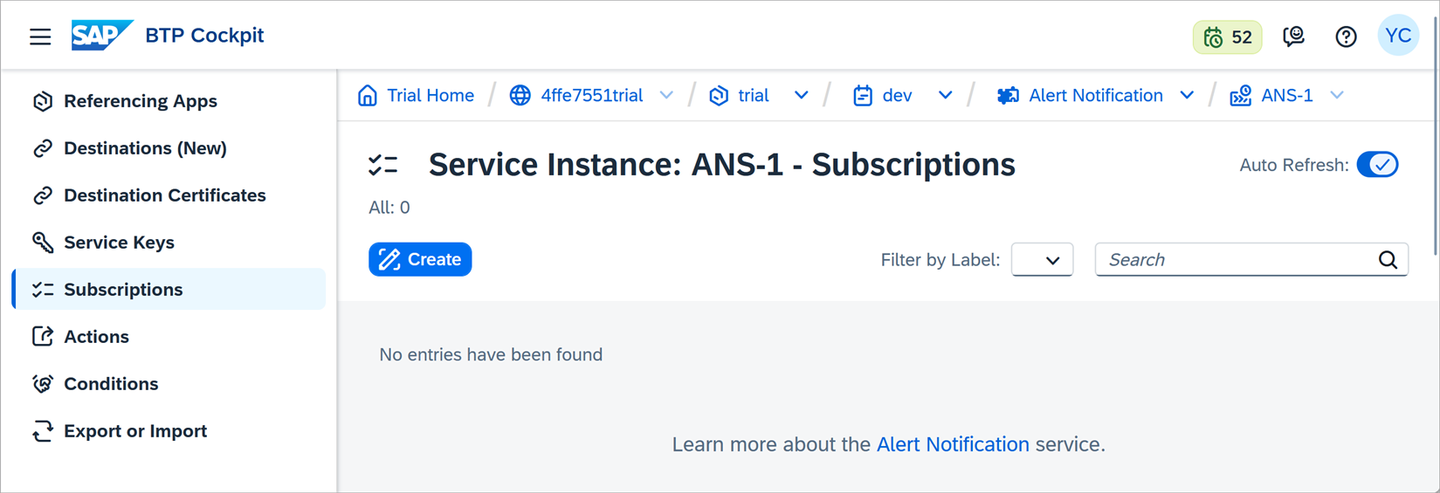
create an action Specify the type of action to be Email.

email action See also Managing Actions for details on other available action types.
Name the action
email_actionand then scroll to the Additional Properties section.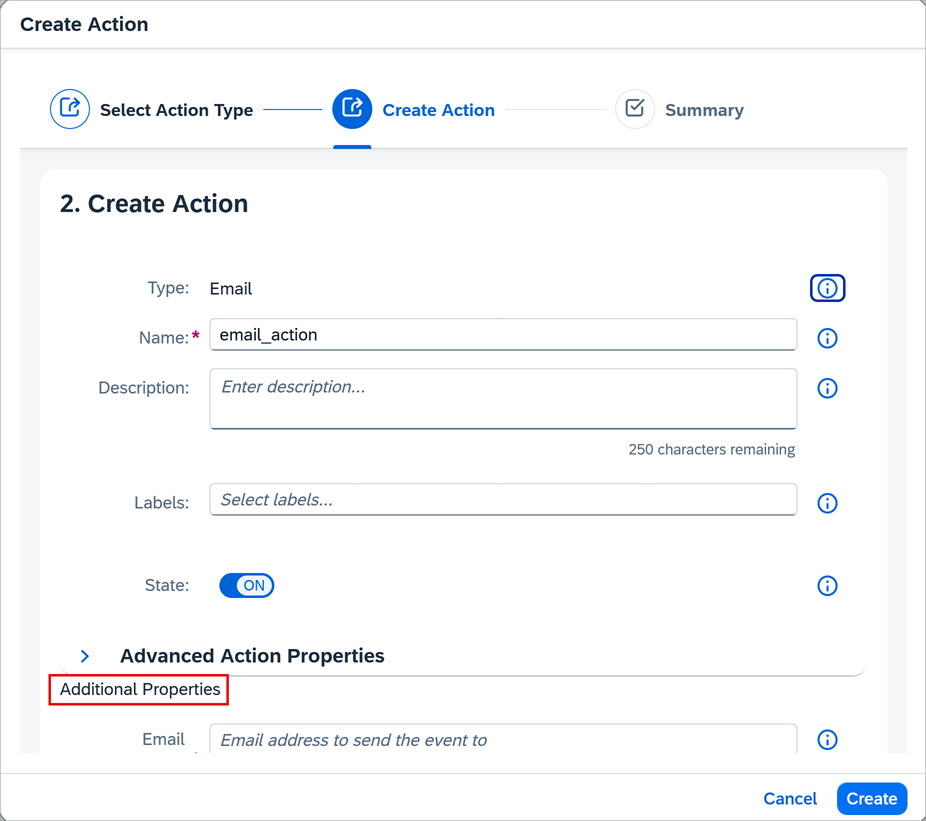
email action details In the Additional Properties section, provide values for Email Address, Subject Template and Payload Template.
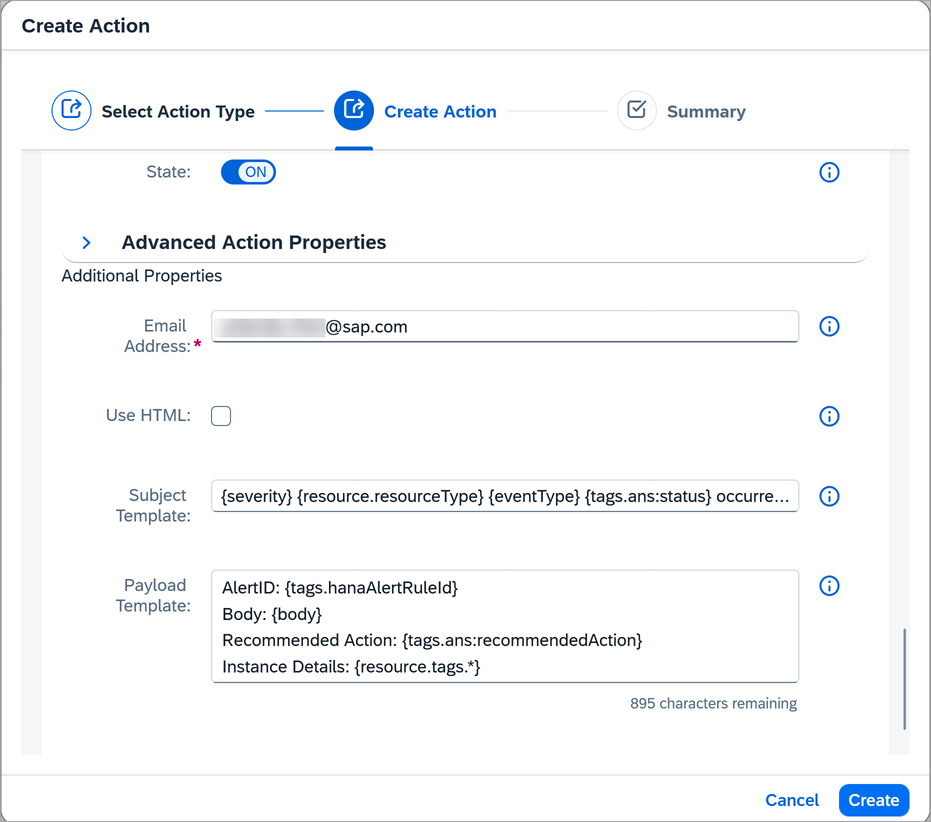
advanced action details Subject{severity} {resource.resourceType} {eventType} {tags.ans:status} occurred on {resource.resourceName}PayloadAlertID: {tags.hanaAlertRuleId} Body: {body} Recommended Action: {tags.ans:recommendedAction} Instance Details: {resource.tags.*}It is also possible to leave the subject and payload template fields empty. In this case, a default template will be used.
Details on the available tags for each alert are provided at Built-In Events.

example documentation A confirmation token will be sent to the email address. Click on the provided link or copy that value and use it to confirm the action as shown in the next sub-step.
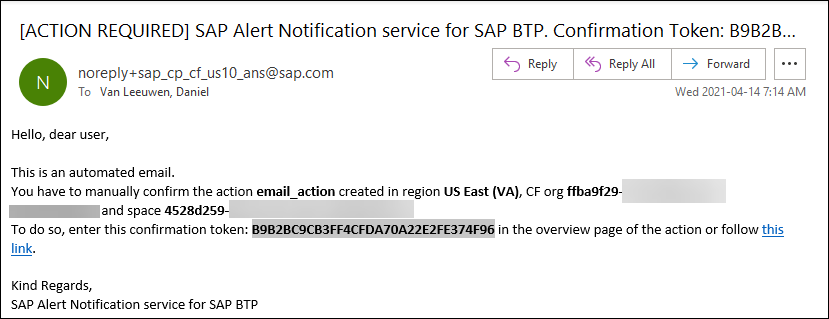
email with confirmation token Click on
email_actionto open it.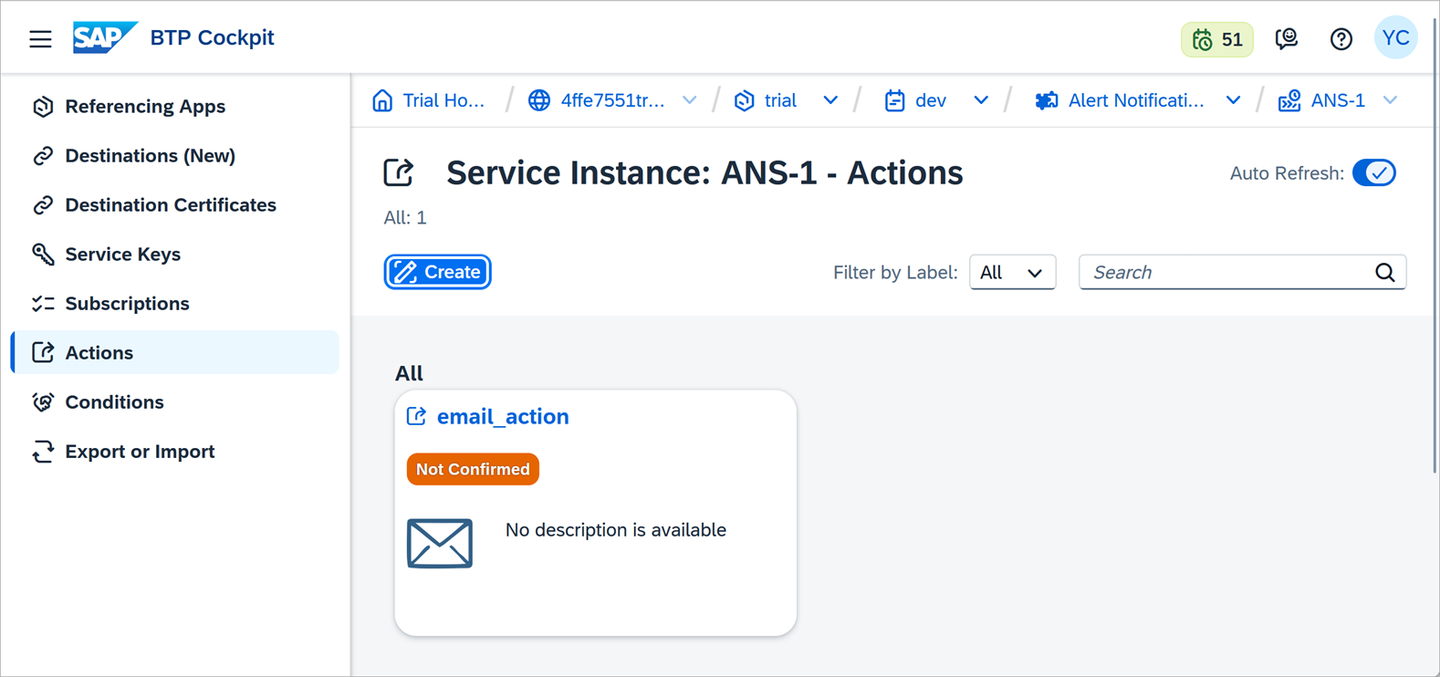
confirm email address Press the Confirm Action button.
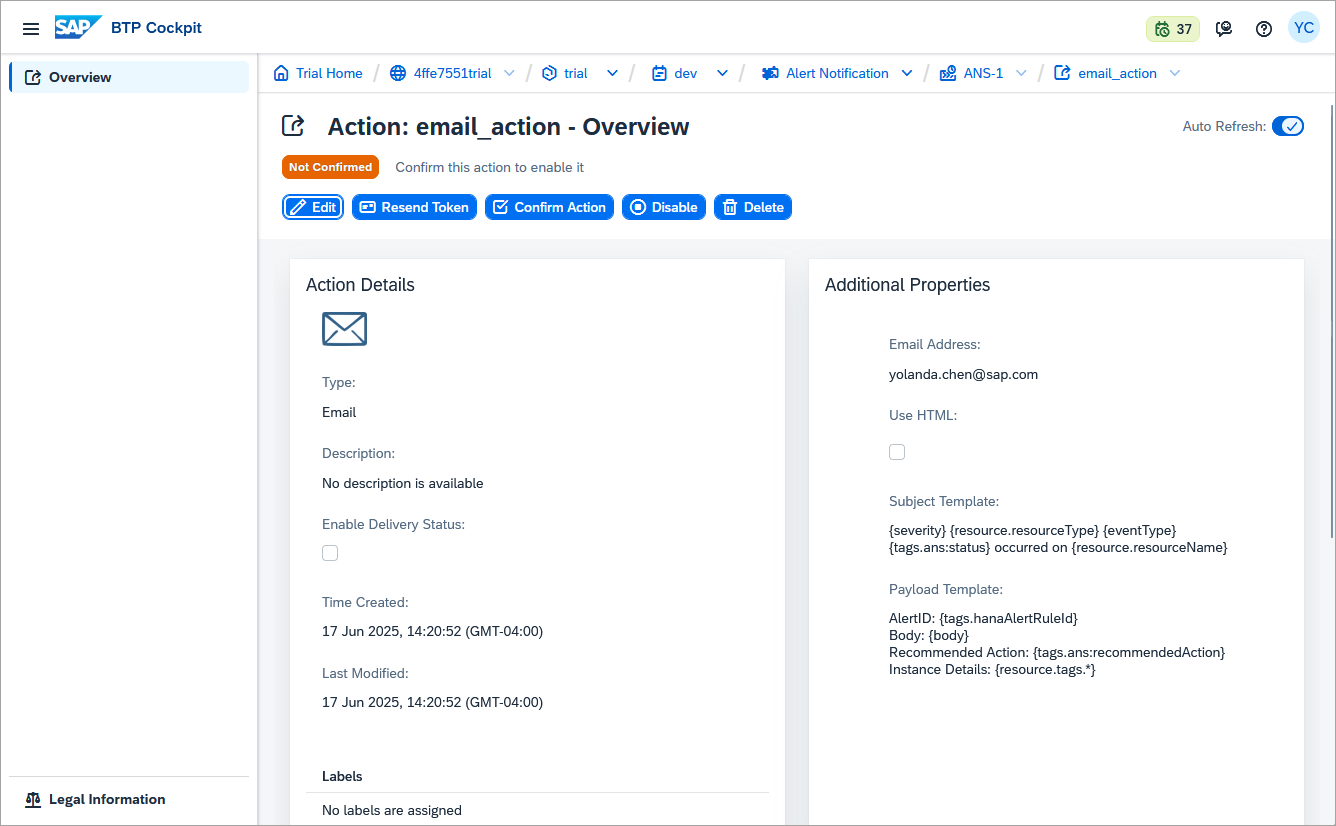
confirm email address Enter the confirmation token.
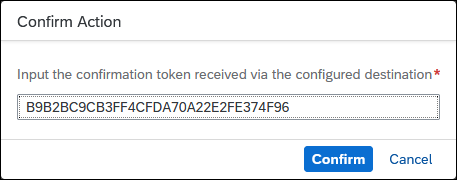
confirmation token The email action is now confirmed.

confirmed final result Create a subscription by selecting Subscriptions and pressing Create.

subscriptions Name the subscription
ANS-HANA-Cloud-Subscriptionand press the Create button.
Add a subscription Assign the conditions to the subscription by including the two previously created conditions and pressing the Assign button.

assign the condition Another example is to specify the instance ID of a specific instance to monitor and to only send an alert when the alert first occurs (create state).

Alternative conditions example Assign the action to the subscription by including the previously created action and pressing the Assign button.
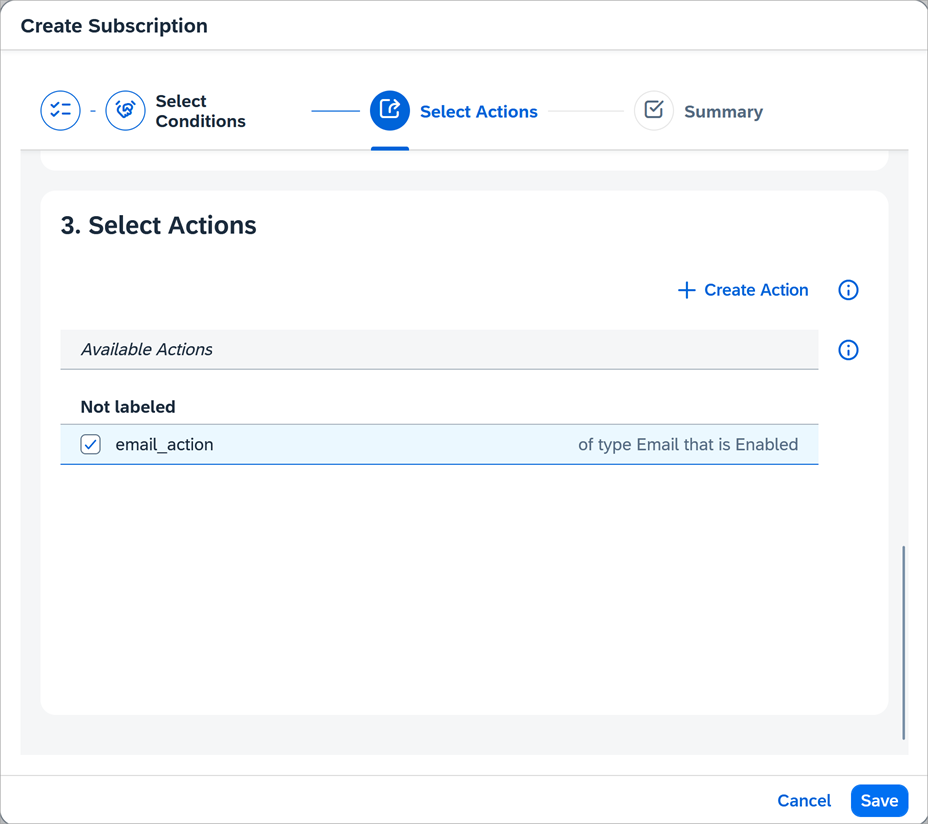
assign the action Completed subscription.

subscription complete Repeating the actions in step 2 and 4 should now send emails like the ones shown below.
Test Alert

test alert email Test Alert (default template)
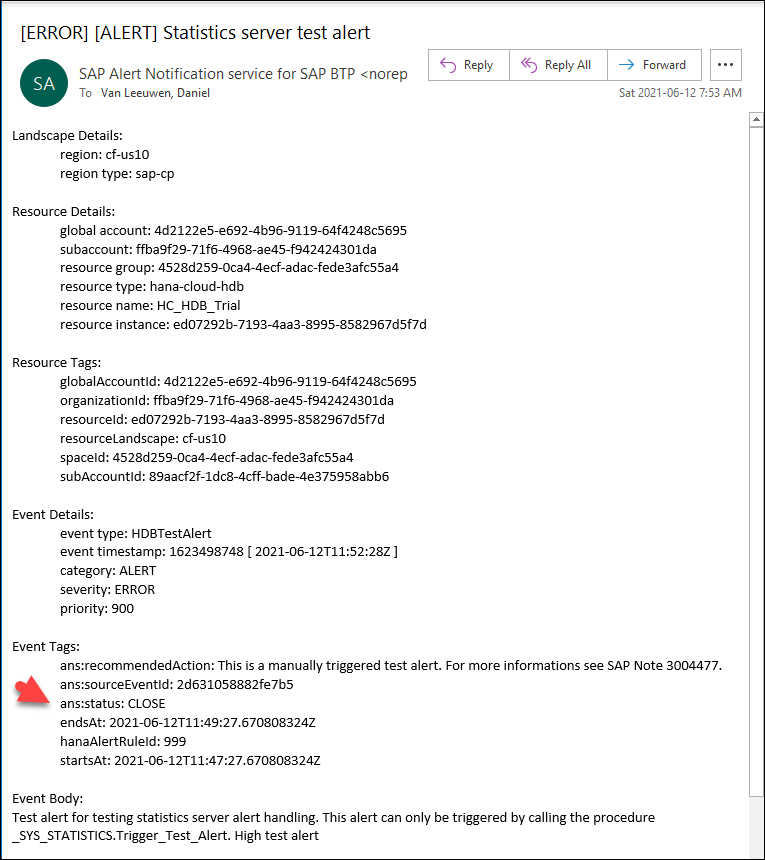
test alert email Notice that the
ans:statusis CLOSE. Events can have a status of CREATE, UPDATE or CLOSE. Some alerts have multiple thresholds or severities so multiple CREATE and CLOSE alerts could be sent as a condition occurs and then is resolved. If an alert is unresolved after a period of time such as 4 hours, an alert with a status of update is sent.Long-Running Statement

long running email Record count of non-partitioned column-store tables

record count email Locked user

data lake locked user
This step will briefly show an example of how to receive a notification in Microsoft Teams.
In Microsoft Teams, search for Incoming Webhook in Apps.

teams webhook app search Choose to add the app to a team.

teams add webhook Specify a name for the webhook, optionally upload an image, and press Create.
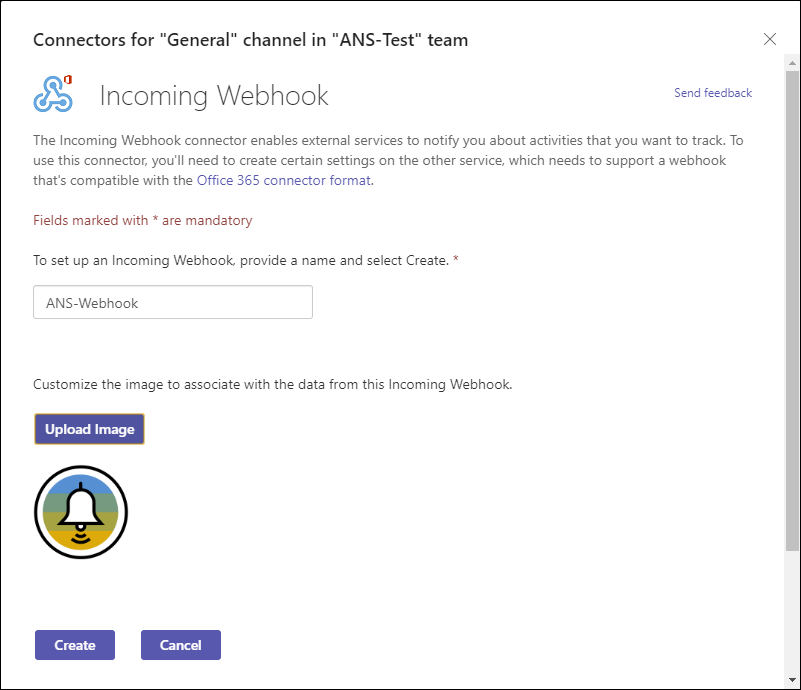
teams add connector After pressing create, copy the provided URL and press Done.

teams copy webhook url A notification will appear in the channel that the connector has been added.
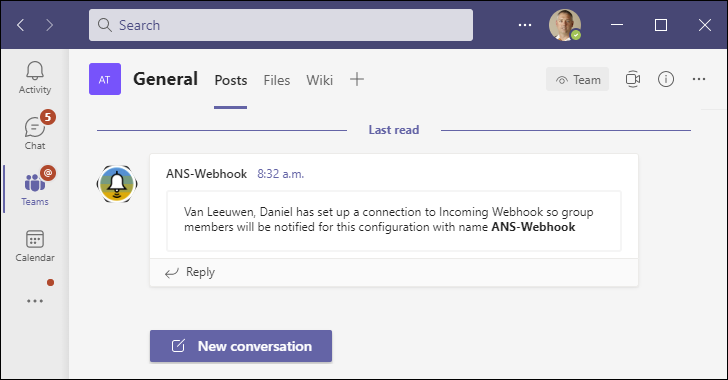
teams connector added posts Similar to the previous step where an ANS action was created for email, create one for Microsoft Teams in the SAP BTP Cockpit.

add ANS teams action Provide the webhook URL under the Additional Properties section.
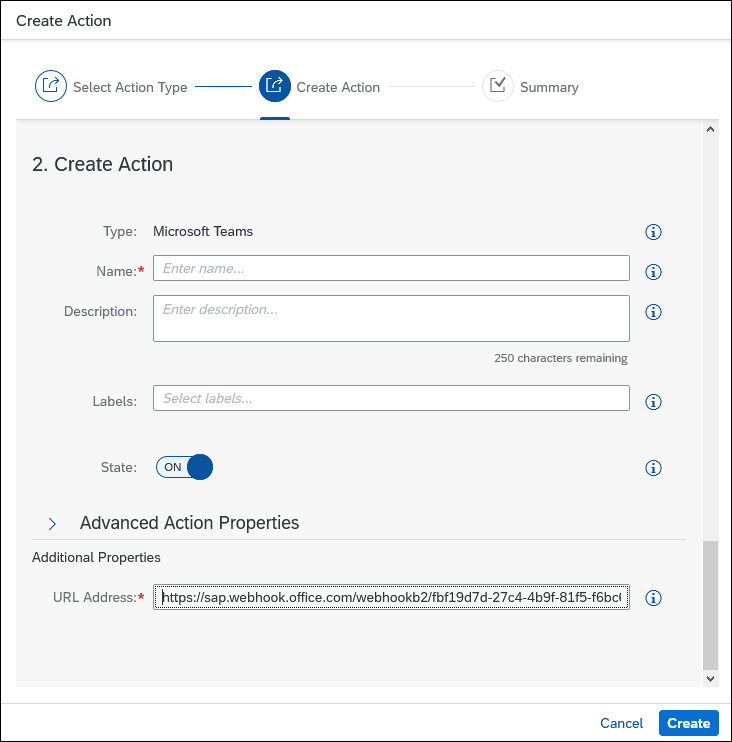
configure ANS teams action Assign the action to a subscription.

assign action to a subscription After triggering an alert, the Microsoft Teams channel will show the notification.

notification in teams
This step will briefly show an example of how to receive a notification in Slack.
In a browser open api.slack.com, click on Create a custom app, and then choose from scratch.
Provide an app name, a workspace, and press Create App.

slack create a custom app Choose to add Incoming Webhooks.
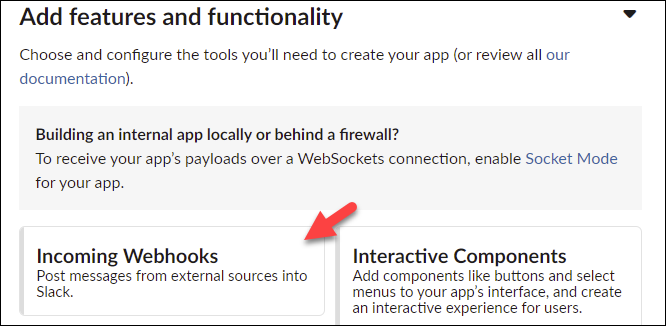
Add incoming webhooks After activating incoming webhooks, click on Add New Webhook to Workspace.
Specify the Slack channel that will be used to post to and click Allow.

slack-choose-channel Copy the provided Webhook URL.
Similar to the step where an ANS action was created for email, create one for Slack in the SAP BTP Cockpit.

add Slack action Provide the webhook URL under the Additional Properties section.

configure ANS Slack action An example of a payload template.
JSON[{ "type": "section", "text": { "type": "mrkdwn", "text": "* {severity} {eventType} {tags.ans:status} on {resource.resourceName}*" } }, { "type": "divider" }, { "type": "section", "text": { "type": "mrkdwn", "text": ":pencil2: Subject: {subject}" } }, { "type": "section", "text": { "type": "mrkdwn", "text": ":scroll: Body: {body}" } }, { "type": "section", "text": { "type": "mrkdwn", "text": " :medical_symbol: Recommended Action: {tags.ans:recommendedAction}" } }]Assign the action to a subscription.
assign action to a subscription After triggering an alert, the Slack channel will show the notification.

notification in Slack
Congratulations! You have now configured alerts, triggered and viewed them via the SAP HANA cockpit and received them via email, Microsoft Teams, and Slack using the SAP Alert Notification service for SAP BTP.
Resources
Discussion
Share feedback on this tutorial or join the conversation in SAP Community.