
Overview
You will learn
- How to disable system replication with SAP HANA Studio


Prerequisites
Prerequisites
- Proficiency: Advanced
- Tutorials Performing a Fail-back
- Credentials: Have access to the SYSTEM user of
SystemDBand “<SID>adm” for a SSH session on the HANA hosts.
Steps
Time to Complete
10 Min
You can disable SAP HANA system replication for an SAP HANA system by first unregistering the secondary system and then disabling system replication on the primary system.
Before we begin to disable system replication, ensure that the Secondary System has been stopped, and that the Primary System is online.
First, we will unregister the secondary system.
In the Systems Panel, right-click the Primary System and choose Configuration and Monitoring > Configure System Replication.
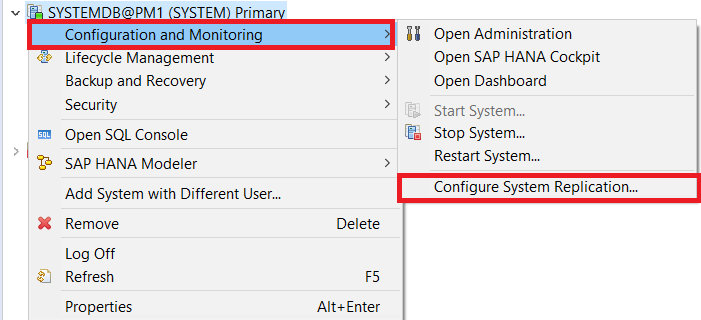
In the pop-up dialog, select Unregister secondary system and then Next.

Select the Secondary System Name. Since Dynamic Tiering only support two-tier system replication, you can leave the default option. Click Next.

Review the configuration details and click Finish.

Now, to disable system replication on the primary system, right-click the Primary System again, and choose Configuration and Monitoring > Configure System Replication.
Choose Disable system replication and click Next.

Leave the Ignore secondary system unchecked, which will remove all secondary system’s metadata, and click Finish.

System Replication has now been disabled.
Resources
Discussion
Share feedback on this tutorial or join the conversation in SAP Community.