
Overview
You will learn
- How to enlarge a
Dbspacefile using reserved space in HANA Cockpit - How to enlarge a
Dbspacefile using a SQL command


Prerequisites
Prerequisites
- Proficiency: Beginner
- Tutorials Adding a
DbspaceFile
Steps
Time to Complete
10 Min
When you are ready to use the reserve space you may do it in increments rather than using all of the reserved space at once. Thus, you can enlarge the Dbspace file only by what you need.
Navigate to Manage Dynamic Tiering Dbspaces on your Cockpit. Click on the “ES_USER_FILE1” created in the last tutorial.

This will open a detail panel for the **ES_USER_FILE1** Dbspace file. To edit this individual Dbspace file, click on the “Edit” button in the bottom right corner of the page.

You can now increase the Dbspace File Size by adding volume from the Reserved Size. To increase the size, enter the amount you wish to take from the Reserved Size in the Increase Size field. For this lesson we will use 10MB of the available 25MB of Reserved Size.

After entering in “10” in the Increase Size field, click Save in the bottom right of the window to complete the operation.
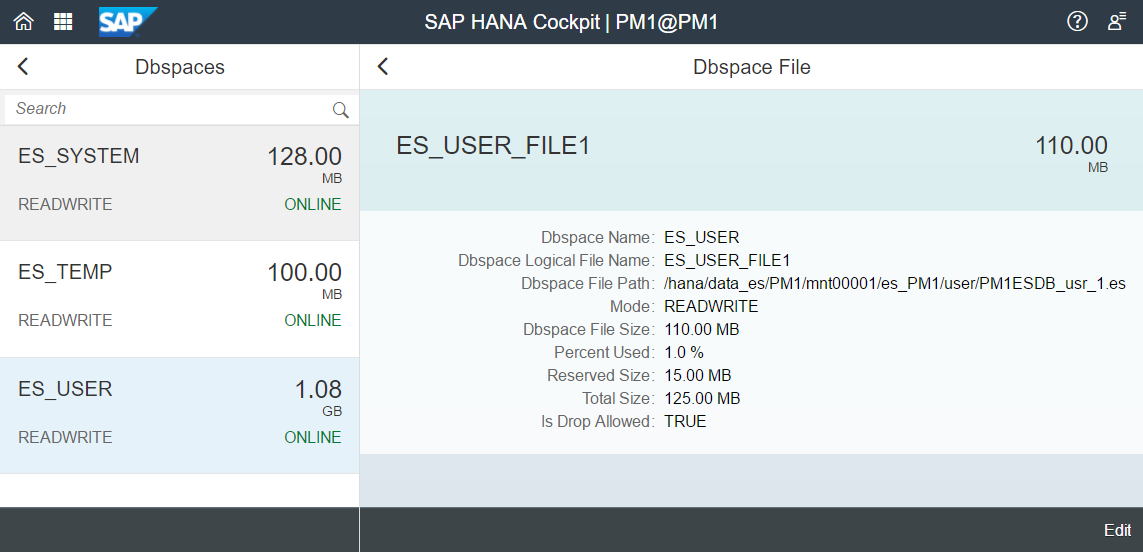
Once the save completes, the updated Dbspace File details for the ES_USER_FILE1 dbspace file will show that the Dbspace file size has increased from 100MB to 110MB while the Reserved Size has decreased from 25MB to 15MB.
In HANA Studio through the System Database, you may also enlarge a file via the SQL command:
ALTER EXTENDED STORAGE ALTER DBSPACE ES_USER ALTER FILE "ES_USER_FILE1" ADD 10 MB;Resources
Discussion
Share feedback on this tutorial or join the conversation in SAP Community.