
Overview
You will learn
- What the SAP BTP command line interface (btp CLI) is
- For which global accounts you can use the btp CLI
- How the btp CLI works
- Where and how to download and install the client
- How commands are structured
- How to get help in the btp CLI
- Where to find documentation


Prerequisites
Prerequisites
- You have access to a global account on SAP BTP that is on feature set B. See Get an Account on SAP BTP to Try Out Free Tier Service Plans.
- You are familiar with the basic concepts of SAP BTP.
Steps
The btp CLI is an alternative to the cockpit for users who prefer working on the command line. It consists of a client and a server. The client is installed on your computer and it interacts with SAP BTP through a server. You connect to this CLI server (https://cli.btp.cloud.sap/) when you log on to your global account through the btp CLI.
The base call to enter on the command line is btp.
Here are some of the tasks you can use the btp CLI for:
- Creating subaccounts and directories
- Managing entitlements of global accounts and subaccounts
- Managing users and their authorizations in global accounts and subaccounts
- Subscribing to applications
- Consuming services that are decoupled from the existing environments (referred to as “Other” environment in the Discovery Center), see Consuming Services in Other Environments Using SAP Service Manager
SAP is currently migrating all global accounts from the existing cloud management tools feature set A to the renovated cloud management tools feature set B. One of the innovations of feature set B is the command line interface (btp CLI) for account management.
Here you can read more about the Cloud Management Tools Feature Set B Innovations.
Cloud Foundry: You may have worked with the Cloud Foundry CLI (cf CLI) to manage your Cloud Foundry environment. To avoid confusion, here’s how the btp CLI relates to the cf CLI: The btp CLI is the CLI for working with global accounts on SAP BTP. You use the btp CLI for all tasks on global account, directory, and subaccount level. Going down the account hierarchy, the last step with btp CLI is creating a Cloud Foundry environment instance, which essentially creates a Cloud Foundry org. From org level onwards, i.e. for managing service instances and members in orgs and spaces, creating spaces, as well as assigning quota to orgs and spaces, you need to use the cf CLI.
Kyma: The same goes for Kyma: You use the btp CLI for all tasks on global account, directory, and subaccount level. The last step in the btp CLI is create a Kyma environment instance, aka a Kyma cluster. You then need to download the configuration file that you need to access your Kyma cluster. To work in the cluster and manage your Kyma service instances, you need the kubectl. See Creating SAP BTP, Kyma runtime via the btp CLI and Accessing a Kyma Instance Using kubectl.
“Other” Environments: SAP Service Manager allows you to consume services from any runtime environment directly from the subaccount. We refer to this as “other” environment. For this environment type “other”, you can use the btp CLI to manage services, instances, plans, and the like, because these are managed on subaccount level. See Working With Resources of SAP Service Manager Using the btp CLI.
Depending on your OS you have different option to install the btp CLI client. The following sections describe the different options for Windows, macOS, and Linux.
Option 1: Installation Script (Windows PowerShell)
When you run the installation script in Windows PowerShell, you will be guided through the installation process:
Invoke-RestMethod 'https://cli.btp.cloud.sap/btpcli-install.ps1' | Invoke-ExpressionOption 2: Windows Package Manager
You can use Windows Package Manager (WinGet) to download the latest version of the btp CLI. WinGet downloads the client from SAP Development Tools. In your terminal, run:
winget install SAP.btp --source wingetOption 3: Manually install the latest Microsoft Windows (amd64) version
- Download the latest Microsoft Windows client from SAP Development Tools.
- Extract the client from
tar.gzarchive. Use PowerShell or an external program, such as WinRar, to extract the tar.gz file. - Once you’ve unpacked the executable file, enter
cmdorpowershellin the address bar of the folder. This opens the command prompt or PowerShell in this folder. Or proceed with the next step to enable calling btp from any location on your system. - Copy the client executable from the unpacked folder to a directory of your choice. We recommend the following, because it ensures that you can call
btpsystem-wide, i.e., that it is in your PATH:C:/Users/<your-user>. In the Windows search, enterEnvironment Variableand open the System Properties. On the Advanced tab, open Environment Variables. Under User Variables, open the Path entry and add the file location of thebtp.exe(C:\Users<your-user>). - Optional: If you have a proxy server configured in your environment, you need to specify its address and port as environment variable
HTTPS_PROXYorhttps_proxyto access SAP BTP. For example,HTTPS_PROXY=https://my-https-proxy:1234. The specified proxy server is then used for HTTPS requests, unless overridden by theNO_PROXYorno_proxy, environment variables, which define a comma-separated list of hosts to be excluded from proxying.
Option 1: Installation Script
When you run the installation script in your Apple macOS terminal, you will be guided through the installation process:
curl https://cli.btp.cloud.sap/btpcli-install.sh | zshOption 2: Homebrew Package Manager
You can use Homebrew open source package management software to download the latest version of the btp CLI. Homebrew downloads the client from SAP Development Tools. In your terminal, run:
brew install --cask btpOption 3: Manually install the latest Apple macOS (amd64 and arm64) version
- Download the latest Apple macOS client (amd64 or arm64) from SAP Development Tools.
- Extract the client from
tar.gzarchive. Open thetar.gzfile by double-clicking it. - Copy the client executable from the unpacked folder to a directory of your choice. We recommend the following, because it ensures that you can call btp system-wide, i.e., that it is in your PATH:
/usr/local/bin - Optional: If you have a proxy server configured in your environment, you need to specify its address and port as environment variable
HTTPS_PROXYorhttps_proxyto access SAP BTP. For example,HTTPS_PROXY=https://my-https-proxy:1234. The specified proxy server is then used for HTTPS requests, unless overridden by theNO_PROXYorno_proxy, environment variables, which define a comma-separated list of hosts to be excluded from proxying.
Option 1: Installation Script
When you run the installation script in your Linux terminal, you will be guided through the installation process:
curl https://cli.btp.cloud.sap/btpcli-install.sh | bashOption 2: Homebrew Package Manager
You can use Homebrew open source package management software to download the latest version of the btp CLI. Homebrew downloads the client from SAP Development Tools. In your terminal, run:
brew install --cask btpOption 3: Manually install the latest Linux (amd64 and arm64) version
- Download the latest Linux client (amd64 or arm64) from SAP Development Tools.
- Extract the client from
tar.gzarchive. Use the terminal to open the tar.gz file withtar -xzf btp-cli-linux-amd64-latest.tar.gz - Copy the client executable from the unpacked folder to a directory of your choice. We recommend the following, because it ensures that you can call btp system-wide, i.e., that it is in your PATH:
/usr/local/bin - Optional: If you have a proxy server configured in your environment, you need to specify its address and port as environment variable
HTTPS_PROXYorhttps_proxyto access SAP BTP. For example,HTTPS_PROXY=https://my-https-proxy:1234. The specified proxy server is then used for HTTPS requests, unless overridden by theNO_PROXYorno_proxy, environment variables, which define a comma-separated list of hosts to be excluded from proxying.
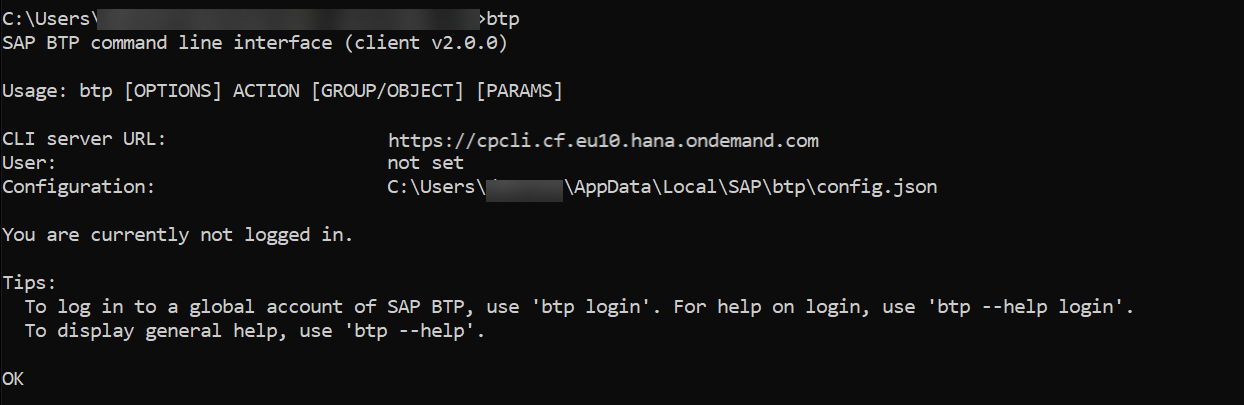
To validate the installation, open a terminal and enter btp.
The output should look similar to this screenshot:
Now type in the following to get syntax instructions and examples help calls:
btp help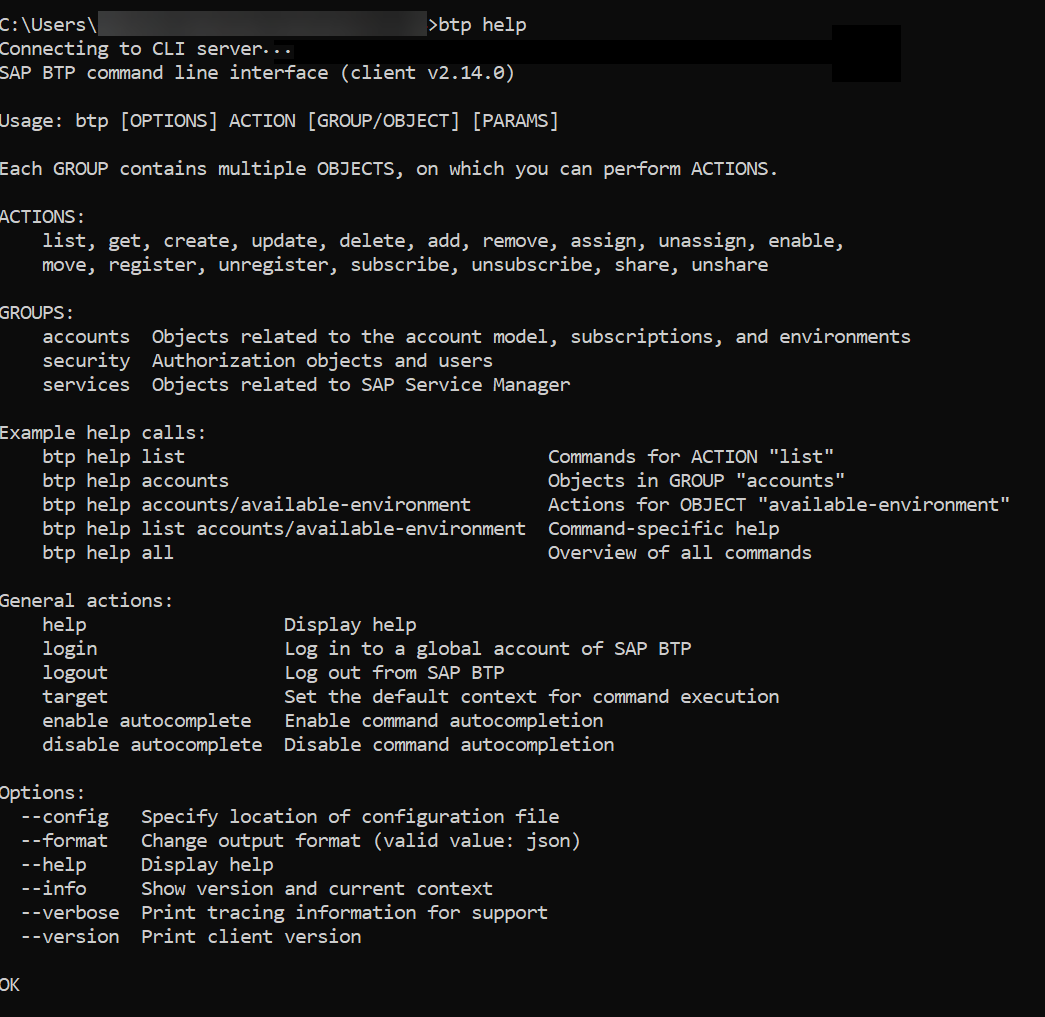
You can call up help in the client on different levels, from an introductory help page btp help, over help for individual actions, to quite extensive command-specific help. You can either type btp help [...] or append --help to the end of (incomplete) commands:
| Syntax | Example |
|---|---|
btp help <ACTION> | btp help list |
btp help <GROUP> | btp help accounts |
btp help | btp help accounts/subaccount |
btp help <ACTION> | btp help list accounts/subaccount |
btp <ACTION> --help | btp list accounts/subaccount --help |
btp <ACTION> --help | btp list --help |
Now let’s log in:
The CLI server URL (https://cli.btp.cloud.sap/) is proposed at login - just accept it with ENTER. This server routes client requests to the platform services.
You have two options for login:
We recommend to login with single sign-on through a browser. To do this, use:
btp login --ssoFor login on the command-line, use:
btp loginIf you have enabled Two-Factor-Authentication, you need to append the token to your password.
Once you’re authenticated, you will automatically be logged in to your global account. If you have access to more than one global account, the CLI will display a list of global accounts from which you can select one.
When you’re logged in, it should look similar to this:


Each command starts with the base call btp. The syntax of the command itself is very close to natural language: It starts with a verb, i.e. the action, followed by a group/object combination. So you build a command by combining btp with an action (let’s say list) and a group/object combination (let’s say accounts/subaccount): btp list accounts/subaccount
Additionally, options and parameters can be added to a command. As you’ve seen in the overview of all commands, there are the following options that you can add at the beginning of each command. For example, to use the verbose mode.
btp --verbose list accounts/subaccount
To call help, you can always place
--helpat the end of a command, even if it’s not complete. For example,btp list --help,btp accounts --help.
Parameters are added to the end, after the group/object combination. A command can have one positional parameter as the first one, followed by other optional or mandatory parameters. The positional parameter is used without a key, all others have a key. The command help specifies the optionality of all parameters and describes what you can or have to add.
For example:
btp assign security/role-collection "Global Account Administrator" --to-user example@mail.com --of-idp my-idp“Global Account Administrator” is the positional parameter, and the other two parameters have keys (--to-user and --of-idp).
Your first login takes you into a global account. Now, all commands are executed on global account level, unless you specify a different context. Remember you can manage the global account and its directories and subaccounts with the btp CLI. So if you want to change the context in which commands are executed to a directory or a subaccount, you can do so using the btp target command. There are three different ways of using this command:
To select a target from the children and parent of the current target, and to navigate up and down the account hierarchy, use:
btp targetTo select a target from the entire account hierarchy of all of your global accounts and their directories and subaccounts, use:
btp target --hierarchyTip: If you like the --hierarchy parameter, you can make it your default with btp set config --target.hierarchy true. See Change Configuration Settings.
To set a target by specifying it as a parameter, use:
btp target [--subaccount <ID> | --directory <ID> | --global-account <SUBDOMAN>]The targeting mechanism works according to the hierarchy of entities in the global account:
After initial login, a global account is targeted.
If a subaccount or directory is targeted and you run a command that only works on a higher level, the command will be executed in the parent directory or global account of the current target. For example,
list accounts/subaccountlists all subaccounts of the global account, even if a subaccount or a directory is targeted.If a subaccount or directory is targeted, you can execute commands in its parent directory or global account by adding parameters
-diror-gawithout a value. For example, if a subaccount is targeted,btp list security/userlists the users of that subaccount. To list the users of the parent directory or global account, use:btp list security/user -dirorbtp list security/user -ga.
To find out your current target, use
btp --info.
To set the target back to the current global account, use
btp target -ga.
We recommend to enable command autocompletion so you won’t have to remember or keep looking up individual commands. Command autocompletion saves you keystrokes when entering command actions, group-object combinations, and their parameters. Autocompletion is supported for Bash, PowerShell, and Zsh.
btp enable autocomplete <SHELL>Enter a partial command action, group-object combination, or parameter, and then press the Tab key. The command line either automatically completes your command or, when there’s more than one option available, it displays a list of suggested command actions/options/parameters. When a suggestion list is displayed, use the Tab or arrow keys to move through the list and press Enter to make a selection.
When you enable command autocompletion, a script containing all the autocomplete commands is downloaded and installed in your file system. Additionally, the RC file of your shell is modified so the script is called at startup.
The autocompletion option remains enabled in future sessions in your current client, until you disable it. To disable command autocompletion and uninstall the autocomplete script, run disable autocomplete <shell>.
Here are a few simple examples of commands on global account level that you can try out:
| Task | Command |
|---|---|
| List subaccounts | btp list accounts/subaccount |
| Get details of the global accounts | btp get accounts/global-account |
| List role collections | btp list security/role-collection |
To learn more:
- See the documentation on SAP Help Portal: Account Administration Using the SAP BTP Command Line Interface.
- Check out this tutorial: Automate Account Operations with the Command Line Interface (CLI).
- Watch the videos in this series of live streams on YouTube about the btp CLI.
You’re invited to share your feedback with the development team: Run the btp feedback command to open a short survey, or, if you have more time and more feedback to share, fill out this long UX survey about the btp CLI. Thanks a lot in advance!
Resources
Discussion
Share feedback on this tutorial or join the conversation in SAP Community.