
Overview
You will learn
- How to test authorizations on the applications deployed to SAP BTP, Cloud Foundry Before you deploy your authentication-enabled application you have to create an instance of service Authorization and Trust Management Service (XSUAA) and configure it, bind it to your application and provide it with the security descriptor that contains roles and scopes of your application. For more details, see section Protecting Your Application in the SAP BTP documentation.


Prerequisites
Steps
Open your application in the browser. Using the links on the welcome page you can check that you can’t access the Orders entity or everything under the AdminService. You should see a 401 error in case you click on these.
To use the AdminService, you need to assign yourself to the role collection BookStore_Administrators that was defined in the xs-security.json file. To assign this role collection to your user you need to navigate to the Security → Role Collections section of your SAP BTP subaccount.
Select the
BookStore_Administratorsrole collection and choose Edit. Enter your email address in the ID and E-Mail field and choose Save.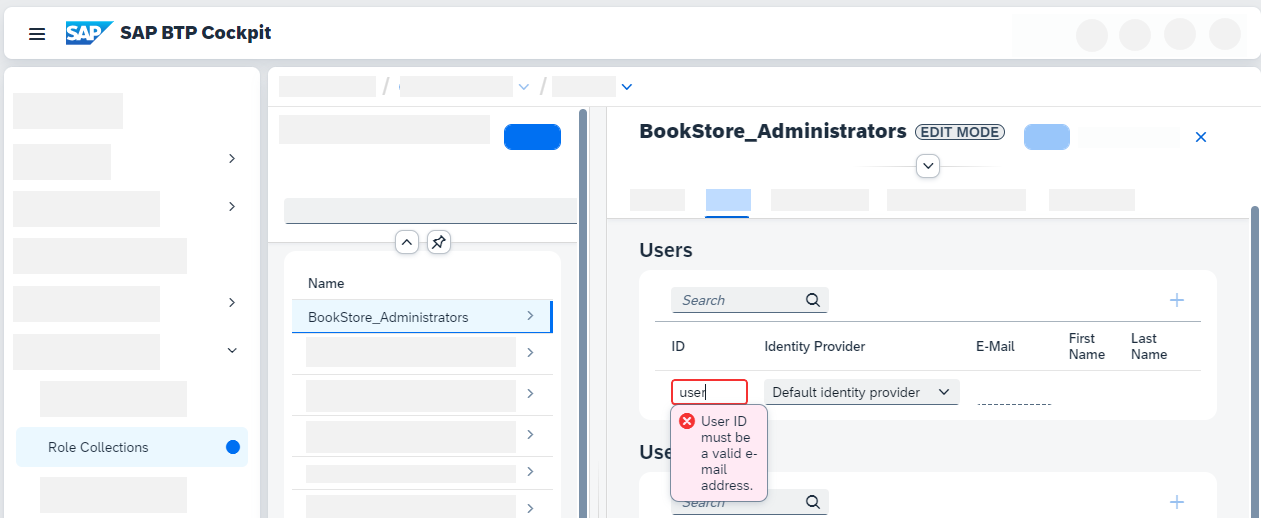
role assignment to administrator
To take effect of the change to the role collection, you need to restart the approuter:
Shell/Bashcf restart bookstoreOpen the application in the browser. The according route can be found under routes of the previous step.
Observe that your application is now secured by an authentication flow (very quick) and that you can access the
AdminServicebecause you’ve assigned the respective role to you.
Done! You have learned how to deploy secured applications to SAP BTP, Cloud Foundry and assign the needed roles.
Resources
Discussion
Share feedback on this tutorial or join the conversation in SAP Community.