
Overview
You will learn
- How to train a machine learning model using the Sales Order Completion (SOC) business blueprint
- How to deploy a machine learning model to get predictions for missing fields in sales order documents


Prerequisites
Steps
In the service key you created for Data Attribute Recommendation in the previous tutorial: Use Free Tier to Set Up Account for Data Attribute Recommendation and Get Service Key or Use Trial to Set Up Account for Data Attribute Recommendation and Get Service Key, you find a section called swagger (as highlighted in the image below) with three entries, called dm (data manager), mm (model manager) and inference.

For this tutorial, copy the URL of the Swagger UI for mm and open it in a browser tab. The Swagger UI for the model manager allows you to train a machine learning model, to delete it, to deploy the model as well as to undeploy the model.
After finishing this tutorial, keep the Swagger UI for
mmopen to perform the clean up tasks in Use the Sales Order Completion (SOC) Business Blueprint to Predict Missing Sales Order Fields.
To be able to use the Swagger UI endpoints, you need to authorize yourself. In the top right corner, click Authorize.

Authorize Get the
access_tokenvalue created in the previous tutorial: Get OAuth Access Token for Data Attribute Recommendation Using Any Web Browser, then add Bearer (with capitalized “B”) in front of it, and enter in the Value field.CodeBearer <access_token>Click Authorize and then click Close.

Authorize
To train a machine learning model using the data that you uploaded in Use a Sales Order Completion (SOC) Dataset Schema to Upload Training Data to Data Attribute Recommendation, you create a training job.
With each training job you provide a model template or a business blueprint which combines data processing rules and machine learning model architecture. You can find the list of available model templates here, and the list of available business blueprints here.
The Sales Order Completion (SOC) business blueprint that you use in this tutorial is suited to predict missing sales order fields that are needed for completion.
To create the training job, proceed as follows:
Expand the endpoint POST /jobs by clicking on it. Then click Try it out.
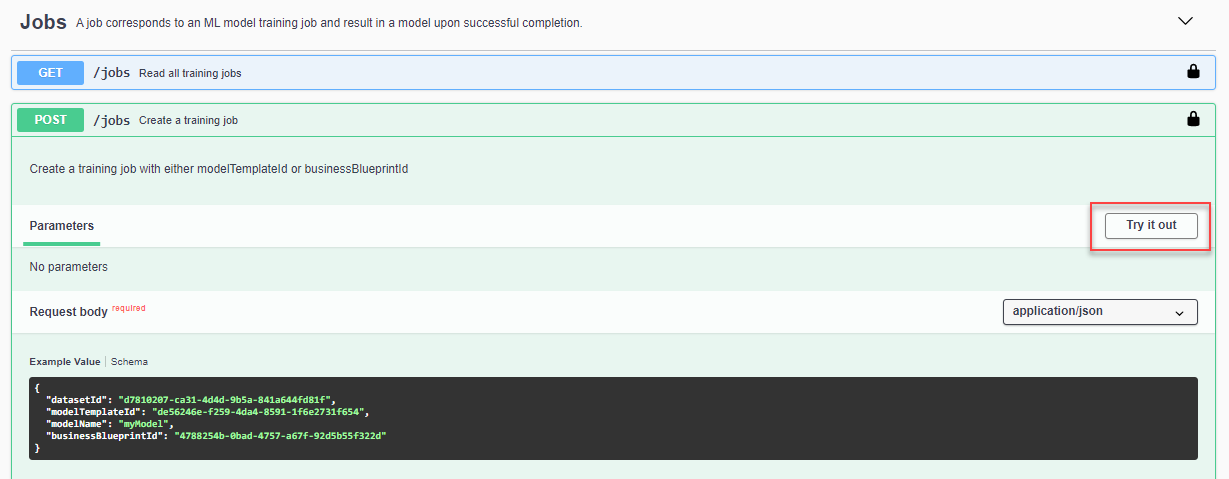
Training Job Endpoint In the text area, replace the parameter value for
datasetIdwith theidof your dataset that you have created in Use a Sales Order Completion (SOC) Dataset Schema to Upload Training Data to Data Attribute Recommendation. Delete themodelTemplateIdline from the Request body. Replace the parameter valuemodelNamewith your model name,soc_tutorial_model, for example. Make sure the parameter value forbusinessBlueprintIdis9d15125d-2b7b-4136-8872-1ddd337cf36f, which is the ID of the SOC business blueprint. Click Execute to create the training job.
Training Job Execute In the response of the service, you find the
idof your training job. Copy theidas you’ll need it in the next step. Along side theid, you find the training job’s current status. Initially, the status isPENDINGwhich says that the training job is in queue but has not started yet.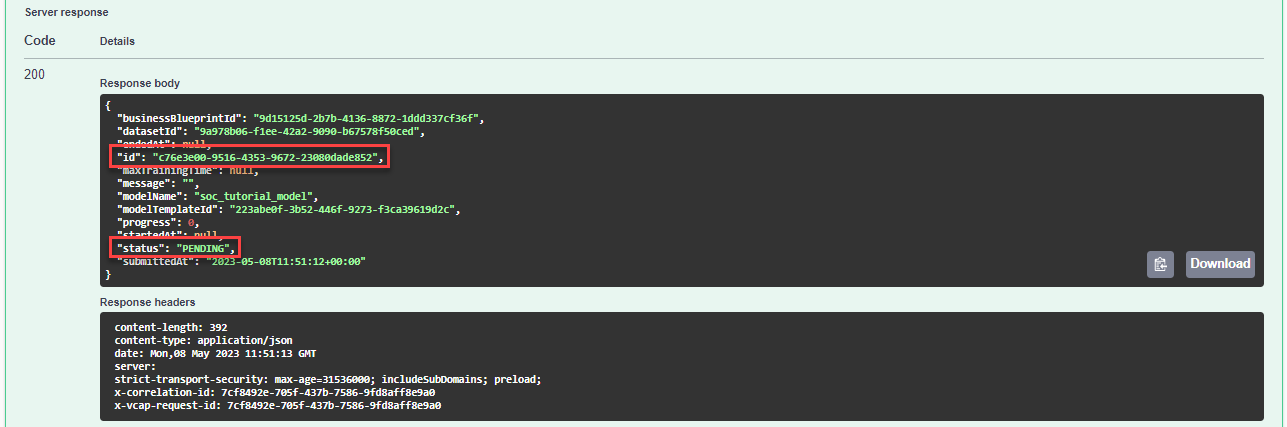
Training Job Response
You have successfully created a training job.
To know when your training job has ended, you have to frequently check its status. For that, proceed as follows:
Expand the endpoint
GET /jobs/{jobId}by clicking on it. Then click Try it out.
Training Job Status Endpoint Fill the parameter
jobIdwithidof your training job that you copied in the previous step. Click Execute.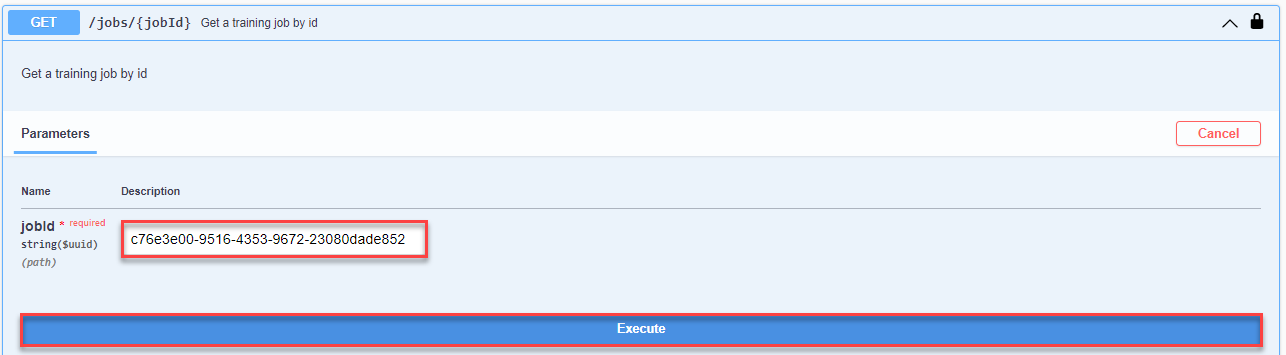
Training Job Status Execute In the response, you find again the current status of your training job along with other details. Immediately after creation of the training job, the status is
PENDING. Shortly after, it changes toRUNNINGwhich means that the model is being trained. The training of the sample data usually takes about 5 minutes to complete but may run longer, up to a few hours due to limited availability of resources in the free tier environment. You can check the status every now and then. Once training is finished, the status changes toSUCCEEDEDwhich means the service has created a machine learning model and you can proceed.
Training Job Status Response
You have successfully trained a machine learning model.
To use the trained model, you need to deploy it. Once deployed, the model is ready to make predictions. To deploy your model, proceed as follows:
Expand the endpoint
POST /deploymentsby clicking on it. Then click Try it out.
Deployment Endpoint In the text area, replace the parameter
modelNamewith the name of your model (soc_tutorial_model). Click Execute to deploy the model.
Deployment Execute In the response of the service, you find the
idof the deployment and its status. Initially, the status isPENDING, indicating the deployment is in progress. Make sure to copy theidas you need it in the next step.
Deployment Response
Finally, you have to ensure that your model is deployed successfully in order to use it for predictions. To check the status of your deployment, proceed as follows:
Expand the endpoint
GET /deployments/{id}by clicking on it. Then click Try it out.
Deployment Status Endpoint Fill the parameter
deploymentIdwith theidof your deployment that you copied in the previous step. Click Execute.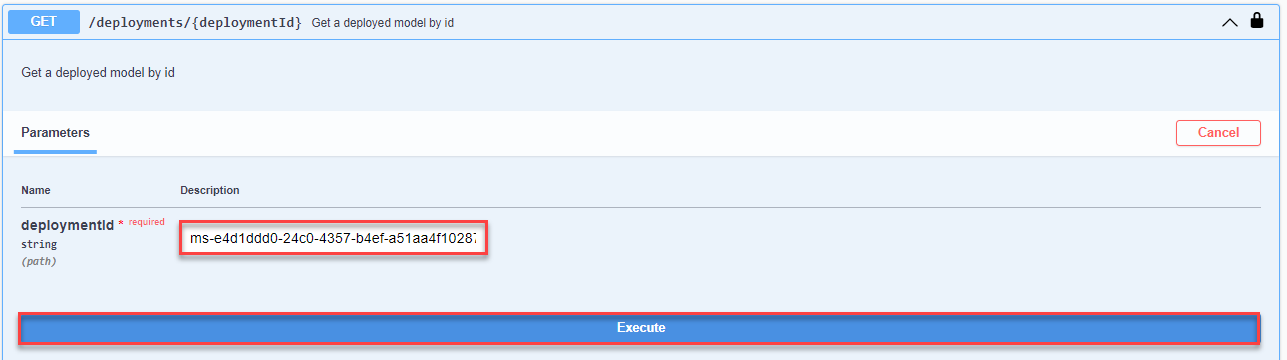
Deployment Status Execute In the response of the service, you find the current status of the deployment. If the status is
SUCCEEDED, your deployment is done. If the status is stillPENDING, check back in a few minutes.
Deployment Status Execute
You have successfully trained a machine learning model and deployed it. Next, you’ll use your model to make predictions.
Resources
Discussion
Share feedback on this tutorial or join the conversation in SAP Community.