
Create and Deep Insert with the Virtual Data Model for OData
Create and deep insert functionality for OData as supported by the SAP S/4HANA Cloud SDK.
Overview
You will learn
- How to build up a complex data structure using the virtual data model
- How to write deeply nested data to SAP S/4HANA in a single call
- How to write unit and integration tests for deep insertion


Prerequisites
Prerequisites
- Introduce Resilience to Your Application
- Connect to OData Service on Cloud Foundry Using SAP Cloud SDK
Please note that the sandbox service does not support testing creating entities, you might have to use an actual S/4 system to try the tutorial out.
Steps
Deep Insert is defined as:
A request to create an entity that includes related entities, represented using the appropriate inline representation, is referred to as a deep insert.
On success, the service MUST create all entities and relate them.
On failure, the service MUST NOT create any of the entities.
This means deep insert is an atomic operation that is either successful or fails for all entities.
To get started, create a new class called StoreBusinessPartnerCommand. It will serve as a single place to build the commands we want to execute. If you did our previous tutorials the following code might look familiar.
The file needs to be put under your <projectroot>/application/src/main/java/com/sap/cloud/sdk/tutorial directory.
package com.sap.cloud.sdk.tutorial;

import com.sap.cloud.sdk.cloudplatform.connectivity.Destination;
import com.sap.cloud.sdk.cloudplatform.resilience.ResilienceConfiguration;
import com.sap.cloud.sdk.cloudplatform.resilience.ResilienceDecorator;
import com.sap.cloud.sdk.cloudplatform.resilience.ResilienceRuntimeException;
import com.sap.cloud.sdk.datamodel.odata.client.exception.ODataException;
import com.sap.cloud.sdk.tutorial.datamodel.odata.namespaces.businesspartner.BusinessPartner;
import com.sap.cloud.sdk.tutorial.datamodel.odata.services.BusinessPartnerService;

public class StoreBusinessPartnerCommand{

    private final BusinessPartnerService businessPartnerService;
    private final BusinessPartner businessPartner;
    private final Destination destination;

    public StoreBusinessPartnerCommand(Destination destination, BusinessPartnerService businessPartnerService, BusinessPartner businessPartner) {
        this.businessPartnerService = businessPartnerService;;
        this.businessPartner = businessPartner;
        this.destination = destination;
    }

    public BusinessPartner execute() {
        return ResilienceDecorator.executeSupplier(this::run, ResilienceConfiguration.of(GetBusinessPartnersCommand.class));
    }

    private BusinessPartner run() {
        try {
            return businessPartnerService
                    .createBusinessPartner(businessPartner)
                    .executeRequest(destination)
                    .getResponseEntity().get();
        } catch (final ODataException e) {
            throw new ResilienceRuntimeException(e);
        }
    }
}What does the code do?
The code introduces a
StoreBusinessPartnerCommandthat uses aBusinessPartnerService, aDestinationand aBusinessPartnerinstance to execute a create command. Within the run() method, i.e., whenever the command is executed, it calls thebusinesspartner service.The
StoreBusinessPartnerCommandtakes aBusinessPartnerinstance as input. This is a potentially complex (containing nested entities) data type. Therefore, in the next step you need to create a nested data structure based on theBusinessPartnerdata model.The structure you are interested in is presented below. The root entity will be the business partner which is connected to zero-to-many
BusinessPartnerRolesandBusinessPartnerAddresseswhich is again connected to zero-to-manyEMailAddresses:
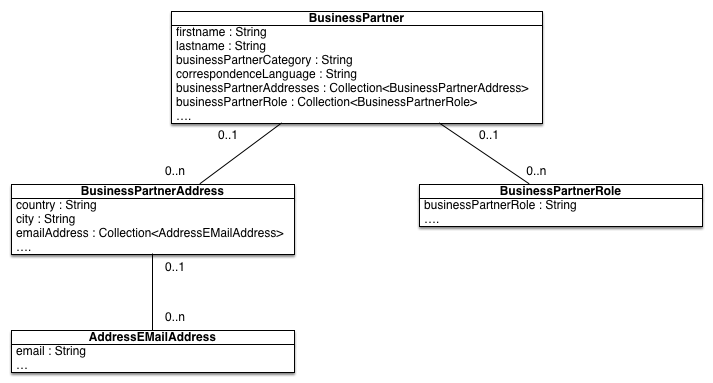
For this purpose, you are editing the BusinessPartnerController to expose a POST method to our clients.
package com.sap.cloud.sdk.tutorial.controllers;
import com.google.gson.Gson;

import com.sap.cloud.sdk.tutorial.GetBusinessPartnersCommand;

import org.slf4j.Logger;
import org.slf4j.LoggerFactory;
import org.springframework.http.MediaType;
import org.springframework.http.ResponseEntity;
import org.springframework.web.bind.annotation.PostMapping;
import org.springframework.web.bind.annotation.RequestBody;
import org.springframework.web.bind.annotation.RequestMapping;
import org.springframework.web.bind.annotation.RequestMethod;
import org.springframework.web.bind.annotation.RestController;

import java.io.PrintWriter;
import java.io.StringWriter;
import java.util.List;

import com.sap.cloud.sdk.cloudplatform.connectivity.Destination;
import com.sap.cloud.sdk.cloudplatform.connectivity.DestinationAccessor;

import com.sap.cloud.sdk.tutorial.StoreBusinessPartnerCommand;
import com.sap.cloud.sdk.tutorial.datamodel.odata.namespaces.businesspartner.Address;
import com.sap.cloud.sdk.tutorial.datamodel.odata.namespaces.businesspartner.BusinessPartner;
import com.sap.cloud.sdk.tutorial.datamodel.odata.namespaces.businesspartner.EmailAddress;
import com.sap.cloud.sdk.tutorial.datamodel.odata.namespaces.businesspartner.Role;
import com.sap.cloud.sdk.tutorial.datamodel.odata.services.DefaultBusinessPartnerService;

@RestController
public class BusinessPartnerController
{
    private static final Logger logger = LoggerFactory.getLogger(BusinessPartnerController.class);
    private static final String DESTINATION_NAME = "MyErpSystem";

    @RequestMapping( path = "/businesspartners", method = RequestMethod.GET , produces = MediaType.APPLICATION_JSON_VALUE)
    public ResponseEntity<?> getBusinessPartner()
    {
        try {
            final Destination destination = DestinationAccessor.getDestination(DESTINATION_NAME);

            final List<BusinessPartner> businessPartners =
                    new GetBusinessPartnersCommand(destination).execute();

            return ResponseEntity.ok( new Gson().toJson(businessPartners));
        } catch (final Exception e) {
            logger.error(e.getMessage(), e);
            return ResponseEntity.internalServerError().body("Failed to fetch business partners.");
        }
    }

    @PostMapping( path = "/businesspartners", produces = MediaType.APPLICATION_JSON_VALUE)
    public ResponseEntity<?> postBusinessPartner(@RequestBody Map<String,String> input) {
        try {
            final String firstName = Option.of(input.get("firstName")).getOrElse("");
            final String lastName = Option.of(input.get("lastName")).getOrElse("");
            final String country = Option.of(input.get("country")).getOrElse("");
            final String city = Option.of(input.get("city")).getOrElse("");
            final String emailAddress = Option.of(input.get("emailAddress")).getOrElse("");

            //do consistency checks here...

            final EmailAddress emailAddress = EmailAddress.builder()
                    .emailAddress(email)
                    .build();

            final Address businessPartnerAddress = Address.builder()
                    .countryRegionKey(country)
                    .city(city)
                    .emailAddress(emailAddress)
                    .build();

            final Role businessPartnerRole = Role.builder()
                    .bPRole("FLCU01")
                    .build();

            final BusinessPartner businessPartner = BusinessPartner.builder()
                    .firstName(firstname)
                    .lastName(lastname)
                    .bPCategory("1")
                    .correspondenceLang("EN")
                    .businessPartnerAddress(businessPartnerAddress)
                    .businessPartnerRole(businessPartnerRole)
                    .build();

            // Rest of your logic here...
            final Destination destination = DestinationAccessor.getDestination(DESTINATION_NAME);
            final BusinessPartner storedBusinessPartner = new StoreBusinessPartnerCommand(destination, new DefaultBusinessPartnerService(), businessPartner).execute();

            return ResponseEntity.ok( new Gson().toJson(storedBusinessPartner));
        } catch (final Exception e) {
            logger.error(e.getMessage(), e);
            return ResponseEntity.internalServerError().body("Failed to post business partner. ");
        }
    }

}What does the code do?
The code adds a new POST request exposed under the
businesspartnerURL path. It expects five parameters to be set:firstname,lastname,country,cityandBased on the five input parameters, you are creating the various entities.
First, an entity to store the E-Mail Address using the exposed builder pattern method.
Second, you create one
BusinessPartnerAddressbased on the city and country parameter as well as the e-mail address entity from the first step.Third, you create a business partner role using the FLCU01 role (which actually stands for a customer).
Fourth, the final business partner entity which consumes the remaining parameters and the entity from the steps before.
Finally, you use the
StoreBusinessPartnerCommandto store the created business partner entity. As a result you will get the stored entity which will be enriched by an ID inserted by the S/4HANA system.In case of an exception, you simply return the error message, ignoring any pretty printing or JSON formatting here for simplicity reasons.
You can deploy the above created code to SAP Cloud Platform or to a local instance (please consider previous tutorials such as Create a Sample Application on Cloud Foundry Using SAP Cloud SDK).
To run it on a localhost, run the following:
 mvn clean install
 mvn spring-boot:run
Then you can use a tool like Postman or Curl to check whether the code works. As you can see in this example, the business partner has been successfully posted and contains a BusinessPartner ID and UUID, which was enriched by S/4HANA.

Let’s write an integration test to test the newly introduced create functionality.
The file needs to be put under your <projectroot>/application/src/test/java/com/sap/cloud/sdk/tutorial directory.
package com.sap.cloud.sdk.tutorial;

import com.github.tomakehurst.wiremock.junit5.WireMockRuntimeInfo;
import com.github.tomakehurst.wiremock.junit5.WireMockTest;
import com.google.gson.Gson;
import org.hamcrest.core.IsEqual;
import org.junit.jupiter.api.BeforeEach;
import org.junit.jupiter.api.Test;
import org.junit.jupiter.api.extension.ExtendWith;
import org.springframework.beans.factory.annotation.Autowired;
import org.springframework.boot.test.autoconfigure.web.servlet.AutoConfigureMockMvc;
import org.springframework.boot.test.context.SpringBootTest;
import org.springframework.http.MediaType;
import org.springframework.test.context.junit.jupiter.SpringExtension;
import org.springframework.test.web.servlet.MockMvc;
import org.springframework.test.web.servlet.MvcResult;
import org.springframework.test.web.servlet.request.MockMvcRequestBuilders;

import com.sap.cloud.sdk.cloudplatform.connectivity.DefaultDestinationLoader;
import com.sap.cloud.sdk.cloudplatform.connectivity.DefaultHttpDestination;
import com.sap.cloud.sdk.cloudplatform.connectivity.Destination;
import com.sap.cloud.sdk.cloudplatform.connectivity.DestinationAccessor;
import com.sap.cloud.sdk.tutorial.datamodel.odata.namespaces.businesspartner.BusinessPartner;

import static com.github.tomakehurst.wiremock.client.WireMock.aResponse;
import static com.github.tomakehurst.wiremock.client.WireMock.equalTo;
import static com.github.tomakehurst.wiremock.client.WireMock.head;
import static com.github.tomakehurst.wiremock.client.WireMock.post;
import static com.github.tomakehurst.wiremock.client.WireMock.stubFor;
import static com.github.tomakehurst.wiremock.client.WireMock.urlPathEqualTo;
import static org.hamcrest.MatcherAssert.assertThat;
import static org.springframework.test.web.servlet.result.MockMvcResultMatchers.status;

@SpringBootTest
@AutoConfigureMockMvc
@ExtendWith(SpringExtension.class)
@WireMockTest
public class BusinessPartnerDeepInsertTest
{
    private static final String DESTINATION_NAME = "MyErpSystem";
    private Destination destination;

    @Autowired
    private MockMvc mockMvc;

    private static final String ODATA_RESPONSE_JSON = """
            {
              "d": {
                "BusinessPartner": "string",
                "CreationDate": "/Date(1492041600000)/",
                "CreationTime": "PT15H51M04S",
                "FirstName": "John",
                "LastName": "Doe",
                "to_BusinessPartnerAddress": {
                  "results": [
                    {
                      "BusinessPartner": "string",
                      "CityName": "Tuxedo",
                      "Region": "US",
                      "to_EmailAddress": {
                        "results": [
                          {
                            "AddressID": "string",
                            "EmailAddress": "john@doe.com"
                          }
                        ]
                      }
                    }
                  ]
                  }
                }
              }
            """;

    @BeforeEach
    void before( final WireMockRuntimeInfo wm ){
        destination = DefaultHttpDestination.builder(wm.getHttpBaseUrl()).name(DESTINATION_NAME).build();
        final DefaultDestinationLoader defaultDestinationLoader = new DefaultDestinationLoader().registerDestination(destination);
        DestinationAccessor.prependDestinationLoader(defaultDestinationLoader);
    }

    @Test
    void testStoreAndGetCustomers() throws Exception {

        stubFor(head(urlPathEqualTo("/sap/opu/odata/sap/API_BUSINESS_PARTNER")).withHeader("X-CSRF-TOKEN", equalTo("fetch"))
                .willReturn(aResponse()
                        .withHeader("Content-Type", "application/json")
                        .withHeader("X-CSRF-TOKEN","myCsrfTokenValue")));

        stubFor(post(urlPathEqualTo("/sap/opu/odata/sap/API_BUSINESS_PARTNER/A_BusinessPartner"))
                .withHeader("X-CSRF-TOKEN", equalTo("myCsrfTokenValue"))
                .willReturn(aResponse().withBody(ODATA_RESPONSE_JSON).withStatus(201)));

        final MvcResult mvcResult = mockMvc.perform(MockMvcRequestBuilders.post("/businesspartners").contentType(MediaType.APPLICATION_JSON_VALUE)
                        .content("""
                                    {
                                    "firstname": "John",
                                    "lastname": "Doe",
                                    "country": "US",
                                    "city": "Tuxedo",
                                    "email": "john@doe.com"
                                   }
                                """))
                .andExpect(status().is2xxSuccessful())
                .andReturn();
        final String contentAsString = mvcResult.getResponse().getContentAsString();
        final BusinessPartner businessPartner = new Gson().fromJson(contentAsString, BusinessPartner.class);
        assertThat(businessPartner.getFirstName(), IsEqual.equalTo("John"));
    }
}You can run the test by executing the following command from the project’s root folder or run your test easily by clicking the ‘Run’ button in your IDE’s user interface
mvn testIn this tutorial you learned how to leverage the deep insert functionality of the S/4HANA Cloud SDK to easily insert deeply nested data to SAP S/4HANA in a single call. Besides the pure functionality, you also learned how to implement unit and integration tests for this functionality.
Resources
Discussion
Share feedback on this tutorial or join the conversation in SAP Community.