
Overview
You will learn
- How to enable the CAP Operator community module in your Kyma cluster.


Prerequisites
Prerequisites
- You’ve enabled the Kyma runtime in your subaccount. Follow the steps in the Setting Up SAP BTP and Kyma Runtime for Deployment tutorial that is part of the Application Lifecycle Management using CAP Operator tutorial group.
- You have an enterprise global account in SAP BTP. To use services for free, you can sign up for an SAP BTPEA (SAP BTP Enterprise Agreement) or a Pay-As-You-Go for SAP BTP global account and use the free tier services only. See Using Free Service Plans.
- You have a platform user. See User and Member Management.
- You’re an administrator of the global account in SAP BTP.
- You have a subaccount in SAP BTP to deploy the services and applications.
Steps
Step 1
Enable CAP Operator community module
Open your Kyma dashboard.
Navigate to Configuration → Modules and choose Add within the Community Modules list.
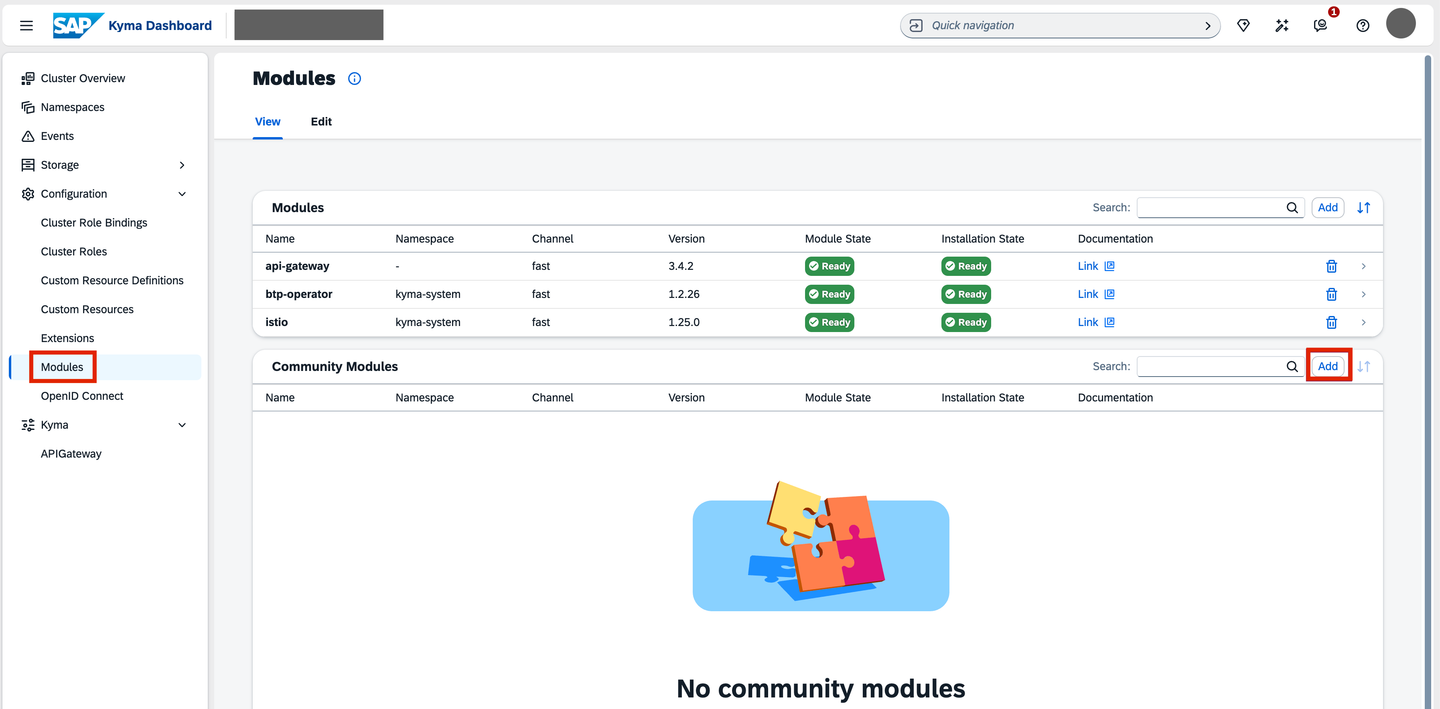
Add Community Module Choose Add in the Source YAMLs section to load the list of community modules.

Load Community Modules In the popup, you can see the list of available community modules. Choose Add.

Select CAP Operator Module Select the CAP Operator module and choose Add.

Add CAP Operator Module Wait until the automatic installation is complete and the Module State changes to Ready.

CAP Operator Installed
Resources
Discussion
Share feedback on this tutorial or join the conversation in SAP Community.