
Overview
You will learn
- Review the extension data model
- How to create the CDS data model in the CAP project
- How to populate the model with initial test data
- How to perform the first CAP service test


Prerequisites
Prerequisites
- Complete the tutorial: Prepare to Develop the SAP SuccessFactors Extension
- Complete the tutorial: Jump start the SAP SuccessFactors Extension CAP Project
- Complete the tutorial: Import SAP SuccessFactors OData Services definitions
Steps
Before you move on with the coding, just quickly review the conceptual data model of your solution:

The logical model depicted in the diagram above has been conceived to comply with the following business rules:
- Each project is composed by members (team) and activities;
- The project team (members) is made of SAP SuccessFactors employees;
- Each project member has an specific role in the project;
- Each project activity is assigned to a specific project member;
- Projects and activities have one status each (i.e. not started, in progress, overdue, completed etc.);
- And last, but not least, whenever a team member is assigned to a project, a special assignment is registered to the employee’s background to signal that such employee has participated in the project, acting in a specific role, as part of the employee’s professional experience.
Now, having that model in mind, you can make its definition into the CAP project.
On the left-hand pane of SAP Business Application Studio, (1) select the db folder, then (2) click on the three dots to the right of the project name and (3) select New File.
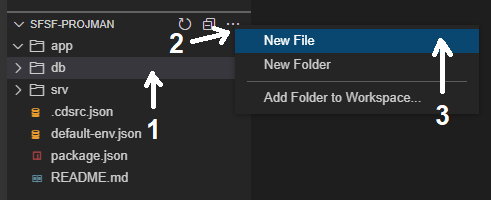
On the dialog, name the file projman-model.cds and click OK.

Copy and paste the code snippet below into the recently created file:
using {
    cuid,
    sap
} from '@sap/cds/common';

namespace sfsf.projman.model.db;

entity Project : cuid {
    name        : String(128);
    description : String(1024);
    startDate   : Date;
    endDate     : Date;
    status      : Association to one Status;
    team        : Composition of many Member
                      on team.parent = $self;
    activities  : Composition of many Activity
                      on activities.parent = $self;
}

entity Member : cuid {
    parent        : Association to one Project;
    member        : Association to one Employee;
    role          : Association to one Role;
    hasAssignment : Boolean default false;
}

entity Activity : cuid {
    parent      : Association to one Project;
    assignedTo  : Association to one Member;
    name        : String(128);
    description : String(1024);
    dueDate     : Date;
    status      : Association to one Status;
}

@readonly
@cds.autoexpose
entity Employee {
    key userId          : String(100);
        username        : String(100);
        defaultFullName : String;
        email           : String;
        division        : String(128);
        department      : String(128);
        title           : String(255);
}

@readonly
@cds.autoexpose
entity Role : sap.common.CodeList {
    key ID : Integer;
}

@readonly
@cds.autoexpose
entity Status : sap.common.CodeList {
    key ID          : Integer;
        criticality : Integer;
}Quickly analyze the model code:
First you import some ready-to-use common aspects from the CAP framework: cuid (common universal unique id) and sap (from where we get the Codelist aspect). To learn more about the common types and aspects you can read this section from the CAP official documentation. The cuid aspect automatically defines a UID primary key for entities Project, Member and Activity.
Then you define a namespace to contain the data model (sfsf.projman.model.db) and through which you will refer to it in the future.
Finally, you define each entity with its corresponding attributes and associations according to the model diagram. You’ll notice that the Project entity is “composed” by a team made of members who are employees and activities assigned to the team members, exactly as depicted in the diagram.
You specify that the entities Employee (the “bridge” between SAP SuccessFactors users and your local model), Role and Status are “read-only” via the @readonly annotation. You also want those entities to be automatically exposed in your CAP service without having to explicitly do it in the service definition (the next step of the development), so you annotate them with the @cds.autoexpose annotation as well.
Now, populate your data model with some initial test data. This can be done by creating some files in CSV format into a subfolder of the db folder named “data” with the specific naming convention of <namespace>-<entity name>.csv.
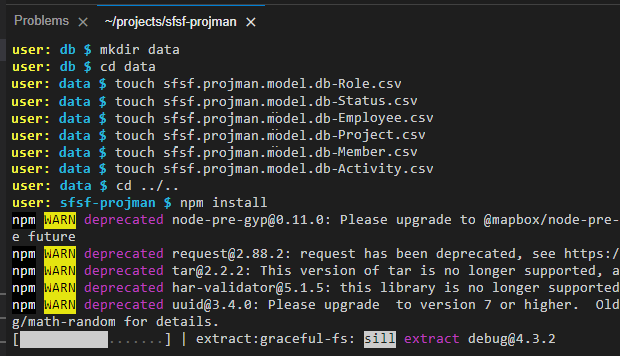
In the root folder of your project on the Terminal, type cd db and press Enter.

Type mkdir data and press Enter.

Type cd data and press Enter.

Type the sequence of commands below pressing Enter after each one:
touch sfsf.projman.model.db-Role.csvtouch sfsf.projman.model.db-Status.csvtouch sfsf.projman.model.db-Employee.csvtouch sfsf.projman.model.db-Project.csvtouch sfsf.projman.model.db-Member.csvtouch sfsf.projman.model.db-Activity.csv

On the left-hand pane, expand the data folder to view the recently created files, then click on the sfsf.projman.model.db-Role.csv file to open it.

Copy & paste the content below into the sfsf.projman.model.db-Role.csv file:
ID;name;descr
1;Project Manager;Project Manager Role
2;Project Lead;Project Lead Role
3;Business Owner;Business Owner Role
4;Product Owner;Product Owner Role
5;SCRUM Master;SCRUM Master Role
6;Solution Architect;Solution Architect Role
7;Software Engineer;Software Engineer Role
8;UX Designer;UX Designer Role
9;Program Designer;Program Designer Role
10;Content Designer;Content Designer Role
11;Content Expert;Content Expert Role
On the left-hand pane, click on the sfsf.projman.model.db-Status.csv file to open it, then copy & paste the content below:
ID;name;descr;criticality
1;Not Started;Activity has not been started yet;2
2;In Progress;Activity is in progress;5
3;Overdue;Activity is overdue;1
4;Blocked;Activity is blocked;2
5;Paused;Activity is paused;2
6;Canceled;Activity is canceled;1
7;Completed;Activity is completed;3
On the left-hand pane, click on the sfsf.projman.model.db-Employee.csv file to open it, then copy & paste the content below:
userId;username;defaultFullName;email;division;department;title
100093;rsmolla;Rick Smolla;Rick.Smolla@bestrunsap.com;Corporate Services (CORP_SVCS);Employee Development (50012007);Development Analyst
100095;kholliston;Kay Holliston;Kay.Holliston@bestrunsap.com;Corporate Services (CORP_SVCS);Human Resources US (50150001);Program Manager
100096;smoultone;Sarah Lynn Moultone;Sarah.Moultone@bestrunsap.com;Manufacturing (MANU);Quality Assurance US (50150013);Inspector
100097;swang;Scott C Wang;Scott.Wang@bestrunsap.com;Manufacturing (MANU);Operations CN (50100010);Quality Assurance Manager
100112;jwilliams;John Williams;John.Williams@bestrunsap.com;Manufacturing (MANU);Operations US (50007753);SVP Operations & Maintenance
100115;mcooper;Mya Cooper;Mya.Cooper@bestrunsap.com;Manufacturing (MANU);Operations US (50007753);VP Operations
IMPORTANT NOTE: the above employees have been taken from an SAP SuccessFactors demo tenant as they must match the data that’s coming from it. Those users usually exist at SAP SuccessFactors demo tenants, so if you are using a demo tenant for your project that content should be fine, otherwise you must search for users in your SAP SuccessFactors tenant and adjust the content of this CSV accordingly.
On the left-hand pane, click on the sfsf.projman.model.db-Project.csv file to open it, then copy & paste the content below:
ID;name;description;startDate;endDate;status_ID
3ca47b3e-eff3-430e-9ae0-1937dd094212;S/4HANA Cloud implementation;Global implementation of the S/4HANA Cloud ERP in the organization;2022-01-02;2022-09-30;1
b85cf0b8-2ff3-40a7-af20-52fa024fbce6;Resource allocation app development;Development of a cloud application to manage presales resources allocation;2022-08-02;2022-11-30;2
b5c6bc42-6f95-4876-9658-13aaecb28008;BTP enablement program development;Development of the plan and content for the global BTP enablement program;2022-05-01;2022-10-31;3
On the left-hand pane, click on the sfsf.projman.model.db-Member.csv file to open it, then copy & paste the content below:
ID;parent_ID;member_userId;role_ID;hasAssignment
df87d8d4-16df-48da-a8bf-5b2218f62602;3ca47b3e-eff3-430e-9ae0-1937dd094212;100093;1;true
3470cf57-b0b9-49ce-b568-52f44df3b09c;3ca47b3e-eff3-430e-9ae0-1937dd094212;100095;2;true
81e89fd2-b2d8-4af3-a4b2-2cadfc69e6de;b85cf0b8-2ff3-40a7-af20-52fa024fbce6;100096;1;true
79da3255-627f-4782-af10-beb8d1c796b6;b85cf0b8-2ff3-40a7-af20-52fa024fbce6;100097;2;true
33c8e150-561a-4228-899f-faabe41094aa;b5c6bc42-6f95-4876-9658-13aaecb28008;100112;1;true
d2696b36-3413-4522-a73b-f00560dc3fe5;b5c6bc42-6f95-4876-9658-13aaecb28008;100115;2;true
IMPORTANT NOTE: the
member_useIdvalues must match the values in theuserIdcolumn from thesfsf.projman.model.db-Employee.csvfile.
On the left-hand pane, click on the sfsf.projman.model.db-Activity.csv file to open it, then copy & paste the content below:
ID;parent_ID;assignedTo_ID;name;description;dueDate;status_ID
4dae162a-56ea-4e99-8061-70ec3f30a2fd;3ca47b3e-eff3-430e-9ae0-1937dd094212;df87d8d4-16df-48da-a8bf-5b2218f62602;Do project planning;Plan the whole project;2022-01-05;7
fcba3d35-013a-4ab6-9ab9-9fb938eff8a4;3ca47b3e-eff3-430e-9ae0-1937dd094212;3470cf57-b0b9-49ce-b568-52f44df3b09c;Assign team to project;Look for the appropriate experts to work on project;2022-01-05;3
3fd253a8-4951-47d0-9946-58d97ac21b95;b85cf0b8-2ff3-40a7-af20-52fa024fbce6;81e89fd2-b2d8-4af3-a4b2-2cadfc69e6de;Do project planning;Plan the whole project;2022-05-04;7
91d18efa-3173-4f7e-86f0-74332c69c8cd;b85cf0b8-2ff3-40a7-af20-52fa024fbce6;79da3255-627f-4782-af10-beb8d1c796b6;Assign team to project;Look for the appropriate experts to work on project;2022-05-04;3
341a6fa0-6ecf-4eb4-8638-426eed4584f7;b5c6bc42-6f95-4876-9658-13aaecb28008;33c8e150-561a-4228-899f-faabe41094aa;Do project planning;Plan the whole project;2022-08-05;7
0194b2b8-b9f7-4c6f-8677-18ae7fd627b7;b5c6bc42-6f95-4876-9658-13aaecb28008;d2696b36-3413-4522-a73b-f00560dc3fe5;Assign team to project;Look for the appropriate experts to work on project;2022-08-05;3Now it has come the time to test the project as it is so far. You will start by installing the required project dependencies.
In the Terminal, change back to the project root folder: type cd ../.. and press Enter.

Type npm install and press Enter.
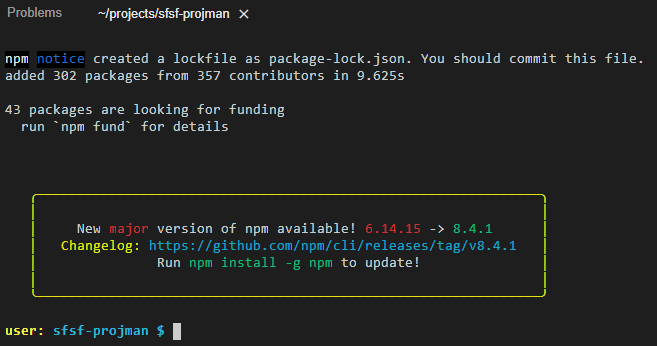
When the installation is completed you should see the following message in the Terminal:
Type cds watch and press Enter to run the project and watch for changes in real time. You should see the following result in the Terminal:

Notice that CDS has automatically set the database to an in-memory SQLite database and filled it with the CSV files. It also says that it could not find any service definitions from the loaded models: that’s because you really haven’t defined any yet (you will do it in the next tutorial from this group).
CTRL+Click on the http://localhost:4004 link that is displayed in the terminal to open the project home page in a new browser tab.

You can see that there are no web applications, and most importantly, no service endpoints yet.
You might be wondering: “what about the Employee, Role and Status entities that I annotated with @cds.autoexpose? why are they not showing up here?”. Well, as you have not defined any service endpoints to expose the entities, CDS cannot expose them even though you explicitly asked to do it automatically.
But don’t worry! They will show up in this page as soon as you complete the next tutorial in this group.
Resources
Discussion
Share feedback on this tutorial or join the conversation in SAP Community.