
Build Your First Chatbot with SAP Conversational AI
Create a simple chatbot that can recognize greetings, understand when asked for a joke, provide a joke, and recognize the user's reaction to the joke.
Overview
You will learn
- How to get an account with SAP Conversational AI
- How to create a chatbot project
- How to train your chatbot (to understand people)
- How to give your chatbot skills


Prerequisites
Steps
Go to https://cai.tools.sap/, and click Sign Up in the upper-right corner.
Follow the instructions for creating an account.

You will get an email with a link to validate your account.
Do one of the following:
If you just validated your account by clicking the link in your email, click Start with a Template.

New user If you are returning:
Go to your home page by opening the URL https://cai.tools.sap/ and sign in.
Click New Bot.
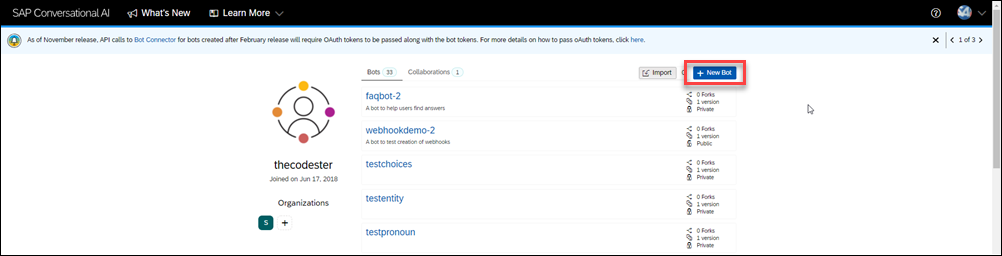
New bot
Fill in the following:
Select Perform Actions.
With a standard Perform Actions bot, the developer is responsible for creating entities and intents with expressions. The developer is also responsible for building and managing the conversational flow that pulls information from back-end systems to help simplify processes for the chatbot end user.
An FAQ bot retrieves answers to users’ questions from one or more documents (
.csvfiles) that you upload. The document must include predefined pairs of questions and answers. This allows your bot to map the user’s query to the best match and retrieve an answer without interpreting the intent of the question.To ease the complexity of the FAQ bot, the intents and entities are predefined and hidden, and the bot includes a set of predefined skills. However, you can design the bot responses as per your business needs.
For the predefined skills, choose Greetings.
In the Create your bot section, enter the following:
Field Name Value Bot name my-first-botDescription A bot that likes to tell jokes and have a little fun For Data Policy, select the following:
Non-personal.
Store.
For Bot visibility, select Public.

New bot form Click Create a bot.
There are 4 stages in your bot’s life:
Train: Teach your bot what it needs to understand.
Here you will create intents – ideas your bot will recognize – using expressions that the bot should recognize coming from the user.
Build: Create your conversational flow with our Bot Builder tool. Here you give your bot skills it can perform.
Here you will create skills – things your bot can do – and define when they will be triggered. Your skills are defined by triggers, requirements (information your bot must collect), and the actions.
Connect: Ship your bot to one or several messaging platforms.
Monitor: See how users are communicating with your bot, check if the bot is understanding users correctly, and make updates to the bots intents/entities. Monitoring also lets you see what your users want, and gives you ideas of what additional capabilities you could add to the bot.
The 4 phases are represented in the bot project by the 4 tabs.

Now we will work in the Train tab, where will build intents. Remember, intents are the things people want to tell our bot. Within an intent, we indicate all the possible expressions that a person might use to communicate that intent.
As SAP Conversational AI is collaborative, you do not have to re-create each intent every time. You can “fork” an intent someone has already created and clone it right into your bot.
Go to the Train tab.
In the Search box, enter
joke, and press Search.
Search for intents You will get a list of intents to fork.

Fork choices Click Fork for the first
@ask-jokeintent.There are many existing intents and the choices are always changing.
Explore the intent by clicking on it.
In the intent we forked, there are 2 expressions to discern if someone wants to be told a joke. In yours, you may receive more expressions.

Joke intent
You will be able to reuse many, many intents created by others. But there are times you will want to create your own.
Click the Train tab.
Create an intent for recognizing good reactions to jokes.
Click New Intent.

Click Create For the name of the intent, enter laughs.
For the description, enter A natural reaction to our awesome jokes.

Create intent Click Create Intent.
Create a second intent, this time for bad reactions to jokes.
Click Create.
For the name of the intent, enter lame.
For the description, enter You can’t succeed every time.
Click Create Intent.
Now that you have created 2 intents, we need to add expressions – things people might say if they had that intent. A golden rule would be to add at least 30 expressions to an intent, and ideally more than 50.
Put yourself in the shoes of the people talking to your bot. What could they possibly ask?
For this tutorial, you do not have to come up with 50 expressions but you will add 4 to each intent.
Click on the
@laughsintent.In the expression field, enter a sentence you want your bot to understand, then press Enter.

Link text e.g., Destination screen Here are some examples for the
laughsintent you added:CodeHahaha that's hilarious ROFL you're good! That, my friend, was an amazing joke. I haven't laughed that much in a long time!For a production bot, you want 30-50 expressions, all the ways someone is likely to express their intent. In addition, after deploying the bot, you can review what users are writing and add those.
Do the same for the
@lameintent (you’ll have to navigate to the intent by click Train tab or navigating the breadcrumb).Here are some examples for the
lameintent:CodeYou have no sense of humor whatsoever. That's both terrible and offensive. What the heck was that? Try harder, that was a very bad joke.
We want to now test to see if the bot can detect when a user says something matching the intent we created.
Click the Train button at the top-right, so that the bot trains itself based on the latest intents and expressions (sometimes referred as your dataset).
The button indicates the current status of training: Yellow is out of date, blue is training, green is up to date..

Train By default, your bot does not train itself but you must click Train for it to understand the latest intents and expressions.
You can change the setting so the bot automatically trains itself at Settings > Version > (current version dropdown), and scroll down to .

Settings 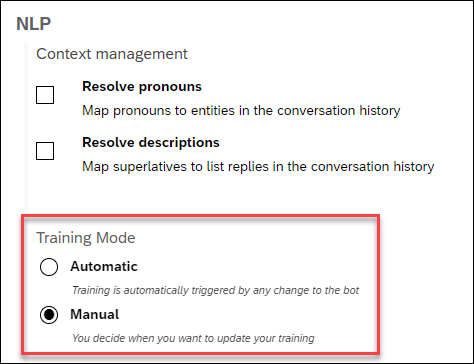At the bottom of the panel, open the Expression Analysis tab.

Expression Analysis Enter something that you think should match the intent, like:
TextBotty bot, can you tell me a joke please?If the intent is successfully trained, the test will show that the bot recognized the intent (as well as entities within the expression).

Successful test
If the bot did not recognize the intent (or selected the wrong intent), you will need to train your bot some more by adding additional expressions (Step 6).
Now that your bot knows how to understand people who talk to it, it’s time to give your robot some skills.
Open the Build tab.

Inside, you’ll find the Bot Builder, which helps you construct the conversation flow of your bot.
What is a skill?
Each skill represents one thing that your bot knows how to do. Your skill can be complicated (e.g., manage payment by credit card) or quite simple (e.g., answer a basic question).
Just like intents, you can create a skill from scratch or inherit skills from other bots you’ve created or from other people’s bots.
In our project, choose the predefined skill Greetings.
The Greetings skill – like all skills – has 4 tabs:
- README.md: A description of the purpose of your skill
- Triggers: The conditions that must occur – generally the intents that the user must express – for the skill to be executed
- Requirements: Information that must be collected in order for the skill to be executed
- Actions: The action to take (basically, this is the skill)
If you navigate through the tabs, you’ll see that the Greetings skill is structured as follows:
It is triggered if either the intent
@greetingsor@goodbyeis matched.It has no requirements because it does not need to collect additional information. That means that it will execute actions directly after being triggered.
It has two possible actions: If the
@greetingsintent is matched, it sends a random welcoming message chosen from a list. If the@goodbyeintent is matched, it does the same thing, but picks the message from a different list.
Now let’s build a skill to tell a joke.
Go back to the Build tab – where you see the canvas.
Click Add skill.
There are several types of skills:
Business skills reflect the core purpose of your bot.
Floating skills complement your bot’s core business skills (for example, small talk).
- The Initialize skill (there can only be one in a chatbot) is triggered when the conversation with the user starts.
Call your skill
tell-me-a-joke, set the type as Business, and click Add.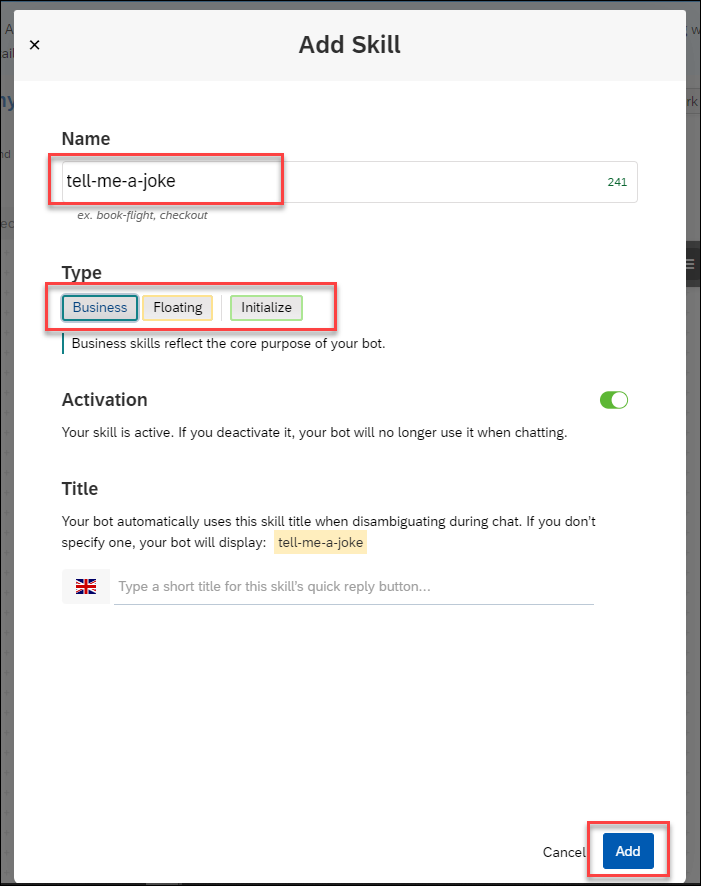
Create skill Click the new tell-me-a-joke skill, and open the Triggers tab.
Add 3
Ifstatements, one for each of the@ask-joke,@laugh, and@lameintents.- Click in the empty space right after
If, select the@ask-jokeintent, and then click Save.

Skill trigger condition Click on the + sign – Add a new condition below, not to the side – and repeat the above for
@laughsand@lameintents.Change the logical conditions to
Orbetween eachIfstatement, simply by clickingAnd.
It should now look like this:

Skill conditions result - Click in the empty space right after
Go to the Actions tab.
Click New Action Group, then Add Condition.
After the
If, select the@ask-jokeintent, and click Save.Click Choose Message Type, choose the Text format, and type in a really good joke, like:
JokeI just flew into town, and boy are my arms tired.You can define additional jokes, and one of the jokes from the set will be displayed randomly.
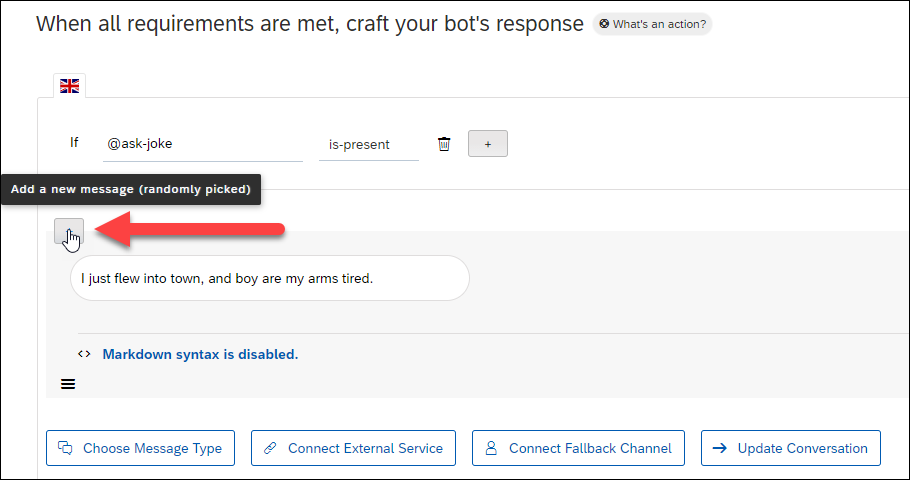
More messages You can also set a delay (optional) between two messages, up to 5 seconds. This might be useful when the messages your bot sends are quite long and need time to be read by the user.
Click Save.
Before releasing your bot to your audience, chat with it in real situation. This will help show you how the bot will behave in a “real” conversation.
Double-check if there are any errors in the conversation flow (e.g., bad answers, fallback errors, weird behavior) and correct them before sending the bot out.
Chat with your bot as often as you can while you build it, which will make it easier to find problems.
Click on the bottom-right yellow button Chat Preview and start sending messages. Use the clear icon

If you say Tell me a joke, the bot will tell you a joke.
Try other phrases and see how the bot responds. If the bot does not respond properly, then try improving your intent with additional expressions.

Congratulations! You have created your first bot.
In later tutorials, you will learn how to deploy your bot and monitor it so it gets smarter and smarter.
Resources
Discussion
Share feedback on this tutorial or join the conversation in SAP Community.