
Overview
You will learn
- How to create a new page (detail page)
- How to navigate and pass a parameter to a different page
- How to reuse logic flows
- How to create custom events
- How to use filtering, ordering and paging for an OData service


Prerequisites
Steps
Intro
The product detail page will let users see the current rating of a product, let them rate the product themselves, add a comment, and see all the comments for the product.
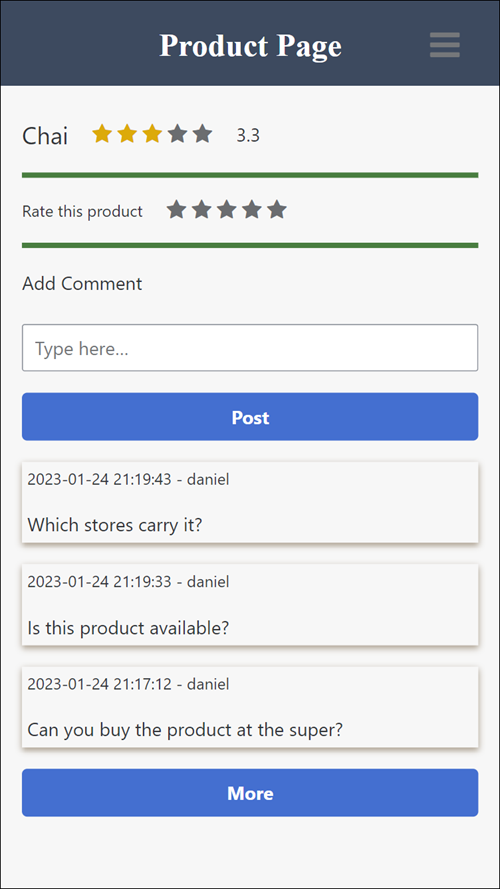
In this tutorial, you create the required variables, binding and logic, and in the next tutorial you will create the UI.
In the upper left, click on the name of the current page.

Pages Click Add New Page.

Add page Call the page
Product Page.Click OK.
Delete all the components on the page, so the page is blank.
Select Variables.
Under Page Variables, add the following page variables:

Variables Variable Type Purpose ratingcomplete True/false Indicates the user gave a rating and we will disable the rating component newcomment Text Contains the text the user enters as a new comment pagesize Number – set initial value to 3 The number of comments to display, which starts at 3 but can grow rating Number The rating given by the user for this product, bound to the star rating component’s Value field totalcount Number The total number of comments for this product, which we get as part of the call to the Comment entity Under Page Parameter, add the following page parameter:
Field Type Purpose productID Text The product to be displayed on the product page, received when the user clicks on a certain product in the list of products Page parameters are variables that are required to pass when navigating to a particular page.
Under Data Variables, add a data variable based on the Comment entity (keep the name Comment1).
Click on the new data variable, open the logic pane, and remove all of the flow functions.

Data variable We will put the logic in a central place, so we can reuse the flow functions.
Under Data Variables, add a data variable based on the Products entity (keep the name Product1).
Set the type of variable to Single data record, and set the ProductID to the following formula:
JavaScriptNUMBER(params.productID)
Products data variable Click Save (upper right).
We want to refresh our comments data at many points in our app (e.g., user adds comment or user pages through comments). So we will put the logic in a central place, and create an event that we can call anytime.
Return to the view of the canvas, then click in an open spot on the canvas, and then open the logic pane.
In the logic, create a logic flow like this:

Comment flow For the Get record collection, set the resource name to Comment.
Now set the filter, ordering, and paging.

Data variable settings For the Filter condition, select the X and select Object with properties.
Click Add Condition, and set the property
productIdequal to the page parameterproductID.
Data variable filter For the Ordering, select the X and select List of values.
Click Add Sort Option, and set the sort property
dateCreatedand the sort direction todesc.
Data variable ordering For the Paging, select the X and select Object with properties.
Set the following values as follows (
pagesizeis the page variable):
Data variable paging
For the Set data variable flow function, set the following:
- Data variable name property to
Comment1 - Record collection to Output value of another node > Get record collection > Collection of records.

Set data variable - Data variable name property to
For the Set page variable, set
totalCountvariable to Output value of another node > Get record collection > Total count.Drag a Receive event flow function (all the way at the bottom) onto the canvas.

Alt text Set Event source to Fired from “Trigger event” (all the way at the bottom).

Trigger event Under Advanced, set the name of the flow function to
Refresh Comments.
Event name This creates an event called Refresh Comments that can be called from other logic flows.
Connect the new event to the Get record collection flow function.

New event Click Save (upper right).
Whenever someone clicks on one of the products on the List of Products page, we want the user to open the Product Page for that product.
Go back to the List of Products page.
Select the list component, and open the logic pane.
Connect an Open page flow function to the tap event.

Open page With the flow function selected, in the Properties pane, set the Page property to Product Page.

Open page properties Set Parameters > ProductID to the following formula:
JavaScriptSTRING(repeated.current.ProductID)
Navigate Click Save.
You can run the app again. Now, when you click a product it will navigate to the Product Page, though it will be empty.
Resources
Discussion
Share feedback on this tutorial or join the conversation in SAP Community.