✔How to onboard a repository using API. [ACCORDION-BEGIN [Step 1: ](Get URL from the service key)] Copy the url: parameter from the generated service key. !Copy_URL[DONE] [ACCORDION-END] [ACCORDION-BEGIN [Step 2: ](Get started with onboarding repository)] 1. Open the Postman. Click on New and then select HTTP Request to open a new tab on Postman to work on. !Postman2. Select the POST method and enter the request URL as like this: "url">/rest/v2/repositories. > Example: You must ensure that you are adding the parameter /rest/v2/repositories as suffix to the request URL. So that the final sample request URL looks like this: https://api-abc-de.cfapps.sap.hana.ondemand.com/rest/v2/repositories !req3. Navigate to Authorization tab and select the type Bearer Token. Enter the JSON web token that you generate in this tutorial Generating the JSON Web Token (JWT). !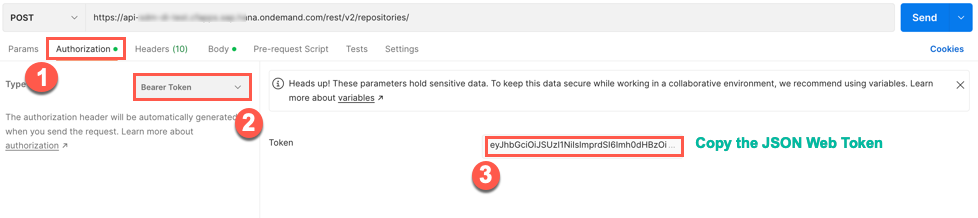 4. Navigate to the Body tab and copy paste the following code snippet. JSON { "repository": { "displayName": "MytestReposiory", "description": "Onboarding as part of the tutorial", "repositoryType": "external", "externalId": "MyTutONBRepo", "repositoryCategory": "GoogleWorkspace", "repositoryId": "GoogleConnectorEntry" }, "connection": { "destinationName": "MyTest" } } >Note Please modify the details according to your needs. It is not necessary to follow the same code snippet. A few details, such as display name, and destination names, may change. It is important that you read the Prerequisites again. !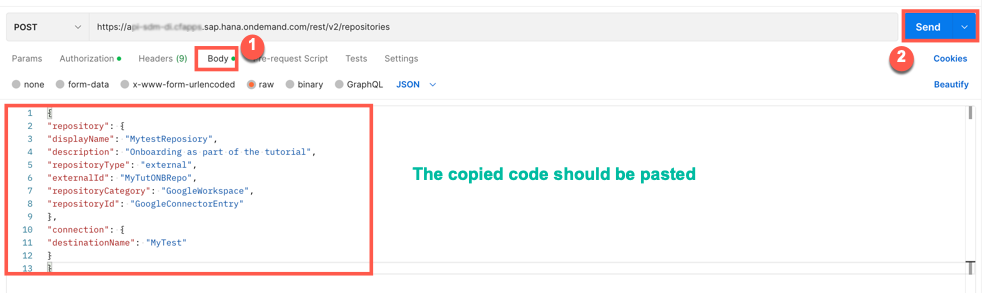 Click Send. 5. When a successful response is received, the status is 200 OK. Results ! [DONE] [ACCORDION-END] [ACCORDION-BEGIN [Step 3: ](Test yourself)] [VALIDATE_5] [DONE] [ACCORDION-END]
You’ve generated a JSON Web Token (JWT) that serves as your authorization for making API calls. For more information, see the tutorial Generating the JSON Web Token (JWT).
You’ve the admin permission for Document Management Service, Integration Option via the SDM_Admin scope.
Copy the url: parameter from the generated service key.
!Copy_URL
Step 2Get started with onboarding repository
+
Open the Postman. Click on New and then select HTTP Request to open a new tab on Postman to work on.
!Postman
Select the POST method and enter the request URL as like this:
"url">/rest/v2/repositories.
Example: You must ensure that you are adding the parameter /rest/v2/repositories as suffix to the request URL. So that the final sample request URL looks like this: https://api-abc-de.cfapps.sap.hana.ondemand.com/rest/v2/repositories
!req
Navigate to Authorization tab and select the type Bearer Token. Enter the JSON web token that you generate in this tutorial Generating the JSON Web Token (JWT).
Navigate to the Body tab and copy paste the following code snippet.
JSON
{"repository":{"displayName":"MytestReposiory","description":"Onboarding as part of the tutorial","repositoryType":"external","externalId":"MyTutONBRepo","repositoryCategory":"GoogleWorkspace","repositoryId":"GoogleConnectorEntry"},"connection":{"destinationName":"MyTest"}}
Note Please modify the details according to your needs. It is not necessary to follow the same code snippet. A few details, such as display name, and destination names, may change. It is important that you read the Prerequisites again.
Joule is an AI assistant. Generative AI may produce inaccurate, incomplete, or biased information. Always verify important details before acting on them.
Conversations are sent to SAP-hosted large language models for processing. Do not include personal data, credentials, or confidential information in your messages.
Joule's responses are based on the SAP tutorial catalog and may not reflect the latest product changes. For authoritative guidance, consult the linked tutorials and official SAP documentation.



