
Overview
You will learn
- How do you manage cross domain mapping at the service instance level


Prerequisites
Prerequisites
- You’ve copied the
ecmservice:urlvalue from the service key of Document Management Service, Integration Option. For more information, see Create a Service Instance and then a Service Key of SAP Document Management Service, Integration Option. - You’ve generated a JSON Web Token (JWT) that serves as your authorization for making API calls. For more information, see Generating the JSON Web Token (JWT).
- You’ve the admin permission for Document Management Service, Integration Option via the
SDM_Adminscope. - You’ve installed the Postman app.
- You’ve created an HTTP destination and added the following additional property. For more information, see Create a Destination.
| Property Name | Value |
|---|---|
google.default_domain | Enter the domain. For example, abcworkspace.com |
Steps
You will learn
- How do you manage cross domain mapping at the service instance level
Introduction
If your domains are different, we need to map your system user account to the Google Workspace domain. For example, if you’re using the domain abc.com (jhon.thane1@abc.com) and have a Google Workspace account with the domain abcworkspace.com (jhon.thane1@abcworkspace.com), you need to maintain cross-domain mapping
Copy the url: parameter from your service key.
!
- Open the Postman. Click on New and then select HTTP Request to open a new tab on Postman to work on.
!
Select the POST method and enter the request URL as like this:
<url>/rest/v2/configs.Example: You must ensure that you are appending the suffix
/rest/v2/configsto the URL. So that the final sample request URL looks like this:https://api-abc-test.apps.sap.hana.ondemand.com/rest/v2/configs.!

req Navigate to Authorization tab and select the type Bearer Token. Enter the JSON web token that you generate in tutorial Generating the JSON Web Token (JWT).
!

GWT_Token_Cross_Domain Navigate to the Body tab and copy paste the following code snippet.
JSON{ "configName" : "isCrossDomainMappingAllowed", "configValue" : "true" }!

EnterCodeSnippet Click Send.
Results: When a successful response is received, the status is
200 OK.!
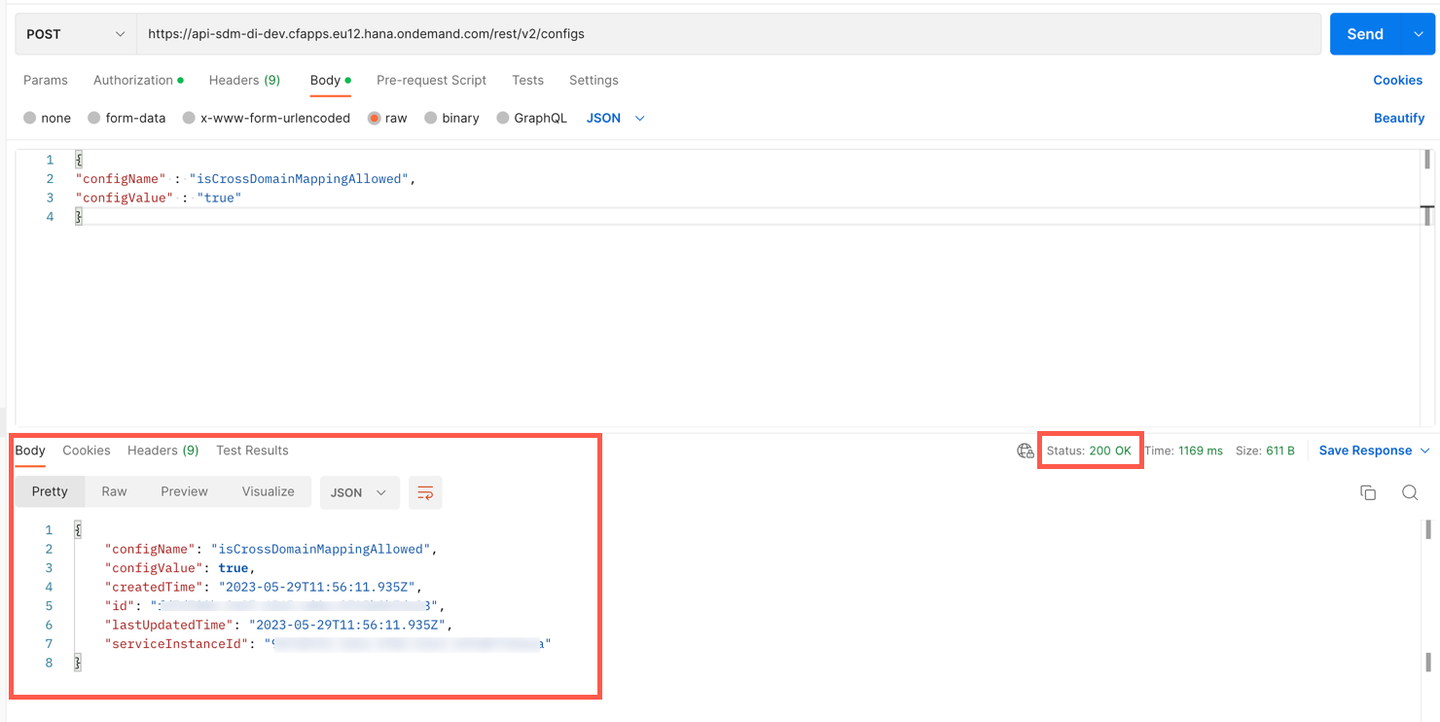
Response_Status
Resources
Discussion
Share feedback on this tutorial or join the conversation in SAP Community.