
Overview
You will learn
- How to integrate a wrapper class in a RAP BO during the save sequence
- How to implement a new action in RAP BO to call the wrapper class and use it to create a purchase requisition
- How to expose the action via service binding


Prerequisites
Prerequisites
- You have completed the previous tutorials in this group to create a wrapper for the BAPI
BAPI_PR_CREATEas well as create a shopping cart business object and enhance it. - For the entirety of this tutorial, you will be using the same user with full development authorization you used in the previous tutorial of this mission.
Steps
Intro
Throughout this tutorial, wherever ### appears, use a number (e.g. 000). This tutorial is done with the placeholder 000.
In this tutorial you will take the wrapper that you created and you will integrate it in your shopping cart RAP Business Object (RAP BO) to create purchase requisitions in your online shop application as indicated in the Using BAPIs in RAP blog post:
- You will implement a new action. The action shall change the status of the business object instance to “Submitted”.
- You will implement a validation for the status. When the status is “Submitted”, the validation will call the BAPI in test mode via the wrapper. It will return any error message raised by the BAPI. These error messages are then returned to the end user.
- You will adapt the RAP BO and turn it into a RAP BO with unmanaged save. In the corresponding
save_modifiedmethod implementation, when the status of a business object instance is “Submitted”, the wrapper will be called via the BAPI and a purchase requisition is created for that business object instance.
Later in this tutorial we will implement a save_modified method in the RAP Business Object, which will invoke authorization checks during the save sequence. If the RAP behavior definition is implemented in ABAP for Cloud Development and the strict(2) mode is applied, this would lead to runtime errors. For this reason, we will switch to strict(1) mode. For more information, see The RAP Transactional Model and the SAP LUW.
Connect to your system via ADT and navigate to the package Z_PURCHASE_REQ_### containing the RAP BO. Open the behavior definition ZR_SHOPCARTTP_### and change to strict(1) mode:

Save and activate it.
Open the behavior definition ZC_SHOPCARTTP_### and change to strict(1) mode there as well:

Save and activate it.
You will now create a whole new action in the RAP BO, called createPurchRqnBAPISave. Open the behavior definition ZR_SHOPCARTTP_### and define a new action with the following code snippet:
action ( features : instance ) createPurchRqnBAPISave result [1] $self;Your behavior definition should look as follows:

Save and activate it.
Position the cursor on the newly defined action and use the shortcut ctrl + 1 to load the quick assist proposals, then double-click on Add missing method for action createpurchrqnbapisave of entity zr_shopcarttp_### in local handler class lhc_shopcart inside global class zbp_shopcarttp_001. This will automatically create an empty method implementation in the lhc_shopcart class. Implement the method as follows:
  METHOD createPurchRqnBAPISave.
  "read transfered order instances
  READ ENTITIES OF zr_shopcarttp_### IN LOCAL MODE
    ENTITY ShoppingCart
      ALL FIELDS WITH
      CORRESPONDING #( keys )
    RESULT DATA(OnlineOrders).

  MODIFY ENTITIES OF zr_shopcarttp_### IN LOCAL MODE
     ENTITY ShoppingCart
        UPDATE FIELDS ( OverallStatus )
           WITH VALUE #( FOR key IN keys (
            OrderUUID = key-OrderUUID
            OverallStatus = c_overall_status-submitted
         ) ).

  "Read the changed data for action result
  READ ENTITIES OF zr_shopcarttp_### IN LOCAL MODE
    ENTITY ShoppingCart
      ALL FIELDS WITH
      CORRESPONDING #( keys )
    RESULT DATA(result_read).
  "return result entities
  result = VALUE #( FOR result_order IN result_read ( %tky   = result_order-%tky
                                                      %param = result_order ) ).
ENDMETHOD.Save and activate it.
This action will mark the orders where purchase requisition shall be created using the OverallStatus field. In a later step we will create the save_modified implementation and adapt it to use this OverallStatus field to filter the orders where purchase requisition shall be created. As a result, when the button for this action is clicked in the UI, a new purchase requisition will be created for the selected entity via the wrapper class.
You now need to adapt the get_instance_features method in the lhc_shopcart class of the behavior implementation by adding the following code snippet:
%action-createPurchRqnBAPISave
= COND #( WHEN OnlineOrder-OverallStatus = c_overall_status-submitted OR OnlineOrder-%is_draft = if_abap_behv=>mk-on
          THEN if_abap_behv=>fc-o-disabled
          ELSE if_abap_behv=>fc-o-enabled )
So the method implementation now looks as follows:

Save and activate it.
As seen in the previous tutorial of this series, certain BAPI have a test mode that can be used to validate the input data. Depending on the type of BAPI, how you plan to integrate it in your RAP BO and your specific use case, it is recommended to use this test mode as a validation in your RAP BO. So, after the action createPurchRqnBAPISave is called, this validation can be used to check the input data (before the logic moves on to the save_modified step, where the entity is modified and the purchase requisition is created).
Open the behavior definition ZR_SHOPCARTTP_### and implement a new validation called checkPurchaseRequisition:
  draft determine action Prepare { validation checkOrderedQuantity; validation checkDeliveryDate; validation checkPurchaseRequisition;}
  .
  .
  validation checkPurchaseRequisition on save { field OverallStatus; }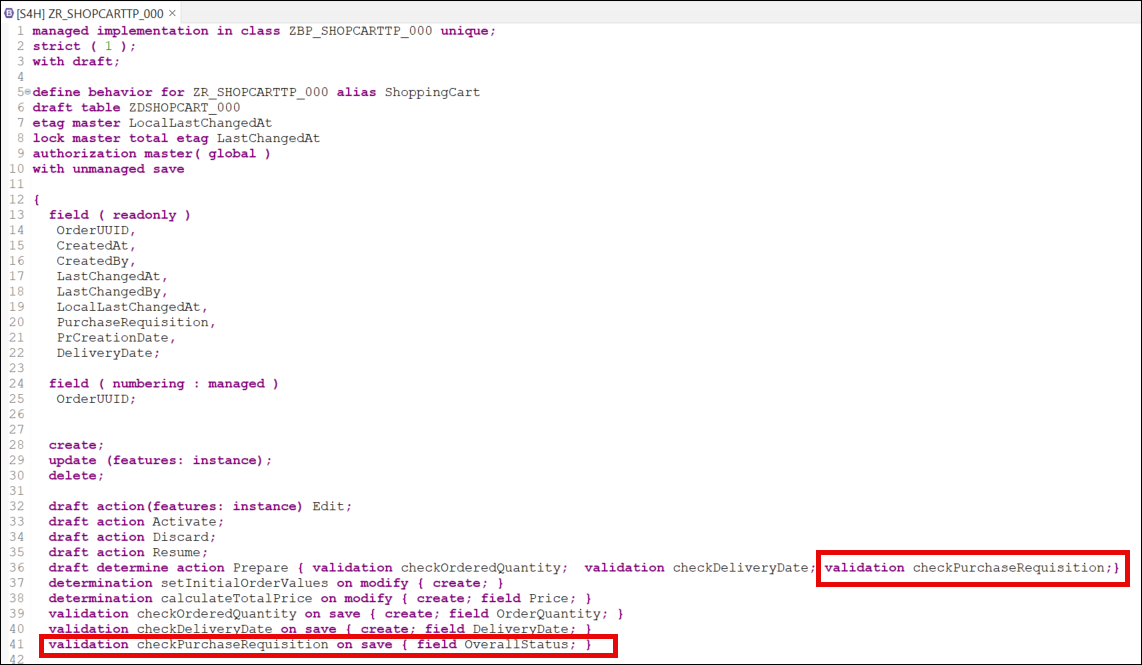
Save and activate it. Then place the cursor on the newly created validation and use the shortcut ctrl + 1 to load the quick assist proposals, then double-click on Add missing method for validation checkpurchaserequisition of entity zr_shopcarttp_### in local handler class lhc_shopcart inside global class zbp_shopcarttp_001 and implement the method as follows:
  METHOD checkPurchaseRequisition.

    DATA prheader TYPE zif_wrap_bapi_pr_create_###=>bapimereqheader .
    DATA prheaderx TYPE zif_wrap_bapi_pr_create_###=>bapimereqheaderx .
    DATA pritem  TYPE zif_wrap_bapi_pr_create_###=>_bapimereqitemimp .
    DATA pritemx  TYPE zif_wrap_bapi_pr_create_###=>_bapimereqitemx  .
    DATA prheaderexp  TYPE zif_wrap_bapi_pr_create_###=>bapimereqheader .
    DATA  return  TYPE zif_wrap_bapi_pr_create_###=>_bapiret2 .

    DATA number  TYPE banfn  .

    "if the data element banfn is not released for the use in cloud develoment in your system
    "you have to use the shadow type zif_wrap_bapi_pr_create_###=>banfn

    "DATA number  TYPE zif_wrap_bapi_pr_create_###=>banfn  .

    "read relevant order instance data
    READ ENTITIES OF zr_shopcarttp_### IN LOCAL MODE
      ENTITY ShoppingCart
        ALL FIELDS WITH
        CORRESPONDING #( keys )
      RESULT DATA(OnlineOrders).

    prheader = VALUE #( pr_type = 'NB' ).
    prheaderx = VALUE #( pr_type = 'X' ).

    LOOP AT OnlineOrders INTO DATA(OnlineOrder) WHERE OverallStatus = c_overall_status-submitted.

      pritem           = VALUE #( (
                           preq_item  = '00010'
                           plant      = '1010'
                           acctasscat = 'U'
                           currency   = OnlineOrder-Currency
                           deliv_date = OnlineOrder-DeliveryDate
                           material    = OnlineOrder-OrderedItem "'ZPRINTER01'
                           matl_group  = 'L001'
                           preq_price = OnlineOrder-Price
                           quantity   = OnlineOrder-OrderQuantity
                           unit       = 'ST'
                           pur_group = '001'
                           purch_org = '1010'
                           short_text =  OnlineOrder-OrderedItem
                         ) ).

      pritemx           = VALUE #( (
                        preq_item  = '00010'
                        plant      = 'X'
                        acctasscat = 'X'
                        currency   = 'X'
                        deliv_date = 'X'
                        material   = 'X'
                        matl_group = 'X'
                        preq_price = 'X'
                        quantity   = 'X'
                        unit       = 'X'
                        pur_group = 'X'
                        purch_org = 'X'
                        short_text = 'X'
                      ) ).


      zcl_bapi_wrap_factory_###=>create_instance( )->bapi_pr_create(
          EXPORTING
            prheader = prheader
            prheaderx = prheaderx
            testrun = abap_true
          IMPORTING
            number   = number
            prheaderexp = prheaderexp
          CHANGING
            pritem          = pritem
            pritemx         = pritemx
            return          = return
            )
        .

      LOOP AT return INTO DATA(pr_return_msg) WHERE type = 'E' OR type = 'W'.
        APPEND VALUE #(
          orderuuid = OnlineOrder-OrderUUID
          %msg = new_message(
                        id        = pr_return_msg-id
                        number    = pr_return_msg-number
                        severity  = COND #( WHEN pr_return_msg-type = 'E' THEN if_abap_behv_message=>severity-error
                                            WHEN pr_return_msg-type = 'W' THEN if_abap_behv_message=>severity-warning
                                             )
                         v1 = pr_return_msg-message_v1
                         v2 = pr_return_msg-message_v2
                         v3 = pr_return_msg-message_v3
                         v4 = pr_return_msg-message_v4  )
          %element-purchaserequisition = if_abap_behv=>mk-on
          %action-createPurchRqnBAPISave = if_abap_behv=>mk-on
           ) TO reported-shoppingcart.

        APPEND VALUE #(
         orderuuid = OnlineOrder-OrderUUID
         %fail = VALUE #( cause = if_abap_behv=>cause-unspecific )
        ) TO failed-shoppingcart.
      ENDLOOP.
    ENDLOOP.
ENDMETHOD.The method reads the entities of the RAP BO, checks the entries and triggers the BAPI test mode call for those orders where a purchase requisition is being created. The method also takes care of error handling: it filters for any error or warning raised from the BAPI call and passes it on to the UI which would display a pop-up error message if needed.
Save it and activate it.
The parameter
FOR VALIDATE ON SAVEmeans that the method will be used during the save sequence of the RAP BO. Which means that after the creation of a new entry, when the user will save it, this method will be called to check the validity of the input data.
For the scope of this tutorial, we will use the material
ZPRINTER01, which is automatically available in any Fully-Activated Appliance in SAP Cloud Appliance Library. If you are using a different system, you might have to create a material to use in the tutorial (see Creating Materials).
In our scenario, we want to call the wrapper during the save sequence and therefore we need to switch to a RAP BO with unmanaged save, so that we can implement and adapt the save_modified method and call the wrapper therein.
Open the behavior definition ZR_SHOPCARTTP_###, delete the following line:
persistent table zashopcart_### and add the unmanaged save statement:
with unmanaged save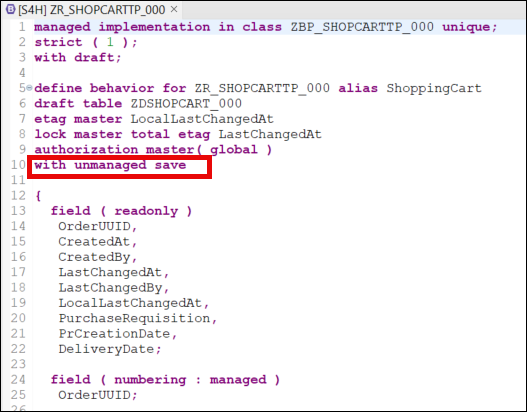
Save and activate it.
Position the cursor on the with unmanaged save statement and use the shortcut ctrl + 1 to load the quick assist proposals, then double-click on Add required method save_modified in new local saver class to automatically create an empty implementation for the method. Implement it as follows:
  METHOD save_modified.

    DATA : lt_shopping_cart_as        TYPE STANDARD TABLE OF zashopcart_###,
          ls_shopping_cart_as        TYPE                   zashopcart_###.
    IF create-shoppingcart IS NOT INITIAL.
      lt_shopping_cart_as = CORRESPONDING #( create-shoppingcart MAPPING FROM ENTITY ).
      INSERT zashopcart_### FROM TABLE @lt_shopping_cart_as.
    ENDIF.
    IF update IS NOT INITIAL.
      CLEAR lt_shopping_cart_as.
      lt_shopping_cart_as = CORRESPONDING #( update-shoppingcart MAPPING FROM ENTITY ).
      LOOP AT update-shoppingcart  INTO DATA(shoppingcart) WHERE OrderUUID IS NOT INITIAL.
        MODIFY zashopcart_### FROM TABLE @lt_shopping_cart_as.
      ENDLOOP.
    ENDIF.

    LOOP AT delete-shoppingcart INTO DATA(shoppingcart_delete) WHERE OrderUUID IS NOT INITIAL.
      DELETE FROM zashopcart_### WHERE order_uuid = @shoppingcart_delete-OrderUUID.
      DELETE FROM zdshopcart_### WHERE orderuuid = @shoppingcart_delete-OrderUUID.
    ENDLOOP.
  ENDMETHOD.
Save and activate it.
We use the unmanaged save option for our scenario, rather than the additional save option. This is because the additional save should only be used in case data needs to be saved in addition to BO data in a persistence outside the BO, as stated in the Additional Save documentation. Since this is not our use case (the purchase requisition is created and saved in the persistency of the shopping cart BO), we rely on the unmanaged save option.
As a final step, you now need to modify the save_modified method of the saver class, so that it calls the wrapper class (which creates the purchase requisition).
Open the lsc_zr_shopcarttp_### class of the behavior implementation and navigate to the save_modified method. Add the following code snippet:
 METHOD save_modified.

    IF create-shoppingcart IS NOT INITIAL.
      INSERT zashopcart_### FROM TABLE @create-shoppingcart  MAPPING FROM ENTITY .
    ENDIF.

    IF update IS NOT INITIAL.
      UPDATE zashopcart_### FROM TABLE @update-shoppingcart
         INDICATORS SET STRUCTURE %control MAPPING FROM ENTITY.
    ENDIF.

    LOOP AT delete-shoppingcart INTO DATA(shoppingcart_delete) WHERE OrderUUID IS NOT INITIAL.
      DELETE FROM zashopcart_### WHERE order_uuid = @shoppingcart_delete-OrderUUID.
      DELETE FROM zdshopcart_### WHERE orderuuid = @shoppingcart_delete-OrderUUID.
    ENDLOOP.

    DATA : prheader    TYPE zif_wrap_bapi_pr_create_###=>bapimereqheader,
           prheaderx   TYPE zif_wrap_bapi_pr_create_###=>bapimereqheaderx,
           pritem      TYPE zif_wrap_bapi_pr_create_###=>_bapimereqitemimp,
           pritemx     TYPE zif_wrap_bapi_pr_create_###=>_bapimereqitemx,
           prheaderexp TYPE zif_wrap_bapi_pr_create_###=>bapimereqheader,
           pr_return   TYPE zif_wrap_bapi_pr_create_###=>_bapiret2.

    DATA number  TYPE banfn  .

    "if the data element banfn is not released for the use in cloud develoment in your system
    "you have to use the shadow type zif_wrap_bapi_pr_create_###=>banfn

    "DATA number  TYPE zif_wrap_bapi_pr_create_###=>banfn  .****

    prheader = VALUE #( pr_type = 'NB' ).
    prheaderx = VALUE #( pr_type = 'X' ).

    IF update IS NOT INITIAL.
      LOOP AT update-shoppingcart INTO DATA(OnlineOrder) WHERE %control-OverallStatus = if_abap_behv=>mk-on.

        pritem           = VALUE #( (
                              preq_item  = '###10'
                              plant      = '1010'
                              acctasscat = 'U'
                              currency   = OnlineOrder-Currency
                              deliv_date  = OnlineOrder-DeliveryDate
                              material    = 'ZPRINTER01'
                              matl_group  = 'A001'
                              preq_price  = OnlineOrder-Price
                              quantity    = OnlineOrder-OrderQuantity
                              unit        = 'ST'
                              pur_group   = '001'
                              purch_org   = '1010'
                              short_text = OnlineOrder-OrderedItem
                            ) ).

        pritemx           = VALUE #( (
                          preq_item  = '###10'
                          plant      = 'X'
                          acctasscat = 'X'
                          currency   = 'X'
                          deliv_date = 'X'
                          material   = 'X'
                          matl_group = 'X'
                          preq_price = 'X'
                          quantity   = 'X'
                          unit       = 'X'
                          pur_group  = 'X'
                          purch_org  = 'X'
                          short_text = 'X'
                        ) ).


        DATA(myclass) = zcl_bapi_wrap_factory_###=>create_instance( ).

        myclass->bapi_pr_create(
          EXPORTING
            prheader    = prheader
            prheaderx   = prheaderx
            testrun     = abap_false
          IMPORTING
            number      = number
            prheaderexp = prheaderexp
          CHANGING
            pritem      = pritem
            pritemx     = pritemx
            return      = pr_return
          ).

        ASSERT NOT line_exists( pr_return[ type = 'E' ] ).

        DATA(creation_date) = cl_abap_context_info=>get_system_date(  ).

        UPDATE zashopcart_###
        SET purchase_requisition = @number,
            pr_creation_date = @creation_date
        WHERE order_uuid = @OnlineOrder-OrderUUID.

      ENDLOOP.
    ENDIF.
ENDMETHOD.Save and activate it.
The logic is now fully implemented: when the new action is used, shopping cart orders are marked (similar to a checkbox) using the OverallStatus field, they are subsequently validated for purchase requisition creation and then used to create the actual purchase requisition in the unmanaged save implementation in the save_modified method.
The BAPI wrapper call is implemented in the unmanaged save implementation
save_modified, and not directly in the action implementation. The reason is for transactional consistency: during the BAPI call aCALL FUNCTION IN UPDATE TASKhappens, and the update task is not allowed in the interaction phase or early-save phase and leads to a runtime error.
You might notice that the
save_modifiednow has twoIF update IS NOT INITIALsections, one from the original behavior implementation from the previous step (which is representative of a standard save sequence implementation for thesave_modifiedmethod), and the new one we just implemented (which calls the wrapper to create a purchase requisition during the save sequence). This is not strictly necessary, and the logic could be combined, but for the sake of clarity and modularity we decided to keep it separated for this tutorial series (even if it is slightly redundant).
Given our implementation, there is no way to handle errors at this phase, so the
ASSERTstatement is used as a contingency: it catches any error that was not caught during the validation phase and leads to a runtime error.
You will now expose the newly created action. To do this, you will modify the Metadata Extension and the Behavior Definition to expose the action.
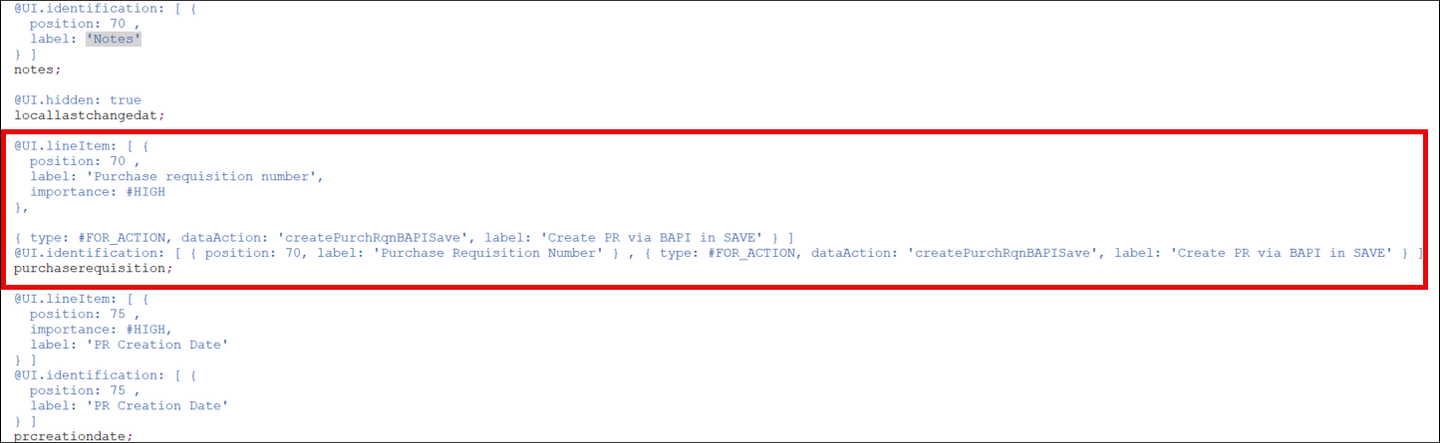
Open the Metadata Extension ZC_SHOPCARTTP_### and substitute all the metadata content referring to the action PurchaseRequisition with the following code snippet referring to the new action:
  @UI.lineItem: [ {
    position: 70 ,
    label: 'Purchase requisition number',
    importance: #HIGH
  },

  { type: #FOR_ACTION, dataAction: 'createPurchRqnBAPISave', label: 'Create PR via BAPI in SAVE' } ]
  @UI.identification: [ { position: 70, label: 'Purchase Requisition Number' } , { type: #FOR_ACTION, dataAction: 'createPurchRqnBAPISave', label: 'Create PR via BAPI in SAVE' } ]
  PurchaseRequisition;
Your metadata implementation should look like this:
Save and activate it.
Open the Behavior Definition ZC_SHOPCARTTP_### and expose the new action with the code snippet:
use action createPurchRqnBAPISave;The Behavior Definition should now look as follows:

Save and activate it.
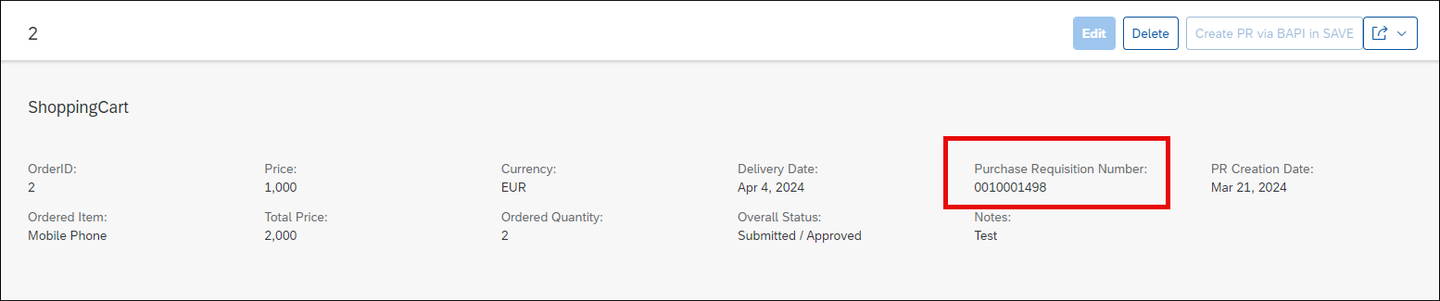
In ADT, open the Service Binding ZUI_SHOPCART_O4_### and click on the Preview button to start a preview of the UI of your RAP BO. You will be prompted to login. Create a new entry and then click on the button Create PR via BAPI in SAVE to create the purchase requisition:


The purchase requisition will be created:
Resources
Discussion
Share feedback on this tutorial or join the conversation in SAP Community.