
Generate the UI for a Custom Business Object and grant Access
Generate an own application based on a Custom Business Object and grant access with a Custom Catalog Extension
Overview
You will learn
- How to generate a User Interface (UI) for the custom business object created in preceding tutorial
- How to expose that UI as a running application with the use of Custom Catalog Extensions so that you can create, update and delete custom business object entities


Prerequisites
Prerequisites
- Authorizations: Your user needs a business role with business catalogs Extensibility - Custom Business Objects (ID:
SAP_CORE_BC_EXT_CBO) and Extensibility - Custom Catalog Extensions (ID:SAP_CORE_BC_EXT_CCE) in your SAP S/4HANA Cloud system
Steps
Additional Info
- UI Generation and UI Adaptation are so called In-App Extensibility features done completely inside an SAP S/4HANA Cloud system. They are functionality with limited possibilities. Alternatively a UI with all SAPUI5 options can be developed with SAP Business Application Studio (see tutorial group Create an SAP Fiori App and Deploy it to SAP S/4HANA Cloud).
- Tutorial last checked for feasibility with SAP S/4HANA Cloud Release 2602
Our Example
A several tutorials spanning example will show extensibility along custom Bonus Management applications.
In the first parts a Manager wants to define business objects “Bonus Plan” for employees. A Bonus Plan is used to save employee specific rules for bonus entitlement.
Start typing Custom Business Objects in the Launchpad search and open the App from the results.

Search for Custom Business Object “Bonus Plan” (1+2) and Select its list item in the search result list (3) and execute the Edit Draft action (4).

Check the two boxes for User Interface and Back End Service.

Publish the business object to trigger the generation of UI (List Report Floorplan) and OData Service.
Now you grant access to the generated UI by assigning it to a Business Catalog. Ensure not to be in edit mode which is the case just after publishing. From the Business Object’s overview go to Custom Catalog Extension application by clicking the Maintain Catalogs link.

A new window will open.
Press Add to start extending the business catalog that the new app shall be part of.

In the opening value help narrow down the result list by searching for Custom Business, select the Catalog with role ID SAP_CORE_BC_EXT_CBO and press OK.

You could also choose another Catalog, but be aware that your user must have a Business Role containing that catalog to be able to access the created application.
Select the just added Catalog and Publish it.

This step takes some minutes, the screen refreshes automatically and once the status switches from unpublished to published, you can close this application’s window and proceed.
Refresh the browser window, start typing Bonus Plan in the Launchpad search and open the App from the results.

Create an object.
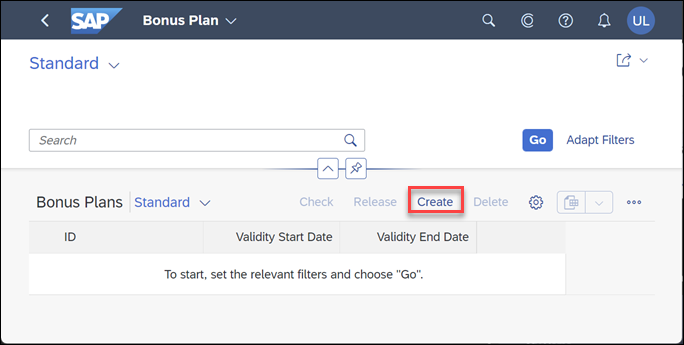
Enter following data
| Field | Value |
|---|---|
| ID | 1 |
| Validity Start Date | 01.01.2017 |
| Validity End Date | 31.12.2017 |
| Target Amount | 1000.00 EUR |
| Low Bonus Assignment Factor | 1 |
| High Bonus Assignment Factor | 3 |
| Employee ID | <any> |
Employee ID <any> shall be the one of a sales person that created sales orders with a Net Amount of more than 3000.00 EUR in 2017 and that are completed.
Create the Bonus Plan. You can return from Bonus Plan object page to list report, where you can see one entry in the list of bonus plans now.
Resources
Discussion
Share feedback on this tutorial or join the conversation in SAP Community.