
Implement Logic for a Custom Business Object
Control your custom business object application with ABAP logic
Overview
You will learn
- How to enable logic implementation for a custom business object
- How to implement changing custom business object database
- How to implement checking a custom business object before save
- How to implement saving or reject saving of a custom business object
- How to implement informing the end user about save
- How to ease development and test already during implementation


Prerequisites
Prerequisites
- Authorizations: Your user needs a business role with business catalog Extensibility – Custom Business Objects (ID:
SAP_CORE_BC_EXT_CBO) and Extensibility - Custom Logic (ID:SAP_CORE_BC_EXT_BLE) in your SAP S/4HANA Cloud system
Steps
Our Example
A several tutorials spanning example will show extensibility along custom Bonus Management applications.
In the first parts a Manager wants to define business objects Bonus Plan for employees. A Bonus Plan is used to save employee specific rules for bonus entitlement.
Tutorial last checked for feasibility with SAP S/4HANA Cloud Release 2602
As there was no backend implementation to set the mandatory key field ID so far, we were forced to set it from the UI to be able to save instances. Now, as we will implement the logic to set the ID in backend and nowhere else, we will set that key field to Read-Only for the UI.
Enter your SAP S/4HANA Cloud system’s Fiori Launchpad.
Start typing Custom Business Objects in the Launchpad search and open the App from the results.

Custom Business Objects application from search results Select the business object Bonus Plan in Custom Business Objects application
Start Edit Mode by executing the Edit Draft action.
Switch to Fields section.
Check the Read-Only box for key field
ID.
Check Read-Only box
Switch to General Information section.
Check the box for Determination and Validation

Check Determination and Validation box Publish the business object.
Now you are enabled to implement Determination logic which is called after each modification to a Bonus Plan instance from the UI, as well as Validation logic which is called before each save of an instance. Only in Determination logic you are able to change custom business object data. Validation logic is intended to check the business object, decide whether a save can be performed and provide the end user a message with helpful information like successful save or the reason for which a save had to be rejected.
For published Custom Business Objects without a Draft version you can implement logic.
Switch to Logic section.

Switch to Logic section Enter the After Modification Event Logic which is a Determination Logic.
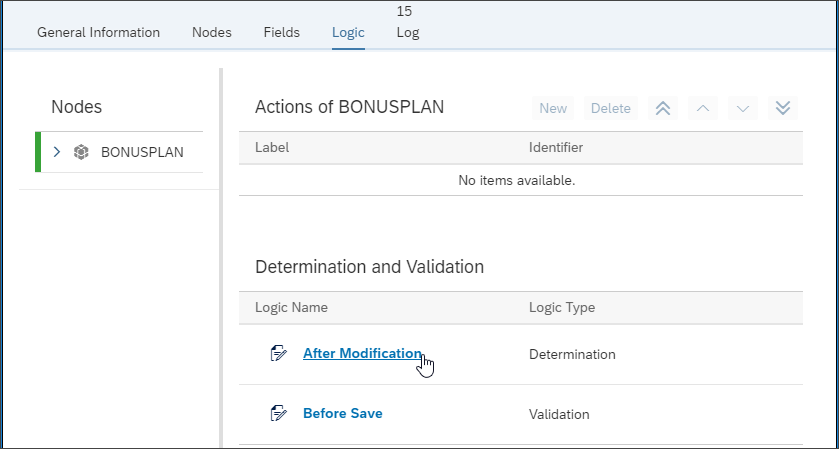
Enter After Modification logic In the Develop section click on Edit to change the currently published logic (which is empty still).

Create Draft of logic implementation Determine and set static values:
Set the key field
IDif still initial.Hint: Changing Parameter
bonusplanenables you to read current node data and change it.Hint: You can access existing Bonus Plan data through the CDS View that corresponds to the Business Object’s identifier. (here:
YY1_BONUSPLAN).Hint: With the key combination CTRL + Space you can access the very helpful code completion.
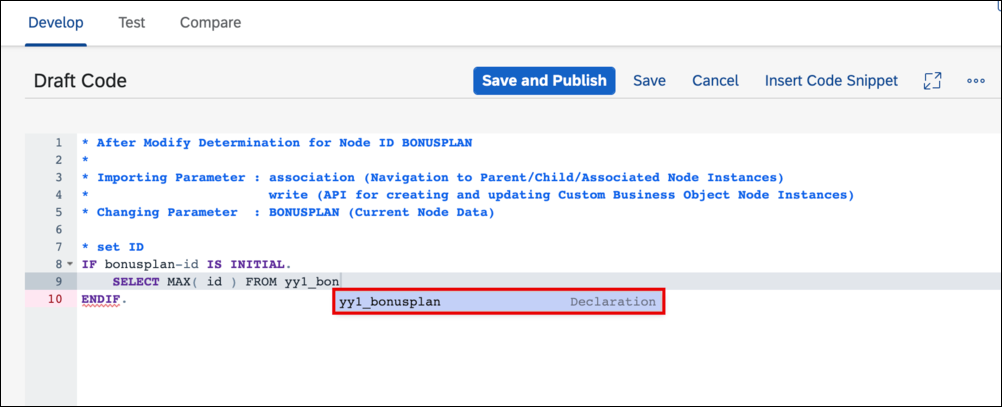
Code Completion ABAP* set ID IF bonusplan-id IS INITIAL. SELECT MAX( id ) FROM yy1_bonusplan INTO @DATA(current_max_id). bonusplan-id = current_max_id + 1. ENDIF.Set the Unit of Measure for the Bonus Percentages to
%which is the unit for percentageABAP* set percentage unit bonusplan-lowbonuspercentage_u = bonusplan-highbonuspercentage_u = '%'.Set the Employee Name from the Employee ID
Hint: Extensibility offers Helper class
CL_ABAP_CONTEXT_INFOwith methodGET_USER_FORMATTED_NAMEthat needs a user ID to return its formatted nameABAP* set Employee Name IF bonusplan-employeeid IS NOT INITIAL. bonusplan-employeename = cl_abap_context_info=>get_user_formatted_name( bonusplan-employeeid ). ENDIF.
Check user input to determine the
IsConsistentproperty.Check that
ValidityStartDateandValidityEndDateare set and thatValidityStartDateis earlier in time thanValidityEndDate.Check that Factors and Percentages are set correctly (all > 0, Percentages < 100,
LowBonusAssignmentFactor<HighBonusAssignmentFactor)Check that Employee ID is set
ABAP* consistency check START IF bonusplan-validitystartdate IS INITIAL OR bonusplan-validityenddate IS INITIAL OR bonusplan-validitystartdate GE bonusplan-validityenddate OR bonusplan-lowbonusassignmentfactor IS INITIAL OR bonusplan-highbonusassignmentfactor IS INITIAL OR bonusplan-lowbonuspercentage_v IS INITIAL OR bonusplan-highbonuspercentage_v IS INITIAL OR bonusplan-lowbonuspercentage_v GE 100 OR bonusplan-highbonuspercentage_v GE 100 OR bonusplan-lowbonusassignmentfactor GE bonusplan-highbonusassignmentfactor OR bonusplan-employeeid IS INITIAL. bonusplan-isconsistent = abap_false. ELSE. bonusplan-isconsistent = abap_true. ENDIF. * consistency check END
Save the logic.

Save logic without publishing
Alternatively you can also change the logic in the Compare section which allows you to see for example the Draft Version and Latest Published Version next to each other.

In the Test section you can test the draft or latest published version of the logic with example runtime data. This data can also be saved as variant for later use.
Switch to Test section
Switch from Importing Parameters to Changing Parameters view, this will add the Value Out column.
Expand the
BONUSPLANnodeEnter following data to the Value In column
Field Name Field Value validitystartdate2017-01-01validityenddate2017-12-31targetamount_v1000targetamount_cEURlowbonusassignmentfactor1highbonusassignmentfactor3lowbonuspercentage_v10highbonuspercentage_v20employeeid<any>employeeid<any>shall be the one of a sales person that created sales orders with a Net Amount of more than 3000.00 EUR in 2017 and that are completed.Execute the Test action
A message toast appears telling that the test was executed
You can see the node data after your logic was executed in the Value Out column.
You can see that your logic works as
id,*percentage_ufields andemployenameare filled as expected andisconsistentis ‘X’.

Go back to Develop section and Publish the After Modification Logic.
Being in After Modification logic you can get to Before Save Logic this way:
Go Back in application

Go Back in application In Tab “Logic”, go to section “Determination and Validation”
Enter the Before Save Event Logic which is a Validation Logic
Implement Before Save event with following functionality
If the bonus plan is consistent, it can be continued to save, if not save shall be rejected. In case of save no further processing is needed and logic can be left.
Hint: Exporting parameter valid must be set to true for save and to false for save rejection
ABAP* decide about save rejection IF bonusplan-isconsistent EQ abap_true. valid = abap_true. RETURN. ELSE. valid = abap_false. ENDIF.If the bonus plan is not consistent, write the first found error into the message and end the logic processing. These are the possible errors in detail:
ValidityStartDateandValidityEndDatemust be setValidityStartDatemust be earlier in time thanValidityEndDate- Factors and Percentages must be > 0
- Percentages must be < 100
- LowBonusAssignmentFactor must be < HighBonusAssignmentFactor
- Employee ID must be set
ABAP* consistency error message START IF bonusplan-validitystartdate IS INITIAL OR bonusplan-validityenddate IS INITIAL. message = 'Validity Period must not be empty.'. RETURN. ELSEIF bonusplan-validitystartdate GE bonusplan-validityenddate. CONCATENATE 'Validity End Date' bonusplan-validityenddate 'must be later than Validity Start Date' bonusplan-validitystartdate '!' INTO message SEPARATED BY space. RETURN. ENDIF. IF bonusplan-targetamount_v IS INITIAL. message = 'Target Amount must be over 0!'. RETURN. ENDIF. IF bonusplan-targetamount_c IS INITIAL. message = 'Target Amount Currency must be set!'. RETURN. ENDIF. IF bonusplan-lowbonusassignmentfactor IS INITIAL OR bonusplan-highbonusassignmentfactor IS INITIAL. message = 'Assignment Factors must be over 0!'. RETURN. ENDIF. IF bonusplan-lowbonuspercentage_v IS INITIAL OR bonusplan-highbonuspercentage_v IS INITIAL. message = 'Percentages must be over 0!'. RETURN. ENDIF. IF bonusplan-lowbonuspercentage_v GE 100 OR bonusplan-highbonuspercentage_v GE 100. message = 'Percentage must be below 100!'. RETURN. ENDIF. IF bonusplan-lowbonusassignmentfactor GE bonusplan-highbonusassignmentfactor. message = 'Low Bonus Factor must be smaller than High Bonus Factor!'. RETURN. ENDIF. IF bonusplan-employeeid IS INITIAL. message = 'Employee ID must be set!'. RETURN. ENDIF. * consistency error message END
Save, Test, and Publish the Before Save Logic
Once ensured that both logic implementations were successfully published you can start testing the Application like an end user via the UI.
- Open the Bonus Plan application
- Open the Bonus Plan with ID
1 - Edit this Bonus Plan
- Enter value
10into field Low Bonus Percentage - Save the Bonus plan. You can see that your business logic works as save fails due to the validation error message for missing percentage.
- Enter value
20into field High Bonus Percentage - Save the Bonus Plan. Now it will not be rejected and missing values will be filled by determination logic.
Resources
Discussion
Share feedback on this tutorial or join the conversation in SAP Community.