You have created the Travel App with workflow handler class as explained here
Steps
Intro
As part of this tutorial, you would extend the Managed Business Object behaviour by defining and implementing a Determination on Savetrigger_travelworkflow during action Create (trigger condition). You will use the Entity Manipulation Language to implement the transactional behavior of the Travel business object.
On Creation of the travel booking, during save event Determination on Save trigger_travelworkflow will be called. trigger_travelworkflow will intern trigger workflow for travel approval and set the overall status of the travel to awaiting approval.
Reminder: Do not forget to replace the suffix placeholder #### with your chosen or assigned group ID in the exercise steps below.
A determination is an optional part of the business object behavior that modifies instances of business objects based on trigger conditions. Determinations are implemented when we need to calculate values of few fields based on trigger conditions.
A determination is implicitly invoked by the RAP framework if the trigger condition of the determination is fulfilled. Trigger conditions can be CRUD operations or fields. Determinations can be created On modify or On save based on if we want to display the value of a calculated field to the user before save or after save.
Please refrain from writing fields which needs to be determined / calculated in the trigger conditions of that determination as it might lead to infinite loop since we are specifying the calculated field in the trigger condition and changing the field inside that determination which is resulting in application dumps.
Step 1Define Determination.
—
Extend the Business Object Behaviour definition with Determination On Save.
Go to behaviour definition of the Travel root entityalt textZR_RAP_TRAVEL_#### and define the determination trigger_travelworkflow. For that, insert the following code as shown in the screenshot below.
Short explanation: This statement specifies that the determination would be triggered during the save event of the operation Create. The determined values would be visible after save.
Activatealt textthe changes
Click on the Quick Assistalt textbesides the newly added line of code and the Add method for determination to declare the required method in behavior implementation class.
QuickAssist
As a result, you can see the method trigger_travelworkflow for determination is added in the local handler class LHC_TRAVEL of Behaviour implementation class ZBP_R_RAP_TRAVEL_RD02
LocalHandlerClass
Short Explanation:
The addition FOR DETERMINE indicates that the method provides the implementation of a determination and the addition ON SAVE indicates the specified trigger time (during save event).
IMPORTING parameter keys – is an internal table containing the keys of the instances the determination will be executed on. Includes all entities for which keys must be assigned.
Implicit CHANGING parameter reported - used to return messages in case of failure.
Activatealt textthe changes
Step 2Implement Determination
+
You will now implement the determination to call trigger workflow method created as part of the previous tutorial and update the overall status of Travel to (W) Awaiting Approval using (EML) Entity Manipulation Language In Local Mode.
Calling EML statements in the local mode - by using the addition IN LOCAL MODE –excludes feature controls and authorization checks. This addition can thus be used to change a BO Instance locally by the same RAP business object itself, i. e. not for other RAP business objects.
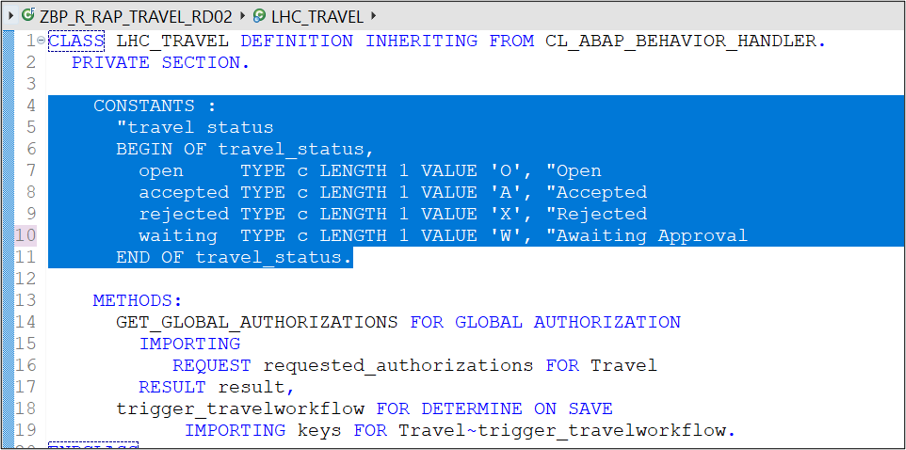
Define the local constanttravel_status to store the allowed value of the overall status of a Travel instance. Insert the following code snippet in the definition part of the local handler class lhc_travel in Private section as shown on the screenshot below.
Insert the following code snippet.
ABAP
CONSTANTS"Travel Status:
BEGIN OFtravel_statusopenTYPE cLength1Value'O',"Open
acceptedTYPE cLength1Value'A',"Accepted
rejectedTYPE cLength1Value'R',"Rejected
waitingTYPE cLength1Value'W',"Awaiting Approval
End oftravel_status
Your code should look like
Implement the method trigger_travelworkflow in the local class lhc_travel of the Business Object Behaviour Implementation Class ZBP_R_RAP_TRAVEL_####.
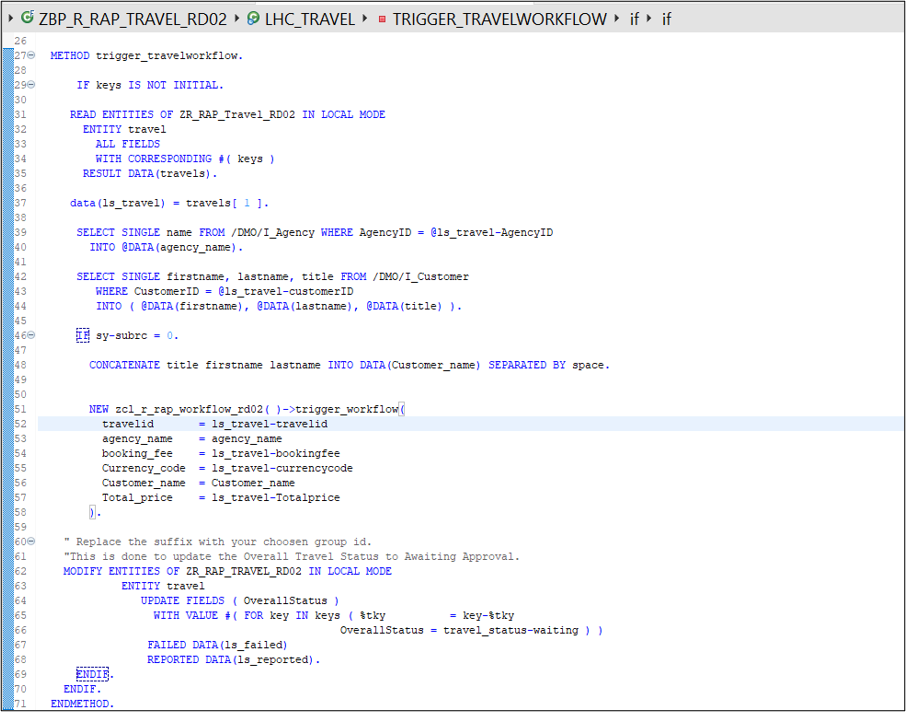
Insert the following code snippet in the method and replace all occurrences of the placeholder #### with your group ID. You can use the F1 help to get detailed information on each EML statement
ABAP
METHODtrigger_travelworkflow.IFkeysIS NOT INITIAL.READENTITIESOFZR_RAP_Travel_RD02INLOCALMODEENTITYtravelALLFIELDSWITHCORRESPONDING#(keys)RESULT DATA(travels).data(ls_travel)=travels[1].SELECTSINGLEnameFROM/DMO/I_AgencyWHEREAgencyID=@ls_travel-AgencyIDINTO@DATA(agency_name).SELECTSINGLEfirstname,lastname,titleFROM/DMO/I_CustomerWHERECustomerID=@ls_travel-customerIDINTO(@DATA(firstname),@DATA(lastname),@DATA(title)).IFsy-subrc=0.CONCATENATEtitlefirstnamelastnameINTODATA(Customer_name)SEPARATED BYspace.NEWzcl_r_rap_workflow_rd02()->trigger_workflow(travelid=ls_travel-travelidagency_name=agency_namebooking_fee=ls_travel-bookingfeeCurrency_code=ls_travel-currencycodeCustomer_name=Customer_nameTotal_price=ls_travel-Totalprice)." Replace the suffix with your choosen group id.
"This is done to update the Overall Travel Status to Awaiting Approval.
MODIFYENTITIESOFZR_RAP_TRAVEL_RD02INLOCALMODEENTITYtravelUPDATEFIELDS(OverallStatus)WITHVALUE#(FORkeyINkeys(%tky=key-%tkyOverallStatus=travel_status-waiting))FAILEDDATA(ls_failed)REPORTEDDATA(ls_reported).ENDIF.ENDIF.ENDMETHOD.
your code should look like
**Short Explanation**
- **Read** the travel instance(s) data with the transferred keys (**keys**) using the EML statement **READ ENTITIES IN Local MODE**.
- **Enrich** the data by getting Agency Name and Customer name, by reading from the CDS Views.
- **Call** the method **trigger_workflow** from workflow handler class **zcl_r_rap_workflow_####** to **trigger workflow** by passing all the required data retrieved in the previous steps.
- As a final step update the **Overall Travel Status** to `Awaiting Approval` by EML statement MODIFY ENTITIES `IN Local Mode` using the transferred keys (keys).
Activatealt textthe changes
Where to trigger the workflow from, in case of Unmanaged Numbering? The actions required to trigger a workflow instance are defined as save actions and can thus only be called during the early or late save phase of a RAP Business Object. Choosing between early or late phase totally depends on how you are generating the numbering for the key field like in this case Travel ID. As the key would be required for your identifying the entry during callback processing.
Early Numbering: Trigger the workflow instance in a determination on save with the required methods.
Late Numbering: Trigger the workflow in a determination on save. To get the generated key field , you can set the payload with the setPayload method even later in the adjust_numbers method.
Step 3Add Value Help to enrich Travel Application UI.
+
Without proper values for Customer ID and Agency ID the read on the CDS views to get Customer Name and Agency Name would not work. Thus, add value help to the fields to select values.
Go to metadata extensions for your RAP application
MetadataExtensions
Using the below annotation add value help for Agency ID.
Insert this code above the field name AgencyID in Metadata Extension.
   **Short explanation:** Here entity name is the Value help CDS View for field and element name in the corresponding field name in Value Help CDS View for which the Value help is being provisioned.

 **Value Help** should now be **available** for the fields.

With this you are done with the implementation part, further we will see how to Preview, run, monitor, and troubleshoot the Travel App.

>In case your value help shows no data try to clear your browser cache or try previewing the application with browser in Inprivate or Incognito mode.
Share feedback on this tutorial or join the conversation in SAP Community.
Submit detailed feedbackDiscuss in Community
Steps
Step 1 of 4
1. Define Determination.2. Implement Determination3. Add Value Help to enrich Travel Application UI.4. Test yourself
Joule
AI Notice
Joule is an AI assistant. Generative AI may produce inaccurate, incomplete, or biased information. Always verify important details before acting on them.
Conversations are sent to SAP-hosted large language models for processing. Do not include personal data, credentials, or confidential information in your messages.
Joule's responses are based on the SAP tutorial catalog and may not reflect the latest product changes. For authoritative guidance, consult the linked tutorials and official SAP documentation.



