
Overview
You will learn
- About SaaS enablement of an add-on product on SAP Business Technology Platform, ABAP Environment
- The End-End process for building and deploying an add-on product on ABAP Environment and providing it as multitenant application


Prerequisites
Prerequisites
- You’ve purchased entitlements that are necessary for the account setup. See Prepare
- You’ve registered a namespace at SAP, for example /NAMESPC/. See Register a Namespace
- You’ve registered your add-on at SAP, for example /NAMESPC/PRODUCTX. See Register a Product
- You’ve created a technical communication user, for example with the credentials ID
TechUserAAKaaS. - You’ve created a technical platform user as a space member in Cloud Foundry, for example with the credentials ID
CFPlatform. - You’ve configured an ASP_CC destination for cloud controller access in the 05 Provide subaccount in the global account for development based on the credentials of the technical Cloud Foundry platform user. See Create a Destination for the Cloud Foundry Cloud Controller Access.
Steps
Intro
This tutorial is intended as an overview of the necessary steps, and provides a sneak-peak into the overall process. Detailed steps on how to achieve this will be covered in further tutorials of this mission.
The following figure shows the system landscape recommended for developing, operating and maintaining SaaS applications on SAP Business Technology Platform, ABAP Environment

- Global Account for Development
- 01 Develop - Holds the development system (DEV) used for continuous development and the correction system (COR) used to develop bug fixes and patches for already released versions of your add-on
- 02 Test - Contains a test system (TST) for testing the changes released from development and the quality assurance system (QAS) to test the bug fixes and patches for already released versions of your add-on
- 03 Build/Assemble - Holds the system created for the add-on assembly. Software components are imported into this system, ATC checks executed, delivery packages for the add-on created
- 04 Build/Test - Holds the system created for add-on installation test performed after add-on build
- 05 Provide - Contains a production like system (AMT) to test multi-tenancy aspects of the SaaS solution (client separation, data isolation…)
- 06 Consume - Consumer subaccounts for facilitating production like tests

- Global Account for Production
- 05 Provide - Provider subaccount for production use - Contains various services for SaaS enablement, ABAP system (AMT) provisioned via ABAP Solution service
- 06 Consume - Consumer subaccounts for production - Each of your customers is assigned a dedicated consumer subaccount

GlobalAccountForProd
The Landscape Portal for SAP BTP ABAP Environment booster automates the setup of access to the Landscape Portal, including all configurations required to use the Build Product Version app. Upon execution, three subaccounts will be created: One subaccount will contain Landscape Portal and CI/CD subscriptions, while the other two can be used during the assembly and test installation stages of the product build process. For more information, see Landscape Portal for ABAP Environment Booster.
- In the development system DEV of your 01 Develop subaccount create a software component with name pattern ‘NAMESPACE/COMPONENT’, where the ‘NAMESPACE’ is the namespace you registered as part of the prerequisites, and COMPONENT is a name of your choosing, then clone software component, See Manage Software Components. Implement your custom business services with the ABAP RESTful Application Programming Model in this software component.
For more information on software components, see Software Components.
For more information on the ABAP RESTful Application Programming Model, see ABAP RESTful Application Programming Model.
Subscribe to the SAP Business Application Studio in the 01 Develop subaccount,See Subscribing to SAP Business Application Studio.
For more information on how to develop a user interface for the application and deploy it to a ABAP system, see Develop an SAP Fiori Application UI and Deploy it to ABAP Using SAP Business Application Studio.
To automate testing of your application and ensure quality, consider writing robust tests for your ABAP Code. For more information, see Ensuring Quality of ABAP Code.
After you have successfully developed your application, created a UI, and deployed it to your ABAP system, you will need to Clone or Pull the changes in your software component “/NAMESPACE/COMPONENT” into your TST system in the 02 Test subaccount and manually test your changes.
See How to clone software components.
Run ABAP Test Cockpit checks in DEV and/or TST systems. See ABAP Test Cockpit in the cloud to understand what is already possible.
Once the application is developed and tested, the next step is to build a first version of your add-on using the ABAP Environment pipeline.
The result of a successful build is an add-on that can be installed/updated in ABAP systems of the type abap/saas-oem.
This is explained in a future tutorial of this mission. Steps at a glance.
- To capture the current state of your software component, create a branch in development system DEV of your 01 Develop subaccount. See How to Work with Branches.
We recommend naming this first branch v1.0.0 and to create a new branch when updating the application with a support package (v1.1.0) or a new release (v2.0.0).
- Use the Build Product Version app of the landscape portal to build and publish your add-on product.
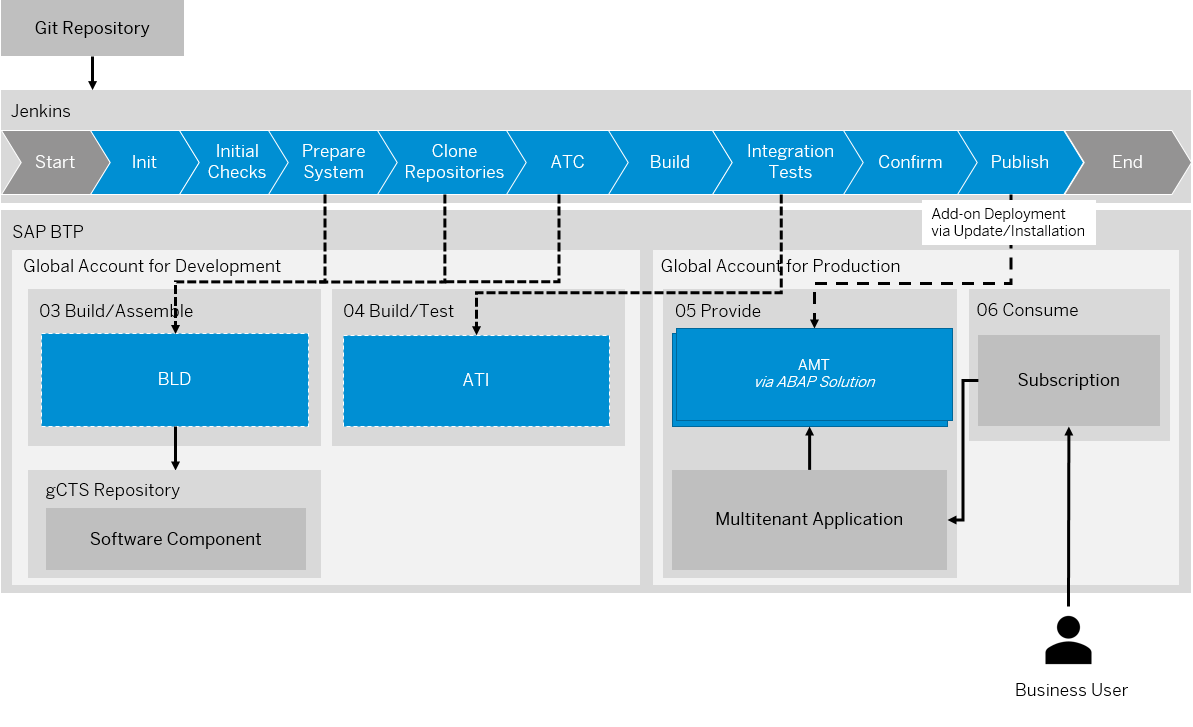
AddOnBuildPipeline
Steps at a glance (detailed steps in further tutorials of this mission):
To prepare the creation of your multitenant application, navigate to your dev space in SAP Business Application Studio. Select “Start from Template” > Basic Multi-target Application.
Update the created MTA descriptor and MTA extension descriptors with suitable configuration.
Configure, build the approuter application and deploy it to Cloud Foundry using the Maintain Solution App.

For a consumer to be able to access the SaaS solution after subscription, a consumer-specific route pointing to the approuter application needs to be created. See Create Routes.
This route needs to match the property TENANT_HOST_PATTERN defined in the “mta.yaml” file.
- Create a new route in the space of multitenant application in the 05 Provide subaccount.
- Assign the route to the deployed approuter application.
- To enable consumer access, subscribe to the solution from the 06 Consume subaccount.
- To enable creation of initial administrator user in the consumer tenant, assign the role collection -admin with the role
SolutionAdminto your user. (the creation of a role collection is part of the prerequisites for this tutorial). - Open the application URL provided by the subscription with the user you wish to onboard as initial administrator user. This is the same user that was assigned to the -admin role collection. After triggering initial user onboarding, you are redirected to the SAP Fiori launchpad of the SaaS solution.

The Landscape Portal acts as a central tool to allow service providers to perform administration tasks such as hibernating systems, creating test tenants and support users, selecting systems for a pre-upgrade, but also lifecycle management operations such as building, deploying and updating product versions, and even guides you through the configuration and deployment of multitenant SaaS solutions.
As a provider, you can use the Deploy Product App to deploy or update your product version in specific systems.
Install namespaces in various ABAP systems of your Landscape using the Maintain Namespaces App of the landscape portal.
The Register Systems for Pre-Upgrade App allows you to select specific test or development systems for an early upgrade. These systems will be upgraded two weeks before the official roll-out, giving you ample time to test your solution prior to the actual upgrade.
The Register Product App provides information about which global accounts are already registered for an available product and enables you, as a provider, to create new products and register your global accounts for installation of existing products.
The Check Product Version App lets you view the results of product version delivery infrastructure checks to see if your product version is ready for delivery. The app shows results for checks of the product version, its components and respective packages.
As a provider, you can use the Deploy Product App to update the version of your product on specific systems.
The Build Product Version App lets you easily trigger the build of new product versions via pipelines based on templates that you can configure for different use cases such as new release deliveries, support packages or hotfixes/patch deliveries.
The Operations Dashboard App gives an overview of all processes that have been triggered in the Landscape Portal to help you monitor your operations.
The Systems Overview App provides an overview of all the systems and tenants in the global account where Landscape Portal is being accessed. The app can also be used to create support users for access to consumer tenants for troubleshooting bugs/issues faced by the consumer.
Maintaining a solution involves development of bug fixes. Bug fixes are not implemented as part of the development code line (systems DEV and TST) but in a separate correction code line (COR) with separate systems to develop and test these corrections.

According to what is mentioned in the prerequisites, the ABAP systems that you use for development, testing, and add-on assembly are of type ABAP/standard and made available via entitlements. As a SaaS solution operator, you have to assign service entitlements to different subaccounts according to the following structure:
| Global Account | Sub-Account | Space | Entitlement | ABAP Systems |
|---|---|---|---|---|
| Global Account for Development | 01 Develop | Develop | 1x ABAP/standard | COR |
| ABAP/hana_compute_unit (standard: 2) | ||||
| ABAP/abap_compute_unit (standard: 1) | ||||
| 02 Test | Test | 1x ABAP/standard | QAS | |
| ABAP/hana_compute_unit (standard: 2) | ||||
| ABAP/abap_compute_unit (standard: 1) |
The service parameter is_development_allowed is used to differentiate between development and test systems.
For development in the ABAP correction system COR, you, as a SaaS solution operator, create a system in subaccount 01 Develop in the development space. For correction system COR, set parameter
is_development_allowed = true.
For testing in the ABAP quality assurance system QAS, you, as a SaaS solution operator, create a system in subaccount 02 Test in the test space. For quality assurance system QAS, set parameteris_development_allowed = false.
Users in the ABAP correction system COR might be locked and need to be unlocked for development of corrections.
For more information around versioning and branches, refer the help documentation.
For more information around add-on package types, refer the help documentation.
Resources
Discussion
Share feedback on this tutorial or join the conversation in SAP Community.