
Overview
You will learn
- How to create and group developer identities in your SAP Cloud Identity Services tenant
- How to enable identity provisioning in your SAP Cloud Identity Services tenant
- How to configure and run identity provisioning
- How to connect Eclipse with the SAP BTP ABAP Environment Additional information
- In this use case the SAP Cloud Identity Services tenant is used as an identity provider and not as a proxy to another identity provider.
- Documentation: SAP Cloud Identity Services – Identity Provisioning >Tutorial last updated with SAP S/4HANA Cloud Release 2302


Prerequisites
Prerequisites
- You have installed and set up ABAP Development Tools for Eclipse, see https://tools.hana.ondemand.com/#abap
- You have an SAP Business Technology Platform customer subaccount and have prepared the following
- Subscription to SAP Cloud Identity Services
- Established trust to your SAP Cloud Identity Services tenant, see SAP BTP ABAP Environment Documentation: Setup of a Custom Identity Service
- Created an SAP BTP ABAP Environment service instance for custom development with
- An SAP Fiori launchpad business role for custom ABAP development created from template
SAP_BR_DEVELOPER, as for example in this tutorialBR_IPS_TUTORIAL_DEVELOPER - A service key for ADT integration
- An SAP Fiori launchpad business role for custom ABAP development created from template
- You have one or more users with authorization for
- User and Group Management in your SAP Cloud Identity Services tenant
- Communication Management in your SAP BTP ABAP Environment service instance (business catalog ID
SAP_CORE_BC_COMor business role from template IDSAP_BR_ADMINISTRATOR)
Steps
As the SAP Cloud Identity service tenant serves as the identity provider, we first ensure that there is an identity for the developer, that shall get a user provisioned in a SAP BTP ABAP Environment.
Log on with your User Management Administrator to your SAP Cloud Identity Services tenant’s administration UI (URL ends with path
/admin, for examplehttps://rapworkshop.accounts.ondemand.com/admin).Navigate to Users & Authorizations > User Management.

Open User Management in SAP Cloud Identity Services tenant and Press Add button for new user Select Add to start the creation process of a user.
Fill the personal information for the user and select Add.

Configure properties of new user The new user is now displayed in the list of users.

List entry for new user
Note that the SAP Cloud Identity Services user will receive an email to activate the account before being able to log on with a local user in some other connected system for the first time.
To bundle developer users, create a corresponding user group in the SAP Cloud Identity Services tenant and assign the users to it.
Navigate to Users & Authorizations > Groups and select Create.

Start User Group creation In the Create Group dialog enter a Name and Display Name and select Next Step.
For the group name, please use the identical name you have set for the business role in your SAP BTP ABAP Environment (created from template
SAP_BR_DEVELOPER, see prerequisites).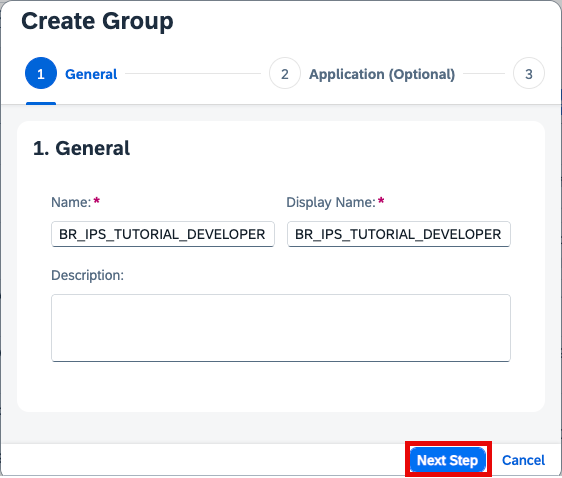
Configure properties of new group Leave Application details empty and select Next Step
To add users to the group select Add.

Start user adding to group Search for the user that you have created earlier, select it, and choose Add.

Save User Group The user is now displayed in the user group list.

List entry for user in group
Authorize an Administrator user for Identity Provisioning Management.
Navigate to Users & Authorizations > Administrators choose the Administrator user, slide the toggle button for Manage Identity Provisioning to ON and select Save.

Identity provisioning requires to configure a so-called source system which is used as a data source for users and user groups that can be provisioned to other systems. We simply need to maintain the used SAP Cloud Identity Service tenant itself as source.
Logon with your Identity Provisioning Manager user to your SAP Cloud Identity service tenant’s administration UI (URL ends with path
/admin, for examplehttps://rapworkshop.accounts.ondemand.com/admin).Navigate to Identity Provisioning > Source Systems

Navigate to Source Systems, Add new and browse To start the creation, select Add.
To simplify the system creation and to reduce the risk of errors, this tutorial provides a template JSON file for the source system. Download
ips_system_template_source.json↓ locally.Define the system by uploading the JSON file via Browse in the Identity Provisioning source system UI.
Adapt the values to your needs and provide the mandatory value for
URLas shown below.Alternatively, you can configure everything manually.
Details:
Label Value Type Identity Authentication System Name For example My Identity Authentication service ABAP DevelopersProperties:
Name Value TypeHTTPProxyTypeInternetURLyour SAP Cloud Identity service tenant URL, for example https://rapworkshop.accounts.ondemand.com AuthenticationClientCertificateAuthenticationias.user.filtergroups.display eq "BR_IPS_TUTORIAL_DEVELOPER"ias.group.filterdisplayName eq "BR_IPS_TUTORIAL_DEVELOPER"Save your changes.
Switch to the Outbound C… (C… like Certificate) tab and Download the certificate (which was automatically generated during creation of the system) for later usage.

Download certificate of source system Save again.
In this example the provisioning SAP Cloud Identity Services tenant itself is used as the source for users and user groups that can be provisioned to other systems. But still to allow identity provisioning to read users and groups, you need a technical user with corresponding permissions.
Navigate to Users & Authorizations > Administrators.
Select Add and choose System.

Start Administrator creation Provide a Name for the system, for example
ips_tutorial_admin.
Configure Administrator Authorizations Make sure to have set authorizations for Read Users and Manage Groups which are both needed to read users and groups during identity provisioning.
Save your changes.
Navigate to Configure System Authentication > Certificate.

Configure certificate Browse for the certificate of the source system and Save the technical user again.

Upload source system’s certificate to technical user
Now the source system can be authenticated via the certificate sent by Identity Provisioning, be mapped to the technical user and via that has the authorizations to read users and groups.
Identity provisioning requires to configure a so-called target system to provision user and user group data to. In this example, the target systems is an ABAP system in SAP BTP.
Logon with your Identity Provisioning Manager user to your SAP Cloud Identity Services tenant’s administration UI (URL ends with path
/admin, for examplehttps://rapworkshop.accounts.ondemand.com/admin).Navigate to Identity Provisioning > Target Systems
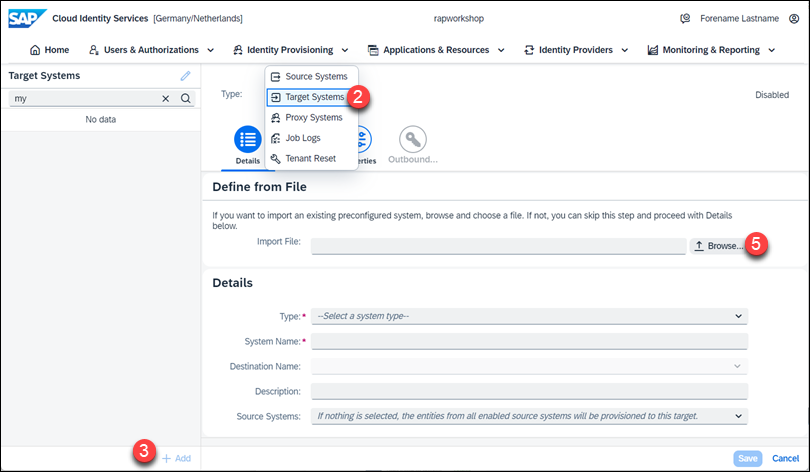
Navigate to Target Systems, Add new and browse To start the creation, select Add.
To simplify the system creation and reduce the risk of errors, this tutorial provides a template JSON file for the target system. Download
ips_system_template_target.json↓ locally.Define the system by uploading the JSON file via Browse in the Identity Provisioning target system UI.
Adapt the values to your needs and provide the mandatory value for
Source SystemandURLas shown below.Alternatively, you can configure everything manually.
Details:
Label Value Type SAP BTP ABAP environment System Name For example My ABAP instanceDescription For example System to receive provisioned Developer UsersSource System Choose the one created earlier from the dropdown Properties:
Name Value TypeHTTPProxyTypeInternetURLThe API URL of your SAP BTP ABAP Environment AuthenticationClientCertificateAuthenticationIdentity Provisioning ips.date.variable.formatyyyy-MM-ddSave your changes.
Switch to the Outbound C… (C… like Certificate) tab and Download the certificate (which was automatically generated during creation of the system) for later usage.

Download certificate of target system Save again.
To enable Identity Provisioning to create users and assign business roles in the target system, that system has to know it and provide the corresponding authorization to it. The Identity Provisioning will be represented and authenticated as a communication user and system, the required authorizations for Business User operations will be given to it via the corresponding communication scenario in a communication arrangement.
Enter your ABAP environment’s Fiori Launchpad with the user that is authorized to use the Communication Management apps.
Start typing Maintain Communication Users in the Launchpad search and open the App from the results.

Maintain Communication Users application from search results Select New.

Select an option to create a new user Enter a User Name for example,
IPS_TUTORIAL_USER, enter a Description, Upload the certificate from the Identity Provisioning target system, and select Create.
Maintain and create user Start typing Communication Systems in the Launchpad search and open the App from the results.

Communication Systems application from search results Select New.
Enter a System ID and System Name, for example
IPS_TUTORIAL_SYSTEMin the opening pop up and select Create.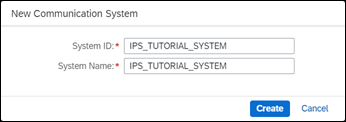
Create system In the object page of the new communication system under General > Technical Data, mark the checkbox to make the communication system Inbound Only.
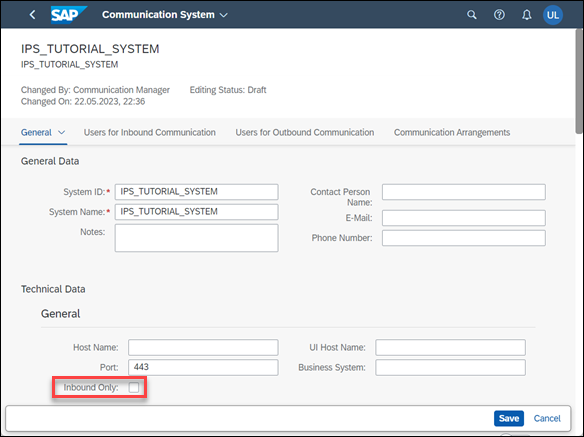
Set system as Inbound Only Under Users for Inbound Communication, select the + to add a user. In the opening pop up, select the communication user you created earlier and choose OK so that the pop up closes.

Add inbound user to system and save Save the system.
Start typing Communication Arrangements in the Launchpad search and open the App from the results.

Communication Arrangements application from search results Select New.
A pop up for the creation of a new communication arrangement opens, where you have to select scenario Identity Provisioning Integration
SAP_COM_0193. This communication scenario exposes all the needed services for identity provisioning integration.
Select communication scenario SAP_COM_0193 Select Create.

Create the communication arrangement Set the Communication System

Set System at Arrangement and Save Save the communication arrangement.
Now the communication user can be authenticated via the certificate sent by Identity Provisioning and has the authorization to create users and assign roles.
{
  "scenario_id":"SAP_COM_0193",
  "type":"basic"
}Now you can run the Identity provisioning.

Switch to Identity Provisioning > Source Systems.
Open your source system.
Select the Jobs tab.
Choose Run Now.
To check the status of the job run, select Identity Provisioning > Provisioning Logs from the navigation pane.
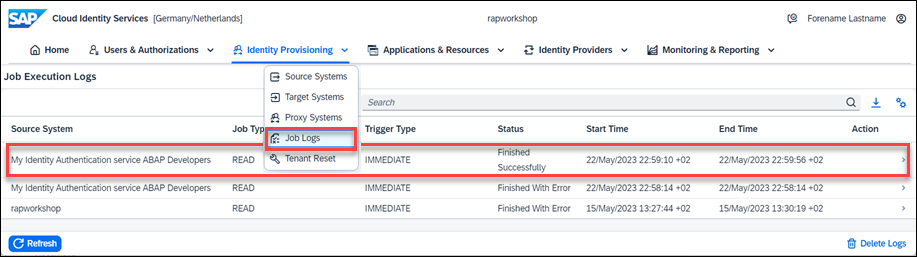
Job Logs Search for your log by checking the source system name and time and make sure the status is Success.
If the run did not finish successfully, you can navigate to the log and follow the instructions there to analyze and solve the problem. See also Guided Answers: Identity Provisioning Troubleshooting.
Now that the Developer user has been provisioned and authorized in the SAP BTP ABAP Environment for ABAP development, you can connect the user to the system by using ABAP Development Tools for Eclipse.
Open your Eclipse and navigate to File > New > Project.

Start project creation in eclipse Choose ABAP Cloud Project and select Next.

Choose to create ABAP Cloud project Choose SAP BTP ABAP Environment > Use a Service Key and select Next.

Choose to create from service key Paste the service key for Eclipse integration (see prerequisites).

Paste Service Key for ADT usage Copy Logon URL to Clipboard.

Copy Logon URL to Clipboard Enter the credentials of the Developer User and log on.

Log on with provisioned developer A success message is displayed and the browser window can be closed.

Log on for ADT succeeded In the project wizard in Eclipse, check the SAP BTP ABAP Environment and user data, that are displayed in the Service Instance Connection dialog and select Finish.
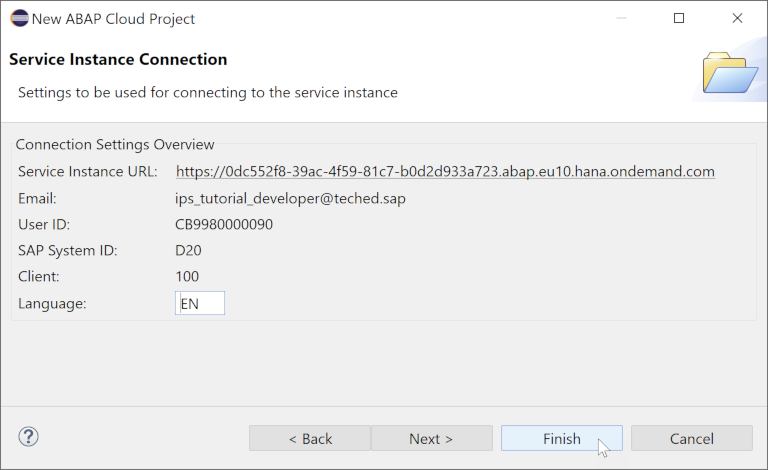
Finish ABAP Cloud project creation The new project is displayed and you can start developing.

See ABAP Cloud project in ADT navigation
Resources
Discussion
Share feedback on this tutorial or join the conversation in SAP Community.