
Overview
You will learn
- How to download service metadata files for the remote function call
- How to create a service consumption model using metadata file
- How to generate proxies for remote function call (RFC)


Prerequisites
Prerequisites
- You need the standard developer authorization profile to create ABAP development objects.
- You need a SAP Cloud Connector account, connected with the subaccount. See https://developers.sap.com/tutorials/abap-env-rfc.html for more details.
Steps
Intro
Always replace XXX with your initials or group number.
Logon to your on-premise system.
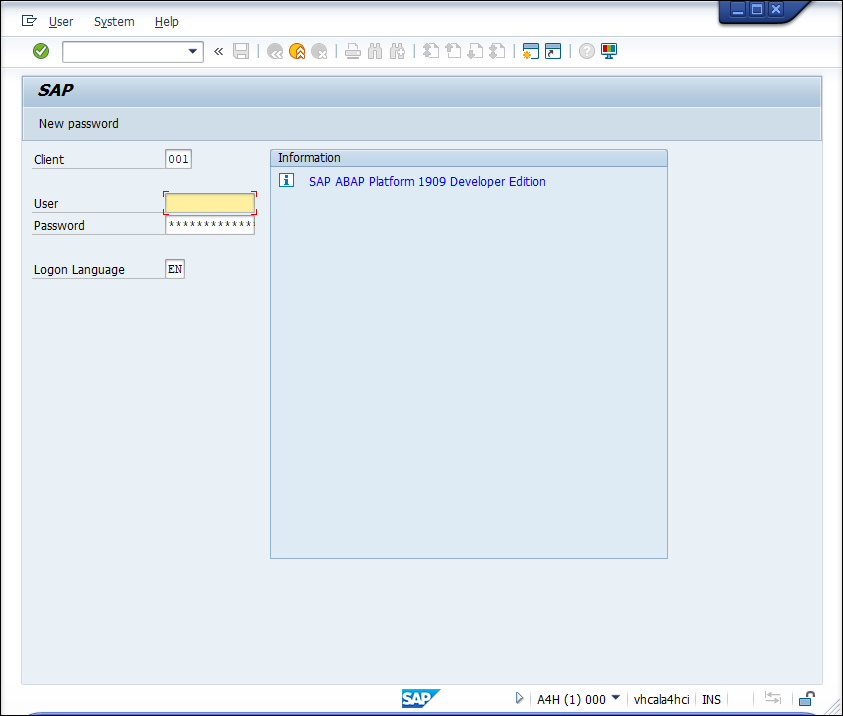
Logon Execute transaction
aco_proxy.

For this tutorial, search two function modules:
RFC_SYSTEM_INFOandRFC_READ_TABLE.Choose File and press Enter to download the file.
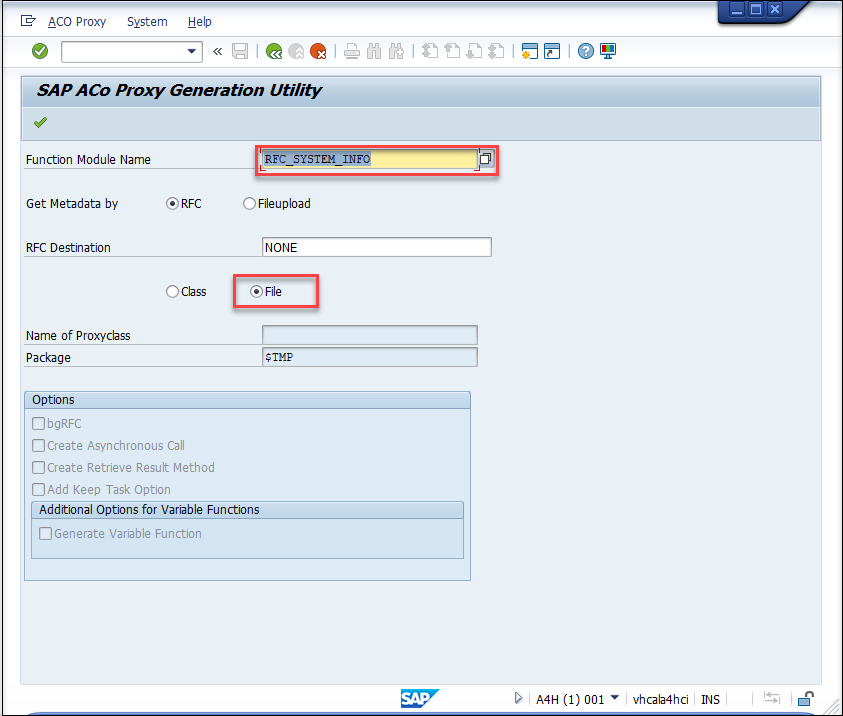
download Store it in an XML file on your local system.
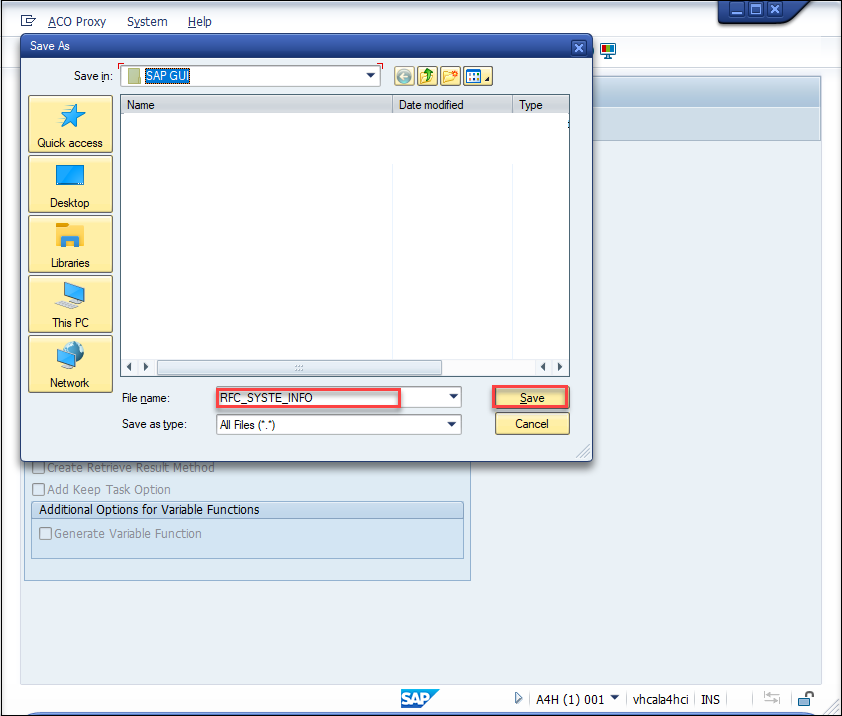
sap GUI
If you have a new system, you will be able to download multiple files, but if not, download all files one after the other and save them for later use.
Open ADT and login to your ABAP System. If you do not have a package, create a new one.
Right-click your package and choose New > Other ABAP Repository Object.

- Choose Service Consumption Model and click Next.

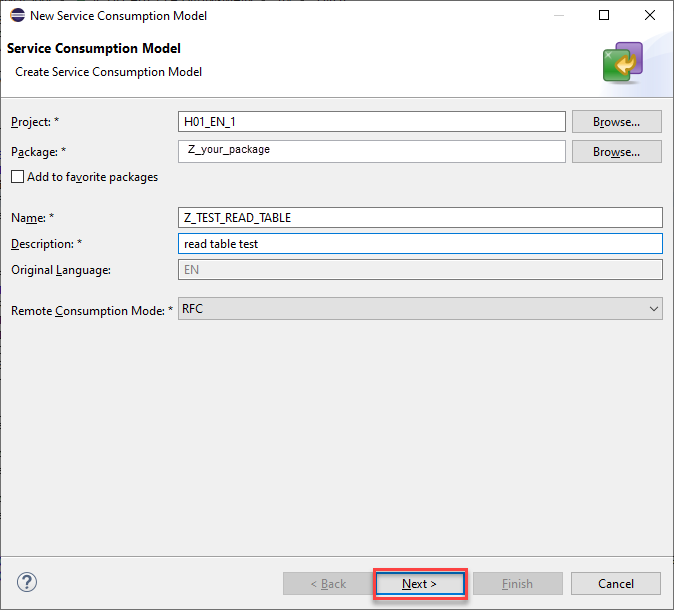
- Enter a Name and Description and choose
RFCas Remote Consumption Model.
Click Next.

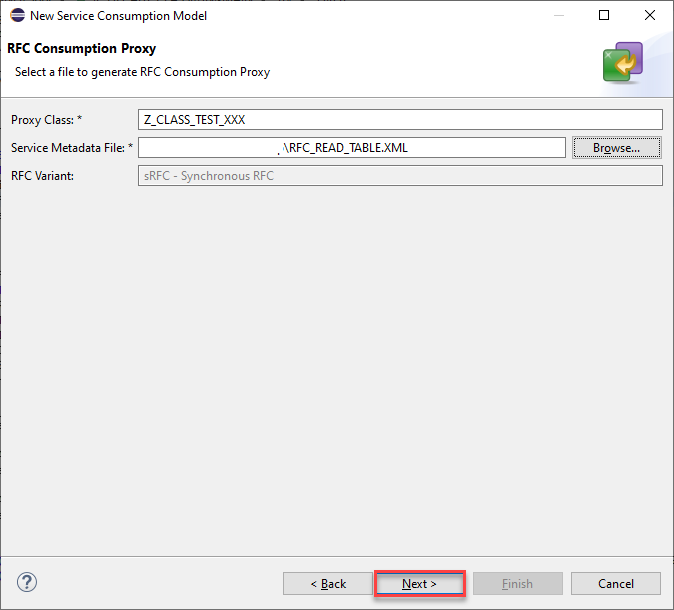
- Set a Proxy Class name and choose the stored metadata file
RFC_SYSTEM_INFOin your local system as Service Metadata File.
Click Next.

- Choose a transport request or create a new one.
Click Finish.

- Check your package and make sure the service consumption model
Z_TEST_XXXand the proxy classZ_CLASS_TEST_XXXwere created. If needed, refresh your package.

Right click your package and create a new Class in your Package and use Add to add
IF_OO_ADT_CLASSRUNinterface.Click Next.
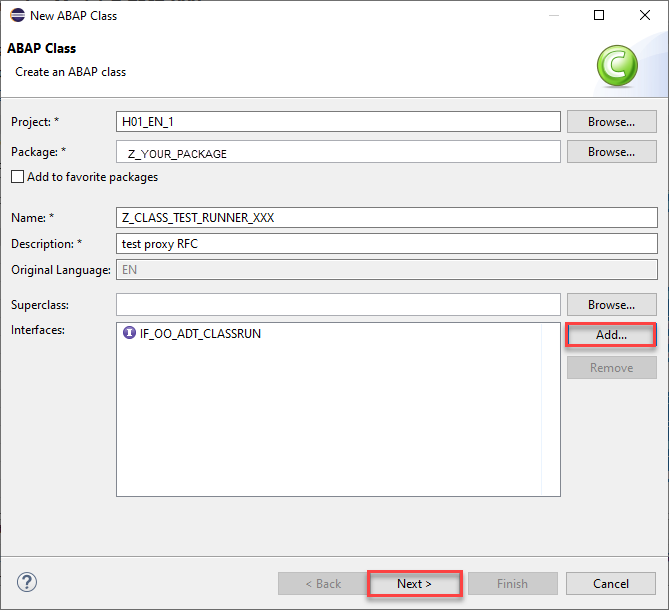
new class Your new created class should look like the following:
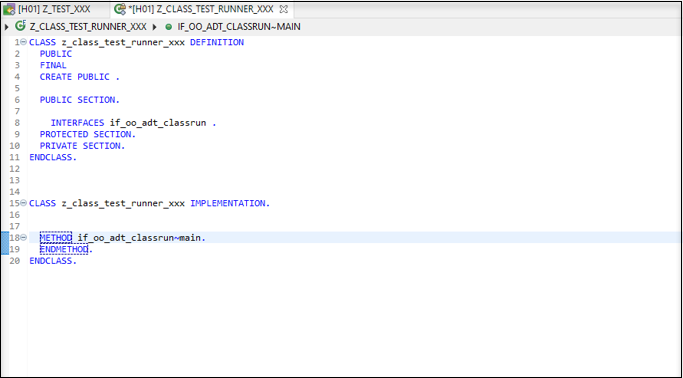
new class like In the service consumption model, copy the code sample.

- Paste the code in your new class in the
if_oo_adt_classrun~mainmethod.

- Enter a valid destination name as
mydestnameand ask for some outputs.

You can copy this code:
out->write( |{ CURRENT_RESOURCES }, { FAST_SER_VERS }, { MAXIMAL_RESOURCES }, { RECOMMENDED_DELAY }, { RFCSI_EXPORT-rfcchartyp }, { S4_HANA }| ).
out->write( RFCSI_EXPORT ).- Activate both classes, auto-generated and created by your own. Press F9 to run the class and check results in the console.
Right-click Service Consumption Models in ADT and create a new service consumption model with the other stored metadata file RFC_READ_TABLE in your local system.
See Step 2 for details.
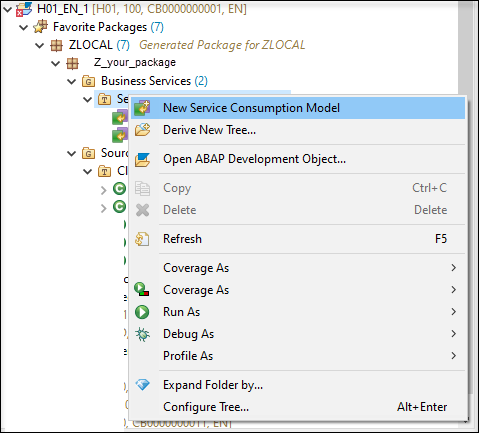
Right-click your package and create a new class and copy the code sample from your created service consumption models into
if_oo_adt_classrun~mainmethod.See Step 3 for details.
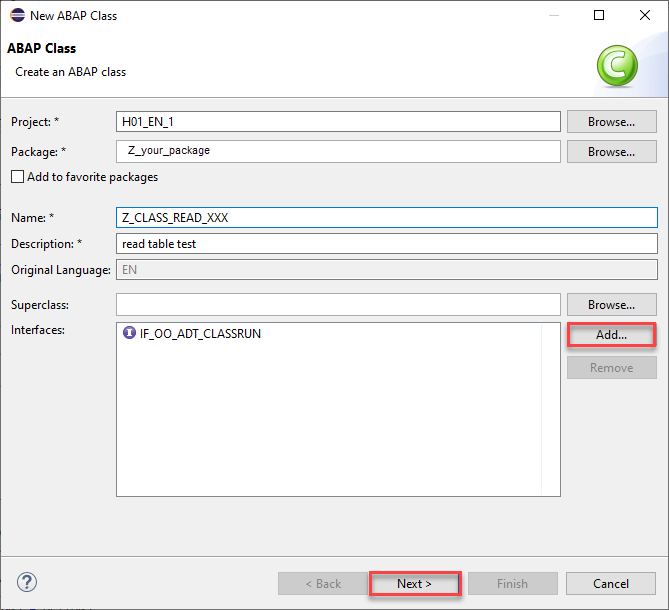
new class 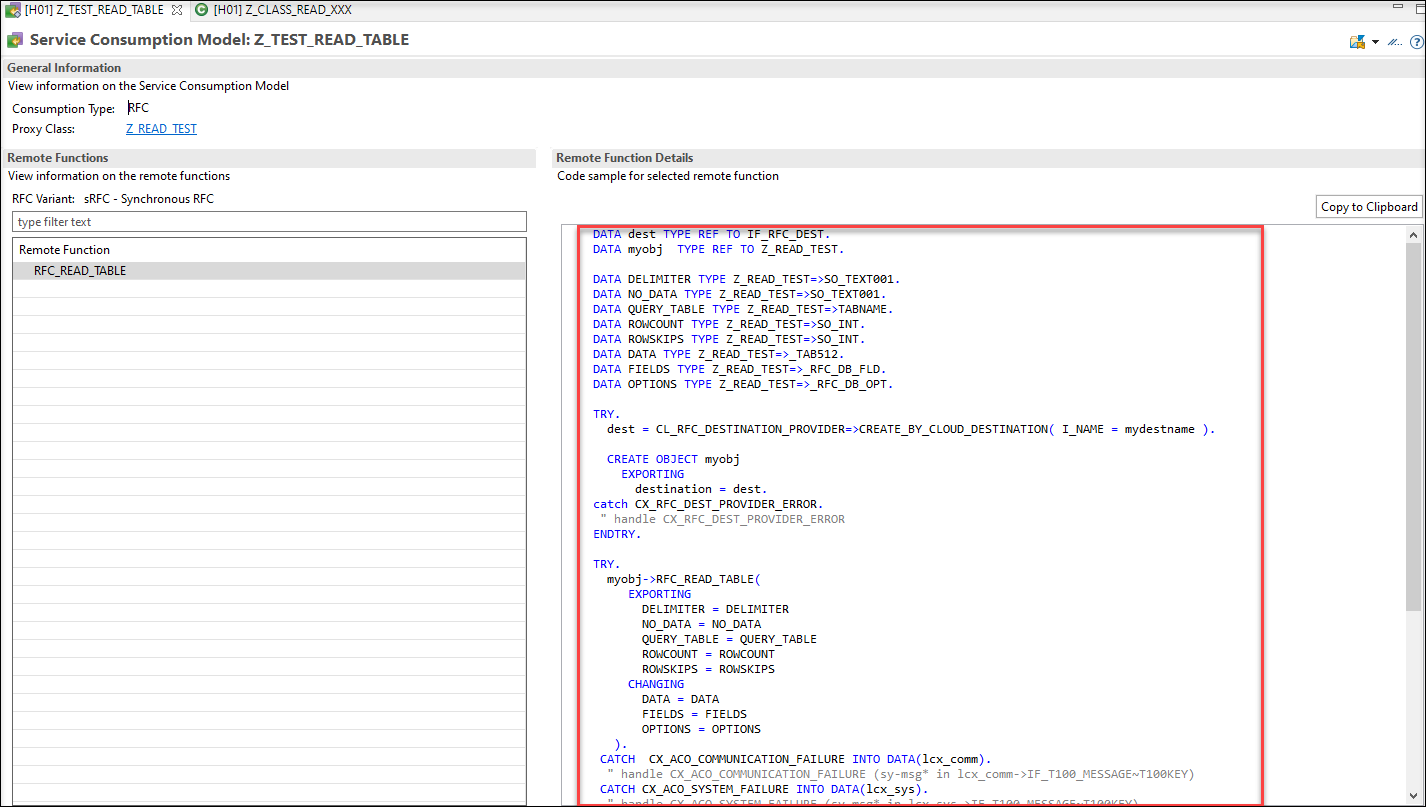
copy code sample Enter a valid destination name as
mydestnameand try to read a table likeSFLIGHT.

Your complete code should look like following:
CLASS z_class_read_xxx DEFINITION
PUBLIC
FINAL
CREATE PUBLIC .
PUBLIC SECTION.
INTERFACES if_oo_adt_classrun .
PROTECTED SECTION.
PRIVATE SECTION.
ENDCLASS.
CLASS z_class_read_xxx IMPLEMENTATION.
METHOD if_oo_adt_classrun~main.
DATA dest TYPE REF TO IF_RFC_DEST.
DATA myobj  TYPE REF TO Z_READ_TEST.
DATA DELIMITER TYPE Z_READ_TEST=>SO_TEXT001.
DATA NO_DATA TYPE Z_READ_TEST=>SO_TEXT001.
DATA QUERY_TABLE TYPE Z_READ_TEST=>TABNAME.
DATA ROWCOUNT TYPE Z_READ_TEST=>SO_INT.
DATA ROWSKIPS TYPE Z_READ_TEST=>SO_INT.
DATA DATA TYPE Z_READ_TEST=>_TAB512.
DATA FIELDS TYPE Z_READ_TEST=>_RFC_DB_FLD.
DATA OPTIONS TYPE Z_READ_TEST=>_RFC_DB_OPT.
TRY.
  dest = CL_RFC_DESTINATION_PROVIDER=>CREATE_BY_CLOUD_DESTINATION( I_NAME = 'A4H' ).
  CREATE OBJECT myobj
    EXPORTING
      destination = dest.
catch CX_RFC_DEST_PROVIDER_ERROR.
 " handle CX_RFC_DEST_PROVIDER_ERROR
ENDTRY.
TRY.
QUERY_TABLE = 'SFLIGHT'.
  myobj->RFC_READ_TABLE(
     EXPORTING
       DELIMITER = DELIMITER
       NO_DATA = NO_DATA
       QUERY_TABLE = QUERY_TABLE
     CHANGING
       DATA = DATA
       FIELDS = FIELDS
       OPTIONS = OPTIONS
   ).
   Loop at DATA into DATA(ls_wa).
   out->write( ls_wa-wa ).
   Endloop.
 CATCH  CX_ACO_COMMUNICATION_FAILURE INTO DATA(lcx_comm).
 out->write( lcx_comm->get_longtext( ) ).
  " handle CX_ACO_COMMUNICATION_FAILURE (sy-msg* in lcx_comm->IF_T100_MESSAGE~T100KEY)
 CATCH CX_ACO_SYSTEM_FAILURE INTO DATA(lcx_sys).
 out->write( lcx_sys->get_longtext( ) ).
  " handle CX_ACO_SYSTEM_FAILURE (sy-msg* in lcx_sys->IF_T100_MESSAGE~T100KEY)
 CATCH CX_ACO_APPLICATION_EXCEPTION INTO DATA(lcx_appl).
  " handle APPLICATION_EXCEPTIONS (sy-msg* in lcx_appl->IF_T100_MESSAGE~T100KEY)
   CASE lcx_appl->GET_EXCEPTION_ID( ).
      WHEN 'DATA_BUFFER_EXCEEDED'.
        "handle DATA_BUFFER_EXCEEDED.
      WHEN 'FIELD_NOT_VALID'.
        "handle FIELD_NOT_VALID.
      WHEN 'NOT_AUTHORIZED'.
        "handle NOT_AUTHORIZED.
      WHEN 'OPTION_NOT_VALID'.
        "handle OPTION_NOT_VALID.
      WHEN 'TABLE_NOT_AVAILABLE'.
        "handle TABLE_NOT_AVAILABLE.
      WHEN 'TABLE_WITHOUT_DATA'.
        "handle TABLE_WITHOUT_DATA.
   ENDCASE.
ENDTRY.
ENDMETHOD.
ENDCLASS.- Activate both classes, auto-generated and created by your own. Press F9 to run the class and check results in the console.

Resources
Discussion
Share feedback on this tutorial or join the conversation in SAP Community.