
Overview
You will learn
- How to create destinations


Prerequisites
Prerequisites
- Authorizations: Your user needs to be a subaccount administrator user in SAP BTP cockpit for the subaccount the destinations will be created in.
Steps
We will create
One Design-time destination in order to define the location from which the SAP Launchpad service should fetch the exposed content.
Two runtime destinations.
One for fetching data for dynamic tiles.
One for launching apps in an
iFrame.
Go to the subaccount, in which you want to use the Launchpad Service.
Choose Destinations in the Connectivity menu item.
Create a new Destination.

URL:
Use Service URL of section “Inbound Services” in the Communication Arrangement created in tutorial “Create communication between SAP BTP, ABAP environment and SAP BTP”.
Add suffix
/entities.Format:
https://<guid>.abap.<region>.hana.ondemand.com/sap/bc/http/sap/aps_flp_content_exposure/entities
User: Inbound user with its password created in tutorial “Create communication between SAP BTP, ABAP environment and SAP BTP”.
Press “Save”.
Create a new Destination.

URL: Use API-URL of section “Common Data” in the Communication Arrangement created in tutorial “Create communication between SAP BTP, ABAP environment and SAP BTP”. Replace abap with abap-web. (Format: https://<tenant>.abap-web.<region>.hana.ondemand.com)
Additional Properties:
HTML5.DynamicDestination: true
sap-platform: ABAP
Press “Save”.
Create a new Destination.
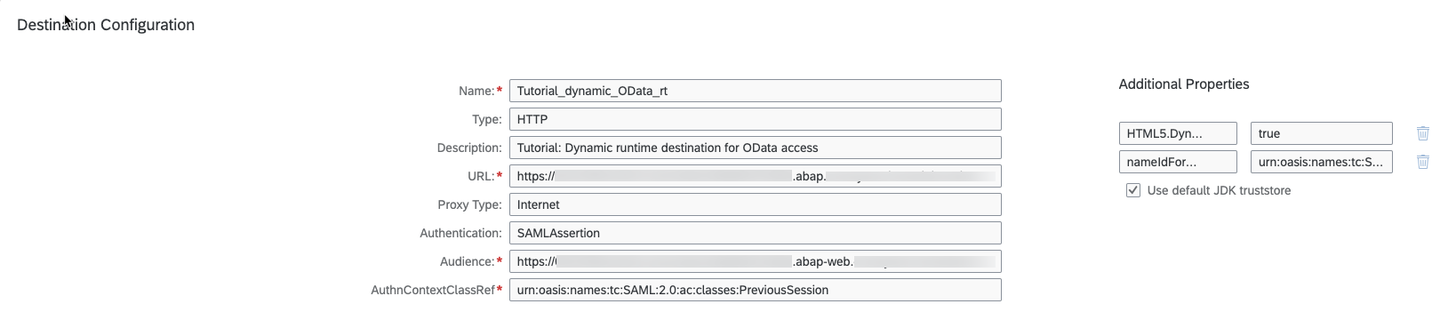
URL: API-URL of section “Common Data” in the Communication Arrangement created in tutorial “Create communication between SAP BTP, ABAP environment and SAP BTP”.
Format: https://<tenant>.abap.<region>.hana.ondemand.com
URL: API-URL of section “Common Data” in the Communication Arrangement created in tutorial “Create communication between SAP BTP, ABAP environment and SAP BTP”. Replace abap with abap-web.
(Format: https://<tenant>.abap-web.<region>.hana.ondemand.com)
AuthnContextClassRef: urn:oasis:names:tc:SAML:2.0:ac:classes:PreviousSession
Additional Properties:
HTML5.DynamicDestination: true
nameIdFormatCreate: urn:oasis:names:tc:SAML:1.1:nameid-format:emailAddress
Press “Save”.
Resources
Discussion
Share feedback on this tutorial or join the conversation in SAP Community.