
Overview
You will learn
- How to create a communication system
- How to create communication users
- How to setup a communication scenario
- How to setup a communication arrangement
- How to expose roles to the SAP Launchpad Service


Prerequisites
Prerequisites
- Subscribe to the SAP Launchpad Service in the same subaccount the content shall be consumed. Follow the steps of tutorial
“Set Up the SAP Launchpad Service” in your subaccount.
Authorizations: Your SAP BTP, ABAP environment user needs a business role with business catalogs Administrator (ID:
SAP_BR_ADMINISTRATOR role) assigned.- Authorizations: User needs to be a subaccount administrator user in the SAP BTP cockpit, in the same subaccount where the destinations for Content Federation will be created .
Steps
In this group of tutorials, the target is to provide the content of a SAP BTP, ABAP environment system to the SAP Launchpad Service of a subaccount on SAP BTP.
Open the
Communication Systemsapp from the Fiori Launchpad in your SAP BTP, ABAP environment system.Create a new Communication system.
Specify the System ID and System Name for the new System.
In the field
Host Nameoptionally enter the callback URL. This is needed for setting up content change notifications. For example portal-service.cfapps.eu10.hana.ondemand.com.
Communication system overview Add a technical user for inbound communication.

New Inbound User 
New Inbound User Authentication method is
User Name and Password. Let the System generate a Password. Do not forget to note the password down. It will be used in Tutorial Create destinations in SAP BTP cockpit.

Similarly add a technical user for outbound communication with
Authentication MethodNone.
Outbound User settings
Open the
Communication Arrangementsapp from the SAP Fiori launchpad and selectNew.In the
New Communication Arrangementapp choose Communication ScenarioSAP_COM_0647for creation.Press
Create.In the “Common Data” section set the Communication System created before using the value help.

- Enter the job execution details for scheduling the exposure job daily and press
Save.
Open the
SAP_BR_ADMINISTRATORapp.Search for Business Role
SAP_BR_ADMINISTRATOR.Mark Business Role
SAP_BR_ADMINISTRATOR.Click
Expose to SAP Launchpad Service.
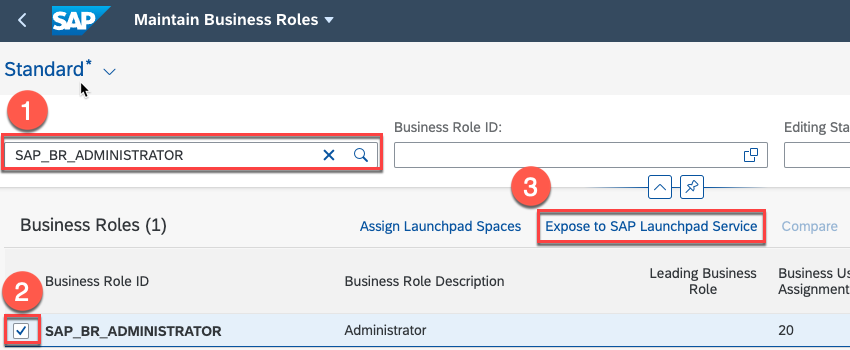
The content related to the Business Role, such as groups, catalogs, pages, or spaces can then be consumed by the SAP Launchpad service.
In the SAP BTP cockpit download the trust certificate of the subaccount runtime destinations, by navigating to Connectivity -> Destinations. Press the
Download Trustbutton.Open the
Communication Systemsapp from the Fiori Launchpad in your SAP BTP, ABAP environment system.Create a new Communication system.
Specifiy the System ID and System Name for the new System.
Select
Inbound only.Set
SAML Bearer Assertion ProvidertoON.Upload the certificate file that you downloaded from your subaccount as the Signing Certificate.
Specify a unique Provider Name in the following format:
cfapps.<**region**>.hana.ondemand.com/<unique_name>Save the communication system.
Resources
Discussion
Share feedback on this tutorial or join the conversation in SAP Community.