
Push Your ABAP Source Code from SAP BTP, ABAP Environment to a GitHub Repository using abapGit
Push Your ABAP Source Code from a SAP BTP, ABAP environment instance to a GitHub repository using the ADT plugin for abapGit.
Overview
You will learn
- How to create or adapt source code in ABAP instance
- How to open
abapGitrepositories - How to stage and commit ABAP development objects


Prerequisites
Prerequisites
- You need an SAP BTP, ABAP environment trial user or a license.
- You have installed the
abapGitplugin. - Generate a personal access token in GitHub, here
Steps
Open ABAP Development Tools and logon to your ABAP system.
Add ABAP development object to your already existing package
TESTABAPGIT(e.g. ABAP class).Therefore right-click on Classes and select New ABAP Class.

create Create a package:
- Name:
Z_Class_YYY - Description: new class

create Click Next >.
- Name:
Click Finish

create Implement your newly created class.

create Save and activate.
Log in to your GitHub repository, select your folder, click Code and copy the HTTP link for later use.

open Go back to Eclipse. Select your ABAP system in the Project Explorer and select Windows > Show View > Other to open the
abapGitrepositories.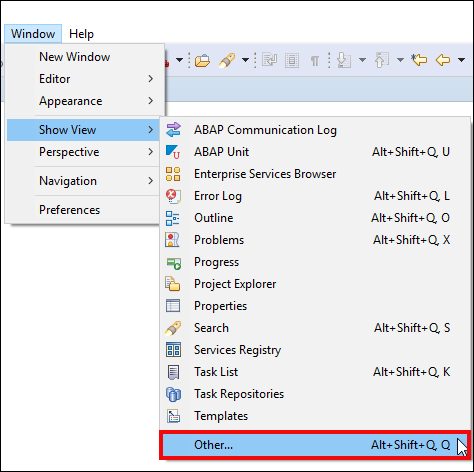
open Search for
abapGit repositories, select it and click Open.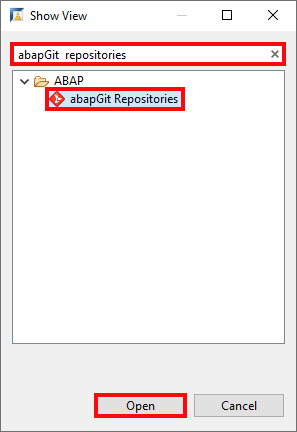
open In your
abapGitrepositories ab, click the+symbol.
open Enter your git repository URL from earlier and click Next >.

open Enter following information:
- URL:
<your_git_repository_url> - User:
<your_git_repository_email_address> - Password:
<your_git_repository_password>

open Click Next > and Finish.
- URL:
Right-click on your package
TESTABAPGITand click Stage and Push.
object Enter your repository credentials in the popup and click OK.

object In the staging view you will see a list of changed, created or deleted ABAP development objects which can be transferred to your repository. Furthermore the icon of the respective file indicated whether a file was created, modified or deleted.

object ABAP development objects which should staged can be selected by drag and drop from the
unstagedbox to the staged box or by clicking on the + button.
object Enter your commit message and click Commit and Push.

object Click OK.

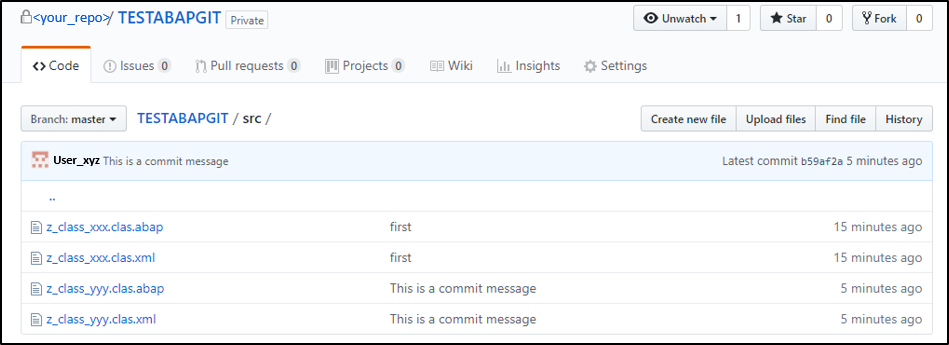
object Check your result.
object
The staged objects are transferred to your repository.
Resources
Discussion
Share feedback on this tutorial or join the conversation in SAP Community.