
Overview
You will learn
- How to implement a query manually for your CDS custom entity
- How to display the data retrieved in a Fiori Elements preview This tutorial is based on:
- Using a CDS Custom Entity for Data Modeling
- Implementing the Query for Service Consumption
- Implementing Data and Count Retrieval Therefore, this tutorial will only cover in detail those aspects that are different. In this case, you are not including both remote and local data, you are only retrieving local data. Therefore, you do not include the local calculated fields,
DiscountPctandDiscountAbs.


Prerequisites
Prerequisites
- IMPORTANT: This tutorial cannot be completed on a trial account
- IMPORTANT: This tutorial is part of a mission. You must complete the previous parts first; otherwise, you may experience errors or unexpected behavior. The link to the mission is available at the top right of the screen, immediately above the list of steps
Steps
You have already tested the connection by displaying data in an ABAP Console app. You will now display this data in a Fiori Elements preview, using a custom entity.
First, open the class
ZCL_PROXY_TRAVELS_###and add the interfaceIF_RAP_QUERY_PROVIDERto the class definition.ABAPINTERFACES: if_oo_adt_classrun, if_rap_query_provider.The signature of the method
IF_RAP_QUERY_PROVIDER~SELECTcontains the import parameterio_request. This parameter represents the OData query options that are delegated from the UI and used as input for the SELECT method. Whenever the OData client requests data, the query implementation class must return the data that matches the request, or throw an exception if the request cannot be fulfilled.You will get a warning: “Implementation missing for method
IF_RAP_QUERY_PROVIDER~SELECT.” Select the warning and choose Quick Fix (Ctrl+1) from the context menu. Then choose the fix Add implementation for select.An empty method implementation is added.
Format, save, and activate ( Sh+F1, Ctrl+S, Ctrl+F3 ) your class.
Open your CDS custom entity by choosing Core Data Services > Data Definitions >
ZCE_TRAVEL_DATA_###, which you created in Create a Service Consumption Model.Add the following annotation to the view (immediately after the ‘@EndUserText.label’ annotation), pointing to the class you have just created - IMPORTANT: Use upper case!
CDS@ObjectModel.query.implementedBy: 'ABAP:ZCL_PROXY_TRAVELS_###'
You will retrieve the travel data using the same method get_travels as before. This time, however, you will output the data to a Fiori Elements preview, by implementing the method if_rap_query_provider~select
Add the following statements to
METHODS get_travelsin the CLASS … DEFINITION.ABAPIMPORTING top TYPE i OPTIONAL skip TYPE i OPTIONALNow add the following code to the method
if_rap_query_provider~select.in the CLASS…IMPLEMENTATION.ABAPMETHOD if_rap_query_provider~select. DATA business_data TYPE TABLE OF zce_travel_data_###. DATA(top) = io_request->get_paging( )->get_page_size( ). DATA(skip) = io_request->get_paging( )->get_offset( ). DATA(requested_fields) = io_request->get_requested_elements( ). DATA(sort_order) = io_request->get_sort_elements( ). TRY. get_travels( EXPORTING top = CONV i( top ) skip = CONV i( skip ) IMPORTING et_business_data = business_data ) . io_response->set_total_number_of_records( lines( business_data ) ). io_response->set_data( business_data ). CATCH cx_root INTO DATA(exception). DATA(exception_message) = cl_message_helper=>get_latest_t100_exception( exception )->if_message~get_longtext( ). ENDTRY. ENDMETHOD.Format, save and activate (
Sh+F1, Ctrl+S, Ctrl+F3) the class.
PUBLIC
FINAL
CREATE PUBLIC .
PUBLIC SECTION.
TYPES t_business_data TYPE TABLE OF z###_model_travels=>tys_simple_travel_type.
METHODS get_travels
IMPORTING
  top              TYPE i OPTIONAL
  skip             TYPE i OPTIONAL
EXPORTING
et_business_data TYPE t_business_data
*
* RAISING
* /iwbep/cx_cp_remote
* /iwbep/cx_gateway
* cx_web_http_client_error
* cx_http_dest_provider_error
.
INTERFACES if_oo_adt_classrun .
INTERFACES if_rap_query_provider .
PROTECTED SECTION.
PRIVATE SECTION.
ENDCLASS.
CLASS zcl_get_travels_### IMPLEMENTATION.
METHOD get_travels.
" Variables for http_client and client_proxy
DATA:
lo_http_client TYPE REF TO if_web_http_client,
lo_client_proxy TYPE REF TO /iwbep/if_cp_client_proxy,
lo_request TYPE REF TO /iwbep/if_cp_request_read_list,
lo_response TYPE REF TO /iwbep/if_cp_response_read_lst.
" 1. Get the destination of remote system; Create http client
DATA(lo_destination) = cl_http_destination_provider=>create_by_comm_arrangement(
comm_scenario = 'Z_OUTBOUND_ODATA_CSCEN_###'
** comm_system_id = '<Comm System Id>'
* service_id = ''
).
lo_http_client = cl_web_http_client_manager=>create_by_http_destination( lo_destination ).
"2. create client proxy
lo_client_proxy = /iwbep/cl_cp_factory_remote=>create_v2_remote_proxy(
EXPORTING
is_proxy_model_key = VALUE #( repository_id = 'DEFAULT'
proxy_model_id = 'Z###_MODEL_TRAVELS'
proxy_model_version = '###1' )
io_http_client = lo_http_client
iv_relative_service_root = '/sap/opu/odata/sap/Z_C_TRAVEL_API_O2_###' " = the service endpoint in the service binding in PRV' ).
).
ASSERT lo_http_client IS BOUND .
" 3. Navigate to the resource and create a request for the read operation
lo_request = lo_client_proxy->create_resource_for_entity_set( 'SIMPLE_TRAVEL' )->create_request_for_read( ).
lo_request->set_top( 50 )->set_skip( 0 ).
" 4. Execute the request and retrieve the business data
lo_response = lo_request->execute( ).
lo_response->get_business_data( IMPORTING et_business_data = et_business_data ).
" Handle remote Exception
ENDMETHOD.
METHOD if_oo_adt_classrun~main.
DATA business_data TYPE TABLE OF z###_model_travels=>tys_simple_travel_type.
TRY.
get_travels(
IMPORTING
et_business_data = business_data
) .
out->write( business_data ).
CATCH cx_root INTO DATA(exception).
out->write( cl_message_helper=>get_latest_t100_exception( exception )->if_message~get_text( ) ).
ENDTRY.
ENDMETHOD.
METHOD if_rap_query_provider~select.
DATA business_data TYPE TABLE OF z###_model_travels=>tys_simple_travel_type.
DATA(top) = io_request->get_paging( )->get_page_size( ).
DATA(skip) = io_request->get_paging( )->get_offset( ).
DATA(requested_fields) = io_request->get_requested_elements( ).
DATA(sort_order) = io_request->get_sort_elements( ).
TRY.
get_travels(
EXPORTING
top = CONV i( top )
skip = CONV i( skip )
IMPORTING
et_business_data = business_data
) .
io_response->set_total_number_of_records( lines( business_data ) ).
io_response->set_data( business_data ).
CATCH cx_root INTO DATA(exception).
DATA(exception_message) = cl_message_helper=>get_latest_t100_exception( exception )->if_message~get_longtext( ).
ENDTRY.
ENDMETHOD.
ENDCLASS.Select your custom entity
ZCE_TRAVEL_DATA_###and choose New > Create Service Definition from the context menu.In the wizard, enter the following:
- Name:
ZCE_TRAVEL_DATA_### - Description Service - Travel data from remote system
- Source Type: Definition
- (The referenced object:
ZCE_TRAVEL_DATA_###should be entered automatically) - Choose Next

step4a-sd-wizard - Name:
Accept the transport request and choose Finish.
The service definition opens in a new editor.
Optional: Add a semantic alias for the service, here
SimpleTravels:CDSexpose ZCE_TRAVEL_DATA_### as SimpleTravels;Choose Save and Activate.
Generally, the custom entity and service definition are part of the same business object and have the same name.
Select your service definition,
ZCE_TRAVEL_DATA_###and choose New > Create Service Binding from the context menu.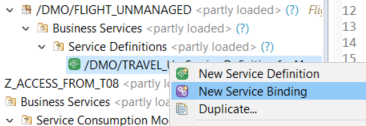
step2a-create-service-binding In the wizard:
- Enter a name:
ZCE_TRAVEL_DATA_###_UI_O2and descriptionEndpoint for ZCE_TRAVEL_DATA_### - Enter the binding type:
ODATA V2 - UI - Choose Next

step5b-create-sb-wizard - Enter a name:
Accept the transport request and choose Finish.
The service binding opens in a new editor.
Choose Activate.
On the left is the Service Definition,
ZCE_TRAVEL_DATA_###. On the right, is the active service, including the Entity Set and the Service URL.Select the entity Set Travel and choose Preview.

step7b-service-binding-editor The Fiori Elements preview for your remote OData service appears in the browser, but without any data.
Choose Settings > Select All > OK, then choose Go.
Your Fiori Elements preview should look roughly like this:

step7c-fiori
Add a label for the BeginDate and EndDate.
Your code should now look like this.
@EndUserText.label: 'Travel data custom entity from PRV'
@ObjectModel.query.implementedBy: 'ABAP:ZCL_PROXY_TRAVELS_###'

define custom entity ZCE_TRAVEL_DATA_###

 {

    @UI.lineItem: [ { position: 10 } ]
    key TravelID               : abap.numc( 8 );

    @UI.lineItem: [ { position: 20 } ]
    AgencyID               : abap.numc( 6 );
    @UI.lineItem: [ { position: 30 } ]
    CustomerID             : abap.numc( 6 );

    @UI.lineItem: [ { position: 40, label: 'Start Date'} ]
    BeginDate              : rap_cp_odata_v2_edm_datetime;

    @UI.lineItem: [ { position: 50, label: 'End Date'} ]
    EndDate                : rap_cp_odata_v2_edm_datetime;

    @Semantics.amount.currencyCode: 'CurrencyCode'
    BookingFee             : abap.dec( 16, 2 );

    @Semantics.amount.currencyCode: 'CurrencyCode'
    TotalPrice             : abap.dec( 16, 2 );

    @Semantics.currencyCode: true
    CurrencyCode           : abap.cuky( 5 );
    Description            : abap.char( 1024 );   //renamed element
    Status                 : abap.char( 1 );
    LastChangedAt          : tzntstmpl;

    CalculatedEtag         : abap.string( 0 );
}The SAP Fiori elements preview should now open looking like this.

Resources
Discussion
Share feedback on this tutorial or join the conversation in SAP Community.