
Create a Global ABAP Class
You will learn how to create a global ABAP class, in which you will retrieve data from a database.
Overview
You will learn
- How to create a global class that retrieves data from the back end
- How to use an internal table
- How to use an ABAP structure as a type for the returning parameter
- How to display data in a SAP List Viewer ("
ALV Grid")


Prerequisites
Prerequisites
- You have a valid instance of an on-premise AS ABAP server, version 7.51 or higher (some ABAP Development Tools may not be available in earlier versions)
- Tutorial: Create an ABAP Project in ABAP Development Tools (ADT)
- You have generated the data for the relevant database table by running the transaction
SEPM_DG.
Steps
First, open your ABAP program,
ZSO_INVOICE_ITEMS_EUROwhich you created in the previous tutorial, Create and run an ABAP application.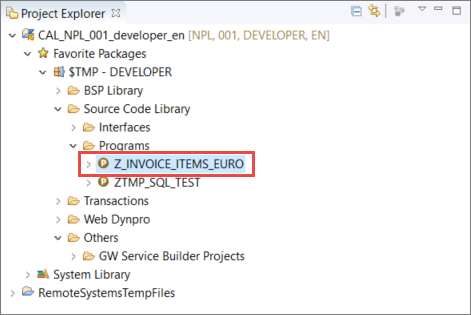
Image depicting step1-open-abap-program Remove the existing method implementation for the
runmethod.
Image depicting step2-delete-write
Now you will create the an object with the type of a new global class, for retrieving backend data.
- In the
runmethod, create an instance of classzcl_invoice_retrievalusing thenewoperator:
data(invoices) = new ZCL_INVOICE_RETRIEVAL( ).Since this class does not yet exist, you will get a syntax error. To create the class, place the cursor on the class name and open the Quick Assist by choosing Ctrl+1. In the Quick Assist menu, double-click on Create global class
zcl_invoice_retrieval: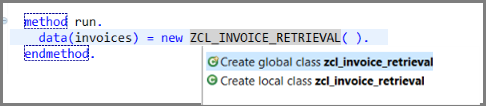
Image depicting step3-create-class_2 A wizard will appear to create a new ABAP class. Enter:
- a name
ZCL_INVOICE_RETRIEVAL - a description invoice Retrieval
- a name
Choose Finish:
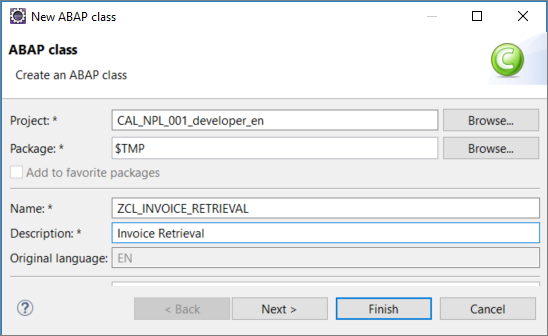
Image depicting step3a-create-class-finish
A new editor will be opened showing the class you have created, ZCL_INVOICE_RETRIEVAL.
Since release 7.40, ABAP permits inline declarations. For more information, see the links at the end of this tutorial.
If necessary, go back to your program and trigger the syntax check using the keyboard shortcut Ctrl+F2.
The syntax error should no longer occur.
To read the records from the database, you need to call a method get_items_from_db.
This method does not yet exist so we will create it with a Quick Assist as follows:
Still in your program, enter an instance method call:
ABAPdata(invoice_items) = invoices->get_items_from_db( ).Since the method does not exist, you will get an error. Position the cursor on the name of the missing method and choose Quick Assist, i.e.
Ctrl+1. In the Quick Assist menu, choose Create methodget_items_from_db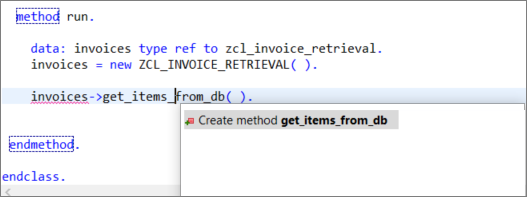
Image depicting step6a-create-method In the Create class wizard that appears, create a public method without parameters, simply by choosing Finish:

Image depicting step6b-finish
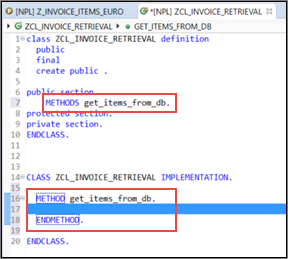
In the class ZCL_INVOICE_RETRIEVAL, the Quick Assist creates:
- a method definition
- an empty method implementation :
In a previous tutorial (Display database content and run SQL queries), you generated a SELECT statement using the SQL console. The advantage of using the SQL console is that you can reduce errors by defining clauses - like JOIN, WHERE, or ORDER BY - simply by using the Data Preview. The SQL Console automatically generates the correct SELECT statement for you.
You will now use this generated SELECT statement in your class to retrieve the data from the database.
Note: We strongly recommend that you gain an understanding of the SQL Console by working through this previous tutorial. However, if you no longer have the SQL console open, you can simply copy the following
SELECTstatement into the method implementation (see step 3. below).
Go back to the SQL console:

Image depicting step9-sql-console-bar Resize the query section and copy the Open SQL statement using the shortcut Ctrl+C:

Image depicting step8-sql-console Now, in your class
ZCL_INVOICE_RETRIEVAL, paste the statement into the method implementation ofget_items_from_db(using Ctrl+V):
The code from the SQL console should look like this. Note that the SQL Console query section automatically adds the INTO clause INTO TABLE @DATA(LT_RESULT).
SELECT
   SNWD_BPA~COMPANY_NAME,
   SNWD_SO_INV_ITEM~GROSS_AMOUNT,
   SNWD_SO_INV_ITEM~CURRENCY_CODE,
   SNWD_SO_INV_HEAD~PAYMENT_STATUS
 FROM
  SNWD_SO_INV_ITEM JOIN SNWD_SO_INV_HEAD ON SNWD_SO_INV_ITEM~PARENT_KEY = SNWD_SO_INV_HEAD~NODE_KEY JOIN SNWD_BPA ON SNWD_SO_INV_HEAD~BUYER_GUID = SNWD_BPA~NODE_KEY
 WHERE
  SNWD_SO_INV_ITEM~CURRENCY_CODE = 'USD'
 ORDER BY  SNWD_BPA~COMPANY_NAME
 INTO TABLE @DATA(LT_RESULT).
 UP TO 100 ROWS.
The statement UP TO 100 ROWS will cause an error. Delete it.
Now you can format (that is, “pretty-print”) the source code.
Open the Source menu and choose Format (or use the shortcut Shift+F1).
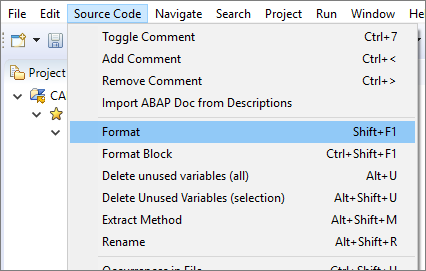
Image depicting step9-pretty-print If you want to specify your formatting settings, you can do this in the project’s properties. Right-click on the Project in the Project Explorer and choose Properties.
To make the
SELECTstatement more readable, add some line breaks in theJOINconditions:
Image depicting step9a-pretty-print-2
In a previous tutorial (Create a structure), you created an ABAP Data Dictionary structure. Now, you will use this structure.
First, we will declare an internal table, lt_result explicitly. Then we will define the type of the returning parameter for your method get_items_from_db.
First position the cursor on the inline declared variable
lt_resultand open Quick Fix by choosing Ctrl+1:
Image depicting step9a-select-local-variable Select Declare local variable
lt_resultexplicitly by double clicking in the Quick Fix menu:
Image depicting step9b-declare-explicitly
This creates an internal table referring to a local type and automatically generates the following code:
TYPES: BEGIN OF helper_type,
         company_name TYPE snwd_bpa-company_name,
         gross_amount TYPE snwd_so_inv_item-gross_amount,
         currency_code TYPE snwd_so_inv_item-currency_code,
         payment_status TYPE snwd_so_inv_head-payment_status,
       END OF helper_type.
DATA: lt_result TYPE STANDARD TABLE OF helper_type.`
It also replaces INTO TABLE @DATA(lt_result) with INTO TABLE @lt_result.
The @ character is simply an escape character to comply with the new Open SQL syntax. For more information, see:
In the next steps, you will replace the local type helper_type with the Data Dictionary structure that you created (in the previous tutorial Create an ABAP Data Dictionary structure).
Still in the editor of your invoice retrieval class ZCL_INVOICE_RETRIEVAL:
In the method
get_items_from_db, change the type of the variablelt_resultto a standard table ofzso_invoice_item:
Image depicting step13-replace-helper-type Remove the local type
helper_type: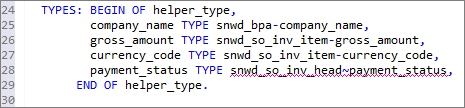
Image depicting step13a-remove-helper-type
Your method still does not return any data. Therefore, you will use another Quick Assist to convert your local variable as a returning parameter - so that you can access the result from your program.
To do so place the cursor on the variable
lt_resultand get the Quick Assist by entering Ctrl+1.Choose Convert
lt_resultto returning parameter:
Image depicting step13b-convert-lt_result_correct
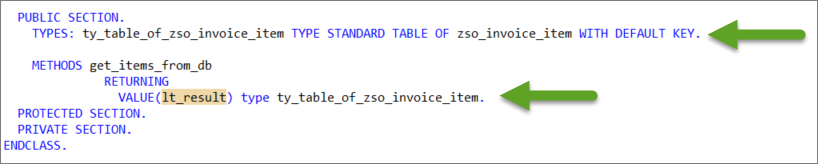
Note that the returning parameter was added to the method and an additional table type based on the structure was generated:
Save ( Ctrl+S ) and Activate ( Ctrl+F3 ) your class.
Now, in your program, declare an inline declared variable, data(invoice_items), to receive the result of the returning parameter invoices->get_items_from_db( ) as follows:
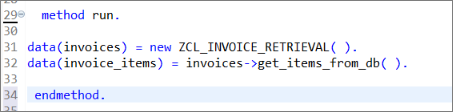
Finally, you can display the invoice items as a SAP List Viewer - or “ALV Grid” - using the class cl_salv_table.
In your program, ZSO_INVOICE_ITEMS_EURO:
Enter
cl_salv_table=>and get the code completion proposals by entering Ctrl+SPACESelect the static method
factoryand …Insert the full signature of the method call by pressing Shift+Enter :
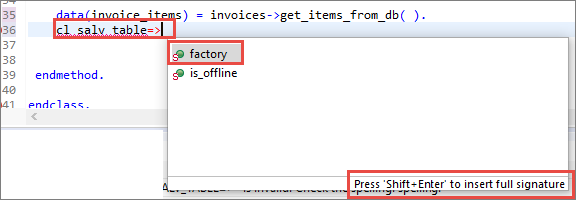
Image depicting step12-insert-alv-grid-v2
If you prefer to insert the full signature by default, you can change the behavior of the code completion in the Preferences. Select Window in the menu and click on Preferences. In the Preferences Dialog enter code completion in the filter field or open the following path ABAP Development > Editors > Source Code Editors > Code Completion. In the Code Completion settings, you can activate a checkbox to Always insert full signature on completion.
In the method call that you have generated:
- Remove the commented exporting parameters
list_display, r_container, and container_nameusing the shortcut Ctrl+D - Uncomment the importing parameter
r_salv_tableusing the shortcut Ctrl+7 and manually assign an inline variablealv_tableto it - Assign the variable
invoice_itemsto the changing parametert_table - Then call the display method of
ALV_TABLE:alv_table->display( ):
Your method should look like this:
cl_salv_table=>factory(

         IMPORTING
           r_salv_table   =     data(alv_table)

          CHANGING
            t_table        = invoice_items ).

alv_table->display( ).Your program code should now look like this:
*&---------------------------------------------------------------------*
*& Report zjp_invoice_items_euro
*&---------------------------------------------------------------------*
*&
*&---------------------------------------------------------------------*
REPORT zjp_invoice_items_euro.


class lcl_main definition create private.

  public section.
    CLASS-METHODS create
      RETURNING
        value(r_result) TYPE REF TO lcl_main.

    methods run.

  protected section.
  private section.

endclass.

class lcl_main implementation.
  method create.
    create object r_result.
  endmethod.

  method run.
    data(invoices) = new ZCL_INVOICE_RETRIEVAL( ).
    data(invoice_items) = invoices->get_items_from_db( ).

       cl_salv_table=>factory(
         IMPORTING
           r_salv_table   =     data(alv_table)
          CHANGING
            t_table        = invoice_items ).

       alv_table->display(  ).

 endmethod.
endclass.

start-of-selection.
lcl_main=>create( )->run( ).Your class code should now look like this:
CLASS zcl_invoice_retrieval DEFINITION
  PUBLIC
  FINAL
  CREATE PUBLIC .

  PUBLIC SECTION.
    TYPES: ty_table_of_zso_invoice_item TYPE STANDARD TABLE OF zso_invoice_item WITH DEFAULT KEY.
    METHODS get_items_from_db
    RETURNING
    VALUE(lt_result) type ty_table_of_zso_invoice_item.
  PROTECTED SECTION.
  PRIVATE SECTION.
ENDCLASS.

CLASS zcl_invoice_retrieval IMPLEMENTATION.

  METHOD get_items_from_db.

  SELECT
    snwd_bpa~company_name,
    snwd_so_inv_item~gross_amount,
    snwd_so_inv_item~currency_code,
    snwd_so_inv_head~payment_status

  FROM
   snwd_so_inv_item
   JOIN snwd_so_inv_head ON snwd_so_inv_item~parent_key = snwd_so_inv_head~node_key
   JOIN snwd_bpa ON snwd_so_inv_head~buyer_guid = snwd_bpa~node_key

   INTO TABLE @lt_result

  WHERE
   snwd_so_inv_item~currency_code = 'USD'

  ORDER BY
   snwd_bpa~company_name.

    ENDMETHOD.
ENDCLASS.Activate your program by clicking the activation icon in the toolbar or using the keyboard shortcut Ctrl+F3. Now run the program. You should get a SAP List Viewer roughly like this:

Using the METHODS statement, create the definition of an instance method get_customers_from_db that returns a value result of type ty_table_of_customers - similar to get_items_from_db above. Do not define any new types.
Do not indent your code.
Enter your code in the box below and choose Submit Answer.
###More information
- Old and new ABAP syntax – overview sheet
- ABAP News for Release 7.40 – Inline Declarations
- 7.4 Release News - Inline Declaration I
Resources
Discussion
Share feedback on this tutorial or join the conversation in SAP Community.